
การแนะนำ
This manual provides instructions for the safe and effective use of your Blukar K9179 Rechargeable LED Flashlight. This powerful and versatile flashlight is designed for various applications, including outdoor activities, camping, and emergency situations. Please read this manual thoroughly before operating the device.

Image: Blukar K9179 LED Flashlight and its complete accessory kit, including the charging cable, battery, and user guide, all neatly organized within a durable protective case.
คุณสมบัติหลัก
The Blukar K9179 LED Flashlight offers a range of advanced features for superior performance:
- ความสว่างสูงสุด: Delivers an impressive 500,000 lumens, providing powerful and far-reaching illumination.
- แบตเตอรี่แบบชาร์จไฟได้: Equipped with a built-in 5000mAh high-capacity battery, rechargeable via USB-C for convenience and environmental friendliness.
- จอแสดงผลพลังงานดิจิทัล: Features a clear digital screen to monitor the remaining battery power in real-time.
- 5 โหมดแสงสว่าง: Includes Super Bright, Normal, Soft, Strobe, and SOS modes to adapt to various lighting needs and situations.
- ฟังก์ชั่นซูมได้: Easily adjust the beam from a wide floodlight to a focused spotlight by extending or retracting the flashlight head.
- กันน้ำ IP67: Constructed from high-quality aluminum alloy with an IP67 waterproof rating, making it suitable for complex outdoor environments.
- พาวเวอร์แบงค์สำรองฉุกเฉิน: Can function as a portable power bank to charge mobile devices via its USB-A output port.

Image: The Blukar K9179 LED Flashlight powerfully illuminating a vast outdoor area at night, showcasing its ultra-bright and long-range beam capability, reaching up to 1524 meters (5000 feet).
การตั้งค่า
การติดตั้งแบตเตอรี่
The flashlight comes with a rechargeable battery. Before first use, ensure the battery is properly installed and charged.
- เปิดฝาหลัง: Unscrew the back cover of the LED torch.
- Note polarity: Observe the positive (+) and negative (-) poles of the battery. The positive pole is typically marked with a '+' sign and is often slightly raised.
- ติดตั้งแบตเตอรี่: Insert the battery into the flashlight with the positive side facing inwards and the negative side facing outwards.
- Close back cover: Screw the back cover back onto the flashlight securely.
Note: Please remove any transparent plastic film from the battery before installation to ensure proper charging and operation.

Image: A four-step visual guide demonstrating the correct battery installation process for the Blukar K9179 flashlight, from unscrewing the back cover to securing it after inserting the battery with correct polarity.
การชาร์จเบื้องต้น
Connect the flashlight to a USB power source (e.g., wall adapter, computer, power bank) using the provided USB-C charging cable. The digital display on the flashlight will show the charging progress. A full charge takes approximately 6 hours and provides 6 to 24 hours of illumination depending on the mode used.
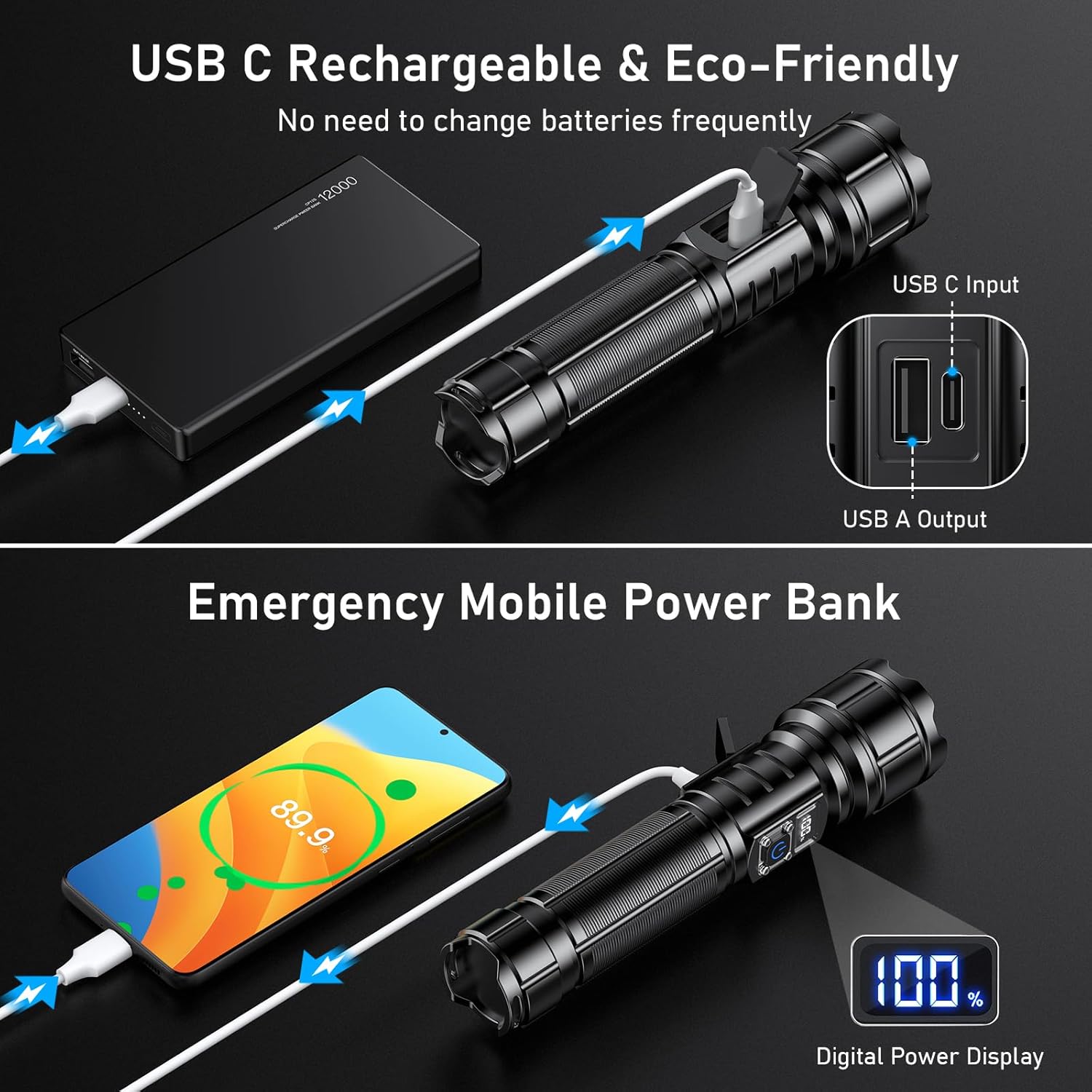
Image: The Blukar K9179 flashlight being charged via a USB-C cable connected to a power bank, highlighting its rechargeable capability and the digital power display showing battery percentage.
คำแนะนำการใช้งาน
เปิด/ปิดเครื่อง
Press the power button once to turn the flashlight on. To turn it off, press and hold the power button for 3 seconds in any mode. The flashlight features a memory function; if you press the switch again after 8 seconds of being off, it will automatically return to the previously used light mode.
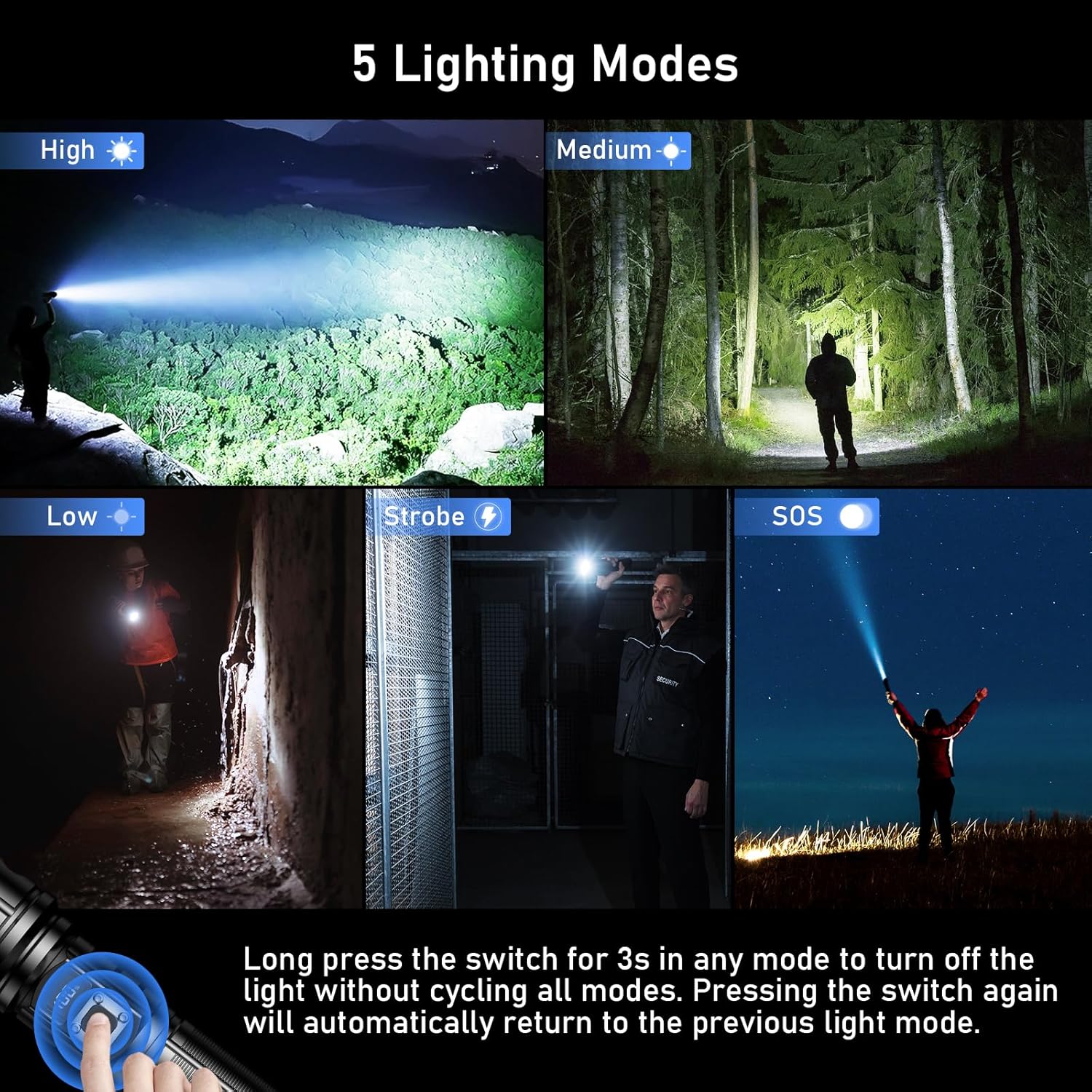
Image: A collage illustrating the five distinct lighting modes of the Blukar K9179 flashlight: High (Super Bright), Medium (Normal), Low (Soft), Strobe, and SOS, demonstrating their visual effects in various scenarios.
สลับโหมดไฟ
With the flashlight on, short press the power button to cycle through the 5 lighting modes: Super Bright, Normal, Soft, Strobe, and SOS. This allows you to quickly select the appropriate illumination for your needs.
ฟังก์ชั่นซูม
To adjust the beam from a wide floodlight to a focused spotlight, simply extend or retract the head of the flashlight. This zoomable feature provides versatility for both close-range and long-distance illumination.

Image: A visual demonstration of the Blukar K9179 flashlight's adjustable focus, illustrating how to zoom out for a wide floodlight beam and zoom in for a concentrated spotlight beam.
Emergency Mobile Power Bank Function
The Blukar K9179 can act as an emergency power bank. Connect your mobile device to the flashlight's USB-A output port using a compatible cable to charge your device. The digital display will show the flashlight's remaining power, ensuring you can monitor its capacity while charging other devices.
การซ่อมบำรุง
การทำความสะอาด
เช็ดไฟฉายด้วยผ้านุ่มๆamp cloth to remove dirt and debris. Do not use abrasive cleaners, harsh chemicals, or solvents, as these can damage the finish or internal components.
พื้นที่จัดเก็บ
Store the flashlight in a cool, dry place away from direct sunlight and extreme temperatures. If storing for extended periods (e.g., more than 3 months), charge the battery periodically (at least every 3-6 months) to maintain its health and prolong its lifespan.
แหวนปิดผนึก
Periodically inspect the thickened sealing rings (O-rings) for any signs of wear, cracks, or damage. These rings are crucial for maintaining the IP67 waterproof rating. Replace them if necessary using the spare sealing rings included in the package to ensure continued water resistance.
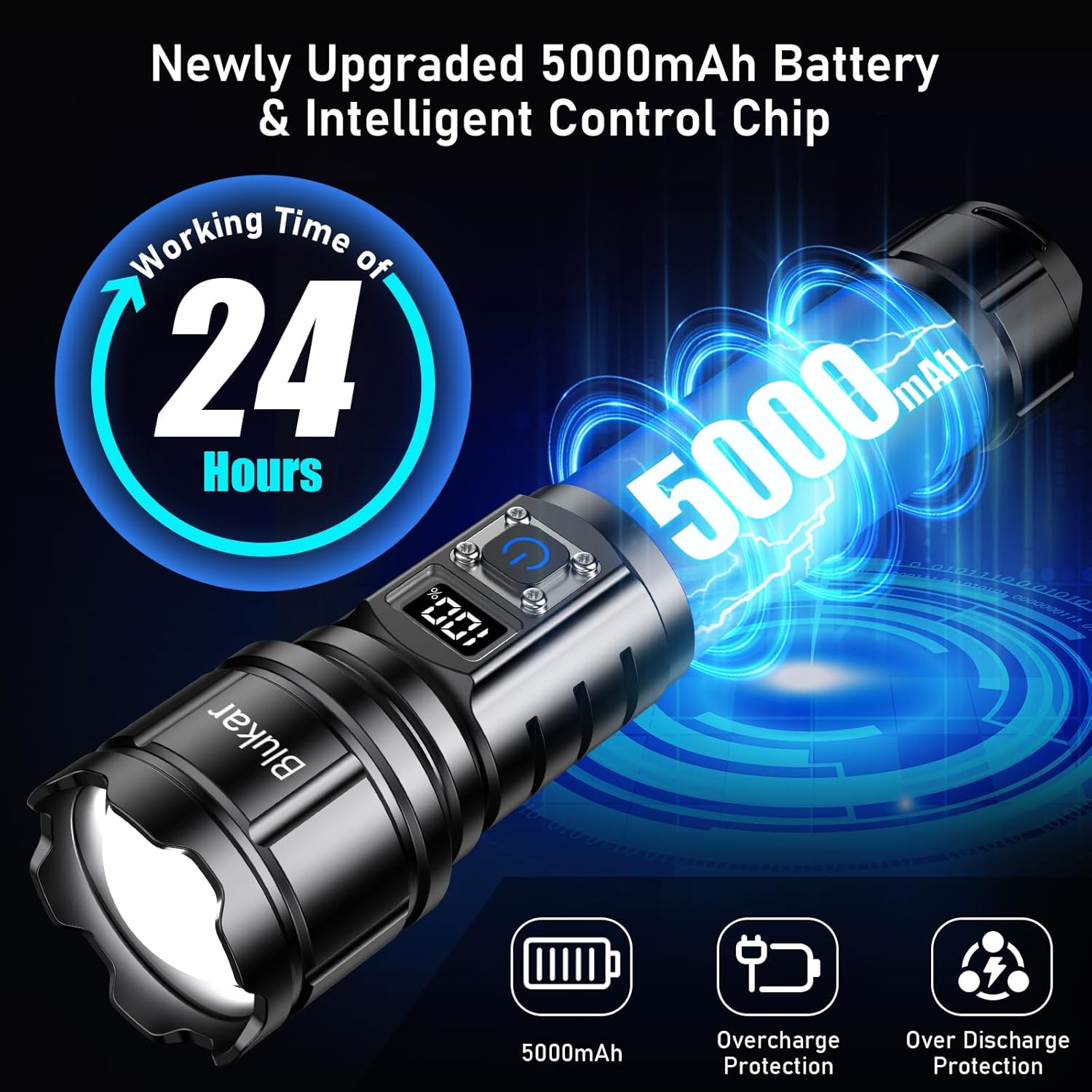
Image: The Blukar K9179 flashlight demonstrating its IP67 waterproof capability under splashing water, with an inset showing a close-up of the thickened sealing ring that ensures its water resistance.
การแก้ไขปัญหา
If you encounter any issues with your Blukar K9179 flashlight, please refer to the table below for common problems and their solutions.
| ปัญหา | สาเหตุที่เป็นไปได้ | สารละลาย |
|---|---|---|
| ไฟฉายไม่ติด | แบตเตอรี่ต่ำ | Recharge the battery fully using the provided USB-C cable. |
| ไฟฉายไม่ติด | ติดตั้งแบตเตอรี่ไม่ถูกต้อง | Check battery polarity and ensure it's inserted correctly (positive side in, negative side out). |
| ไฟฉายไม่ติด | Transparent plastic film on battery | Remove the transparent plastic film from the battery before installation. |
| เอาต์พุตแสงสลัว | แบตเตอรี่ต่ำ | Recharge the battery. Optimal brightness is achieved with a fully charged battery. |
| Water ingress / Reduced waterproof performance | Damaged or improperly seated sealing ring | Inspect and replace sealing rings if damaged. Ensure the back cover is tightly screwed on. |
ข้อมูลจำเพาะ
- ยี่ห้อ: บลูการ์
- หมายเลขรุ่น: เค9179
- ขนาดสินค้า : 18 x 4.17 x 4.17 ซม. (7.09 x 1.64 x 1.64 นิ้ว)
- น้ำหนัก: 192 กรัม (0.42 ปอนด์)
- แบตเตอรี่: 1 Lithium-Polymer battery (included), 5000mAh capacity
- ประเภทแหล่งกำเนิดแสง: LED (Upgraded XHP70.2 Lamp ลูกปัด)
- เอาท์พุตของลูเมน: 500,000 ลูเมน
- โหมดแสงสว่าง: Super Bright, Normal, Soft, Strobe, SOS
- ระดับการกันน้ำ: IP67
- อินเทอร์เฟซการชาร์จ: ยูเอสบี-ซี
- อินเทอร์เฟซเอาท์พุต: USB-A (for power bank function)
- วัสดุ: อลูมิเนียมการบิน
- คุณสมบัติพิเศษ: Rechargeable, Zoomable, Digital Power Display, Emergency Power Bank, Memory Function, Non-Slip Handle, Safety Hammer
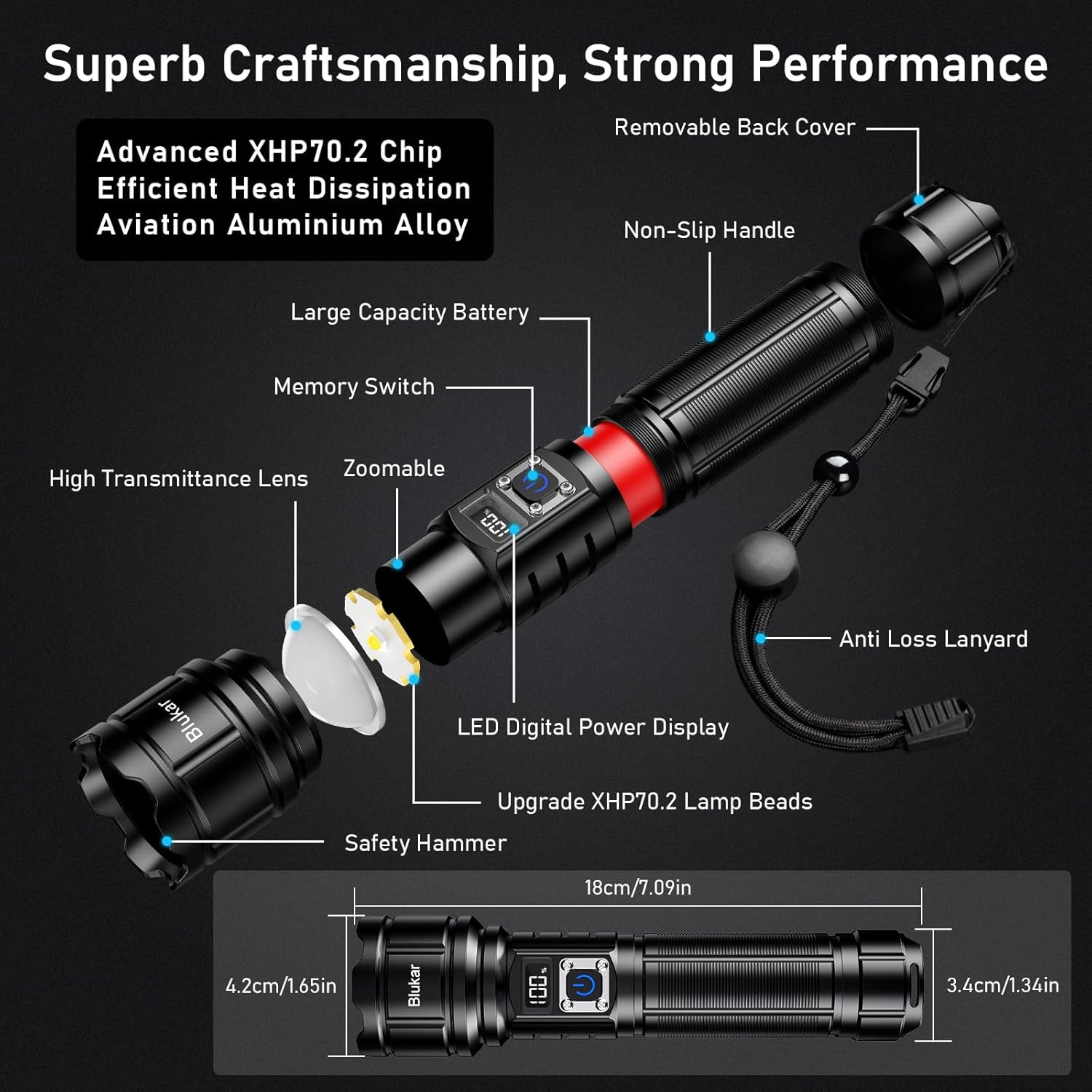
ภาพ: ระเบิด view diagram of the Blukar K9179 flashlight, detailing its internal and external components, including the XHP70.2 LED chip, aviation aluminum alloy body, digital power display, and key dimensions.
การรับประกันและการสนับสนุน
For warranty information or technical support regarding your Blukar K9179 flashlight, please contact Blukar customer service through the retailer where the product was purchased. You may also visit the official Blukar webเว็บไซต์นี้มีแหล่งข้อมูลเพิ่มเติมและรายละเอียดการติดต่อ
Keep your purchase receipt or proof of purchase as it may be required for any warranty claims or support inquiries.
For more information and to explore other Blukar products, visit the ร้านบลูการ์.