
1. บทนำ
Thank you for choosing the pecron E3600LFP Portable Power Station. This manual provides essential information for the safe and efficient operation, maintenance, and troubleshooting of your device. The E3600LFP is a high-capacity portable power solution designed for various applications, from outdoor adventures to emergency home backup.
Key features include a 3072Wh LiFePO4 battery, 3600W AC output, and expandability up to 15360Wh with additional EP3000-48V batteries. It offers multiple output options and fast charging capabilities to keep your devices powered wherever you are.
2. การตั้งค่า
Before first use, ensure your pecron E3600LFP is fully charged. The unit comes with necessary cables for various charging methods.
2.1 การแกะกล่องและการตรวจสอบเบื้องต้น
นำส่วนประกอบทั้งหมดออกจากบรรจุภัณฑ์อย่างระมัดระวัง ตรวจสอบให้แน่ใจว่ามีสิ่งของครบถ้วน:
- pecron E3600 LFP Power Station (x1)
- EP3000-48V Extension battery (x1)
- 15A AC cable (x1)
- 30A AC cable (x1)
- Single port XT60 to MC4 solar charging cable (x1)
- Parallel dual port XT60 to MC4 solar charging cable (x1)
- สายชาร์จในรถยนต์ (1 เส้น)
- Slotted Screwdriver (x1)
- Accessory Pouch (x1)
- User Instruction (x1)
2.2 Connecting the Extended Battery
To expand the capacity of your E3600LFP, connect the EP3000-48V Extension Battery using the provided cable. Ensure a secure connection for optimal performance.

Figure 2.1: pecron E3600LFP Power Station connected to its extended battery.
2.3 การชาร์จสถานีไฟฟ้า
The E3600LFP supports multiple charging methods:
- การชาร์จไฟ AC: Fully charge in 1.3 hours with 3200W AC charge or 2 hours with 1800W AC charge. Use the appropriate AC cable provided.
- การชาร์จแผงโซลาร์เซลล์: Achieve a full charge in approximately 1.5 hours with 8*300W solar panels (2400W total). Use the XT60 to MC4 solar charging cables.
- การชาร์จรถยนต์: Charge the unit using the included Car Charging Cable.

Figure 2.2: Illustration of the three primary charging methods for the E3600LFP.
3. คู่มือการใช้งาน
The pecron E3600LFP offers versatile power output options for a wide range of devices.
3.1 Output Options
The power station features 16 output options to meet diverse charging needs:
- 4 x AC Output (100V-120V, 3600W Max)
- 1 x TT30-R Output
- พอร์ต USB-A 4 พอร์ต
- 2 x 100W USB-C Ports
- 1 x XT60-F Output
- 1 x Cigar Port
- 1 x DC5525 Output
- 2 x Wireless Charger Pads

รูปที่ 3.1: เกินview of the 16 output options on the E3600LFP.
3.2 การจ่ายไฟให้กับอุปกรณ์
Connect your devices to the appropriate output ports. The E3600LFP can power a variety of electronics and appliances, including smartphones, tablets, laptops, cameras, RVs, and more.
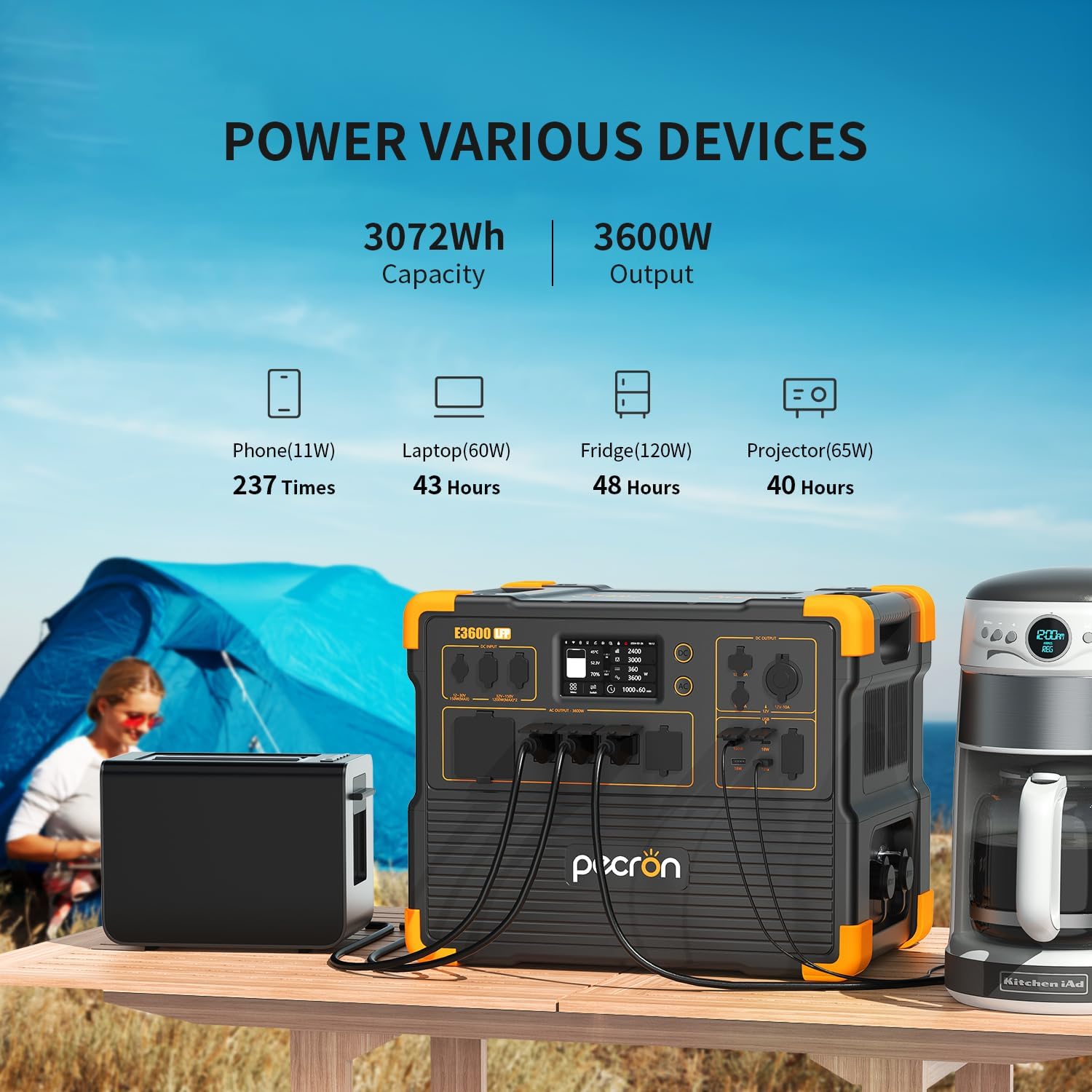
รูปที่ 3.2: อดีตamples of devices powered by the E3600LFP and estimated usage times.
3.3 App Smart Control
Manage and monitor your power station remotely using the pecron app. The app allows you to:
- View power levels (input/output)
- Customize charging power
- ตรวจสอบสถานะแบตเตอรี่
- Control various settings via Wi-Fi and Bluetooth

Figure 3.3: The pecron app provides smart control and monitoring capabilities.
4. การบำรุงรักษา
Proper maintenance ensures the longevity and optimal performance of your pecron E3600LFP.
4.1 การดูแลแบตเตอรี่
The E3600LFP utilizes a durable LiFePO4 battery, designed for long-term use. It can retain 80% of its original capacity after 3500 complete charge cycles.
- เก็บโรงไฟฟ้าไว้ในที่เย็นและแห้ง ห่างจากแสงแดดโดยตรง
- หลีกเลี่ยงอุณหภูมิที่สูงหรือต่ำเกินไป
- For long-term storage, charge the battery to approximately 50-80% and recharge every 3-6 months.

Figure 4.1: The E3600LFP features a long-lasting LiFePO4 battery.
4.2 คุณลักษณะด้านความปลอดภัย
The power station is equipped with a built-in Battery Management System (BMS) to ensure safety and provide stable power support. The BMS protects against:
- ไฟฟ้าลัดวงจร
- โอเวอร์โหลด
- ความร้อนสูงเกินไป

Figure 4.2: The integrated BMS ensures safe and reliable operation.
5 การแก้ไขปัญหา
If you encounter issues with your pecron E3600LFP, refer to the following common troubleshooting tips:
5.1 ไม่มีกำลังไฟฟ้าออก
- Ensure the power station is turned on and the specific output ports (AC/DC) are activated.
- Check the battery level. Recharge if the battery is low.
- Verify that the connected device is working correctly and its power requirements do not exceed the power station's output limits.
- Inspect cables for damage and ensure they are securely connected.
5.2 การชาร์จช้า
- Confirm that you are using the correct charging cable and adapter (e.g., 30A AC cable for fastest charging).
- For solar charging, ensure panels are clean, optimally angled towards the sun, and not shaded. Verify the total wattage of connected solar panels.
- Check the charging speed setting in the pecron app, if applicable.
5.3 ระบบป้องกันการโอเวอร์โหลดทำงานแล้ว
- If the power station shuts down or displays an overload warning, disconnect some devices.
- Reduce the total power draw to below the rated output (3600W).
- เริ่มเดินเครื่องโรงไฟฟ้าอีกครั้ง
5.4 ปัญหาการเชื่อมต่อแอป
- โปรดตรวจสอบให้แน่ใจว่าได้เปิดใช้งาน Bluetooth และ Wi-Fi บนอุปกรณ์มือถือของคุณแล้ว
- Make sure the power station is within range.
- Restart both the power station and the app.
- ตรวจสอบการอัปเดตแอป
6. ข้อมูลจำเพาะ
| ยี่ห้อ | เพครอน |
| ชื่อรุ่น | E3600LFP |
| ความจุ | 3072Wh (Expandable to 15360Wh with EP3000-48V) |
| เอาท์พุตไฟฟ้ากระแสสลับ | 3600W (Rated), 100V-120V Pure Sine Wave |
| ประเภทแบตเตอรี่ | ลิเธียมไอออนฟอสเฟต |
| วงจรชีวิต | 3500+ รอบถึง 80% ของความจุ |
| Fast Charging (AC) | 1.3 Hrs (3200W), 2 Hrs (1800W) |
| การชาร์จพลังงานแสงอาทิตย์ | 1.5 Hrs (8*300W Solar Panel Charging) |
| ปลั๊กไฟทั้งหมด | 16 |
| น้ำหนักสินค้า | 79 ปอนด์ |
| ขนาดสินค้า | ยาว 17.5 นิ้ว x กว้าง 12.1 นิ้ว x สูง 13.8 นิ้ว |
| คุณสมบัติพิเศษ | Portable, Fast Charging, Large Capacity, Long Last, Safety, Smart Control, UPS |
7. การรับประกันและการสนับสนุน
pecron offers a comprehensive warranty and dedicated customer service for your peace of mind.
7.1 ข้อมูลการรับประกัน
Your pecron E3600LFP Portable Power Station comes with a 2+3 years worry-free warranty. This includes an initial 2-year warranty, with an additional 3 years upon product registration or specific conditions. Please refer to the official pecron website or contact customer service for full warranty terms and conditions.
7.2 การบริการลูกค้า
For any questions, technical support, or warranty claims, pecron provides 24 hours/7 days friendly customer service.
ข้อมูลติดต่อ:
- อีเมล: support@pecron.com (อดีตample, please refer to your product documentation for actual contact details)
- Webเว็บไซต์: www.pecron.com (อดีตample, please refer to your product documentation for actual contact details)
When contacting support, please have your product model number (E3600LFP) and purchase information ready to expedite assistance.