
1. บทนำ
This manual provides essential instructions for the safe and effective operation of the CONTEC TP500(LED) Non-Contact Infrared Thermometer. This device is designed for accurate and rapid temperature measurement without physical contact, suitable for infants, children, and adults. Please read this manual thoroughly before use and retain it for future reference.

Figure 1: CONTEC TP500(LED) Non-Contact Infrared Thermometer.
2. ข้อมูลด้านความปลอดภัย
- อย่าจุ่มเทอร์โมมิเตอร์ลงในน้ำหรือของเหลวอื่นๆ
- ควรเก็บอุปกรณ์ให้ห่างจากแสงแดดโดยตรง อุณหภูมิที่สูงจัด และความชื้นสูง
- หลีกเลี่ยงการทำอุปกรณ์หล่นหรือกระแทกอย่างรุนแรง
- ห้ามถอดประกอบหรือซ่อมแซมอุปกรณ์ด้วยตนเอง หากต้องการรับบริการ โปรดติดต่อฝ่ายบริการลูกค้า
- เก็บแบตเตอรี่ให้พ้นมือเด็ก และทิ้งแบตเตอรี่ที่ใช้แล้วอย่างถูกต้องตามระเบียบข้อบังคับของท้องถิ่น
- This device is intended for household use. Consult a medical professional for any health concerns or persistent fever.
- Ensure the measurement probe is clean before each use to maintain accuracy and hygiene.
3. คุณสมบัติของผลิตภัณฑ์
- การวัดแบบไม่สัมผัส: Measures temperature without physical contact, reducing discomfort and potential cross-contamination.
- Precise Infrared Probe: Utilizes an advanced infrared sensor for accurate and rapid temperature readings within 1 second.
- จอแสดงผล LED ขนาดใหญ่: Clear and easy-to-read LED display, visible even in low light conditions or at night.
- ฟังก์ชั่นหน่วยความจำ: Stores up to 30 groups of measurement values, allowing for easy tracking of temperature trends.
- คำเตือนเรื่องไข้: Intelligent sound and light prompts indicate different temperature levels (normal, low fever, high fever) for quick assessment.
- ปิดเครื่องอัตโนมัติ: Device automatically turns off after 5 seconds of inactivity to conserve battery life.
- การแปลงหน่วย: Easily switch between Celsius (°C) and Fahrenheit (°F) as preferred.
- ไฟแสดงสถานะแบตเตอรี่ต่ำ: แจ้งเตือนผู้ใช้เมื่อแบตเตอรี่ใกล้หมดและต้องเปลี่ยนใหม่

Figure 2: Understanding the display indicators.
4. การตั้งค่า
4.1 การติดตั้งแบตเตอรี่
- ค้นหาฝาครอบช่องใส่แบตเตอรี่บนด้ามจับของเทอร์โมมิเตอร์
- Slide or open the cover according to the indicator marks.
- Insert two "AAA" batteries, ensuring correct polarity (+/-) as indicated inside the compartment.
- ปิดฝาช่องใส่แบตเตอรี่ให้แน่นจนกระทั่งล็อคเข้าที่
Note: The package does not contain batteries. Please use two new "AAA" batteries for optimal performance.
5. คู่มือการใช้งาน
5.1 การวัดผล
- ตรวจสอบให้แน่ใจว่าเทอร์โมมิเตอร์สะอาดและแห้ง
- Press the power button to turn on the device. The LED display will light up.
- Position the thermometer 1-3 cm (approximately 0.4-1.2 inches) from the center of the forehead. Ensure there is no hair, sweat, or cosmetics obstructing the measurement area.
- Press the measurement button (trigger) once. The temperature reading will appear on the LED display within 1 second.
- The device will provide sound and light prompts based on the measured temperature.
- The measurement will be automatically saved to the device's memory.

Figure 3: Proper measurement distance and placement on the forehead.
5.2 Switching Between Celsius (°C) and Fahrenheit (°F)
- เปิดเทอร์โมมิเตอร์.
- Long press the "M" (Memory) button to enter the memory interface.
- While in the memory interface, long press and hold the "M" button again to enter the setting mode.
- Press the "M" button briefly to toggle between Celsius (°C) and Fahrenheit (°F).
- Once your desired unit is displayed, release the button. The setting will be saved automatically.
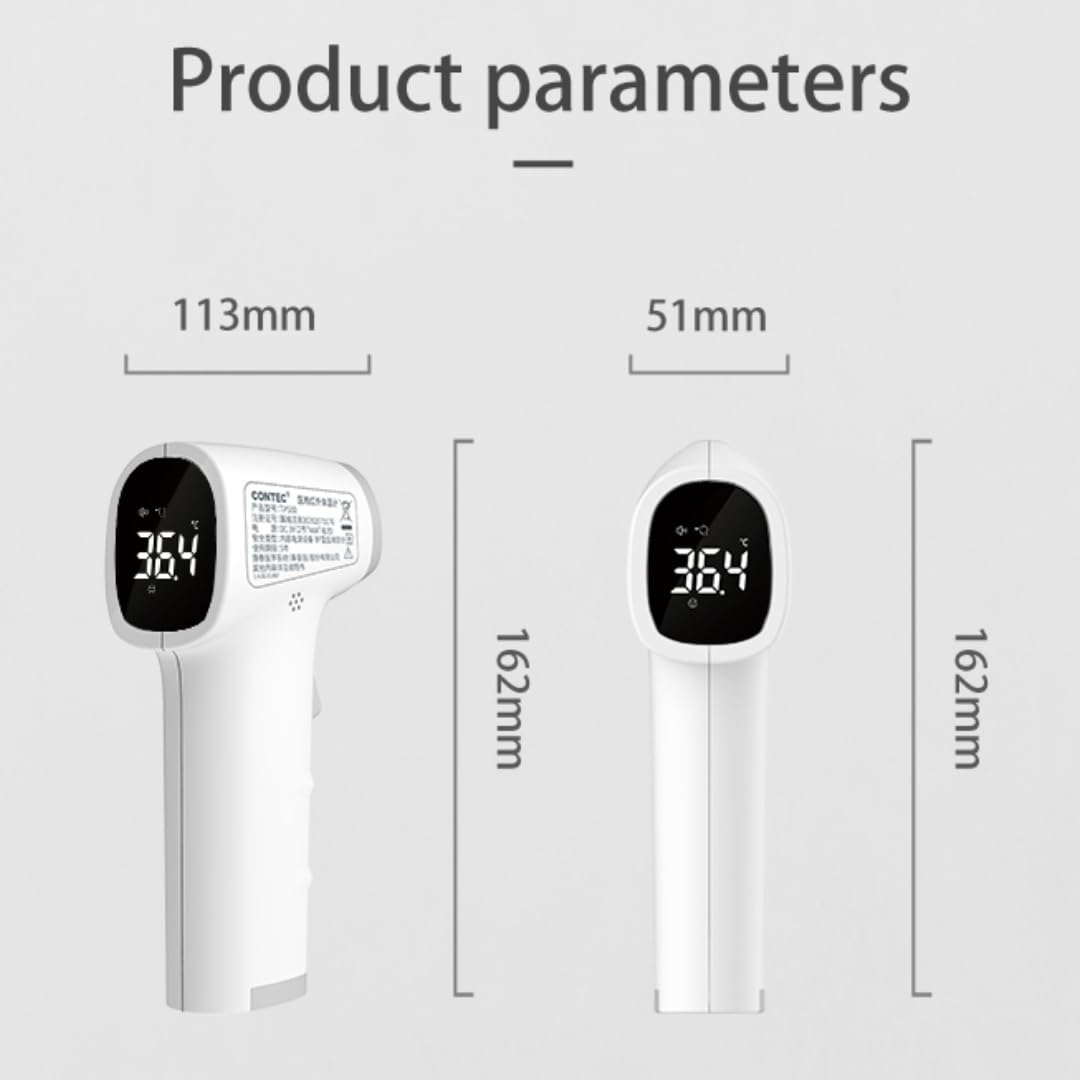
Figure 4: Celsius and Fahrenheit unit conversion.
5.3 ฟังก์ชั่นหน่วยความจำ
The CONTEC TP500(LED) thermometer automatically stores the last 30 temperature readings. To view การวัดค่าในอดีต:
- เปิดเทอร์โมมิเตอร์.
- Briefly press the "M" (Memory) button to cycle through the stored readings. Each press will display the next stored value.

Figure 5: Memory function displaying temperature trends.
6. การบำรุงรักษา
6.1 การทำความสะอาด
- เช็ดตัวเทอร์โมมิเตอร์ด้วยผ้านุ่มๆ เช็ดเบาๆamp ผ้า.
- For the infrared probe, gently clean with a cotton swab lightly moistened with 70% isopropyl alcohol. Allow it to dry completely before use.
- ห้ามใช้สารทำความสะอาดที่มีฤทธิ์กัดกร่อน สารละลาย หรือแช่อุปกรณ์ในน้ำ
6.2 พื้นที่จัดเก็บ
- เก็บเทอร์โมมิเตอร์ไว้ในที่แห้งและเย็น หลีกเลี่ยงแสงแดดโดยตรง อุณหภูมิที่สูงหรือต่ำเกินไป และความชื้นสูง
- If the device will not be used for an extended period (e.g., more than one month), remove the batteries to prevent leakage and potential damage.
7 การแก้ไขปัญหา
| ปัญหา | สาเหตุที่เป็นไปได้ | สารละลาย |
|---|---|---|
| อุปกรณ์ไม่เปิด | แบตเตอรี่หมดหรือใส่ไม่ถูกต้อง | Replace batteries with new "AAA" batteries, ensuring correct polarity. |
| การอ่านที่ไม่ถูกต้อง | Measurement distance too far or too close; dirty probe; environmental interference. | Ensure correct measurement distance (1-3 cm). Clean the infrared probe. Avoid measuring in areas with strong drafts or extreme temperature changes. |
| ไม่สามารถเปลี่ยนหน่วยอุณหภูมิได้ | ลำดับการกดปุ่มไม่ถูกต้อง | Follow the steps in section 5.2 carefully: Turn on, long press 'M' to memory, then long press 'M' again to setting mode, brief press 'M' to toggle. |
| หน้าจอจะแสดง "Lo" หรือ "Hi" | อุณหภูมิอยู่นอกช่วงที่สามารถวัดได้ | Ensure the thermometer is used within its specified operating temperature range. If measuring body temperature, ensure proper placement and that the subject's temperature is within the human body temperature range. |
8. ข้อมูลจำเพาะ
- แบบอย่าง: TP500
- วิธีการวัด: อินฟราเรดแบบไม่สัมผัส
- ระยะการวัด: 1-3ซม.
- แสดง: นำ
- พื้นที่เก็บข้อมูลหน่วยความจำ: 30 กลุ่ม
- ปิดเครื่องอัตโนมัติ: 5 วินาที
- แหล่งพลังงาน: แบตเตอรี่ AAA 2 ก้อน (ไม่รวม)
- อายุการใช้งานแบตเตอรี่: ประมาณ 600 การวัด
- คุณสมบัติพิเศษ: Low Battery Indicator, Fever Warning
- วัสดุ: พลาสติก
- สี: สีขาว
- ขนาด : Approximately 162mm (Height) x 113mm (Length) x 51mm (Width)

รูปที่ 6: ขนาดผลิตภัณฑ์
9. การรับประกันและการสนับสนุน
The CONTEC TP500(LED) Non-Contact Infrared Thermometer comes with a one-year warranty from the date of purchase. This warranty covers manufacturing defects and malfunctions under normal use.
For warranty claims, technical support, or any questions regarding the product, please contact CONTEC customer service. You can typically find contact information on the product packaging or through the official CONTEC webเว็บไซต์.
For purchases made on Amazon, you may also contact the seller, CONTEC, directly through your Amazon order history for assistance.