
บลูการ์ เค9127
บลูการ์ เฮดลamp คู่มือการใช้งาน LED แบบชาร์จไฟได้
รุ่น : K9127
การแนะนำ
Thank you for choosing the Blukar Headlamp LED Rechargeable. This super bright head torch is designed for various outdoor activities, offering versatile lighting modes, continuous dimming, and motion sensor capabilities. Its durable, waterproof design ensures reliable performance in diverse environments. Please read this manual carefully before use to ensure proper operation and maintenance.

Image: The Blukar Headlamp LED Rechargeable in Eustoma Purple, showcasing its sleek design and adjustable headband. A USB-C charging cable is also visible.
ข้อมูลด้านความปลอดภัย

Image: A warning label detailing important safety precautions for the headlamp.
โปรดปฏิบัติตามข้อควรระวังด้านความปลอดภัยต่อไปนี้ เพื่อป้องกันความเสียหายต่อผลิตภัณฑ์หรือการบาดเจ็บส่วนบุคคล:
- หลีกเลี่ยงการตกกระแทกและการอัดขึ้นรูป
- Do not disassemble or replace the internal parts of the lamp yourself, as this may damage the product or cause safety hazards.
- Do not use this product in extremely hot or cold environments (temperatures below 25°C or above 40°C).
- เก็บหัวไว้amp away from fire, flammable gas, and corrosive liquids.
- ห้ามจ้องไปที่แหล่งกำเนิดแสงโดยตรงเพื่อหลีกเลี่ยงการระคายเคืองดวงตา
เนื้อหาแพ็คเกจ
เมื่อเปิดบรรจุภัณฑ์ โปรดตรวจสอบว่าประกอบด้วยสิ่งของต่อไปนี้ทั้งหมด:
- บลูการ์ เฮดลamp LED Rechargeable (Model: K9127)
- สายชาร์จ USB-C
- Built-in Lithium Polymer Battery (pre-installed)
- 4 x Helmet Clips
การตั้งค่า
การชาร์จเบื้องต้น
ก่อนใช้งานครั้งแรก ขอแนะนำให้ชาร์จหัวให้เต็มamp. Connect the provided USB-C cable to the headlamp's charging port and plug the other end into a compatible USB power source (e.g., AC charger, power bank, computer USB port). The indicator light will show charging status.
การสวมศีรษะamp
Adjust the elastic headband to fit comfortably and securely around your head. The headband is designed for good breathability and minimal slippage. For helmet use, utilize the included helmet clips to secure the headlamp อย่างมั่นคง.

ภาพ: ภาพแสดงส่วนหัวamp's lightweight design (86g), adjustable headband, and 45-degree tilt angle feature.
คำแนะนำการใช้งาน
โหมดแสงสว่าง
The Blukar Headlamp offers 10 distinct lighting modes, divided into Normal and Sensor modes. Press the power button to cycle through the modes.

Image: A visual guide illustrating the 10 available lighting modes (Spotlight, Floodlight, Spotlight + Floodlight, Red Floodlight, Red Strobe, 3 Sensor White Light, 2 Sensor Red Light) and the stepless dimming function.
Normal Modes (5 Modes):
- XPG White Light: Focused beam for spotlighting.
- COB White Light: Wide beam for floodlighting.
- XPG & COB White Light: Combination of focused and wide beams for maximum illumination.
- COB Red Light: Preserves night vision and is less disruptive.
- COB Red Light SOS: ไฟสีแดงกะพริบสำหรับส่งสัญญาณฉุกเฉิน
Note: In Normal Mode, if there is no operation for 8 seconds, pressing the switch again will turn the lamp ปิด.
Sensor Modes (5 Modes):
These modes allow you to turn the headlamp on/off by waving your hand within 15 cm in front of the headlamp.
- XPG White Light (Sensor)
- COB White Light (Sensor)
- XPG & COB White Light (Sensor)
- COB Red Light (Sensor)
- COB Red Light SOS (Sensor)
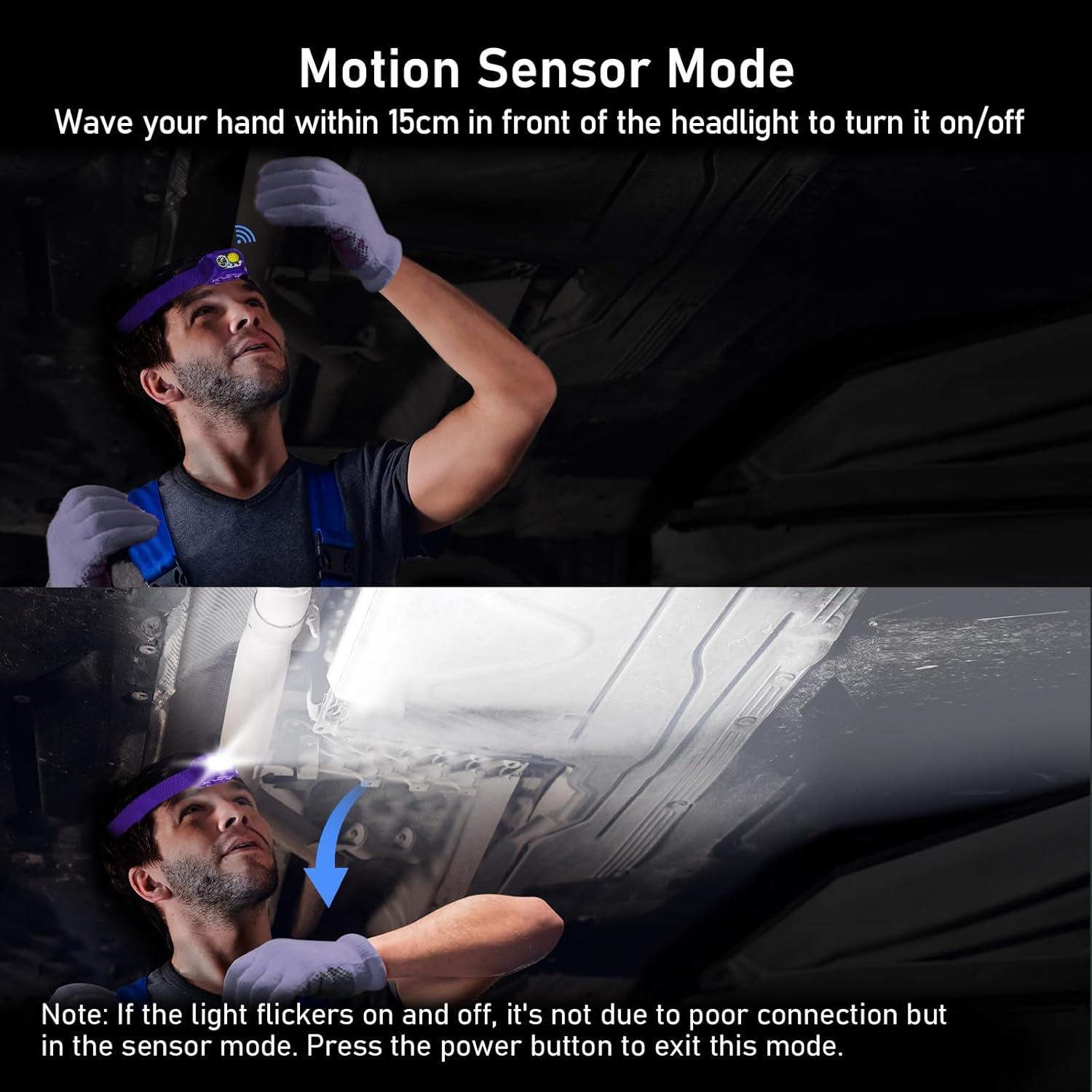

Image: Two images demonstrating the motion sensor mode. The first shows a user activating the sensor by waving their hand. The second image includes a note: "If the light flickers on and off, it's not due to poor connection but in the sensor mode. Press the power button to exit this mode."
Continuous Dimmable Brightness
เฮดลamp features an infinitely dimmable brightness function. To adjust the brightness, press and hold the power button. The brightness will cycle smoothly between 100% and 30%. Release the button at your desired brightness level. The headlamp includes a memory function that automatically saves the last used mode and brightness settings.

Image: A powerful beam from the Blukar Headlamp illuminating a vast outdoor area at night, highlighting its super bright capability.

Image: A diagram illustrating the distinct beam angles for spotlight (60 degrees) and floodlight (120 degrees) modes, demonstrating the headlamp's versatility in illumination.
การชาร์จ Headlamp
The Blukar Headlamp is equipped with a built-in 1200mAh Lithium Polymer battery and features a convenient USB-C charging port. A full charge takes approximately 3 hours.
กระบวนการชาร์จ:
- ค้นหาพอร์ตชาร์จ USB-C บนหัวหูฟังamp (usually protected by a waterproof plug).
- Insert the USB-C end of the charging cable into the headlampท่าเรือของ
- Connect the other end of the USB-C cable to a suitable power source, such as:
- An AC wall adapter (not included)
- พาวเวอร์แบงค์
- พอร์ต USB ของคอมพิวเตอร์
- ไฟแสดงสถานะบน headlamp will show the charging status (e.g., red for charging, green for fully charged).

Image: The Blukar Headlamp being charged via its USB-C port, demonstrating compatibility with an AC charger, a power bank, and a laptop.
การซ่อมบำรุง
การทำความสะอาด
การทำความสะอาดหัวampค่อย ๆ เช็ดพื้นผิวด้วยความนุ่มนวลงamp cloth. Do not use abrasive cleaners or solvents, as they may damage the finish or internal components. Ensure the charging port's waterproof plug is securely closed before cleaning or exposing to water.
การดูแลและจัดเก็บแบตเตอรี่
To prolong battery life, avoid fully discharging the headlamp frequently. Recharge the battery regularly, even if not in use, to maintain its capacity. Store the headlamp ในสถานที่แห้งและเย็น ห่างจากแสงแดดโดยตรงและอุณหภูมิที่สูงหรือต่ำมาก
การแก้ไขปัญหา
| ปัญหา | สาเหตุที่เป็นไปได้ | สารละลาย |
|---|---|---|
| เฮดลamp ไม่เปิด | แบตเตอรี่หมด | ชาร์จหัวamp ใช้งานได้เต็มประสิทธิภาพโดยใช้สาย USB-C ที่ให้มา |
| Light flickers in sensor mode. | Normal behavior in sensor mode when detecting motion. | This is not a malfunction. Press the power button to exit sensor mode if continuous light is desired. |
| เฮดลamp ไม่ชาร์จ | Loose cable connection or faulty power source. | Ensure the USB-C cable is securely connected to both the headlamp and the power source. Try a different USB port or power adapter. |
| การปรับความสว่างใช้งานไม่ได้ | Button not held long enough or in an incompatible mode. | Press and hold the power button to activate continuous dimming. Ensure you are not in a fixed-brightness mode. |
ข้อมูลจำเพาะ
| คุณสมบัติ | รายละเอียด |
|---|---|
| ยี่ห้อ | บลูการ์ |
| หมายเลขรุ่น | เค9127 |
| น้ำหนักสินค้า | 86 กรัม |
| ขนาดสินค้า | 5.75 x 4.27 x 3.6 ซม. |
| ประเภทแบตเตอรี่ | ลิเธียมโพลีเมอร์ 1 อัน (รวมอยู่ด้วย) |
| ความจุของแบตเตอรี่ | 1200mAh |
| สี | Eustoma Purple |
| วัสดุ | เอบีเอส |
| แหล่งพลังงาน | ใช้พลังงานจากแบตเตอรี่ |
| ประเภทแหล่งกำเนิดแสง | LED (XPG & COB) |
| คุณสมบัติพิเศษ | Rechargeable, Continuously Dimmable, Motion Sensor, IPX5 Waterproof, 45° Adjustable Angle |
| ระดับการกันน้ำ | IPX5 |
การรับประกันและการสนับสนุน
Specific warranty details are not provided in the product information. For any product inquiries, technical support, or warranty claims, please contact Blukar customer service through the retailer's platform or the official Blukar website. Please have your model number (K9127) and purchase details ready when contacting support.
Ask a question about this manual
Ask about setup, troubleshooting, compatibility, parts, safety, or missing instructions. Manuals+ will review the question and use this page’s manual context to help answer it.