
VGN ATK RS7 PRO
คู่มือผู้ใช้คีย์บอร์ดเอฟเฟกต์ฮอลล์ ATK RS7 Pro RGB eSports Edition
Model: ATK RS7 PRO | Brand: VGN
การแนะนำ
This manual provides comprehensive instructions for the ATK RS7 Pro RGB eSports Edition Hall Effect Keyboard. It covers setup, operation, maintenance, and troubleshooting to ensure optimal performance and longevity of your device. The ATK RS7 Pro features a Hall Effect design with adjustable 0 dead zone, an 8000Hz polling rate, and ultra-low 0.3ms latency, utilizing Gateron Magnetic Jade Switches (Amethyst Limited Edition).
คุณสมบัติหลัก
- Hall Effect Keyboard: Utilizes magnetic sensors for key actuation, offering precise and customizable actuation points.
- สามารถปรับตั้งค่า Dead Zone เป็น 0 ได้: Allows for fine-tuning of key sensitivity and responsiveness.
- อัตราการสำรวจ 8000Hz: Provides extremely fast communication between the keyboard and your computer, reducing input lag.
- ความหน่วงต่ำพิเศษ 0.3ms: Engineered for competitive gaming, minimizing delay from key press to in-game action.
- Gateron Magnetic Jade Switches: Features Amethyst Limited Edition switches for a unique tactile and auditory experience.
- 75% เค้าโครง: Compact design retaining essential keys for gaming and productivity.
- Aluminum Alloy Top Case: Durable and premium construction.
- Resilient GAS Structure: ช่วยเพิ่มความรู้สึกและเสียงในการพิมพ์ให้ดียิ่งขึ้น
- Adjustable Sensitivity Levels: Customize key actuation to your preference.
- Rapid Trigger/Reset (RT): Advanced feature for competitive play, allowing keys to re-actuate instantly upon reset.
- ATK V HUB Compatibility: Software support for advanced customization.
- NKRO (N-Key Rollover): Ensures all simultaneous key presses are registered.
- Dye-Sub Keycaps: Durable keycap legends that resist fading.
- Advanced Key Functions: Programmable keys and macros for enhanced control.
- แสงไฟด้านหลัง: Equipped with RGB backlighting for customizable aesthetics.
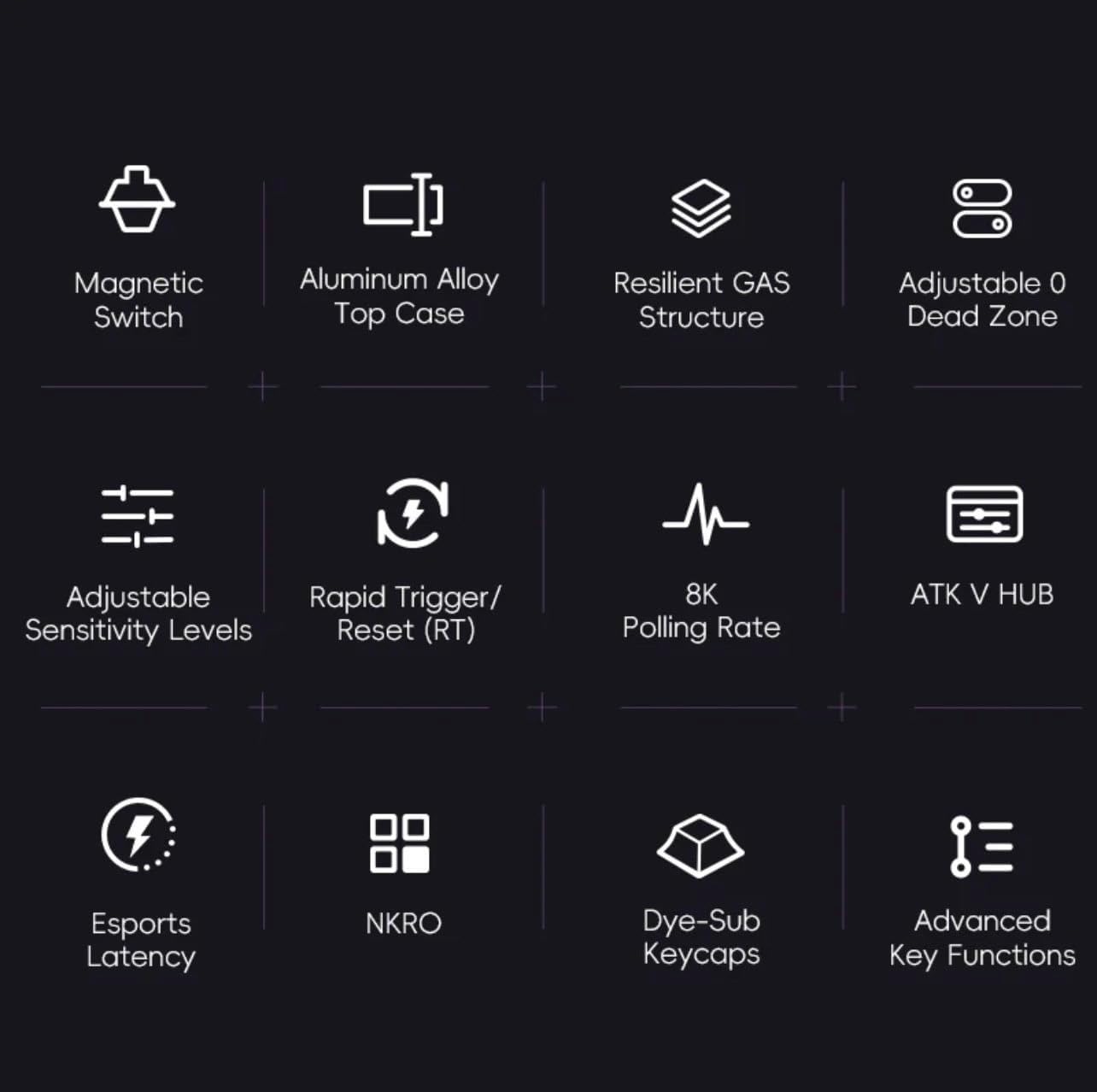
รูปที่ 1: เกินview of ATK RS7 Pro's advanced features.
เนื้อหาแพ็คเกจ
กรุณาตรวจสอบแพ็คเกจสำหรับรายการต่อไปนี้:
- ATK RS7 Pro RGB eSports Edition Hall Effect Keyboard
- USB Cable (USB-A connection)
- คู่มือการใช้งาน (เอกสารนี้)
การตั้งค่า
- เชื่อมต่อคีย์บอร์ด: Locate an available USB-A port on your computer. Insert the USB-A end of the provided cable into your computer's USB port and the other end into the keyboard's USB port.
- การติดตั้งไดร์เวอร์: The keyboard is typically plug-and-play. Your operating system should automatically detect and install the necessary drivers.
- การติดตั้งซอฟต์แวร์ (ทางเลือก): For advanced customization, such as adjusting actuation points, rapid trigger settings, RGB lighting, and macros, download and install the ATK V HUB software from the official VGN webเว็บไซต์.

Figure 2: ATK RS7 Pro Keyboard connected via USB-A.
คำแนะนำการใช้งาน
การใช้งานพื้นฐาน
The ATK RS7 Pro functions as a standard QWERTY keyboard for typing and general computer use. All keys are fully functional upon connection.
คุณสมบัติขั้นสูงและการปรับแต่ง
The ATK RS7 Pro offers several advanced features for enhanced performance, particularly in gaming. These features are primarily configured via the ATK V HUB software.
- การปรับจุดการทำงาน: Customize the distance a key needs to travel before registering a press. This can be set individually for each key.
- ทริกเกอร์อย่างรวดเร็ว (RT): This feature allows a key to re-actuate immediately upon reset, without needing to return to its full resting position. This is highly beneficial for rapid inputs in games. Configure the activation and deactivation points within the software.
- 0 โซนตาย: Ensure that there is no unresponsive travel distance at the beginning or end of a key press, providing maximum responsiveness.
- อัตราการสำรวจความคิดเห็น: The keyboard operates at an 8000Hz polling rate by default, providing 0.3ms latency. This setting is fixed for optimal performance.
- แสงไฟ RGB: Customize lighting effects, colors, and brightness through the ATK V HUB software.
- Macros and Key Remapping: Assign complex sequences of commands to a single key or remap keys to different functions using the software.

Figure 3: The ATK RS7 Pro features ultra-low 0.3ms latency with an 8000Hz polling rate.
การซ่อมบำรุง
- การทำความสะอาด: Use a soft, dry cloth to wipe down the keyboard surface. For deeper cleaning, use compressed air to remove dust and debris from between keycaps. Avoid using harsh chemicals or abrasive materials.
- การถอดคีย์แคป: If necessary, keycaps can be carefully removed using a keycap puller (not included) for thorough cleaning. Reinstall them by aligning and gently pressing down until they click into place.
- พื้นที่จัดเก็บ: เมื่อไม่ได้ใช้งาน ให้เก็บแป้นพิมพ์ไว้ในสภาพแวดล้อมที่สะอาดและแห้ง หลีกเลี่ยงแสงแดดโดยตรงและอุณหภูมิที่สูงหรือต่ำเกินไป

Figure 4: Internal components of the ATK RS7 Pro, illustrating its layered construction for durability and sound.
การแก้ไขปัญหา
| ปัญหา | สาเหตุที่เป็นไปได้ | สารละลาย |
|---|---|---|
| แป้นพิมพ์ไม่ตอบสนอง | การเชื่อมต่อ USB หลวม, พอร์ต USB ชำรุด, มีปัญหากับไดรเวอร์ | Ensure USB cable is securely connected. Try a different USB port. Restart your computer. Check Device Manager for driver issues. |
| Keys not registering correctly | Dust/debris under keycap, software settings, switch malfunction. | Clean under the keycap with compressed air. Check ATK V HUB software for actuation point settings. If issue persists, contact support. |
| ไฟ RGB ไม่ทำงาน | การตั้งค่าซอฟต์แวร์ ปัญหาด้านพลังงาน | Ensure ATK V HUB software is running and lighting is enabled. Check USB connection for sufficient power delivery. |
| Software (ATK V HUB) not detecting keyboard | Software not updated, driver conflict, background processes. | Ensure you have the latest version of ATK V HUB. Reinstall keyboard drivers. Close other background applications that might interfere. |
ข้อมูลจำเพาะ
| คุณสมบัติ | รายละเอียด |
|---|---|
| ยี่ห้อ | วีจีเอ็น |
| หมายเลขรุ่น | ATK RS7 PRO |
| คำอธิบายแป้นพิมพ์ | คีย์บอร์ดสำหรับเล่นเกม |
| ข้อแนะนำการใช้ | การเล่นเกม |
| เทคโนโลยีการเชื่อมต่อ | ยูเอสบี-เอ |
| อุปกรณ์ที่รองรับ | เครื่องคอมพิวเตอร์ส่วนบุคคล |
| คุณสมบัติพิเศษ | มีไฟแบ็คไลท์ |
| ส่วนประกอบที่รวมอยู่ | สาย USB |
| ประเภทสวิตซ์ | Tactile (Gateron Magnetic Jade) |
| เค้าโครงแป้นพิมพ์ | QWERTY (75% layout) |
| การวางแนวมือ | ถนัดทั้งสองมือ |
| อัตราการสำรวจความคิดเห็น | 8000เฮิรตซ์ |
| ความหน่วงเวลา | 0.3มิลลิวินาที |
| โซนแห่งความตาย | Adjustable 0 Dead Zone |
การรับประกันและการสนับสนุน
The ATK RS7 Pro RGB eSports Edition Hall Effect Keyboard comes with a standard manufacturer's warranty. Please refer to the warranty card included in your package or visit the official VGN webเว็บไซต์สำหรับข้อกำหนดและเงื่อนไขการรับประกันโดยละเอียด
For technical support, troubleshooting assistance, or inquiries regarding your product, please contact VGN customer service through their official website or the contact information provided with your purchase. Ensure you have your product model number (ATK RS7 PRO) and purchase details ready when contacting support.
เอกสารที่เกี่ยวข้อง - ATK RS7 PRO
 |
VGN UFO 8K Wireless Mouse Receiver User Manual Comprehensive user manual for the VGN UFO 8K Wireless Mouse Receiver, including setup instructions, indicator light functions, and troubleshooting for common connectivity and performance issues. |
 |
คู่มือผู้ใช้ DragonFly F1 Pro Max - VGN คู่มือผู้ใช้ที่ครอบคลุมสำหรับเมาส์เล่นเกมไร้สาย VGN DragonFly F1 Pro Max ซึ่งมีข้อมูลผลิตภัณฑ์โดยละเอียด ข้อมูลจำเพาะการขาย การเปรียบเทียบพารามิเตอร์ ข้อมูลจำเพาะโดยละเอียด การเชื่อมต่อ ความเข้ากันได้ รายละเอียดเซ็นเซอร์ ชิปควบคุมหลัก แบตเตอรี่ เฟรตติง ตัวเข้ารหัสลูกกลิ้ง สติกเกอร์ที่เท้า การสนับสนุนซอฟต์แวร์ บรรจุภัณฑ์ และคำเตือน FCC |
 |
VGN V108 Keyboard Product Manual User manual for the VGN V108 gaming keyboard, covering safety instructions, setup, operation, and maintenance guidelines. |
 |
คู่มือผู้ใช้คีย์บอร์ดเชิงกล VGN N75 Pro คู่มือผู้ใช้สำหรับคีย์บอร์ดเชิงกล VGN N75 Pro ครอบคลุมคำอธิบายปุ่ม โหมดการเชื่อมต่อ (2.4G, Bluetooth, แบบมีสาย), การจัดการพลังงาน, ฟังก์ชันการนอนหลับ, ชุดปุ่ม FN, เอฟเฟกต์แสง, การแก้ไขปัญหาทั่วไป และการปฏิบัติตาม FCC |
 |
คู่มือผู้ใช้คีย์บอร์ดเชิงกล VGN V98 Pro V2 คู่มือผู้ใช้สำหรับคีย์บอร์ดเชิงกล VGN V98 Pro V2 ซึ่งมีรายละเอียดเกี่ยวกับการปฏิบัติตาม FCC คุณสมบัติ และข้อมูลจำเพาะ |
 |
คู่มือผู้ใช้คีย์บอร์ดเชิงกล VGN S99 คู่มือผู้ใช้สำหรับคีย์บอร์ดเชิงกล VGN S99 ครอบคลุมคำอธิบายปุ่ม คู่มือเริ่มต้นฉบับย่อสำหรับการเชื่อมต่อไร้สาย 2.4G, Bluetooth และแบบมีสาย การจัดการพลังงาน ฟังก์ชันพักเครื่อง ปุ่มผสม FN เอฟเฟกต์แสง และเคล็ดลับการแก้ไขปัญหาทั่วไป |
Ask a question about this manual
Ask about setup, troubleshooting, compatibility, parts, safety, or missing instructions. Manuals+ will review the question and use this page’s manual context to help answer it.