
การแนะนำ
This manual provides essential instructions for the setup, operation, and maintenance of your Carrera Wireless 2.0 Duo Controllers and Receiver. This system is designed to enhance your Carrera DIGITAL 132 and DIGITAL 124 slot car racing experience by providing wireless control.

Image: The Carrera Wireless 2.0 Duo Controllers and Receiver set, showing two controllers and one receiver unit.
The Wireless 2.0 system utilizes 2.4-GHz radio technology, ensuring an interruption-free connection and a range of up to 15 meters. This allows for greater freedom of movement around your racetrack. The controllers operate on standard AAA 1.5-V batteries (not included).
การตั้งค่า
1. การแกะกล่องและส่วนประกอบ
แกะส่วนประกอบทั้งหมดออกจากบรรจุภัณฑ์อย่างระมัดระวัง บรรจุภัณฑ์ควรมีสิ่งต่อไปนี้:
- 2 Wireless 2.0 Speed Controllers
- 1 Wireless 2.0 Receiver
2. Battery Installation (Controllers)
Each Wireless 2.0 Speed Controller requires one (1) AAA 1.5-V battery (not included).
- Locate the battery compartment on the back of each controller.
- เปิดฝาช่องใส่แบตเตอรี่
- ใส่แบตเตอรี่ AAA หนึ่งก้อน ตรวจสอบให้แน่ใจว่าขั้วถูกต้อง (+/-)
- ปิดฝาช่องใส่แบตเตอรี่ให้แน่น
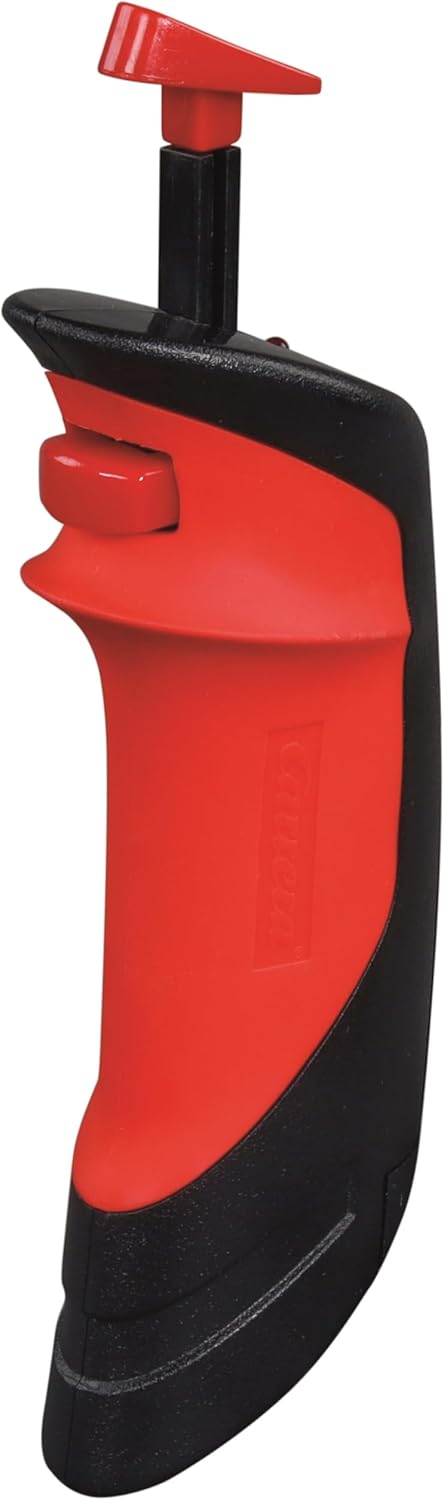
Image: A single Carrera Wireless 2.0 Speed Controller, showing its ergonomic design. The battery compartment is located on the underside/back.
3. การเชื่อมต่อตัวรับ
The Wireless 2.0 Receiver connects to your Carrera Digital Control Unit.
- Locate an available port on your Carrera Digital Control Unit.
- Insert the connector cable from the Wireless 2.0 Receiver into the designated port on the Control Unit.
- ตรวจสอบให้แน่ใจว่าการเชื่อมต่อแน่นหนาดีแล้ว

Image: The Carrera Wireless 2.0 Receiver unit with its connection cable, displaying the 'CHANNEL' indicator and 'SET' button.
4. Pairing Controllers with Receiver
After connecting the receiver and installing batteries in the controllers, you must pair the controllers with the receiver. The specific pairing process is detailed in the instruction manual for your Carrera Digital Control Unit. Generally, this involves:
- Activating pairing mode on the Control Unit.
- Pressing a designated button on the Wireless 2.0 controller to initiate pairing.
- Confirming successful pairing via an indicator light or display on the Control Unit or receiver.
สำคัญ: Ensure that vehicle addresses are not assigned twice if operating multiple wireless systems (e.g., Wireless 2.0 and Wireless+).
คำแนะนำการใช้งาน
การทำงานพื้นฐาน
Once the controllers are paired and the system is powered on, you can control your slot cars wirelessly.
- ควบคุมคันเร่ง: Use the trigger on the controller to adjust the speed of your assigned vehicle.
- การเปลี่ยนเลน: Utilize the lane change button (if applicable to your track system and vehicle) to switch lanes.
- พิสัย: The 2.4-GHz radio technology provides a reliable connection up to 15 meters from the receiver, allowing for flexible positioning around your track.
หมายเหตุความเข้ากันได้
The Carrera Wireless 2.0 system has specific compatibility requirements:
- Wireless 2.0 hand-held controllers are exclusively compatible with a Wireless 2.0 receiver.
- Previous Wireless+ hand-held controllers are only compatible with Wireless+ receivers.
- การทำงานแบบขนาน: It is possible to operate both Wireless 2.0 and Wireless+ systems simultaneously. To do this, both a Wireless 2.0 receiver (Model 20010122) and a Wireless+ receiver (Model 20010112) must be connected to the Carrera Digital Control Unit. Ensure that the addresses assigned to the vehicles are unique and not duplicated across the systems.
การซ่อมบำรุง
การเปลี่ยนแบตเตอรี่
When the controller's performance diminishes or it fails to connect, it is likely time to replace the AAA battery. Follow the battery installation steps outlined in the Setup section. Always use fresh, high-quality AAA 1.5-V alkaline or rechargeable batteries.
การทำความสะอาด
To maintain the longevity and appearance of your controllers and receiver:
- เช็ดพื้นผิวด้วยผ้าแห้งนุ่ม
- หลีกเลี่ยงการใช้น้ำยาทำความสะอาดที่มีฤทธิ์กัดกร่อน ตัวทำละลาย หรือสารเคมีที่รุนแรง
- Do not immerse the controllers or receiver in water or any other liquid.
การแก้ไขปัญหา
| ปัญหา | สาเหตุที่เป็นไปได้ | สารละลาย |
|---|---|---|
| คอนโทรลเลอร์ไม่ตอบสนอง |
|
|
| Receiver not recognized by Control Unit |
|
|
| การเชื่อมต่อเป็นระยะ |
|
|
| Cannot use Wireless 2.0 and Wireless+ simultaneously |
|
|
ข้อมูลจำเพาะ
| ยี่ห้อ | คาร์เรร่า |
| หมายเลขรุ่น | 20010120 |
| ส่วนประกอบที่รวมอยู่ | 2 Wireless 2.0 Speed Controllers, 1 Wireless 2.0 Receiver |
| แหล่งพลังงาน | ใช้พลังงานจากแบตเตอรี่ |
| ประเภทแบตเตอรี่ | AAA 1.5-V Alkaline (2 required, not included) |
| เทคโนโลยีวิทยุ | 2.4 กิกะเฮิรตซ์ |
| ระยะการทำงาน | สูงสุด 15 เมตร (ประมาณ 49 ฟุต) |
| น้ำหนักสินค้า | 0.31 กิโลกรัม (ประมาณ 0.68 ปอนด์) |
| ขนาดรายการ (ยาว x กว้าง x สูง) | 11 x 7 x 2 นิ้ว (ประมาณ 27.9 x 17.8 x 5.1 ซม.) |
| ประเภทวัสดุ | พลาสติก |
| ช่วงอายุที่แนะนำ | อายุ 8 ปีขึ้นไป |
| ยูพีซี | 050227109246 |
คำเตือน: มีชิ้นส่วนเล็ก ไม่เหมาะสำหรับเด็กอายุต่ำกว่า 3 ปี
ข้อมูลการรับประกัน
Specific warranty details for the Carrera Wireless 2.0 Duo Controllers and Receiver are typically provided with the product packaging or can be found on the official Carrera webไซต์ โปรดเก็บหลักฐานการซื้อไว้เพื่อใช้ในการเรียกร้องการรับประกัน
การสนับสนุนลูกค้า
For further assistance, technical support, or to inquire about replacement parts, please visit the official Carrera webเว็บไซต์หรือติดต่อฝ่ายบริการลูกค้าของพวกเขา
Official Carrera Webเว็บไซต์: www.carrera-toys.com