
1. บทนำ
This manual provides detailed instructions for the installation, operation, and maintenance of the Yitouniu EWeLink 2-Channel Smart WiFi Switch Relay. This device enables remote control of household appliances and electronic devices via a mobile application, RF remote control, and voice commands through smart assistants like Alexa and Google Home. It supports various operating modes and timing functions to enhance smart home automation.
2. ข้อมูลด้านความปลอดภัย
- โปรดตรวจสอบให้แน่ใจว่าได้ตัดกระแสไฟแล้วก่อนทำการติดตั้งหรือบำรุงรักษา เพื่อป้องกันไฟฟ้าช็อต
- Installation should be performed by qualified personnel or under strict adherence to electrical safety guidelines.
- ไม่เกินกระแสและปริมาตรสูงสุดtagค่า e ที่ระบุไว้สำหรับอุปกรณ์
- เก็บอุปกรณ์ให้ห่างจากน้ำ ความชื้น และอุณหภูมิที่สูงเกินไป
- ตรวจสอบว่าการเชื่อมต่อสายไฟทั้งหมดแน่นหนาและถูกต้องก่อนที่จะคืนกระแสไฟฟ้า
3. สินค้าหมดview
The Yitouniu EWeLink Smart WiFi Switch Relay is a compact, 2-channel device designed for integrating traditional appliances into a smart home system. It features WiFi and Bluetooth connectivity for app control and supports RF 433MHz for remote control.

ภาพที่ 3.1: ด้านหน้า view of the Yitouniu EWeLink Smart WiFi Switch Relay. The device is white with branding and connection labels visible.

ภาพที่ 3.2: ภาพระยะใกล้ view of the Yitouniu EWeLink Smart WiFi Switch Relay, showing input terminals (N, L), output terminals (NO, COM, NC), and model information.

Image 3.3: The compact size of the Yitouniu EWeLink Smart WiFi Switch Relay, held in a hand for scale.
4. ข้อมูลจำเพาะ
| พารามิเตอร์ | ค่า |
|---|---|
| อินพุต Voltage | AC/DC 85-250V, Micro USB 5V input |
| แม็กซ์ปัจจุบัน | 10เอ |
| พลังสูงสุด | 2200วัตต์ |
| มาตรฐาน WiFi | WiFi 2.4GHz b/n/g + Bluetooth (IEEE 802.11b/g/n) |
| อุณหภูมิในการทำงาน | -20°C ถึง 70°C |
| วัสดุ | สารหน่วงไฟABS |
| ขนาดสินค้า | 2.76 x 1.77 x 1.1 นิ้ว |
| น้ำหนักสินค้า | 1.76 ออนซ์ |
| ประเภทการติดต่อ | เปิดปกติ |
| การให้คะแนนการคุ้มครองระหว่างประเทศ | IP65 |
| การรับรอง | เอฟซีซี |
5. การตั้งค่าและการติดตั้ง
5.1 คำแนะนำในการเดินสายไฟ
The device supports both AC/DC 85-250V input and Micro USB 5V input. Ensure correct wiring based on your application. The relay has Normally Open (NO), Common (COM), and Normally Closed (NC) contacts for controlling external devices.
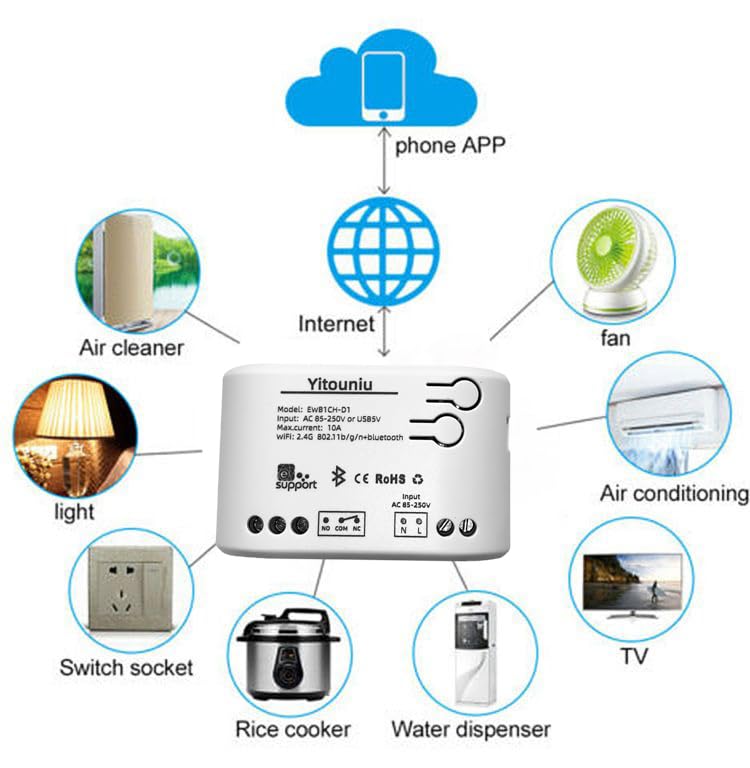
Image 5.1: Diagram illustrating the connectivity of the Yitouniu EWeLink Smart WiFi Switch Relay to various household appliances like lights, fans, and air conditioners, all controlled via a phone app and the internet.
5.2 การดาวน์โหลดและการจับคู่แอป
- ดาวน์โหลด อีเวลิงค์ แอปจาก Apple App Store หรือ Google Play Store
- ลงทะเบียนบัญชีและเข้าสู่ระบบ
- Power on the Smart WiFi Switch Relay.
- Open the eWeLink app, tap the '+' icon to add a device.
- Follow the on-screen instructions to connect the device to your 2.4GHz WiFi network.

Image 5.2: Screenshots of the eWeLink app interface, showing controls for a garage door (ON/OFF) and a scheduling function for setting specific times.
6. โหมดการทำงาน
The device supports three operating modes: self-locking, interlocking, and inching (micromotion). These modes can typically be configured within the eWeLink app or via physical buttons on the device, depending on the specific model variant.
- โหมดล็อคอัตโนมัติ: Each channel operates independently. Pressing the button (or app control) turns the relay ON, pressing it again turns it OFF.
- Interlocking Mode: When one channel is turned ON, all other channels are automatically turned OFF. This is useful for applications where only one device should be active at a time.
- Inching (Micromotion) Mode: The relay turns ON for a set duration (e.g., 0.5 seconds to 1 hour) and then automatically turns OFF. This is suitable for momentary actions like garage door openers or pulse controls.
7. การควบคุมผ่านแอปพลิเคชันและการควบคุมด้วยเสียง
7.1 eWeLink App Features
The eWeLink app provides comprehensive control over your Smart WiFi Switch Relay:
- เปิด/ปิดระยะไกล: ควบคุมอุปกรณ์ที่เชื่อมต่อจากทุกที่ที่มีการเชื่อมต่ออินเทอร์เน็ต
- ฟังก์ชั่นจับเวลา: Set schedules, countdowns, or recurring timers for automatic on/off operations.
- การควบคุมอิสระ: Each of the two channels can be controlled independently.
- การแชร์อุปกรณ์: แบ่งปันการควบคุมอุปกรณ์ของคุณกับสมาชิกในครอบครัว
- การควบคุมกลุ่ม: Organize multiple smart devices into groups for simultaneous control.

Image 7.1: A user remotely controlling home lighting via the eWeLink mobile application, demonstrating the convenience of app-based control.

Image 7.2: Illustration of the eWeLink app's group control and sharing functions, allowing multiple users to manage devices across different rooms.

Image 7.3: The timing function interface within the eWeLink app, enabling users to set specific on/off times for connected appliances.
7.2 การบูรณาการการควบคุมด้วยเสียง
The Yitouniu Smart WiFi Switch Relay is compatible with popular voice assistants, including Amazon Alexa and Google Home/Nest. To enable voice control:
- Ensure your Smart WiFi Switch Relay is successfully paired with the eWeLink app.
- เปิดแอป Alexa หรือ Google Home
- ไปที่ส่วน 'ทักษะ' หรือ 'ทำงานร่วมกับ Google'
- ค้นหา and enable the 'eWeLink Smart Home' skill/service.
- เชื่อมโยงบัญชี eWeLink ของคุณเมื่อได้รับแจ้ง
- Discover devices. Your Smart WiFi Switch Relay should now be controllable via voice commands.
Exampเล คำสั่ง:
- "อเล็กซ่า เปิดไฟห้องนั่งเล่น"
- "เฮ้ Google ปิดพัดลมหน่อย"

Image 7.4: A user interacting with voice assistants like Amazon Alexa and Google Home to control smart devices, highlighting the voice control capability of the relay.
8. การบำรุงรักษา
The Yitouniu Smart WiFi Switch Relay requires minimal maintenance. Follow these guidelines:
- การทำความสะอาด: Wipe the device with a dry, soft cloth. Do not use liquid cleaners or solvents.
- ตรวจสอบการเชื่อมต่อ: ตรวจสอบการเชื่อมต่อสายไฟเป็นระยะเพื่อให้แน่ใจว่ายังคงแน่นหนาดีอยู่
- อัพเดตเฟิร์มแวร์: Keep the eWeLink app updated to receive the latest firmware for the device, which may include performance improvements and new features.
9 การแก้ไขปัญหา
- อุปกรณ์ไม่เชื่อมต่อกับ WiFi:
- ตรวจสอบให้แน่ใจว่าเครือข่าย WiFi ของคุณเป็น 2.4GHz อุปกรณ์นี้ไม่รองรับเครือข่าย 5GHz
- ตรวจสอบว่ารหัสผ่าน WiFi ที่ป้อนในแอปถูกต้อง
- ย้ายอุปกรณ์ให้ใกล้กับเราเตอร์ WiFi มากขึ้น
- รีสตาร์ทอุปกรณ์และเราเตอร์ของคุณ
- อุปกรณ์ออฟไลน์ในแอป:
- ตรวจสอบว่าการเชื่อมต่ออินเทอร์เน็ตที่บ้านของคุณใช้งานได้หรือไม่
- ตรวจสอบว่าอุปกรณ์มีไฟเลี้ยงหรือไม่
- รีสตาร์ทอุปกรณ์
- การควบคุมด้วยเสียงไม่ทำงาน:
- Confirm the eWeLink skill/service is enabled and linked in your Alexa or Google Home app.
- Ensure the device is named clearly in the eWeLink app and discovered by your voice assistant.
- ตรวจสอบการเชื่อมต่ออินเตอร์เน็ตของคุณ
- Device not responding to RF remote:
- Ensure the RF remote is paired with the switch. Refer to the RF pairing instructions (if applicable to your specific remote).
- Check the battery in the RF remote.
10. อะไรอยู่ในกล่อง
เมื่อเปิดบรรจุภัณฑ์ผลิตภัณฑ์คุณจะพบรายการต่อไปนี้:
- 1 x Yitouniu Wifi 2-Channel Relay Switch
- 1 x คู่มือการใช้งาน (เอกสารนี้)
11. การรับประกันและการสนับสนุน
This product comes with a standard manufacturer's warranty. For specific warranty terms, conditions, and duration, please refer to the documentation included with your purchase or contact Yitouniu customer support. For technical assistance or further inquiries, please visit the official Yitouniu webเว็บไซต์หรือติดต่อช่องทางบริการลูกค้าของเรา