
Techmade TM-URI01
Techmade Universal 3-in-1 Remote Control (Model TM-URI01) Instruction Manual
การแนะนำ
This manual provides comprehensive instructions for the setup, operation, and maintenance of your Techmade Universal 3-in-1 Remote Control, Model TM-URI01. This remote is designed to consolidate control of up to three infrared devices, including televisions, set-top boxes (digital terrestrial and satellite), and DVD players, offering broad compatibility with brands such as Samsung, LG, and Sony.
1. การตั้งค่า
1.1 การติดตั้งแบตเตอรี่
รีโมทคอนโทรลต้องใช้แบตเตอรี่ AAA สองก้อน (ไม่ได้รวมอยู่ด้วย) ทำตามขั้นตอนเหล่านี้เพื่อติดตั้ง:
- ค้นหาฝาปิดช่องใส่แบตเตอรี่ที่ด้านหลังของรีโมทคอนโทรล
- กดแท็บลงแล้วเลื่อนฝาครอบออก
- ใส่แบตเตอรี่ AAA สองก้อน โดยตรวจสอบให้แน่ใจว่าขั้วบวก (+) และขั้วลบ (-) ตรงกับเครื่องหมายภายในช่อง
- เลื่อนฝาปิดช่องใส่แบตเตอรี่กลับเข้าที่จนกระทั่งล็อคเข้าที่อย่างแน่นหนา
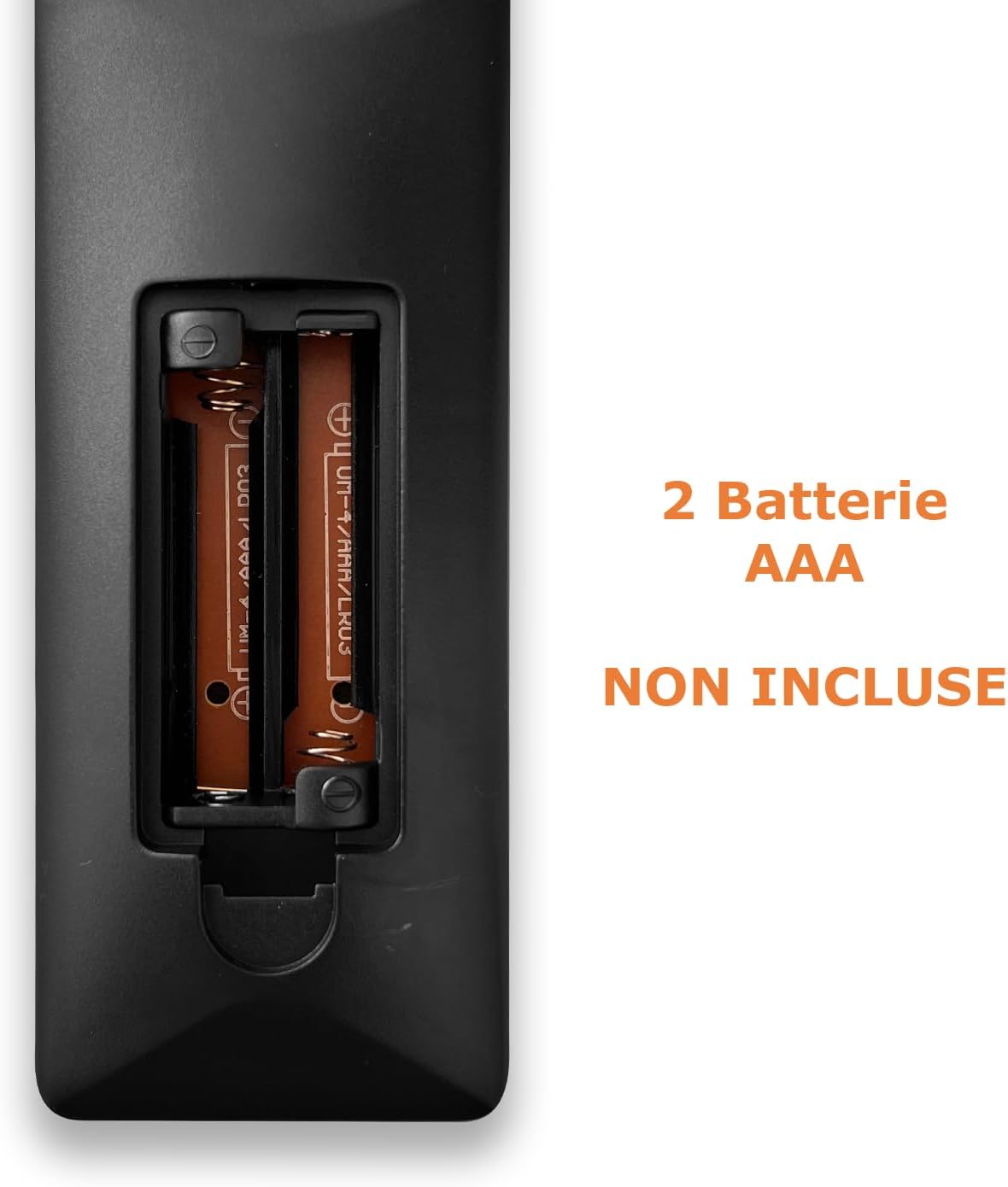
Image: Back of the remote control with the battery compartment open, indicating where to insert two AAA batteries.
1.2 การตั้งโปรแกรมรีโมทคอนโทรล
The Techmade TM-URI01 remote control can be programmed to operate up to three different devices (TV, SAT/DVB-T, DVD). The remote retains its settings even when batteries are removed, thanks to its permanent memory.
Method 1: Direct Code Entry (Recommended)
- Turn on the device you wish to control (e.g., TV, Set-top box, DVD player).
- Press and hold the corresponding device button on the remote (e.g., TV, นั่ง, ดีวีดี) for approximately 3 seconds until the indicator light (usually the power button LED) illuminates and stays on.
- Enter the 4-digit code for your device's brand. A list of common codes is typically provided in a separate code booklet (not included in this manual). For example, for Samsung TVs, try codes like 0001, 0002, etc.
- If the indicator light turns off, the code has been accepted. Test the remote by pressing the Power button. If the device turns off, the programming was successful.
- If the device does not respond, repeat the process with the next code for your brand.
วิธีที่ 2: ค้นหารหัสอัตโนมัติ
- เปิดอุปกรณ์ที่คุณต้องการควบคุม
- Press and hold the corresponding device button (e.g., TV, นั่ง, ดีวีดี) for approximately 3 seconds until the indicator light illuminates and stays on.
- กดปุ่ม พลัง button once. The indicator light will start flashing, indicating the remote is searching for a code.
- Point the remote at your device. When the device turns off, immediately press the device button (e.g., TV) again to save the code.
- Test the remote's functions. If not all functions work, repeat the auto-search process to find a more compatible code.

Image: The remote control's button layout, highlighting device selection and power buttons for programming.
2. การใช้งานรีโมทคอนโทรล
Once programmed, your Techmade TM-URI01 remote control functions similarly to your original device remotes. Here are the basic operations:

ภาพ: ด้านหน้า view of the Techmade TM-URI01 remote control, showing its complete 48-button layout.
- การเลือกอุปกรณ์: กดปุ่ม TV, นั่ง, หรือ ดีวีดี button to select the device you wish to control. The remote will then send commands to that specific device.
- พลัง: การ พลัง button (usually red) turns the selected device on or off.
- การควบคุมระดับเสียง: ใช้ เล่ม+ และ ฉบับ- ปุ่มปรับระดับเสียง
- การควบคุมช่อง: ใช้ CH+ และ ช- ปุ่มเปลี่ยนช่อง
- ปุ่มกดตัวเลข: Use the number buttons (0-9) to directly input channel numbers or other numerical selections.
- การนำทาง: ปุ่มลูกศรทิศทาง (UP, ลง, ซ้าย, ขวา) และ OK button are used for menu navigation and selection.
- เมนู/คู่มือ: ปุ่มเหมือน เมนู และ แนะนำ access the respective functions on your device.
- การควบคุมการเล่น: ปุ่มต่างๆ เช่น เล่น, หยุดชั่วคราว, หยุด, ส่งต่ออย่างรวดเร็ว, และ ย้อนกลับ are available for DVD or media player control.
Refer to your device's original manual for specific functions that may be mapped to the universal remote's buttons.
3. การบำรุงรักษา
เพื่อให้รีโมทคอนโทรลของคุณมีอายุการใช้งานยาวนานและมีประสิทธิภาพเหมาะสมที่สุด โปรดปฏิบัติตามคำแนะนำการบำรุงรักษาดังต่อไปนี้:
- การทำความสะอาด: เช็ดรีโมทคอนโทรลเป็นประจำด้วยผ้าแห้งนุ่มๆ สำหรับคราบสกปรกฝังแน่น ให้ใช้ผ้าชุบน้ำหมาดๆ เช็ดเบาๆampชุบผ้าด้วยน้ำหรือน้ำยาทำความสะอาดอ่อนๆ แล้วเช็ดให้แห้งทันที หลีกเลี่ยงการใช้สารทำความสะอาดที่มีฤทธิ์กัดกร่อนหรือตัวทำละลาย
- การเปลี่ยนแบตเตอรี่: Replace batteries when the remote's response becomes sluggish or the indicator light fails to illuminate. Always replace both batteries at the same time with new AAA batteries. Do not mix old and new batteries, or different types of batteries.
- พื้นที่จัดเก็บ: Store the remote in a cool, dry place away from direct sunlight and extreme temperatures. If the remote will not be used for an extended period, it is advisable to remove the batteries to prevent leakage.
- หลีกเลี่ยงการหยด: Protect the remote from drops and impacts, as this can damage internal components.
4 การแก้ไขปัญหา
If you experience issues with your Techmade TM-URI01 remote control, consult the following troubleshooting tips:
- ระยะไกลไม่ทำงาน:
- ตรวจสอบให้แน่ใจว่าได้ติดตั้งแบตเตอรี่อย่างถูกต้อง โดยให้ขั้ว (+/-) ถูกต้อง
- เปลี่ยนแบตเตอรี่เก่าด้วยแบตเตอรี่ AAA ใหม่
- Make sure you have selected the correct device (TV, SAT, DVD) using the device selection buttons.
- Point the remote directly at the device's infrared receiver, ensuring no obstructions are in the way.
- Verify that the remote is within the effective operating range (up to 10 meters).
- Device Not Responding After Programming:
- The code entered may be incorrect or not fully compatible. Try another code from the code list for your device's brand.
- Perform the auto code search method again.
- Ensure the device was turned on before starting the programming process.
- ฟังก์ชันบางอย่างใช้งานไม่ได้:
- Not all functions of your original remote may be available or mapped to the universal remote.
- Try programming the remote with a different code for your device, as some codes offer better compatibility for specific functions.
- Indicator Light Not Illuminating:
- ตรวจสอบการติดตั้งแบตเตอรี่และเปลี่ยนแบตเตอรี่หากจำเป็น
- If the issue persists after replacing batteries, the remote may be faulty.
5. ข้อมูลจำเพาะ
| คุณสมบัติ | รายละเอียด |
|---|---|
| ยี่ห้อ | เทคเมด |
| หมายเลขรุ่น | TM-URI01 |
| เทคโนโลยีการเชื่อมต่อ | อินฟราเรด |
| จำนวนอุปกรณ์ที่รองรับ | Up to 3 (TV, SAT/DVB-T, DVD) |
| อุปกรณ์ที่รองรับ | TVs (Samsung, LG, Sony, and others), Set-top boxes, DVD/Blu-ray players |
| จำนวนปุ่ม | 48 |
| ระยะสูงสุด | 10 เมตร |
| ประเภทแบตเตอรี่ | แบตเตอรี่อัลคาไลน์ AAA 2 ก้อน (ไม่รวมอยู่ในชุด) |
| น้ำหนัก | 200 กรัม |
| คุณสมบัติพิเศษ | Lightweight, Permanent Memory (retains settings without batteries) |
| สี | สีดำ |
6. ข้อมูลการรับประกัน
Specific warranty details for the Techmade Universal 3-in-1 Remote Control (Model TM-URI01) are not provided within this instruction manual. Please refer to the retailer's purchase terms or the official Techmade webเว็บไซต์สำหรับการรับประกันและเงื่อนไข
7. การสนับสนุนลูกค้า
For further assistance, technical support, or inquiries regarding your Techmade Universal 3-in-1 Remote Control, please visit the official Techmade website or contact your retailer. Contact information is not provided directly in this manual.
Ask a question about this manual
Ask about setup, troubleshooting, compatibility, parts, safety, or missing instructions. Manuals+ will review the question and use this page’s manual context to help answer it.