
1. สินค้าหมดview
The Daytona Mio MiVue M802WD is a motorcycle-specific drive recorder designed for reliable recording with front and rear 2-megapixel Full HD cameras. It offers convenient operation via a smartphone app for video confirmation and settings adjustments.
คุณสมบัติที่สำคัญ ได้แก่:
- Front and Rear Full HD Cameras: Equipped with high-sensitivity CMOS image sensors for clear recording even at night.
- SuperMP4 / High-Speed Data Storage: Records data every second, ensuring reliable saving even if power is cut, preventing file การทุจริตคอร์รัปชั่น
- H.264 Codec & microSDXC 256GB Support: Enables high-quality, long-duration recording without overwriting, optimizing file ขนาด.
- 2x Speed Wi-Fi: Faster data transfer to smartphones for quick video review.
- Automatic Impact Recording: G-sensor detects impacts and automatically saves footage to a dedicated folder, preventing overwriting. Manual recording is also available via a control switch.
- GPS ในตัว: Records location, date/time, and speed. Supports 5 types of GPS signals (GPS, GLONASS, GALILEO, BDS, Michibiki) for improved accuracy.
- ดีไซน์กะทัดรัดและทนทาน: Dustproof and waterproof (main unit: IP65, cameras/remote/GPS antenna: IP67) for use in various weather conditions.
- National LED Signal Support: Compatible with LED traffic lights across Japan.
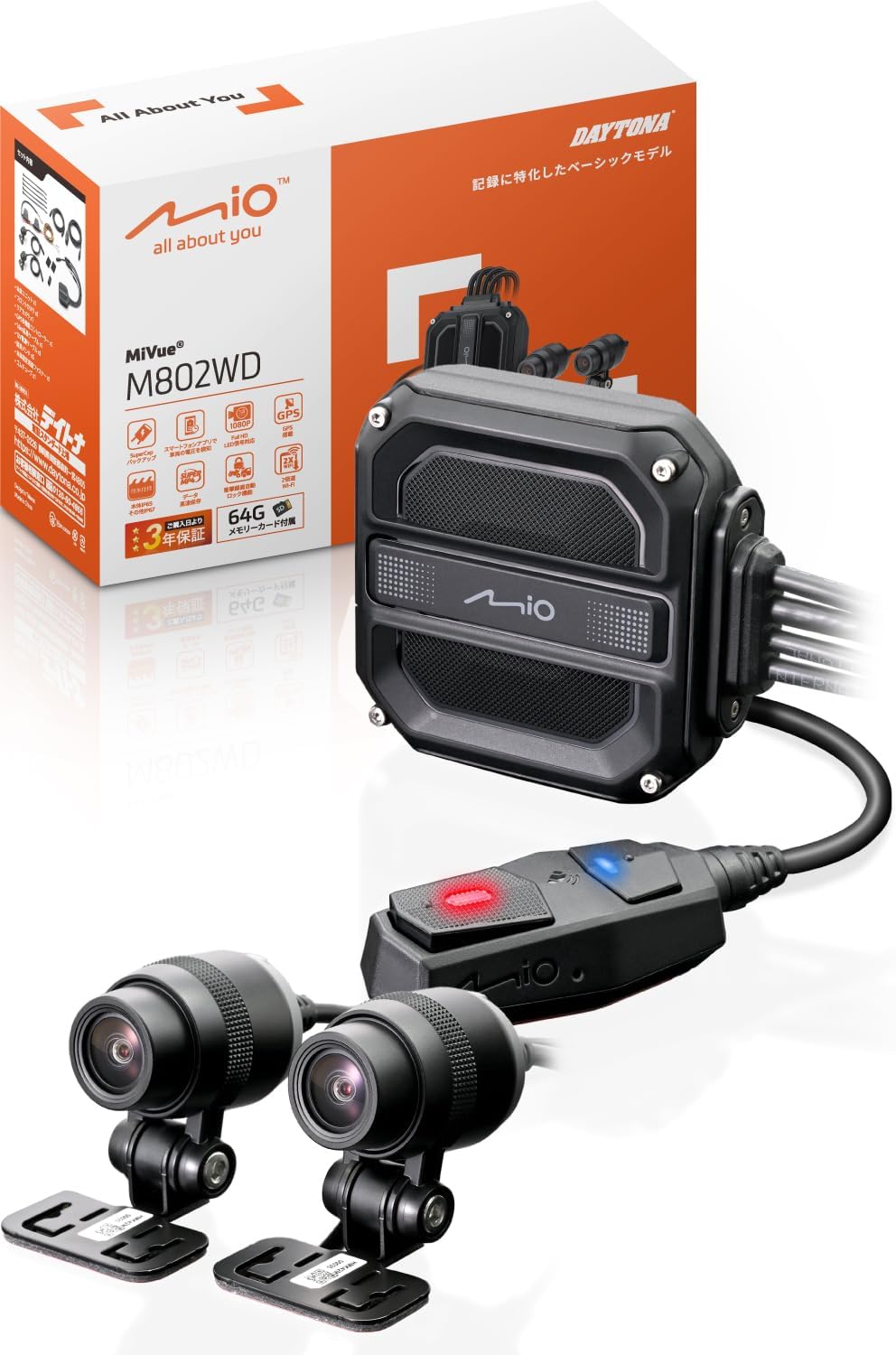
Image 1.1: Daytona Mio MiVue M802WD Motorcycle Dash Cam components, including the main unit, front and rear cameras, and remote control.
2. การตั้งค่าและการติดตั้ง
2.1 ข้อควรระวังเพื่อความปลอดภัย
- Ensure the device is installed in a location that does not obstruct driving or visibility, complying with road transport vehicle safety standards.
- ปรึกษาผู้เชี่ยวชาญหากคุณไม่แน่ใจเกี่ยวกับขั้นตอนการติดตั้ง
2.2 การระบุส่วนประกอบ
Before installation, identify all components:
- หน่วยงานหลัก
- กล้องหน้า
- กล้องหลัง
- Remote Control Switch with GPS Antenna
- สายไฟ
- สายเคเบิลกล้อง
- Mounting Brackets and Adhesive Pads
- การ์ด microSD (มีให้ในชุด 64GB)
2.3 ขั้นตอนการติดตั้ง
- ติดตั้งตัวเครื่องหลัก: Find a secure, dry location on your motorcycle, typically under the seat or within a fairing, to mount the main unit. Ensure it is protected from direct exposure to elements.
- Install Cameras: Attach the front and rear cameras to suitable locations on your motorcycle using the provided mounting brackets and adhesive pads. Ensure a clear, unobstructed view for both cameras. The cameras are IP67 rated for dust and water resistance.
- เชื่อมต่อสายเคเบิล: Route the camera cables from the cameras to the main unit. Connect the power cable to the main unit and to a suitable 12V power source on your motorcycle (e.g., ACC power).
- Mount Remote Control Switch: Install the remote control switch on your handlebar for easy access. This switch also houses the GPS antenna. Ensure it has a clear view of the sky for optimal GPS signal reception. The remote control is IP67 rated.
- ใส่การ์ด microSD: Open the main unit's cover and insert the provided 64GB microSD card into the designated slot. Secure the cover.
- Initial Power-On and App Connection: Turn on your motorcycle's ignition. The dash cam should power on. Download the Mio MiVue Pro app on your smartphone (available on iOS and Android). Connect your smartphone to the dash cam via Wi-Fi to verify camera angles and adjust settings.

ภาพที่ 2.1: อดีตample of main unit installation on a motorcycle, typically under the seat.

ภาพที่ 2.2: อดีตample of front camera installation on a motorcycle, showing various mounting positions.

ภาพที่ 2.3: อดีตample of rear camera installation on a motorcycle, showing various mounting positions.
3. คู่มือการใช้งาน
3.1 การบันทึกอัตโนมัติ
Once installed and powered, the MiVue M802WD will automatically begin recording when your motorcycle's ignition is turned on. Recording will stop when the ignition is turned off.
3.2 Impact Detection and Emergency Recording
The built-in G-sensor detects impacts. If an impact exceeding a preset value is detected, the device automatically saves the recording as an emergency file in a dedicated folder, preventing it from being overwritten by continuous recording. This emergency recording includes footage from 20 seconds before and 20 seconds after the impact.

Image 3.1: Illustration of automatic recording upon impact detection, saving footagก่อนและหลังเหตุการณ์
3.3 การบันทึกเหตุฉุกเฉินด้วยตนเอง
In emergencies or when you wish to record a specific moment, press the control switch on your handlebar. This will save the current footage as an emergency file, protecting it from being overwritten.

Image 3.2: A gloved hand pressing the control switch on a motorcycle handlebar to initiate manual recording.
3.4 Using the MiVue Pro Smartphone App
The MiVue Pro app (available for iOS and Android) allows you to:
- View ไลฟ์ฟูtage: Check camera angles and live video feed.
- Review การบันทึก: Access and play back recorded videos.
- ดาวน์โหลด Files: Transfer recorded videos to your smartphone at approximately twice the speed of previous models.
- ปรับการตั้งค่า: Modify various dash cam settings.
- ตรวจสอบปริมาณแบตเตอรี่tage: Monitor your vehicle's battery status.
- อัพเดตเฟิร์มแวร์: Update the dash cam's firmware wirelessly.

Image 3.3: A smartphone displaying the vehicle's battery voltage via the MiVue Pro app.
3.5 ฟังก์ชัน GPS
The built-in GPS records your driving location, date, time, and speed. Through the MiVue Pro app, you can view your route on Google Maps simultaneously with video playback and even upload videos to YouTube.
4. การบำรุงรักษา
4.1 การจัดการการ์ด microSD
- Regularly format the microSD card using the MiVue Pro app to ensure optimal performance and prevent recording errors.
- Replace the microSD card if you experience frequent recording issues or if the card is old.
4.2 การทำความสะอาด
- Wipe the camera lenses periodically with a soft, clean cloth to ensure clear video quality.
- Keep the main unit and remote control free from excessive dirt and debris.
การอัปเดตเฟิร์มแวร์ 4.3 รายการ
Check for firmware updates regularly via the MiVue Pro app to ensure your device has the latest features and bug fixes.
5 การแก้ไขปัญหา
| ปัญหา | สาเหตุที่เป็นไปได้ | สารละลาย |
|---|---|---|
| อุปกรณ์ไม่เปิดเครื่อง | ไม่มีแหล่งจ่ายไฟหรือสายไฟไม่ถูกต้อง | Check power cable connections and ensure the motorcycle's ignition is on. |
| การบันทึกหยุดโดยไม่คาดคิด | microSD card error or full. | Format the microSD card via the app or replace it. |
| คุณภาพวิดีโอไม่ดี | เลนส์สกปรกหรือสภาพแสงน้อย | Clean camera lenses. Ensure sufficient lighting for optimal night recording. |
| ปัญหาการเชื่อมต่อ Wi-Fi | Interference or distance from smartphone. | Ensure your smartphone is close to the main unit. Avoid strong electromagnetic interference. |
| ไม่ได้รับสัญญาณ GPS | ถูกขัดขวาง view of the sky for the GPS antenna. | Ensure the remote control switch (with built-in GPS antenna) has a clear view of the sky. Allow time for initial GPS lock. |
| LED traffic lights appear to flash in recordings. | Normal behavior due to LED light frequency. | This is a characteristic of LED traffic lights. Judge the signal status from surrounding vehicles and context. |
6. ข้อมูลจำเพาะ
| คุณสมบัติ | รายละเอียด |
|---|---|
| ยี่ห้อ | เดย์โทน่า |
| ชื่อรุ่น | เอ็ม802ดับบลิวดี |
| หมายเลขรุ่นผลิตภัณฑ์ | 47750 |
| ขนาดผลิตภัณฑ์ (หน่วยหลัก) | 2.26 x 6.4 x 6.58 ซม. |
| น้ำหนักสินค้า | 294 กรัม |
| ตำแหน่งกล้อง | ด้านหน้าด้านหลัง |
| ความละเอียดในการจับภาพวิดีโอ | ฟูลเอชดี 1080p |
| อัตราเฟรม | 58 เฟรมต่อวินาที |
| คุณสมบัติพิเศษ | G-sensor, App control, Automatic incident detection, Compact design, Built-in GPS |
| ระดับการกันฝุ่น/กันน้ำ | Main Unit: IP65, Cameras/Remote/GPS Antenna: IP67 |
| ส่วนประกอบที่รวมอยู่ | Warranty card, microSD 64GB |
| ประเภทการติดตั้ง | กาว |
| วิธีการควบคุม | แอป |
| ประเภทรถที่เข้ากันได้ | รถจักรยานยนต์ |
7. การรับประกันและการสนับสนุน
7.1 ข้อมูลการรับประกัน
ผลิตภัณฑ์นี้มาพร้อมกับ รับประกัน 3 ปี from the date of delivery. A delivery note or proof of purchase is required for warranty claims. The warranty is limited to use within Japan.
7.2 การสนับสนุนลูกค้า
For technical assistance, troubleshooting not covered in this manual, or warranty claims, please contact Daytona customer support. Refer to the warranty card or Daytona's official webเว็บไซต์สำหรับรายละเอียดการติดต่อ