
การแนะนำ
This manual provides detailed instructions for the safe and effective use of your VGR V-941 Professional Digital Display Turbo Function Rechargeable Cordless Hair Clipper. Please read this manual thoroughly before first use and retain it for future reference.
สินค้าเกินview
The VGR V-941 is a versatile hair clipper designed for precise grooming. It features a digital display, turbo function, and a rechargeable battery for cordless operation.
ส่วนประกอบ
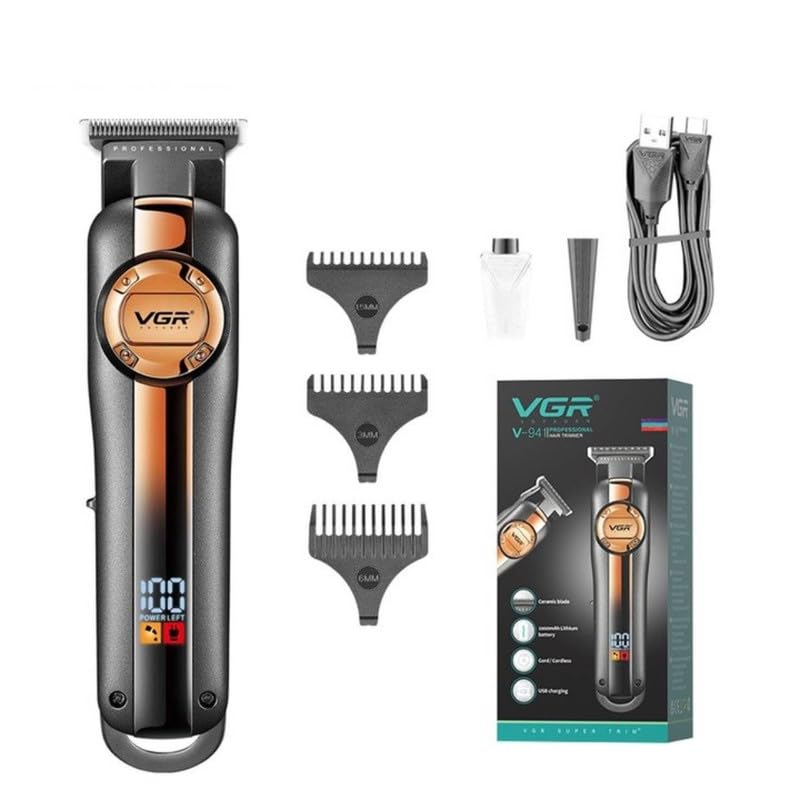
Image: VGR V-941 Hair Clipper with included accessories: three guide combs, USB charging cable, lubricating oil, and cleaning brush. The product packaging is also visible.
- หน่วยตัดผม
- หวีรองตัด 3 ขนาด (1.5 มม., 3 มม., 6 มม.)
- สายชาร์จแบบ USB Type-C
- แปรงทำความสะอาด
- น้ำมันหล่อลื่น
- ฝาครอบป้องกัน
คุณสมบัติหลัก

Image: Diagram highlighting the ON/OFF switch for easy operation, USB charging capability, extended work time from a 2000mAh Li-ion battery, and an LED display indicating power status.
- Pro Li Outliner Grooming: Designed for various hairstyles.
- Turbo Power Function: Provides additional power when required.
- Precise & Sharp Blades: Self-sharpening stainless steel and ceramic blades for smooth cutting.
- จอแสดงผลดิจิตอล LED: Shows remaining battery charge and indicates when oiling is needed. Includes over-charge protection.
- การทำงานแบบไร้สาย: Up to 250 minutes run time on a 3-hour charge.
- Multiple Cutting Lengths: 3 attachment combs (1.5mm, 3mm, 6mm) for various trimming ranges (0mm to 6mm).
- เสียงรบกวนต่ำ: High-performance motor with reduced operational noise.
การตั้งค่า
1. การชาร์จครั้งแรก

Image: The VGR V-941 hair clipper connected to a USB charging cable. The LED display shows "POWER LEFT" and a battery icon, indicating the charging status. Text overlays show "3 Hours Charge Time" and "250 Mins Work Time".
- Before first use, fully charge the clipper for approximately 3 hours.
- Connect the USB Type-C charging cable to the clipper's charging port.
- เสียบปลายอีกด้านหนึ่งของสาย USB เข้ากับอะแดปเตอร์ไฟ USB ที่ใช้งานร่วมกันได้ (ไม่รวมอยู่ด้วย) หรือพอร์ต USB ของคอมพิวเตอร์
- The LED digital display will show the charging status. A full charge provides up to 250 minutes of cordless operation.
2. การติดตั้งหวีรองตัด

Image: Three guide combs with lengths 1.5mm, 3mm, and 6mm are displayed alongside the VGR V-941 hair clipper, illustrating how they are attached to the blade for different cutting lengths.
- ตรวจสอบให้แน่ใจว่าเครื่องตัดผมปิดอยู่
- Select the desired guide comb (1.5mm, 3mm, or 6mm).
- จัดตำแหน่งหวีให้ตรงกับใบมีดของเครื่องตัดผมและกดให้แน่นจนกระทั่งล็อคเข้าที่
- เพื่อถอดออก ให้ดึงหวีออกจากใบมีดเบาๆ
คำแนะนำการใช้งาน
1. การทำงานพื้นฐาน
- Ensure the clipper is charged and a guide comb is attached if desired.
- Press the ON/OFF switch to power on the clipper. The LED display will illuminate.
- For a close trim (0mm), operate the clipper without any guide comb.
- Move the clipper against the direction of hair growth for effective cutting.
- Press the ON/OFF switch again to turn off the clipper after use.
2. ฟังก์ชั่นเทอร์โบ
The clipper is equipped with a Turbo function for increased power when cutting thicker or denser hair.
- While the clipper is on, press the Turbo button (if available, or refer to specific button on your model) to activate the enhanced power mode.
- The clipper will operate at a higher speed.
- Press the Turbo button again to return to standard operating mode.
การซ่อมบำรุง
1. การทำความสะอาดใบมีด
- ปิดเครื่องตัดผมและถอดปลั๊กออกจากแหล่งจ่ายไฟ
- ถอดหวีนำที่ติดมาออก
- ใช้แปรงทำความสะอาดที่ให้มาเพื่อกำจัดเส้นผมที่หลุดร่วงออกจากใบมีด
- For thorough cleaning, the blades can be rinsed under running water. Ensure the clipper body does not get wet if it is not waterproof. Dry the blades completely before reattaching or storing.
2. การหยอดน้ำมันหล่อลื่นใบมีด
Regular oiling ensures optimal performance and extends blade life. The LED display may indicate when oiling is needed.
- After cleaning, apply a few drops of the provided lubricating oil onto the blades.
- เปิดเครื่องตัดผมสักสองสามวินาทีเพื่อให้Zน้ำมันกระจายตัวอย่างทั่วถึง
- เช็ดน้ำมันส่วนเกินออกด้วยผ้านุ่ม
การแก้ไขปัญหา
| ปัญหา | สาเหตุที่เป็นไปได้ | สารละลาย |
|---|---|---|
| เครื่องคลิปเปอร์ไม่เปิด | แบตเตอรี่หมด | ชาร์จเครื่องตัดผมให้เต็ม |
| ปัตตาเลี่ยนดึงผมหรือตัดผมได้ไม่ดี | ใบมีดทื่อหรือมีเส้นผมอุดตัน ใบมีดจำเป็นต้องหยอดน้ำมัน | Clean the blades thoroughly. Apply lubricating oil to the blades. |
| เครื่องหนีบผมมีเสียงผิดปกติ | ใบมีดไม่ได้จัดเรียงอย่างถูกต้องหรือจำเป็นต้องหยอดน้ำมัน | Check blade alignment. Apply lubricating oil. If problem persists, contact support. |
| จอแสดงผล LED ไม่ทำงาน | หน่วยทำงานผิดปกติ | Ensure unit is charged. If problem persists, contact support. |
ข้อมูลจำเพาะ
| คุณสมบัติ | รายละเอียด |
|---|---|
| หมายเลขรุ่น | วี-941 |
| วัสดุใบมีด | Stainless Steel & Ceramic |
| ประเภทแบตเตอรี่ | ลิเธียมไอออน (2000 mAh) |
| เวลาในการชาร์จ | ประมาณ 3 ชั่วโมง |
| เวลาดำเนินการ | สูงสุด 250 นาที |
| ความยาวตัด | 0mm (without comb), 1.5mm, 3mm, 6mm (with guide combs) |
| แหล่งพลังงาน | ใช้พลังงานจากแบตเตอรี่ (ชาร์จ USB) |
| ขนาดสินค้า | 20 x 9.7 x 6.7 ซม. |
| น้ำหนักสินค้า | 460 กรัม |
| ประเทศต้นกำเนิด | จีน |
การรับประกันและการสนับสนุน
The VGR V-941 Hair Clipper comes with a 12-month quality warranty. For any issues or support, please contact customer service.
ข้อมูลติดต่อ: Refer to your purchase documentation or the official VGR webไซต์สำหรับรายละเอียดการติดต่อที่เฉพาะเจาะจง