
1. บทนำ
The Lemnoi Digital Calendar Day Clock is designed to assist individuals, particularly seniors with memory loss or Alzheimer's, by clearly displaying the time, day, date, and period of the day. It features a 7-inch HD display, multiple alarm and reminder functions, automatic dimming, and support for various languages. This manual provides detailed instructions for setting up and operating your clock.

รูปที่ 1 : ด้านหน้า view of the Lemnoi Digital Calendar Day Clock displaying the time, day, and date.
2. การตั้งค่า
2.1 เนื้อหาบรรจุภัณฑ์
- Lemnoi Digital Calendar Day Clock
- อะแดปเตอร์แปลงไฟ (Type-C)
- คู่มือการใช้งาน
2.2 การเปิดเครื่อง
- Connect the provided Type-C power cable to the 'Type-C Power' port on the back of the clock.
- เสียบอะแดปเตอร์จ่ายไฟเข้ากับเต้ารับไฟฟ้ามาตรฐาน
- The clock will automatically power on and display the initial setup screen.
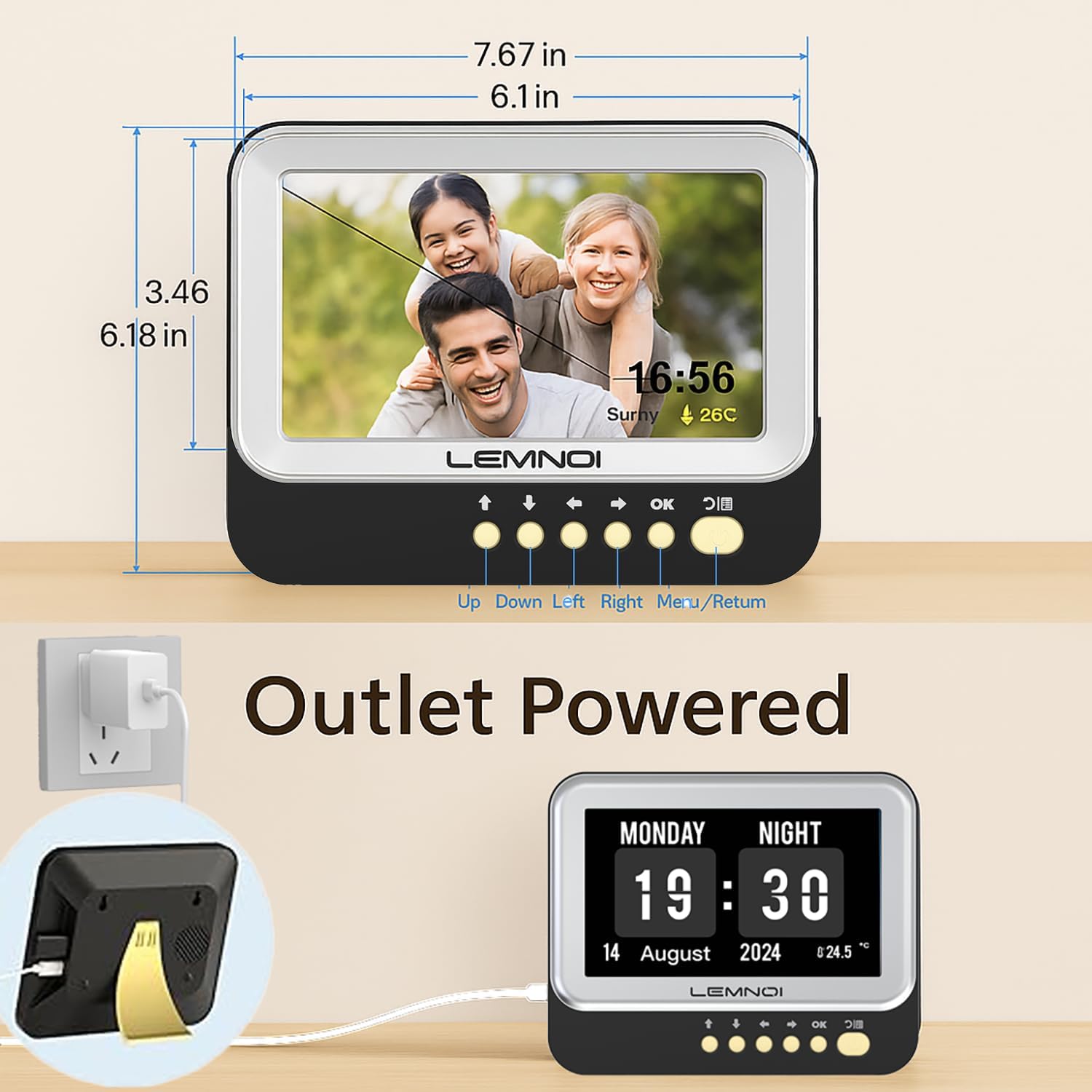
รูปที่ 2: ด้านหลัง view of the clock highlighting the USB port and Type-C power input.
2.3 Initial Settings (Date, Time, Language)
Upon first power-on, or after a factory reset, you will be guided through initial settings:
- ใช้ UP และ ลง ปุ่มสำหรับเลื่อนดูตัวเลือกต่างๆ
- ใช้ ซ้าย และ ขวา ปุ่มเพื่อเปลี่ยนค่า
- กด OK to confirm a selection or move to the next setting.
- กด เมนู/ผลตอบแทน to go back to the previous screen or exit a menu.
- Set the current วันที่ (Month, Day, Year).
- Set the current เวลา (Hour, Minute, AM/PM or 24-hour format).
- เลือกที่ต้องการ ภาษา (English, German, French, Italian, Spanish are available).
3. คู่มือการใช้งาน
3.1 โหมดการแสดงผล
The clock offers 6 distinct display modes. To switch between modes, press the ซ้าย or ขวา navigation buttons on the front panel.

รูปที่ 3: อดีตamples of the 6 available display modes, showing variations in layout and background.
3.2 Brightness Adjustment and Auto Dimming
The clock features 5 levels of brightness. You can manually adjust the brightness or enable the auto-dimming function.
- ปรับความสว่างด้วยตนเอง: Navigate to the 'Brightness' setting in the menu and use the ซ้าย และ ขวา buttons to select a brightness level from 1 to 5.
- ลดแสงอัตโนมัติ: Enable this feature in the 'Brightness' menu. The clock will automatically dim at night and brighten in the morning. You can customize the start and end times for auto-dimming and set a specific sleep brightness level (e.g., 0% for completely off).

Figure 4: Visual representation of the 5-level adjustable brightness and auto-dimming function.
3.3 เวลาออมแสง (DST)
The clock includes an automatic Daylight Saving Time function. When enabled, it will automatically adjust for summer/winter time changes in March and October.
4. Alarms and Reminders
The Lemnoi clock offers extensive alarm and reminder capabilities to support daily routines.
4.1 Setting Daily Alarms
You can set up to 15 normal daily alarms. Each alarm can be configured for specific times and recurrence patterns (every day, weekdays, weekends, or specific dates).
- Navigate to the 'Alarm' section in the main menu.
- Select 'Create an alarm' or choose an existing alarm slot.
- ตั้งค่า ชั่วโมง และ นาที สำหรับการเตือนภัย
- เลือก ทำซ้ำ ลวดลาย.
- เลือกสิ่งที่เหมาะสม ฉลาก for the alarm (see 4.3).
- Choose an alarm เสียง (มีให้เลือก 6 แบบ)
- ยืนยันการตั้งค่าของคุณ
4.2 Setting Medication Reminders
The clock supports up to 15 medication reminders, allowing you to set specific alerts for morning, afternoon, and evening medication times.
- Navigate to the 'Take Medicine' section in the main menu.
- Select a medication reminder slot.
- Set the desired time for morning, afternoon, or evening reminders.
- ยืนยันการตั้งค่าของคุณ
4.3 Alarm Labels and Visual Cues
The clock features 12 distinct alarm labels with vivid color images to make reminders easier to understand. These include reminders for activities such as waking up, drinking water, eating, bathing, walking, and doctor appointments.
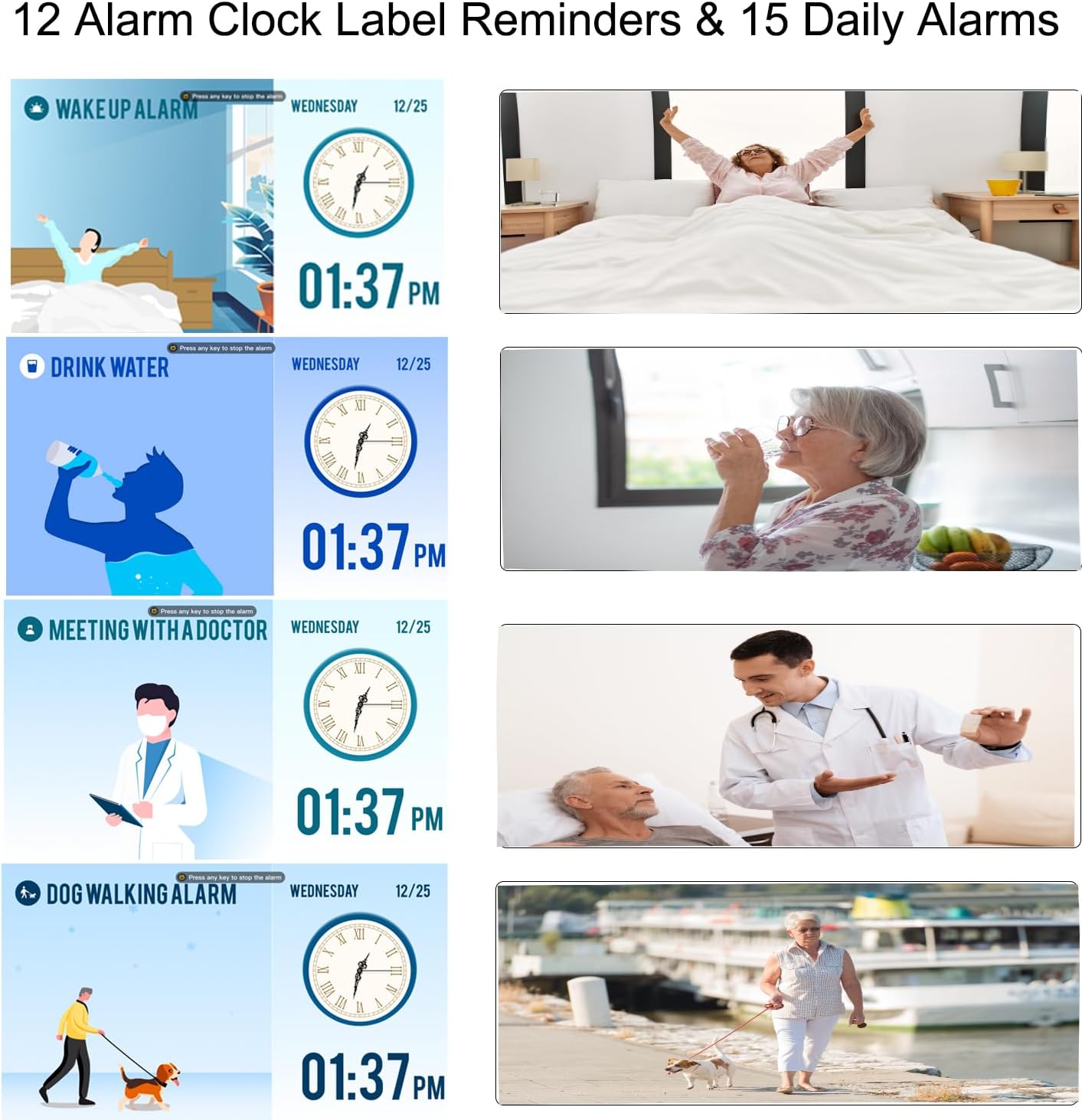
Figure 5: Visual alarm labels for various daily activities, enhancing clarity for users.
5. Digital Photo Frame Function
The Lemnoi clock can also function as a digital photo frame, allowing you to display photos and videos.
- Insert a USB flash drive containing your photos and videos into the USB port on the back of the clock.
- Navigate to the 'Photo Frame' or 'Media Playback' option in the menu (exact menu name may vary).
- Select the desired photos or videos to play.

Figure 6: The clock displaying personal photos, showcasing its digital photo frame feature.
6. การบำรุงรักษา
To ensure the longevity and optimal performance of your Lemnoi Digital Calendar Day Clock, follow these maintenance guidelines:
- การทำความสะอาด: Wipe the screen and exterior with a soft, dry, lint-free cloth. Do not use abrasive cleaners, solvents, or aerosol sprays, as these can damage the finish or screen.
- การจัดวาง: Place the clock on a stable, flat surface or mount it securely on a wall. Avoid direct sunlight, extreme temperatures, and high humidity.
- พลัง: Use only the provided power adapter. Disconnect power during electrical storms or when not in use for extended periods.
7 การแก้ไขปัญหา
If you encounter any issues with your clock, refer to the following common problems and solutions:
| ปัญหา | สาเหตุที่เป็นไปได้ | สารละลาย |
|---|---|---|
| นาฬิกาไม่เปิดเครื่อง | อะแดปเตอร์ไฟไม่ได้เชื่อมต่อหรือมีข้อบกพร่อง | Ensure the Type-C cable is securely connected to the clock and the adapter is plugged into a working outlet. Try a different outlet. |
| Display is blank or too dim. | Brightness setting is too low or auto-dimming is active. | Adjust the brightness manually in the settings. Check auto-dimming settings and ensure the sleep brightness is not set to 0% during active hours. |
| สัญญาณเตือนภัยไม่ดัง | Alarm is disabled, volume is too low, or incorrect time set. | Verify alarm settings (enabled, time, repeat). Check the volume level in the clock's settings. |
| Date or Time is incorrect. | Incorrect manual setting or DST issue. | Go to 'Date & Time' settings to correct. Ensure DST is set correctly if applicable. |
8. ข้อมูลจำเพาะ
- ยี่ห้อ: Lemnoi
- หมายเลขรุ่น: เอสจี9
- สี: 7 นิ้ว สีดำ
- ขนาดสินค้า : 19.56 x 3.81 x 15.75 ซม.
- น้ำหนักสินค้า: 290 กรัม
- เล่มที่tage: 100โวลต์
- วัสดุ: อะคริโลไนไตรล์ บิวทาไดอีน สไตรีน (ABS)
- ประเภทจอภาพ: ดิจิตอล
- คุณสมบัติพิเศษ: Adjustable Brightness, Auto Dimmable, Daylight Saving, Temperature Display
- โหมดการแสดงผล: 6
- ภาษา: อังกฤษเยอรมันฝรั่งเศสอิตาลีสเปน
- สัญญาณเตือนภัย: 15 Normal Alarms, 15 Medication Reminders
- Alarm Labels: 12 Visual Labels
- Photo Frame Function: Supports photos and videos via USB
9. การรับประกันและการสนับสนุน
For warranty information, technical support, or any questions not covered in this manual, please contact Lemnoi customer service. Refer to the product packaging or the retailer's webไซต์สำหรับรายละเอียดการติดต่อที่เฉพาะเจาะจง
บันทึก: ไม่มีวิดีโอผลิตภัณฑ์อย่างเป็นทางการ URL was provided in the product data. If available, a video demonstrating key features would be embedded here.