
1. บทนำ
Thank you for choosing the BOTSLAB G980H 4K Dash Cam with Hardwire Kit. This manual provides detailed instructions for the installation, operation, and maintenance of your new dash camera system. Please read this manual thoroughly before using the product to ensure proper functionality and safety.
2. สินค้าหมดview
The BOTSLAB G980H is a high-performance dash camera system designed to capture clear video footage of your journeys. The front camera records in true 4K resolution, while the rear camera records in 1080P (optimized to approximately 2K via BOTSLAB algorithm). Both cameras utilize the Sony IMX 415 sensor, providing clear video capture, including in low-light conditions. The system includes advanced features such as 24/7 parking mode, ADAS (Advanced Driver-Assistance Systems), and built-in GPS for reliable recording and enhanced driving safety.
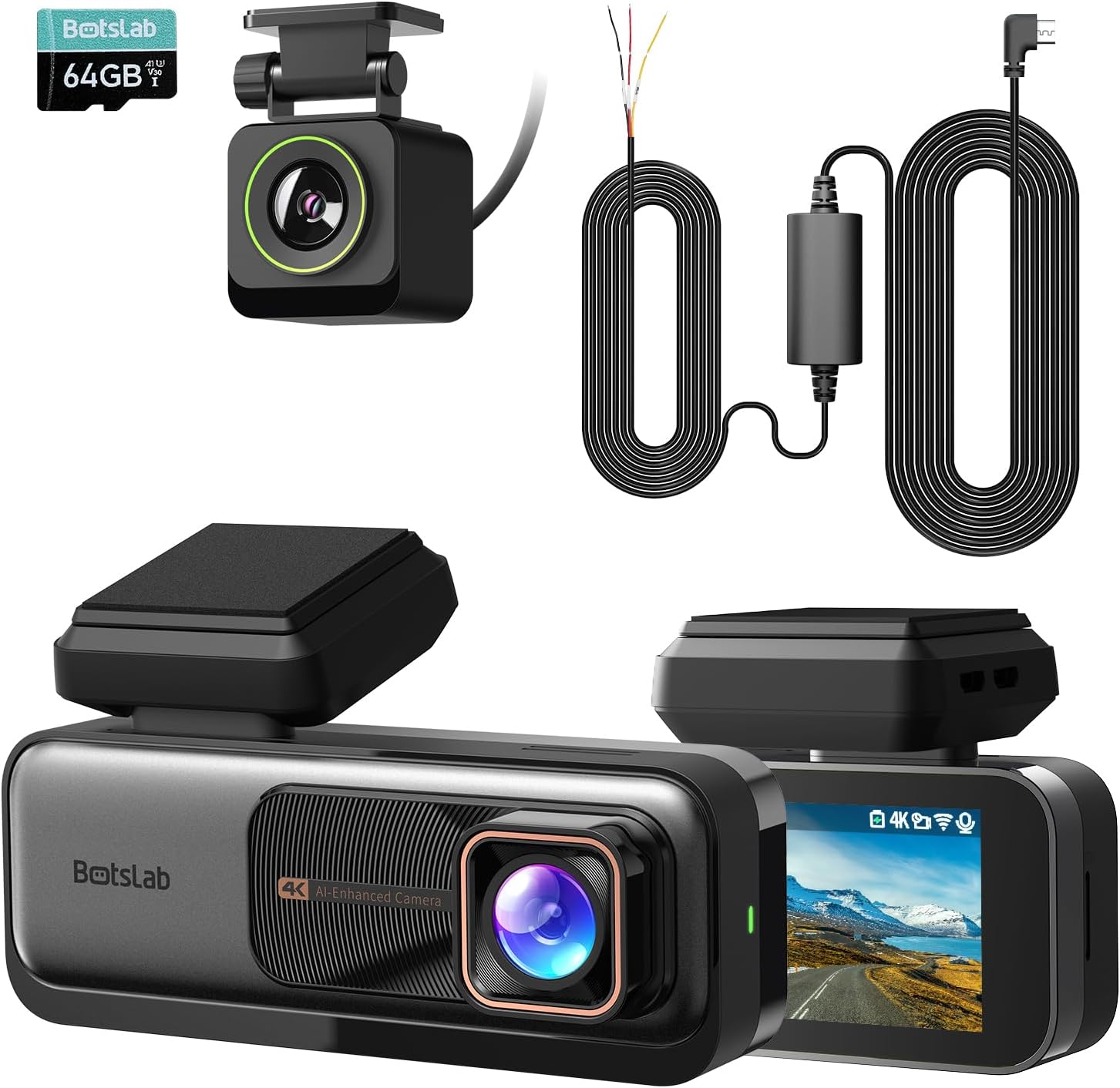
Image: The main components of the BOTSLAB G980H Dash Cam system, including the front camera, rear camera, and hardwire kit.
3. อะไรอยู่ในกล่อง
เมื่อแกะกล่อง โปรดตรวจสอบว่ามีสิ่งของต่อไปนี้ครบถ้วนหรือไม่:
- BOTSLAB G980H Dash Cam (Front Unit)
- กล้องหลัง
- ชุดฮาร์ดไวร์
- ADAS (Advanced Driver-Assistance Systems) functionality
- Micro USB cable (integrated with hardwire kit)
- คู่มือการใช้งาน
Image: A visual representation of the items included in the product packaging.
4. การตั้งค่าและการติดตั้ง
Proper installation is crucial for optimal performance. The G980H dash cam is designed for windshield mounting.
4.1 การติดตั้งชุดสายไฟแบบถาวร
The included hardwire kit enables 24/7 parking mode functionality. It requires connection to your vehicle's fuse box.
- ขั้นตอนที่ 1: ทดสอบแหล่งจ่ายไฟ
Use a multimeter to check for a 12V constant power source and an ACC (Accessory) power source in your car's fuse box. - ขั้นตอนที่ 2: ติดตั้งสายไฟ
Connect the Yellow Wire (ACC) to the accessory power, the Red Wire (VCC+) to the constant power, and the Black Wire (GND-) to a grounding point on the vehicle chassis. - ขั้นตอนที่ 3: เชื่อมต่อกล้องติดรถยนต์
Attach the micro USB port of the hardwire kit to your BOTSLAB G980H dash cam. Ensure the cable is routed neatly and securely.

Image: A multimeter being used to test fuse box connections for constant and ACC power.

ภาพ: ระยะใกล้ view of the hardwire kit's yellow, red, and black wires connected to the car's fuse box and ground.
Image: The micro USB connector of the hardwire kit ready to be plugged into the dash cam.

Image: A diagram showing the micro USB port, power conversion box, and the three wires (ACC, VCC+, GND-) of the hardwire kit.

Image: The 9ft long hardwire cable, designed for compatibility with various car models.
4.2 การติดตั้งกล้องติดรถยนต์
ติดตั้งกล้องติดหน้ารถไว้ที่กระจกหน้ารถ โดยควรติดตั้งไว้ด้านหลังเบาะหลังจะดีที่สุดview กระจก เพื่อให้แน่ใจว่ามันไม่กีดขวางการมองเห็นของคุณ view. Position the rear camera on the rear window for optimal coverage.
4.3 การใส่การ์ดหน่วยความจำ
Insert a high-quality U3 or V30 rated microSD card (not included) into the designated slot on the dash cam. Ensure it is inserted correctly until it clicks into place. The dash cam requires a memory card for recording footage.
5. คู่มือการใช้งาน
5.1 การทำงานพื้นฐาน
- เปิด/ปิดเครื่อง: The dash cam will automatically power on and begin recording when your vehicle starts, and power off when the engine is turned off (if connected via ACC power).
- การบันทึกแบบวนซ้ำ: The G980H features seamless loop recording, continuously overwriting the oldest footagเช่นเมื่อการ์ดหน่วยความจำเต็ม
- จีเซ็นเซอร์: In the event of a sudden impact or collision, the built-in G-Sensor will automatically lock the current video segment to prevent it from being overwritten.
- คุณภาพวิดีโอ: The front camera records in 4K resolution, providing a wide 170-degree view ของถนนข้างหน้า

Image: Illustration of the dash cam's 4K resolution and 170-degree wide-angle recording capability.
5.2 ADAS Features (Advanced Driver-Assistance Systems)
The G980H is equipped with a 1.5TOPS AI NPU chip and BOTSLAB's AI algorithm to provide real-time driving alerts:
- สัญญาณเตือนการชนคนเดินเท้า: Alerts you to potential collisions with pedestrians.
- Front Vehicle Starts Moving: Notifies you when the vehicle ahead begins to move, useful in traffic.
- คำเตือนการออกเลน: Alerts if you unintentionally drift out of your lane.
- Headway Monitoring Warning: Helps maintain a safe distance from the vehicle in front.
- Driver Fatigue Alerts: Provides alerts every 2 hours to encourage breaks and prevent fatigue.

Image: Visual representation of the various ADAS warnings provided by the dash cam, along with illustrations of the AI NPU chip and built-in GPS.
5.3 โหมดจอดรถตลอด 24 ชั่วโมง
With the hardwire kit installed, the G980H can monitor your vehicle even when it's turned off, providing protection against theft and vandalism.
- The dash cam will automatically switch to parking mode when the vehicle is parked.
- It will record emergencies and suspicious activities around your car.

Image: The dash cam display showing options for Time-Lapse Recording (Parking Mode) and Normal Recording (Driving Mode), illustrating its 24-hour monitoring capability.
5.4 GPS Integration
The built-in GPS module integrates with Google Maps, allowing you to track your driving path. The dash cam's display will show your real-time speed, and recorded videos will include speed records.

Image: The dash cam screen showing real-time speed and GPS data, with a map overlay indicating the driving path.
6. การบำรุงรักษา
- การทำความสะอาด: ใช้ผ้าแห้งเนื้อนุ่มเช็ดทำความสะอาดเลนส์กล้องและหน้าจอ หลีกเลี่ยงการใช้สารทำความสะอาดที่มีฤทธิ์กัดกร่อนหรือตัวทำละลาย
- การ์ดหน่วยความจำ: Regularly format the memory card (at least once a month) to ensure optimal performance and prevent data corruption. Use a high-quality U3 or V30 rated microSD card.
- อัพเดตเฟิร์มแวร์: ตรวจสอบข้อมูลอย่างเป็นทางการของ BOTSLAB webหมั่นตรวจสอบเว็บไซต์เป็นระยะเพื่ออัปเดตเฟิร์มแวร์ เพื่อให้แน่ใจว่ากล้องติดรถยนต์ของคุณมีฟีเจอร์ล่าสุดและแก้ไขข้อบกพร่องต่างๆ
7 การแก้ไขปัญหา
| ปัญหา | สาเหตุที่เป็นไปได้ / วิธีแก้ไข |
|---|---|
| กล้องติดรถยนต์ไม่สามารถเปิดได้ |
|
| คุณภาพวิดีโอไม่ดีหรือเบลอ |
|
| โหมดจอดรถไม่ทำงาน |
|
| GPS signal is weak or not found. |
|
8. ข้อมูลจำเพาะ
| คุณสมบัติ | รายละเอียด |
|---|---|
| ชื่อรุ่น | G980H |
| ยี่ห้อ | บอทส์แล็บ |
| ความละเอียดของกล้องหน้า | True 4K (Sony IMX 415 sensor) |
| ความละเอียดกล้องหลัง | 1080P (optimized to near 2K) |
| คุณสมบัติพิเศษ | Hardwire Kit, ADAS, 24/7 Parking Mode, Built-in GPS, Loop Recording, G-Sensor |
| เทคโนโลยีการเชื่อมต่อ | USB, Wireless (for display features) |
| ประเภทการติดตั้ง | ที่ยึดกระจกหน้า |
| สี | สีดำ |
| ชิปเอไอ | 1.5TOPS AI NPU chip |
9. การรับประกันและการสนับสนุน
สำหรับข้อมูลการรับประกันและการสนับสนุนทางเทคนิค โปรดดูที่เว็บไซต์อย่างเป็นทางการของ BOTSLAB webหรือติดต่อฝ่ายบริการลูกค้าโดยตรง โปรดเก็บใบเสร็จรับเงินไว้เป็นหลักฐานการซื้อสำหรับการเรียกร้องการรับประกัน
ผู้ผลิต: บอทส์แล็บ
วันที่เข้าใช้งานครั้งแรก: 25 ตุลาคม 2024