The Glocusent Ergonomic Neck Reading Light A27 is designed to provide comfortable and versatile illumination for various activities such as reading, knitting, and crafting. This manual provides detailed instructions for setup, operation, maintenance, and troubleshooting to ensure optimal use of your device.
Image: The Glocusent Ergonomic Neck Reading Light worn around the neck, with its two flexible arms directing light onto an open book.
The Glocusent A27 Neck Reading Light incorporates several features for enhanced user experience:
การออกแบบตามหลักสรีรศาสตร์: Features soft pads to reduce pressure and a narrower neck part to prevent wobbling.
Partner-Friendly Lighting: 90° narrow beam angle and independent control for each arm minimize disturbance to others.
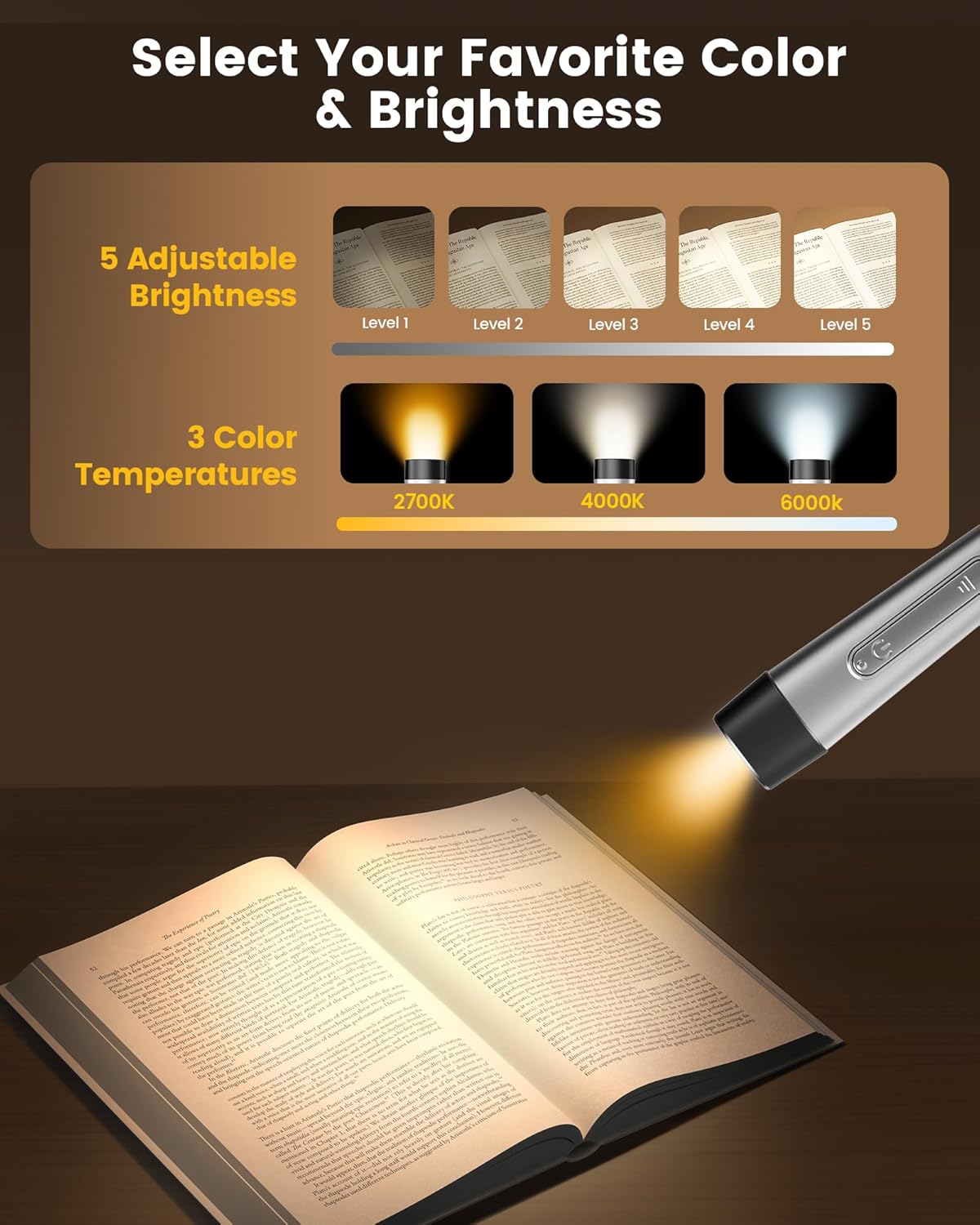
ตัวเลือกระบบแสงสว่างอเนกประสงค์: Offers 5 brightness levels and 3 color temperatures (2700K, 4000K, 6000K).
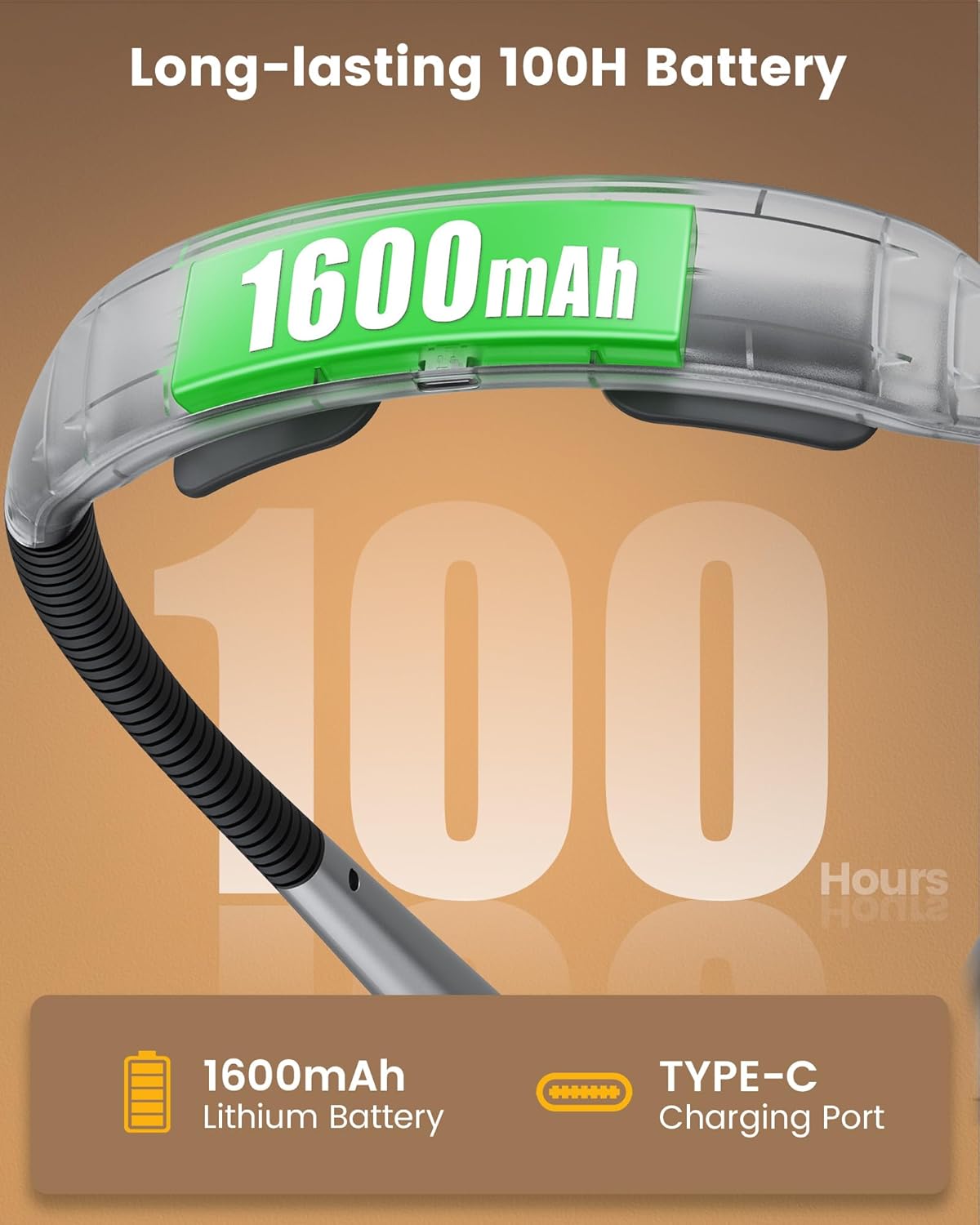
แบตเตอรี่ใช้งานได้ยาวนาน: Equipped with a 1600mAh rechargeable battery providing up to 100 hours of use.
การชาร์จ USB-C: For faster and safer power-ups, with four battery indicators.
Integrated Timers: 30-minute and 45-minute auto-off functions.
Sleep Aid Feature: Gradually dimming light to assist with transitioning to sleep.
ล็อคการเดินทาง: A switch to prevent accidental activation during transport.
คอห่านยืดหยุ่น: Allows for precise light positioning.
Image: The ergonomic pads on the neck light, designed for comfort during extended use.
Image: A visual comparison highlighting the comfortable elastic and soft silicone pads of the Glocusent light against a competitor's hard plastic design.
การตั้งค่า
1. การชาร์จครั้งแรก
Before first use, fully charge the Glocusent Neck Reading Light. Connect the provided USB-C charging cable to the charging port on the device and to a compatible USB power source (e.g., wall adapter, computer USB port). The four battery indicator lights will show charging progress and battery level.
ตัวบ่งชี้แบตเตอรี่: Four LEDs indicate battery status. Each light represents approximately 25% charge.
Image: The neck light's central unit displaying the 1600mAh battery capacity and the USB-C charging port.
2. Wearing the Light
Place the light around your neck with the flexible arms positioned forward. Adjust the arms to direct the light precisely onto your reading material or workspace. The ergonomic design ensures a snug and comfortable fit.
คำแนะนำการใช้งาน
The Glocusent A27 features intuitive controls for customized lighting.
1. เปิด/ปิดเครื่อง
Each arm has an independent power button. Press the power button on either arm to turn on the corresponding light. Press again to turn off.
2. การปรับความสว่าง
Each arm has a dedicated brightness control button. Press the brightness button to cycle through 5 different brightness levels (from low to high). The light output can reach up to 65 lumens.
Image: Visual representation of the 5 brightness levels and 3 color temperatures available on the light.
Image: A detailed chart showing the battery life at each of the 5 brightness levels, from 10% (100 hours) to 100% (10 hours).
3. การปรับอุณหภูมิสี
Each arm also has a color temperature control button. Press this button to switch between 3 color temperature settings:
2700K (Warm Light): Ideal for night reading and eye care, promoting relaxation.
4000K (Warm White Light): Provides a balanced and relaxed illumination.
6000K (Cool White Light): Suitable for tasks requiring better focus, such as crafting.
Image: A user enjoying night reading with the light set to 2700K warm light, emphasizing eye comfort.
Image: A user reading on an airplane with the light set to 4000K warm white light, indicating a relaxed setting.
Image: A user knitting with the light set to 6000K cool white light, highlighting its suitability for tasks requiring focus.
4. ฟังก์ชั่นจับเวลา
The central unit features a timer button. Short press the timer button to select a 30-minute or 45-minute auto-off timer. The corresponding indicator light will illuminate.
Image: The control panel of the neck light, detailing the timer, sleep aid, and travel lock functions.
5. Sleep Aid Feature
Long press the timer button to activate the sleep aid feature. The light will gradually dim over a period, simulating a sunset to help you transition to sleep.
6. ล็อคการเดินทาง
To prevent accidental activation during travel or storage, slide the lock switch located on the central unit. This will disable all buttons. Slide the switch back to unlock for normal operation.
Image: The neck light in a compact, portable state, demonstrating its travel-friendly design and the travel lock feature.
บริการลูกค้า: 24/7 dedicated customer experience team available for assistance.
ใบรับรอง: FCC, CE, RoHS, PSE & C-TICK certified.
For support, please refer to the contact information provided with your product packaging or visit the official Glocusent webเว็บไซต์.
Ask a question about this manual
Ask about setup, troubleshooting, compatibility, parts, safety, or missing instructions. Manuals+ will review the question and use this page’s manual context to help answer it.