
1. บทนำ
Thank you for choosing the GOOJODOQ Magsafe Power Bank AD4008. This manual provides essential information for the safe and efficient use of your new power bank. Please read it thoroughly before operation and retain it for future reference.
This 10000mAh wireless power bank features 20W magnetic wireless fast charging and 22.5W wired output, compatible with various smartphones and tablets.
2. สินค้าหมดview
2.1 คุณสมบัติหลัก
- ความจุสูง 10000mAh: Provides multiple charges for compatible devices.
- การชาร์จแบบไร้สายด้วยแม่เหล็ก: Supports 7.5W, 10W, and 15W Max wireless charging for Magsafe-compatible iPhones.
- การชาร์จเร็วแบบใช้สาย: Offers 22.5W Max USB Power Delivery (PD) and 20W USB-C output.
- ตัวเลือกการชาร์จที่หลากหลาย: Features built-in Type-C and Lightning cables, a USB output port, and a Type-C input/output port.
- จอแสดงผลดิจิตอล LED: แสดงเปอร์เซ็นต์แบตเตอรี่ที่เหลืออย่างชัดเจนtage.
- ขนาดกะทัดรัดและพกพาสะดวก: Designed for easy carrying during travel or outdoor activities.
- Reliable Security: Built-in protection against overcharge, overdischarge, short circuit, and high temperature.
2.2 เนื้อหาบรรจุภัณฑ์
- GOOJODOQ Magsafe Power Bank AD4008
- สายชาร์จ USB-C
- คู่มือการใช้งาน (เอกสารนี้)
2.3 แผนผังผลิตภัณฑ์

ภาพ: เหนือview of the power bank's various input and output ports, including Type-C Output, Lighting Output, Micro USB Input, USB Input, USB Output, and Type-C Output/Input Port.
3. การตั้งค่า
3.1 การชาร์จ Power Bank ครั้งแรก
- Connect the provided USB-C cable to the power bank's Type-C input/output port.
- Plug the other end of the USB-C cable into a compatible USB wall adapter (not included).
- The LED digital display will show the charging progress. Charge the power bank fully before first use.
Alternatively, you can use the Micro USB Input or Lighting Input ports to charge the power bank.

Image: The power bank's LED digital display indicating a full 100% charge, demonstrating its clear battery status indicator.
4. คู่มือการใช้งาน
4.1 Charging Devices Wirelessly (Magsafe)
- Ensure your device is Magsafe compatible (iPhone 12 series and above).
- วางด้านหลังของ iPhone ให้ตรงกับพื้นที่ชาร์จแม่เหล็กบนพาวเวอร์แบงค์ แม่เหล็กจะยึดเข้าที่
- พาวเวอร์แบงค์จะเริ่มชาร์จแบบไร้สายโดยอัตโนมัติ
- For optimal magnetic adsorption and charging efficiency, use a Magsafe-compatible phone case or no case at all. Thick or non-magnetic cases may affect performance.
4.2 Charging Devices Wired
The power bank offers multiple wired charging options:
- การใช้สายเคเบิลในตัว: Connect your device directly using the integrated Type-C or Lightning cables.
- Using USB Output Port: Connect your device's charging cable to the standard USB output port.
- Using Type-C Output/Input Port: Connect your device's USB-C charging cable to this port for fast charging.
The power bank can charge up to 5 devices simultaneously using a combination of wireless and wired connections.

Image: Illustration showing an iPhone wirelessly charging on the power bank and another iPhone connected via a wired cable, highlighting both fast charging methods.

Image: The power bank connected to and wirelessly charging multiple smartphones and a tablet, demonstrating its 10000mAh capacity and ability to charge up to 5 devices.
5. การบำรุงรักษา
- การทำความสะอาด: เช็ดทำความสะอาดพาวเวอร์แบงค์ด้วยผ้าแห้งเนื้อนุ่ม ห้ามใช้สารเคมีรุนแรงหรือน้ำยาทำความสะอาดที่มีฤทธิ์กัดกร่อน
- พื้นที่จัดเก็บ: เก็บพาวเวอร์แบงค์ไว้ในที่แห้งและเย็น หลีกเลี่ยงแสงแดดโดยตรงและอุณหภูมิที่สูงหรือต่ำเกินไป
- หลีกเลี่ยงความชื้น: Do not expose the power bank to water or high humidity.
- สายชาร์จ: Use only the original USB-C cable or certified cables for charging the power bank and your devices.
- สุขภาพแบตเตอรี่: เพื่อให้แบตเตอรี่ใช้งานได้นานที่สุด ควรชาร์จและปล่อยประจุแบตเตอรี่ให้หมดจนหมดอย่างน้อยทุกๆ สามเดือน หากไม่ได้ใช้งานเป็นประจำ
6 การแก้ไขปัญหา
6.1 พาวเวอร์แบงค์ไม่ชาร์จ
- ตรวจสอบให้แน่ใจว่าสายชาร์จเชื่อมต่อกับพาวเวอร์แบงค์และอะแดปเตอร์ติดผนังอย่างแน่นหนา
- Verify that the wall adapter is functioning correctly and the power outlet has power.
- ลองใช้สายชาร์จหรืออะแดปเตอร์ติดผนังอื่น
6.2 อุปกรณ์ไม่ชาร์จ
- การชาร์จแบบไร้สาย:
- Ensure your device is Magsafe compatible and properly aligned with the power bank's magnetic area.
- Remove any non-Magsafe compatible or excessively thick phone cases.
- การชาร์จแบบมีสาย:
- ตรวจสอบให้แน่ใจว่าสายชาร์จเชื่อมต่อกับพาวเวอร์แบงค์และอุปกรณ์ของคุณอย่างแน่นหนาแล้ว
- ลองใช้สายชาร์จอื่นหรือพอร์ตเอาท์พุตอื่นบนพาวเวอร์แบงค์
- Ensure the power bank has sufficient charge, as indicated by the LED display.
6.3 การชาร์จช้า
- ตรวจสอบให้แน่ใจว่าอุปกรณ์ของคุณรองรับการชาร์จเร็ว และคุณใช้สายเคเบิลที่เข้ากันได้
- ตรวจสอบให้แน่ใจว่าพาวเวอร์แบงค์ชาร์จเต็มแล้ว
6.4 Overheating During Charging
It is normal for the power bank to generate some heat during charging or discharging. However, if it becomes excessively hot, discontinue use and allow it to cool down. Ensure the power bank is not covered and is in a well-ventilated area. Avoid using it near other heat sources.

Image: The power bank magnetically attached to the back of an iPhone, illustrating the strong magnetic adsorption feature for secure wireless charging.
7. ข้อมูลจำเพาะ
| ยี่ห้อ | GOOJODOQ |
| ชื่อรุ่น / หมายเลข | AD4008 |
| ความจุของแบตเตอรี่ | 10000 มิลลิแอมป์ |
| ประเภทเซลล์แบตเตอรี่ | ลิเธียมไอออน |
| เอาท์พุทชาร์จไร้สาย | สูงสุด 7.5W, 10W, 15W |
| เอาต์พุตแบบมีสาย | 22.5W Max USB PD, 20W USB-C output |
| พอร์ตอินพุต | Micro USB, USB Input, Type-C Input/Output, Lighting Input (as per diagram) |
| พอร์ตเอาท์พุต | Type-C Output, Lighting Output, USB Output, Type-C Output/Input |
| ประเภทขั้วต่อ | ไมโคร USB, USB ไทป์ C |
| ขนาด (ยาว x กว้าง x หนา) | 11.3L x 6.9W x 2.4Th Centimeters |
| น้ำหนัก | 204 กรัม |
| อุปกรณ์ที่รองรับ | iPhone 12, 13, 14, 15, 16 series, Type C smartphones, Tablets |
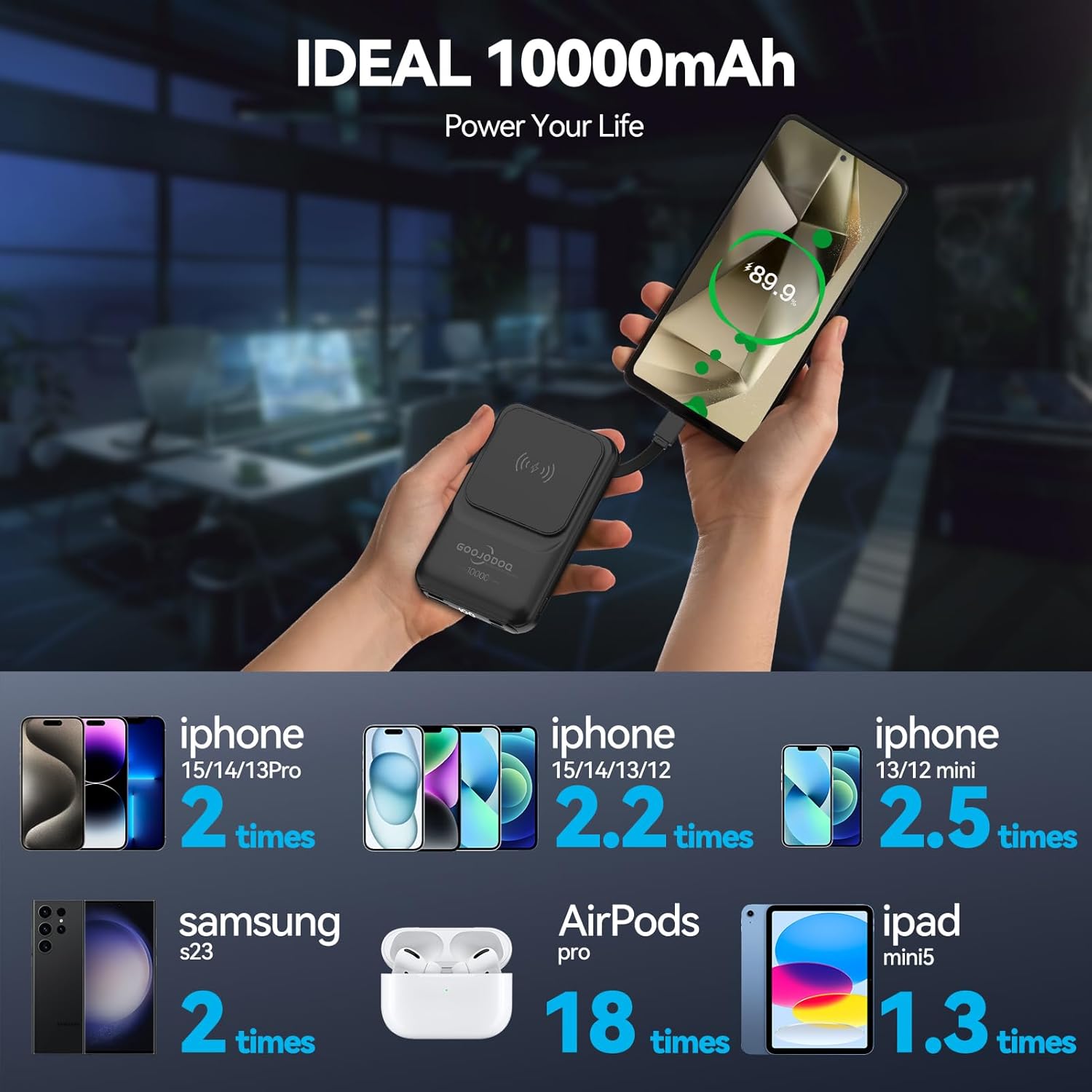
Image: An infographic detailing how many times the 10000mAh power bank can charge different devices, such as iPhones, Samsung S23, AirPods Pro, and iPad mini5.
8. ข้อมูลการรับประกัน
This GOOJODOQ Magsafe Power Bank AD4008 comes with a รับประกันจากผู้ผลิต 1 ปี. This warranty is non-transferable and is valid for 1 year from the original date of purchase. Please retain your proof of purchase for warranty claims.
9. ข้อมูลการสนับสนุน
For technical support or warranty inquiries, please contact:
- ติดต่อผู้ผลิต: maisifang_yd@163.com
- Importer Contact (VALUECART PRIVATE LIMITED): arun@valuecart.in - 9901545456