1. บทนำ
This manual provides comprehensive instructions for the installation, operation, and maintenance of your Generic Car Navigation Android TS18 Single Motherboard 6+128. This product is designed as a core component for advanced car infotainment systems, offering Android operating system capabilities with 6GB RAM and 128GB internal storage. Please read this manual thoroughly before installation and use to ensure proper function and longevity of the device.
2. ข้อมูลด้านความปลอดภัย
- แนะนำการติดตั้งอย่างมืออาชีพ: Due to the complex nature of car electronics and the need for precise wiring, professional installation by a qualified technician is strongly recommended.
- ความปลอดภัยทางไฟฟ้า: Ensure the vehicle's power is disconnected before attempting any installation or wiring. Incorrect wiring can cause damage to the motherboard, vehicle electronics, or lead to fire hazards.
- ข้อควรระวังในการจัดการ: The motherboard contains sensitive electronic components. Handle with care, avoiding static electricity discharge. Do not touch exposed circuits.
- สภาพแวดล้อม : Do not expose the device to moisture, extreme temperatures, or direct sunlight for prolonged periods.
- การระบายอากาศ : Ensure adequate ventilation around the installed motherboard to prevent overheating.
3. อะไรอยู่ในกล่อง
บรรจุภัณฑ์ของผลิตภัณฑ์ประกอบด้วยรายการต่อไปนี้:
- Generic Car Navigation Android TS18 Single Motherboard 6+128 (Motherboard only)
No additional accessories, cables, or mounting hardware are included with this motherboard.
4. การตั้งค่าและการติดตั้ง
This section outlines the general steps for installing the TS18 Single Motherboard. Professional installation is highly recommended.
- การตระเตรียม: Disconnect the vehicle's battery. Carefully remove existing car navigation or audio components to access the installation area.
- การติดตั้ง: The motherboard supports Dashboard Mount and Panel Mount configurations. Secure the motherboard in the designated location within the vehicle's dashboard or panel, ensuring it is stable and has adequate clearance for connections and ventilation.
- การเชื่อมต่อไฟฟ้า: Connect the motherboard to the vehicle's power supply according to the wiring diagram provided with your specific car navigation system. Ensure correct polarity and fuse protection.
- การเชื่อมต่อจอภาพ: Connect the motherboard to the compatible touchscreen display unit using the appropriate display cable.
- การเชื่อมต่ออุปกรณ์ต่อพ่วง: Connect other necessary peripherals such as GPS antenna, Wi-Fi antenna, USB devices, audio output, and camera inputs. Refer to the specific port labels on the motherboard.
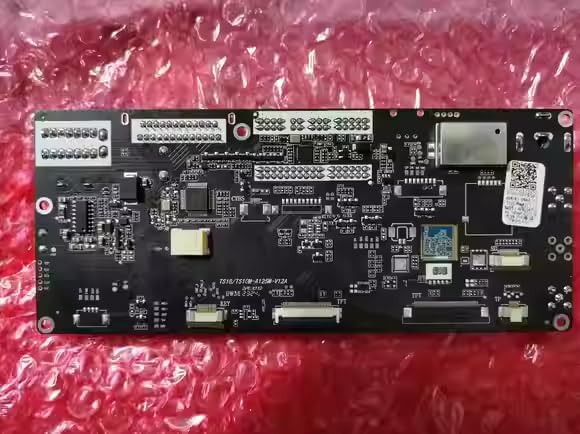
รูปที่ 4.1 : ด้านหน้า view of the TS18 Single Motherboard, showing various integrated circuits and connection points.
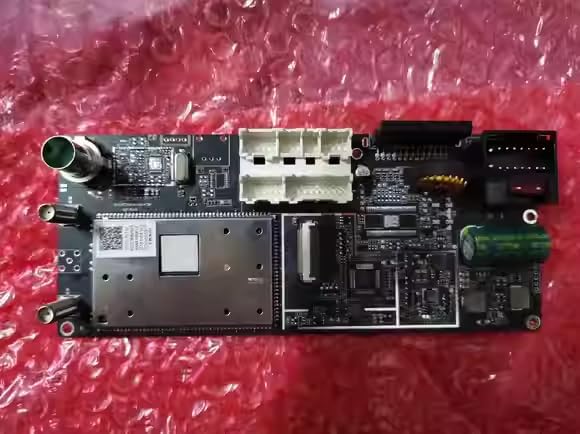
รูปที่ 4.2: ด้านหลัง view of the TS18 Single Motherboard, highlighting various input/output connectors for power, display, and peripherals.
- การตรวจสอบขั้นสุดท้าย: Double-check all connections for security and correctness. Reconnect the vehicle's battery.
5. คู่มือการใช้งาน
Once installed and powered on, the TS18 Single Motherboard will boot into the Android operating system. Interaction is primarily via a connected touchscreen display.
- เปิด/ปิดเครื่อง: The system typically powers on automatically with the vehicle's ignition. To power off, follow the shutdown procedure within the Android system settings or turn off the vehicle's ignition.
- อินเทอร์เฟซหน้าจอสัมผัส: Navigate the Android interface by tapping, swiping, and pinching on the connected touchscreen display.
- การเชื่อมต่อ Wi-Fi: To connect to a Wi-Fi network, go to Android Settings > Network & Internet > Wi-Fi. Select your desired network and enter the password if required.
- การนำทาง: The system supports Road map type navigation. Access pre-installed navigation applications or download new ones from the app store. Ensure the GPS antenna has a clear view ของท้องฟ้าเพื่อการรับสัญญาณที่ดีที่สุด
- ข้อมูลระบบ: คุณสามารถทำได้ view detailed system information, including CPU, GPU, memory, and software versions, through the Android settings menu.

รูปที่ 5.1: อดีตample of the Android system information screen, displaying hardware specifications and storage details.
6. การบำรุงรักษา
- การทำความสะอาด: Use a soft, dry, lint-free cloth to clean the motherboard if it becomes dusty. Do not use liquid cleaners or solvents.
- การอัปเดตซอฟต์แวร์: Periodically check for system software updates through the Android settings menu to ensure optimal performance and security.
- การควบคุมสิ่งแวดล้อม: Ensure the operating environment within the vehicle remains within reasonable temperature and humidity ranges to prevent damage to electronic components.
7 การแก้ไขปัญหา
If you encounter issues with your TS18 Single Motherboard, refer to the following common troubleshooting steps:
| ปัญหา | สาเหตุที่เป็นไปได้ | สารละลาย |
|---|---|---|
| ไม่มีไฟฟ้า | Incorrect power connection, blown fuse, vehicle battery low. | ตรวจสอบการเชื่อมต่อสายไฟทั้งหมด ตรวจสอบฟิวส์รถยนต์ ตรวจสอบให้แน่ใจว่าแบตเตอรี่รถยนต์มีไฟเพียงพอ |
| ไม่มีการแสดงผล | Display cable disconnected, incompatible display, display unit fault. | Verify display cable connection. Ensure display unit is compatible and functional. |
| ไม่มีเสียง | Audio cables disconnected, volume muted, ampปัญหาตัวขยายเสียง | Check audio output connections. Adjust volume settings in Android. Verify external ampเครื่องขยายเสียงถ้าใช้ |
| การสูญเสียสัญญาณ GPS | GPS antenna disconnected, obstructed view of sky, faulty antenna. | Ensure GPS antenna is securely connected and has a clear line of sight to the sky. |
| ปัญหาการเชื่อมต่อ Wi-Fi | Incorrect password, out of range, Wi-Fi antenna issue. | Verify Wi-Fi password. Move closer to the Wi-Fi source. Check Wi-Fi antenna connection. |
| ระบบไม่ตอบสนอง | Software glitch, overheating. | Perform a system restart (if possible via power cycle). Ensure adequate ventilation. |
If the problem persists after attempting these solutions, please contact your seller or a qualified service technician for further assistance.
8. ข้อมูลจำเพาะ
| คุณสมบัติ | รายละเอียด |
|---|---|
| ขนาดสินค้า | 30 x 10 x 20 นิ้ว |
| หมายเลขรุ่นสินค้า | motherboard 6+128 |
| ยี่ห้อ | ทั่วไป |
| ประเภทบริการยานพาหนะ | รถ |
| คุณสมบัติพิเศษ | Touchscreen (requires compatible display) |
| เทคโนโลยีการเชื่อมต่อ | ไวไฟ |
| ประเภทแผนที่ | ถนน |
| ส่วนประกอบที่รวมอยู่ | Motherboard only |
| ประเภทการติดตั้ง | ติดตั้งบนแผงหน้าปัด ติดตั้งบนแผงควบคุม |
| ปณิธาน | 0000 (Actual resolution depends on connected display) |
| ระบบปฏิบัติการ | แอนดรอยด์ |
| ประเภทจอภาพ | Touchscreen (requires compatible display) |
9. การรับประกันและการสนับสนุน
For warranty information and technical support, please refer to the terms and conditions provided by your retailer or contact the seller directly. Keep your purchase receipt as proof of purchase for any warranty claims.


