การแนะนำ
This manual provides comprehensive instructions for the JMMO T202 Wireless HI-FI Stereo Ultra-Low Latency Earbuds. Please read this manual carefully before using the product to ensure proper operation and to maximize your listening experience. Keep this manual for future reference.
เนื้อหาแพ็คเกจ
- JMMO T202 Wireless Earbuds (Left and Right)
- เคสชาร์จไฟ
- สายชาร์จ USB
- คู่มือการใช้งาน
สินค้าเกินview
The JMMO T202 earbuds feature a compact design with intuitive controls and a portable charging case. Below is an image illustrating the earbuds and their charging case.

คำอธิบายภาพ: A pair of green JMMO T202 wireless earbuds resting inside their white charging case. The case is open, revealing the earbuds and an LED battery indicator on the front.
Each earbud is equipped with touch-sensitive areas for control, and the charging case provides power on the go.
การตั้งค่า
1. การชาร์จหูฟังและเคส
Before first use, fully charge the earbuds and the charging case. Connect the provided USB charging cable to the charging port on the case and to a power source. The LED indicator on the case will show charging status.

คำอธิบายภาพ: An illustration showing the battery performance of the JMMO T202 earbuds. It indicates 6 hours of playtime on a single charge, 24 hours total with the charging case, and less than 2 hours for fast charging.
- เวลาเล่นเอียร์บัด: ใช้งานได้ประมาณ 6 ชั่วโมงต่อการชาร์จหนึ่งครั้ง
- เวลาเล่นทั้งหมดกับเคส: นานถึง 24 ชั่วโมง
- ชาร์จเร็ว: Less than 2 hours for a full charge.
2. การจับคู่กับอุปกรณ์ของคุณ (การจับคู่แบบขั้นตอนเดียว)
The JMMO T202 earbuds feature one-step pairing for quick and easy connection.
- ตรวจสอบให้แน่ใจว่าบลูทูธของอุปกรณ์ของคุณเปิดอยู่
- เปิดกล่องชาร์จ หูฟังจะเข้าสู่โหมดจับคู่โดยอัตโนมัติ
- On your device, search for Bluetooth devices and select "JMMO T202" from the list.
- เมื่อเชื่อมต่อแล้ว คุณจะได้ยินเสียงยืนยัน และอุปกรณ์จะแสดง "เชื่อมต่อแล้ว"

คำอธิบายภาพ: An illustration demonstrating the one-step pairing process. A smartphone screen shows "JMMO T202" as a connected Bluetooth device, next to the open charging case with earbuds inside, indicating successful pairing.
After the initial pairing, the earbuds will automatically connect to the last paired device when the case is opened, provided Bluetooth is enabled on the device.
คำแนะนำการใช้งาน
การสวมหูฟัง
Insert the earbuds into your ears and gently rotate them to find a comfortable and secure fit. A proper fit ensures optimal sound quality and noise isolation.

คำอธิบายภาพ: A person wearing a green JMMO T202 earbud in their right ear, demonstrating the in-ear fit and sleek design.
การควบคุมแบบสัมผัส
The JMMO T202 earbuds feature intuitive touch controls on each earbud. Refer to the following table for control functions:

คำอธิบายภาพ: An infographic showing the JMMO T202 earbuds and their charging case, with a list of touch control gestures and their corresponding functions, such as answering calls, playing music, and adjusting volume.
| การกระทำ | ท่าทาง |
|---|---|
| รับสาย/วางสาย | Click either earbud |
| ปฏิเสธการรับสาย | Press left or right earbud for 1.5 seconds |
| เล่น / หยุดชั่วคราว | Click either earbud |
| เพลงถัดไป | Triple click the right earbud |
| เพลงก่อนหน้า | คลิกสามครั้งที่หูฟังด้านซ้าย |
| เพิ่มระดับเสียง | ดับเบิลคลิกที่เอียร์บัดด้านขวา |
| ลดระดับเสียง | ดับเบิลคลิกที่หูฟังเอียร์บัดด้านซ้าย |
| เปิดเครื่อง | กดยาว 3 วินาที |
| ปิดเครื่อง | กดยาว 5 วินาที |
| ผู้ช่วยเสียง | Press left or right until prompt sounds |
คุณสมบัติหลัก
- HI-FI Stereo Sound: Enjoy crisp highs, rich mids, and deep bass for an immersive listening experience. The earbuds are equipped with a 13mm dynamic driver for enhanced audio quality.
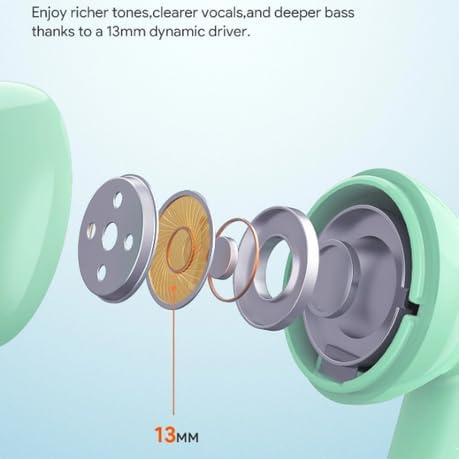
คำอธิบายภาพ: A cutaway diagram of the JMMO T202 earbud, highlighting the internal 13mm dynamic driver components responsible for producing rich tones, clear vocals, and deep bass.
- เวลาแฝงต่ำมาก: Experience minimal audio delay, ensuring seamless synchronization between video and audio content, ideal for gaming and video streaming.
- ENC Call Noise Reduction with 4-Mic: Reduce background noise and enhance voice pickup for clearer calls.

คำอธิบายภาพ: A diagram showing the internal structure of a JMMO T202 earbud, illustrating the ENC (Environmental Noise Cancellation) technology with 4 microphones designed to reduce background noise for clearer calls.
- การเชื่อมต่อไร้สาย: Connect effortlessly via Bluetooth technology for wireless freedom.
- สวมใส่สบาย: ออกแบบตามหลักสรีรศาสตร์เพื่อการสวมใส่ที่ยาวนานโดยไม่รู้สึกอึดอัด
การซ่อมบำรุง
- การทำความสะอาด: ทำความสะอาดหูฟังและกล่องชาร์จเป็นประจำด้วยผ้านุ่ม แห้ง และไม่เป็นขุย ห้ามใช้สารเคมีรุนแรงหรือวัสดุที่มีฤทธิ์กัดกร่อน
- พื้นที่จัดเก็บ: เมื่อไม่ได้ใช้งาน ให้เก็บหูฟังไว้ในกล่องชาร์จเพื่อปกป้องหูฟังและชาร์จไฟให้หูฟังอยู่เสมอ
- หลีกเลี่ยงน้ำ: หูฟังนี้ไม่กันน้ำ หลีกเลี่ยงการสัมผัสน้ำหรือความชื้นมากเกินไป
- อุณหภูมิ: Store and operate the earbuds within recommended temperature ranges to prevent damage to the battery and internal components.
การแก้ไขปัญหา
| ปัญหา | สารละลาย |
|---|---|
| หูฟังเอียร์บัดไม่จับคู่ |
|
| ไม่มีเสียงจากเอียร์บัดข้างเดียว |
|
| เคสชาร์จไม่ชาร์จ |
|
| คุณภาพเสียงไม่ดี |
|
ข้อมูลจำเพาะ
| คุณสมบัติ | รายละเอียด |
|---|---|
| ชื่อรุ่น | JMMO - T202 |
| เทคโนโลยีการเชื่อมต่อ | Wireless (Bluetooth 5.1, inferred from pairing image) |
| ฟอร์มแฟกเตอร์ | ในหู |
| สี | สีเขียว |
| คุณสมบัติพิเศษ | Fast Charging, HiFi Stereo Sound, Lightweight, Ultra-Low Latency, ENC Call Noise Reduction |
| ส่วนประกอบที่รวมอยู่ | Cable, Protective Case, Wireless Charging Case |
| การรับประกันของผู้ผลิต | 6 เดือน |
การรับประกันและการสนับสนุน
The JMMO T202 Wireless Earbuds come with a รับประกันจากผู้ผลิต 6 เดือนโปรดเก็บหลักฐานการซื้อไว้เพื่อใช้เรียกร้องการรับประกัน
For technical support or warranty inquiries, please contact your retailer or the manufacturer's customer service. Contact information may be available on the product packaging or the retailer's webเว็บไซต์.


