
Acekool TAC-12CHPB/DM7
Acekool Mobile Air Conditioner 12000 BTUs User Manual
Model: TAC-12CHPB/DM7
1. บทนำ
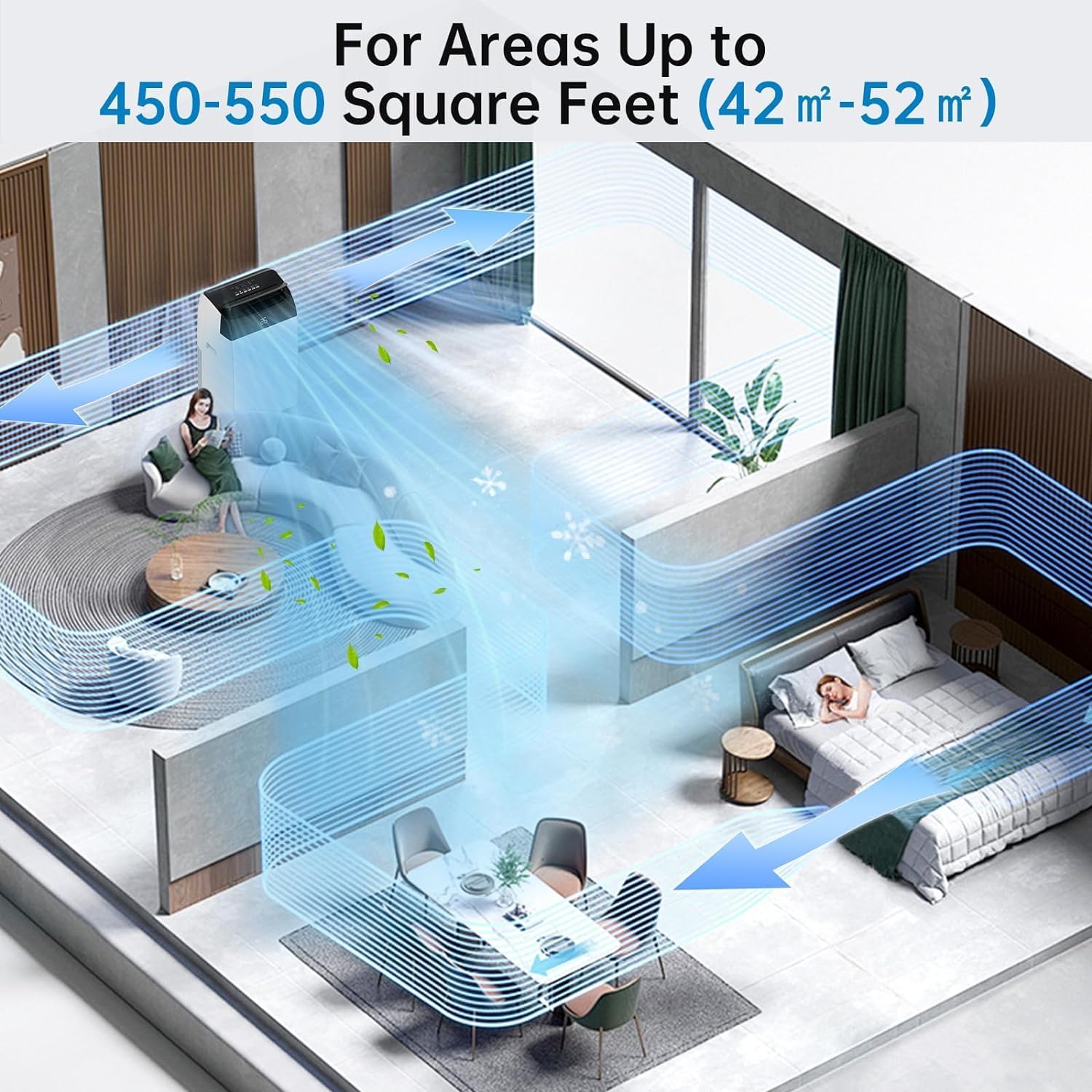
Thank you for choosing the Acekool Mobile Air Conditioner. This 3-in-1 unit provides cooling, dehumidifying, and fan functions, designed for optimal comfort in your home or office. With a powerful 12000 BTUs cooling capacity, it is suitable for rooms up to 550 square feet (approximately 52 square meters). This manual provides essential information for safe operation, installation, maintenance, and troubleshooting to ensure long-lasting performance of your appliance.
โปรดอ่านคู่มือนี้อย่างละเอียดก่อนใช้งานเครื่อง และเก็บไว้เพื่อใช้อ้างอิงในอนาคต
2. คำแนะนำด้านความปลอดภัย
เพื่อป้องกันการบาดเจ็บของผู้ใช้หรือบุคคลอื่น และความเสียหายต่อทรัพย์สิน ต้องปฏิบัติตามคำแนะนำต่อไปนี้ การดำเนินการที่ไม่ถูกต้องเนื่องจากการเพิกเฉยต่อคำแนะนำอาจทำให้เกิดอันตรายหรือเสียหายได้
ข้อควรระวังเพื่อความปลอดภัยทั่วไป:
- Always use the unit on a flat, stable surface to prevent tipping.
- ห้ามปิดกั้นช่องลมเข้าหรือออก ควรเว้นระยะห่างจากผนังหรือวัตถุอื่นๆ อย่างน้อย 20 ซม.
- ห้ามสอดนิ้วหรือวัตถุแปลกปลอมเข้าไปในช่องลมเข้า/ออก
- ควรวางอุปกรณ์ให้ห่างจากก๊าซไวไฟหรือวัสดุที่ติดไฟได้ง่าย
- ตรวจสอบให้แน่ใจว่าสายไฟไม่ได้รับความเสียหายหรือถูกหนีบ
- ห้ามใช้งานเครื่องด้วยมือเปียก
- ถอดปลั๊กเครื่องก่อนทำความสะอาดหรือดำเนินการบำรุงรักษาใดๆ
- เครื่องใช้ไฟฟ้าตัวนี้ไม่ได้มีวัตถุประสงค์เพื่อให้บุคคล (รวมทั้งเด็ก) ที่มีความบกพร่องทางร่างกาย ทางประสาทสัมผัส หรือทางจิตใจ หรือขาดประสบการณ์และความรู้ ใช้งาน เว้นแต่จะมีการดูแลหรือคำแนะนำเกี่ยวกับการใช้เครื่องใช้ไฟฟ้าโดยบุคคลที่รับผิดชอบด้านความปลอดภัยของบุคคลดังกล่าว
- ควรมีผู้ดูแลเด็กเพื่อให้แน่ใจว่าไม่ได้เล่นกับเครื่องใช้ไฟฟ้าดังกล่าว
ความปลอดภัยทางไฟฟ้า:
- Connect the unit to a properly grounded electrical outlet with the correct voltagอี (220V)
- Do not use extension cords or multi-sockets with this appliance.
- หากสายไฟเสียหาย จะต้องเปลี่ยนโดยผู้ผลิต ตัวแทนให้บริการ หรือบุคคลที่มีคุณสมบัติใกล้เคียงเพื่อหลีกเลี่ยงอันตราย
3. สินค้าหมดview
Familiarize yourself with the components and controls of your Acekool Mobile Air Conditioner.
เนื้อหาแพ็คเกจ:
- Mobile Air Conditioner Unit
- รีโมทคอนโทรล
- ท่อไอเสีย
- Slide Bar (Window Kit)
- ขั้วต่อแถบเลื่อน
- Exhaust Pipe Joint (2 pieces)

รูปที่ 3.1: Package Contents and Dimensions. This image shows the main unit with its dimensions (36cm depth, 42cm width, 70cm height) and all accessories included in the box, such as the remote control, exhaust hose, slide bar, slide bar connector, and two exhaust pipe joints.

รูปที่ 3.2: เกินview of the Acekool Portable Air Conditioner and its accessories, including the main unit, remote control, and various components for window installation.
แผงควบคุมและรีโมทคอนโทรล:
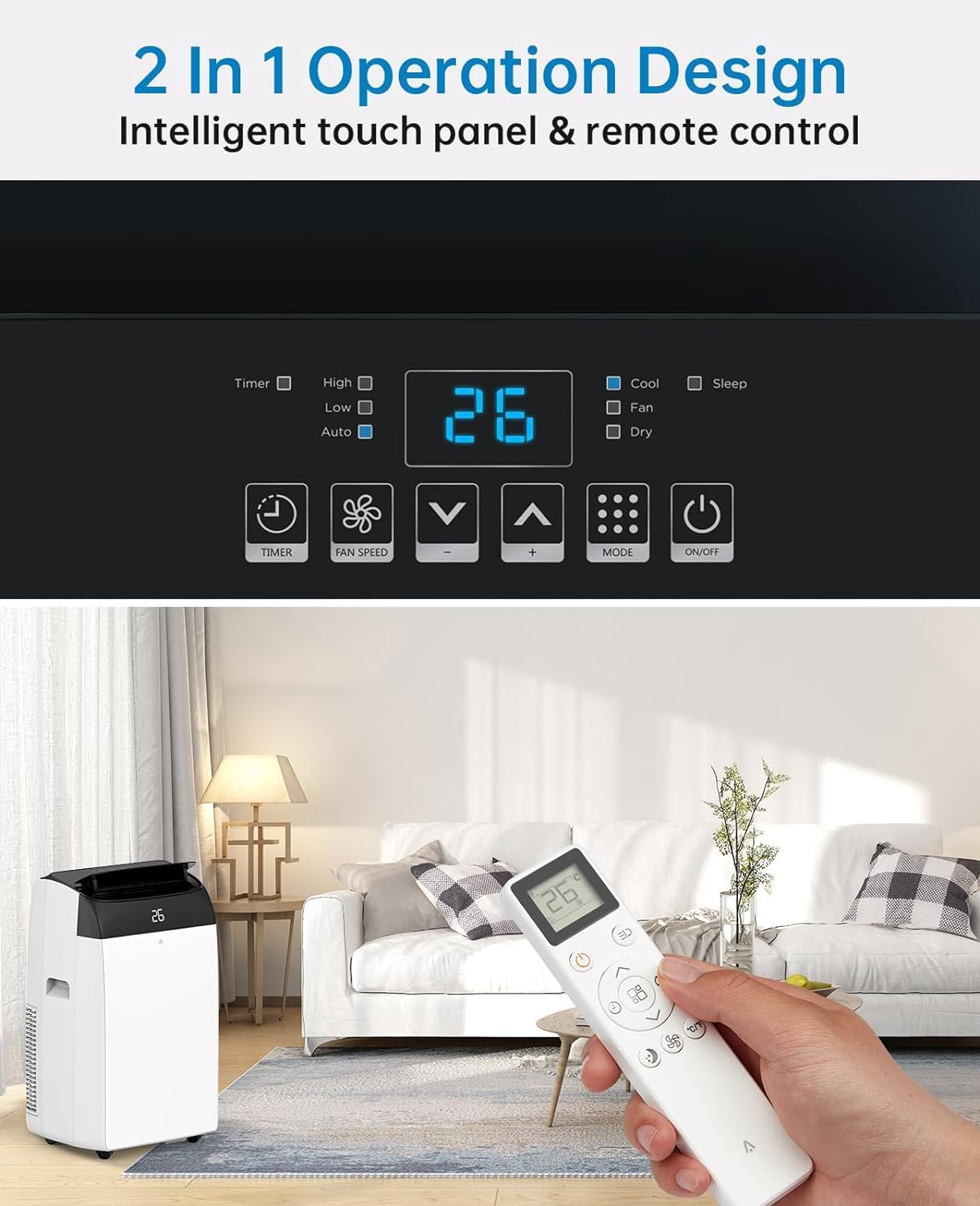
The unit can be operated via the intelligent touch panel on top of the unit or the included remote control.
รูปที่ 3.3: Control Panel and Remote Control. This image highlights the digital display showing "26" and various touch buttons for Timer, Fan Speed, Mode, and Power. Below, a hand holds the remote control, demonstrating its use with the air conditioner in a living room setting.
- จอแสดงผลดิจิตอล: แสดงอุณหภูมิปัจจุบันหรือการตั้งค่าตัวจับเวลา
- ปุ่มเปิด/ปิด: เปิด/ปิดเครื่อง
- ปุ่มโหมด: Cycles through Cool, Fan, and Dehumidify modes.
- ปุ่มเพิ่ม/ลดอุณหภูมิ: Adjusts the desired temperature in Cool mode.
- ปุ่มปรับความเร็วพัดลม: เลือกความเร็วพัดลม (ต่ำ, กลาง, สูง)
- ปุ่มตั้งเวลา: Sets the 24-hour timer for automatic operation.
- ปุ่มโหมดสลีป: Activates quiet operation for nighttime use.
4. การตั้งค่า
Proper installation of the exhaust hose is crucial for efficient cooling. This unit is designed for window installation.
การติดตั้งท่อไอเสีย:
- Attach the exhaust pipe joint to one end of the exhaust hose by twisting it clockwise until secure.
- Attach the slide bar connector to the other end of the exhaust hose.
- Connect the assembled exhaust hose to the exhaust outlet on the back of the air conditioner unit.
- Adjust the slide bar (window kit) to fit your window opening. Secure it in place.
- Insert the slide bar connector into the opening of the adjusted window kit, ensuring a tight seal to prevent air leakage.

รูปที่ 4.1: Easy Installation Steps. This image illustrates the process of connecting the exhaust hose to the unit and the window kit, ensuring proper ventilation for the air conditioner.
สำคัญ: Ensure the exhaust hose is as straight and short as possible to maximize cooling efficiency. Avoid kinks or sharp bends.
5. คู่มือการใช้งาน
Your Acekool Mobile Air Conditioner offers three primary functions: Cooling, Fan, and Dehumidifying.
โหมดการทำงาน:
รูปที่ 5.1: Multipurpose 3-in-1 Function. This graphic illustrates the three main operating modes: Cool Mode (18°C-32°C), Dry Mode (45L/Days dehumidification), and Fan Mode (3 Speeds).
- โหมดเย็น:
Cools your room by expelling hot air outside. Set your desired temperature between 18°C and 32°C using the Up/Down buttons. The unit will cycle on and off to maintain the set temperature.
- โหมดพัดลม:
Circulates air without cooling. Ideal for improving air circulation. Select from three fan speeds (Low, Medium, High) using the Fan Speed button.
- Dehumidify Mode (Dry Mode):
Removes excess moisture from the air, with a capacity of up to 45 liters per day. This mode helps maintain indoor humidity between 40% and 60%. The fan speed is typically fixed in this mode.
ฟังก์ชั่นจับเวลา:
The 24-hour timer allows you to set a specific time for the unit to turn on or off automatically. Press the Timer button and use the Up/Down buttons to set the desired duration.
โหมดสลีป:
Activate Sleep Mode for quieter operation during nighttime. In this mode, the fan speed is reduced, and the temperature may gradually increase to save energy and ensure comfortable sleep. The noise level can be as low as 48dB.

รูปที่ 5.2: Sleep Mode & Quiet Operation. This image shows the air conditioner in a bedroom setting, highlighting its quiet operation at 48dB, along with features like 24h Smart Timer, Sleep Mode, Auto Shut Off, and Ultra Quiet.
6. การบำรุงรักษา
การบำรุงรักษาตามปกติจะช่วยให้เครื่องปรับอากาศของคุณทำงานได้อย่างเหมาะสมที่สุดและยืดอายุการใช้งานของเครื่องปรับอากาศของคุณ
การทำความสะอาดตัวกรองอากาศ:
The air filter should be cleaned every two weeks or more frequently depending on usage and air quality. A clean filter improves air quality and unit efficiency.
- ถอดปลั๊กเครื่องปรับอากาศออกจากเต้าเสียบไฟฟ้า
- หาแผงกรองอากาศ ซึ่งโดยปกติจะอยู่ด้านหลังหรือด้านข้างของเครื่อง
- ถอดตัวกรองออกโดยดึงออกเบาๆ
- Wash the filter under running water (warm, soapy water can be used for heavy dirt).
- ล้างให้สะอาดและปล่อยให้ตัวกรองแห้งสนิทก่อนใส่กลับเข้าไปใหม่ ห้ามวางไว้กลางแดดโดยตรง
- เมื่อแห้งสนิทแล้ว ให้ใส่แผ่นกรองกลับเข้าไปในช่องเดิม

รูปที่ 6.1: Washable Filter. This image demonstrates how to remove the air filter from the back of the unit and wash it under a faucet, emphasizing its reusability and ease of cleaning.
การระบายน้ำกลั่นตัว:
This air conditioner features an advanced self-evaporation technology, which automatically evaporates most of the condensed water and expels it with the exhaust air. This significantly reduces the need for manual drainage.

รูปที่ 6.2: Self-Evaporation System and Efficient Condensing System. This diagram illustrates the internal workings of the air conditioner, showing how condensed water is evaporated and how the efficient condensing system operates.
However, in high humidity conditions or during prolonged dehumidification mode, the internal water tank may fill up. When this happens, the unit will stop operating and display an error code (refer to troubleshooting section). You will need to manually drain the water:
- ถอดปลั๊กเครื่อง
- วางถาดหรือภาชนะตื้นๆ ไว้ใต้ช่องระบายน้ำที่ด้านหลังส่วนล่างของเครื่อง
- ถอดปลั๊กท่อระบายน้ำ
- ปล่อยให้น้ำระบายออกจนหมด
- Replace the drain plug firmly.
7 การแก้ไขปัญหา
ก่อนติดต่อฝ่ายบริการลูกค้า โปรดดูตารางต่อไปนี้เพื่อดูปัญหาทั่วไปและวิธีแก้ไข
| ปัญหา | สาเหตุที่เป็นไปได้ | สารละลาย |
|---|---|---|
| เครื่องไม่เปิด | No power; Power cord damaged; Water tank full. | Check power connection; Inspect power cord; Drain water tank. |
| เครื่องไม่เย็นอย่างมีประสิทธิภาพ | แผ่นกรองอากาศสกปรก; ท่อระบายอากาศอุดตัน/บิดงอ; ห้องใหญ่เกินไป; ประตู/หน้าต่างเปิดอยู่ | Clean air filter; Check exhaust hose for obstructions; Ensure room size is within capacity; Close all doors and windows. |
| หน่วยมีเสียงดัง | Unit not on a level surface; Fan speed too high; Obstruction in fan. | Place on a flat surface; Reduce fan speed; Check for foreign objects. |
| น้ำรั่ว. | Drain plug not secured; Unit tilted. | Ensure drain plug is firmly in place; Place unit on a level surface. |
| รีโมทคอนโทรลไม่ทำงาน | แบตเตอรี่หมด/ใส่ไม่ถูกต้อง; มีสิ่งกีดขวางระหว่างรีโมทและตัวเครื่อง | Replace batteries; Ensure clear line of sight to unit's receiver. |
8. ข้อมูลจำเพาะ
Detailed technical specifications for the Acekool Mobile Air Conditioner.
| คุณสมบัติ | ข้อมูลจำเพาะ |
|---|---|
| ยี่ห้อ | เอซคูล |
| หมายเลขรุ่น | TAC-12CHPB/DM7 |
| ความสามารถในการทำความเย็น | 12000 บีทียู |
| ลดความชื้นความจุ | 45 ลิตร/วัน |
| ขนาดสินค้า (กว้าง x ยาว x สูง) | 35.8 x 41.9 x 68.8 ซม. |
| น้ำหนัก | 30.8 กิโลกรัม |
| เล่มที่tage | 220 โวลต์ |
| วัดtage | 1780 วัตต์ |
| ระดับเสียง | 65 dB (Operating), as low as 48dB (Sleep Mode) |
| ระดับประสิทธิภาพการใช้พลังงาน | A |
| ประเภทการติดตั้ง | หน้าต่าง |
| คุณสมบัติพิเศษ | Dehumidifier, 24H Timer, Digital Display, Remote Control, Self-Evaporation System |
9. การรับประกันและการสนับสนุน
For warranty information and customer support, please refer to the warranty card included with your product packaging or visit the official Acekool website. Ensure you have your model number (TAC-12CHPB/DM7) and purchase details ready when contacting support.
For further assistance, please contact Acekool customer service through their official channels.
Ask a question about this manual
Ask about setup, troubleshooting, compatibility, parts, safety, or missing instructions. Manuals+ will review the question and use this page’s manual context to help answer it.