
Walfront PM6508
PM6508 Digital Humidity and Temperature Meter User Manual
Model: PM6508 | Brand: Walfront
การแนะนำ
This user manual provides detailed instructions for the operation and maintenance of the Walfront PM6508 Digital Humidity and Temperature Meter. This device is designed for accurate measurement of ambient temperature, humidity, dew point temperature, and wet bulb temperature. Please read this manual thoroughly before use to ensure proper operation and to prevent damage.
ข้อมูลด้านความปลอดภัย
- อย่าพยายามถอดประกอบหรือดัดแปลงมิเตอร์
- ควรเก็บอุปกรณ์ให้ห่างจากน้ำและสภาพแวดล้อมที่มีความชื้นสูง เว้นแต่จะระบุไว้ว่าสามารถใช้งานในสภาพแวดล้อมดังกล่าวได้
- Avoid exposing the sensor to direct sunlight or extreme temperatures.
- ถอดแบตเตอรี่ออกหากจะไม่ได้ใช้งานอุปกรณ์เป็นเวลานานเพื่อป้องกันการรั่วไหล
- กำจัดแบตเตอรี่และอุปกรณ์ตามกฎระเบียบท้องถิ่น
สินค้าเกินview
The PM6508 is an ergonomic, handheld digital meter featuring a clear LCD backlight display and intuitive button controls.

This image displays the front of the PM6508 meter, highlighting its orange protective casing, the black control panel, and the LCD screen. The screen shows current humidity and temperature readings. Below the screen are the power button, backlight button, unit conversion button (°C/°F), memory button (MEM), data hold button (H), dew point/wet bulb button (DP/WB), MIN/MAX button, and READ button. The sensor probe is visible at the top.
ส่วนประกอบ:
- จอแสดงผล LCD: Shows humidity, temperature, and other indicators.
- Humidity/Temperature Sensor: Located at the top of the device, protected by a cover.
- ปุ่มควบคุม:
- ปุ่มเปิด/ปิด: เปิด/ปิดอุปกรณ์
- ปุ่มแบ็คไลท์: เปิด/ปิดไฟแบ็คไลท์ของจอแสดงผล
- ปุ่ม °C/°F: สลับระหว่างหน่วยอุณหภูมิเซลเซียสและฟาเรนไฮต์
- ปุ่มบันทึก: เข้าถึงระเบียนข้อมูลที่จัดเก็บไว้
- ปุ่ม H: ฟังก์ชันการเก็บข้อมูลค้าง (Data Hold)
- DP/WB Button: Switches between Dew Point and Wet Bulb temperature display.
- MIN/MAX Button: Displays minimum and maximum recorded values.
- ปุ่มอ่าน: Used for reading stored data.
- ช่องใส่แบตเตอรี่: อยู่ที่ด้านหลังของอุปกรณ์
การตั้งค่า
การติดตั้งแบตเตอรี่:
- Locate the battery compartment cover on the back of the PM6508 meter.
- เลื่อนฝาลงเพื่อเปิดช่อง
- Insert four (4) AAA dry batteries (24A, LR03) into the compartment, ensuring correct polarity (+/-).
- ปิดฝาช่องใส่แบตเตอรี่โดยเลื่อนขึ้นด้านบนจนกระทั่งล็อคเข้าที่
บันทึก: Batteries are not included with the device. A low battery indicator will appear on the display when battery power is low.

This image provides a dual view of the PM6508 meter, displaying both its front and back. The back view clearly shows the battery compartment cover and a "Q.C. PASSED" sticker, indicating quality control. This view is useful for understanding how to access and install batteries.
คำแนะนำการใช้งาน
เปิด/ปิดเครื่อง:
- กดปุ่ม ปุ่มเปิดปิด เพื่อเปิดมิเตอร์
- กดปุ่มค้างไว้ ปุ่มเปิดปิด for approximately 2 seconds to turn the meter off.
- The device has an automatic shutdown function to conserve battery life.
การวัด:
- Once powered on, the meter will immediately begin displaying ambient humidity and temperature readings.
- Ensure the sensor probe at the top of the device is exposed to the environment you wish to measure.
- Allow a few moments for the readings to stabilize, especially when moving between environments with different conditions. The update rate is approximately 400ms.
การเปลี่ยนหน่วยอุณหภูมิ (°C/°F):
- กดปุ่ม ปุ่ม° C / ° F to toggle the temperature display between Celsius (°C) and Fahrenheit (°F).
Dew Point and Wet Bulb Temperature:
- กดปุ่ม DP/WB Button to cycle through the display modes: Ambient Temperature, Dew Point Temperature, and Wet Bulb Temperature.
การระงับข้อมูล (H):
- กดปุ่ม ปุ่มเอช to freeze the current readings on the display. The "H" icon will appear.
- กดปุ่ม ปุ่มเอช again to release the data hold and resume live readings.
Minimum/Maximum Readings (MIN/MAX):
- กดปุ่ม ปุ่ม MIN/MAX once to display the maximum recorded values (MAX icon).
- กดปุ่ม ปุ่ม MIN/MAX again to display the minimum recorded values (MIN icon).
- กดปุ่ม ปุ่ม MIN/MAX a third time to exit MIN/MAX mode and return to live readings.
Memory Storage (MEM) and Recall:
- The meter has a capacity to store up to 99 records.
- To save a current reading, press and hold the ปุ่ม MEM.
- หากต้องการเรียกดูข้อมูลที่บันทึกไว้ ให้กดปุ่ม ปุ่ม MEM briefly. Use the READ Button or arrow keys (if available, not explicitly shown but implied by "READ") to navigate through the stored records.
ฟังก์ชั่นแบ็คไลท์:
- กดปุ่ม ปุ่มไฟแบ็คไลท์ to illuminate the LCD display for better visibility in low-light conditions.
- กดปุ่ม ปุ่มไฟแบ็คไลท์ อีกครั้งเพื่อปิดไฟแบ็คไลท์
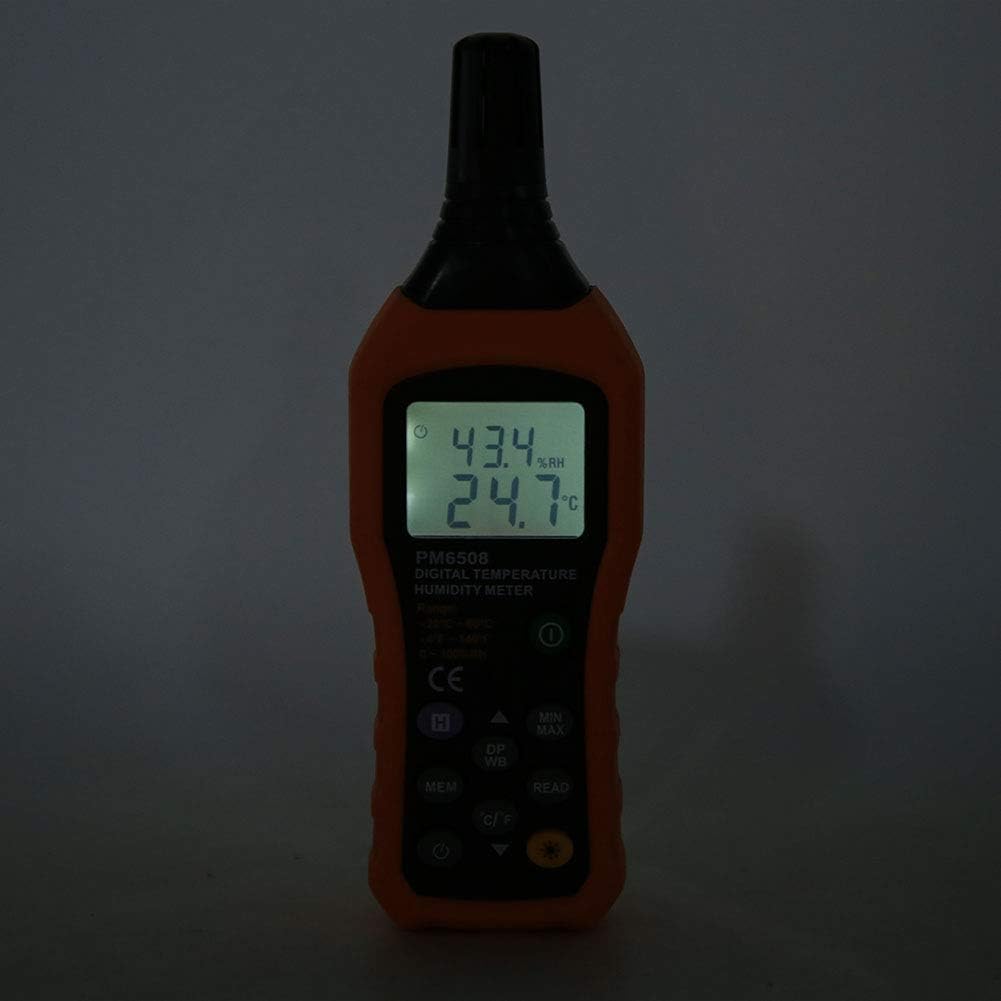
This image shows the PM6508 meter in a dark environment with its LCD backlight turned on. The illuminated display clearly shows the humidity and temperature readings, demonstrating the effectiveness of the backlight feature for use in low-light conditions.
การซ่อมบำรุง
การทำความสะอาด:
- เช็ดทำความสะอาดมิเตอร์asing กับ d อ่อนamp ผ้า ห้ามใช้สารทำความสะอาดที่มีฤทธิ์กัดกร่อนหรือตัวทำละลาย
- Keep the sensor area clean and free from dust or debris. Do not insert objects into the sensor opening.
พื้นที่จัดเก็บ:
- เก็บเครื่องวัดไว้ในที่แห้งและเย็น หลีกเลี่ยงแสงแดดโดยตรงและอุณหภูมิที่สูงหรือต่ำเกินไป
- หากเก็บรักษาเป็นเวลานาน ควรถอดแบตเตอรี่ออกเพื่อป้องกันการรั่วไหลและความเสียหายที่อาจเกิดขึ้นกับอุปกรณ์
- Utilize the provided protective holster/bag for storage to prevent physical damage.
การแก้ไขปัญหา
| ปัญหา | สาเหตุที่เป็นไปได้ | สารละลาย |
|---|---|---|
| มิเตอร์ไม่เปิดใช้งาน | แบตเตอรี่เสียหรือติดตั้งไม่ถูกต้อง | ตรวจสอบขั้วแบตเตอรี่ เปลี่ยนแบตเตอรี่ AAA ใหม่ |
| การอ่านที่ไม่ถูกต้อง | Sensor obstructed or dirty; rapid environmental changes; device not calibrated. | Clean the sensor. Allow time for readings to stabilize. Ensure sensor is exposed to the correct environment. If issues persist, contact support. |
| จอภาพมืดหรือกระพริบ | แบตเตอรี่อ่อน | เปลี่ยนแบตเตอรี่ |
| Cannot recall stored data. | No data saved; incorrect button sequence. | Ensure data was saved. Refer to "Memory Storage" section for correct recall procedure. |
ข้อมูลจำเพาะ
| พารามิเตอร์ | ค่า |
|---|---|
| แบบอย่าง | PM6508 (Item model number: WALFRONTinpedoqgs5) |
| ช่วงอุณหภูมิแวดล้อม | -20 ถึง 60°C (-4 ถึง 140°F) |
| Ambient Temperature Accuracy | ±1.0°C (0 to 45°C), ±1.5°C (-20 to 0°C, 45 to 60°C) |
| Ambient Temperature Resolution | 0.1°C/°F |
| ช่วง RH | ความชื้นสัมพัทธ์ 0-100% |
| ความแม่นยำ RH | ±3.0% RH (20% to 80%), ±4.0% RH (0% to 20%, 80% to 100%) |
| ความละเอียด RH | 0.1% |
| ช่วงอุณหภูมิกระเปาะเปียก | -20 ถึง 60°C (-4 ถึง 140°F) |
| Wet Bulb Temperature Accuracy | ±1°C (0 to 45°C), ±1.5°C (-20 to 0°C, 45 to 60°C) |
| Wet Bulb Temperature Resolution | 0.1°C/°F |
| Dew-point Temperature Range | -50 ถึง 60°C (-58 ถึง 140°F) |
| Dew-point Temperature Accuracy | ±1°C (0 to 45°C), ±1.5°C (-50 to 0°C, 45 to 60°C) |
| Dew-point Temperature Resolution | 0.1°C/°F |
| อัตราการอัพเดท | 400มิลลิวินาที |
| Number of Storage Records | 99 |
| แหล่งจ่ายไฟ | 4 * AAA dry Batteries (not included) |
| อายุการใช้งานแบตเตอรี่ | 200 ชั่วโมง |
| น้ำหนัก | ประมาณ 261 กรัม / 9.2 ออนซ์ |
| ขนาด | Approx. 184 * 60 * 29mm / 7.2 * 2.4 * 1.1in |
| ผู้ผลิต | WALFRONT |
| ประเทศต้นกำเนิด | จีน |
การรับประกันและการสนับสนุน
For product support, technical assistance, or warranty inquiries, please contact Walfront customer service through the retailer where the product was purchased or visit the official Walfront store page on Amazon: Walfront Amazon Store.
โปรดเก็บใบเสร็จรับเงินไว้เป็นหลักฐานการซื้อสำหรับกรณีที่มีการเรียกร้องการรับประกัน
Ask a question about this manual
Ask about setup, troubleshooting, compatibility, parts, safety, or missing instructions. Manuals+ will review the question and use this page’s manual context to help answer it.