การแนะนำ
This manual provides detailed instructions for the operation and maintenance of your Generic X20-1 7-inch GPS Navigation System. Please read this manual thoroughly before using the device to ensure proper functionality and to maximize your navigation experience.
เนื้อหาแพ็คเกจ
ตรวจสอบว่ามีรายการทั้งหมดอยู่ในแพ็คเกจ:
- อุปกรณ์นำทาง GPS
- ที่ชาร์จในรถยนต์
- สาย USB
- ตัวยึดกระจกหน้ารถ
- Center Console Bracket
- คู่มือผู้ใช้ (เอกสารนี้)

สินค้าเกินview
The Generic X20-1 is a 7-inch touchscreen GPS navigation system designed for various vehicle types, including cars and trucks. It features intelligent route planning, voice broadcast, and multimedia capabilities.

คุณสมบัติหลัก:
- 7-inch High-Resolution Touchscreen Display
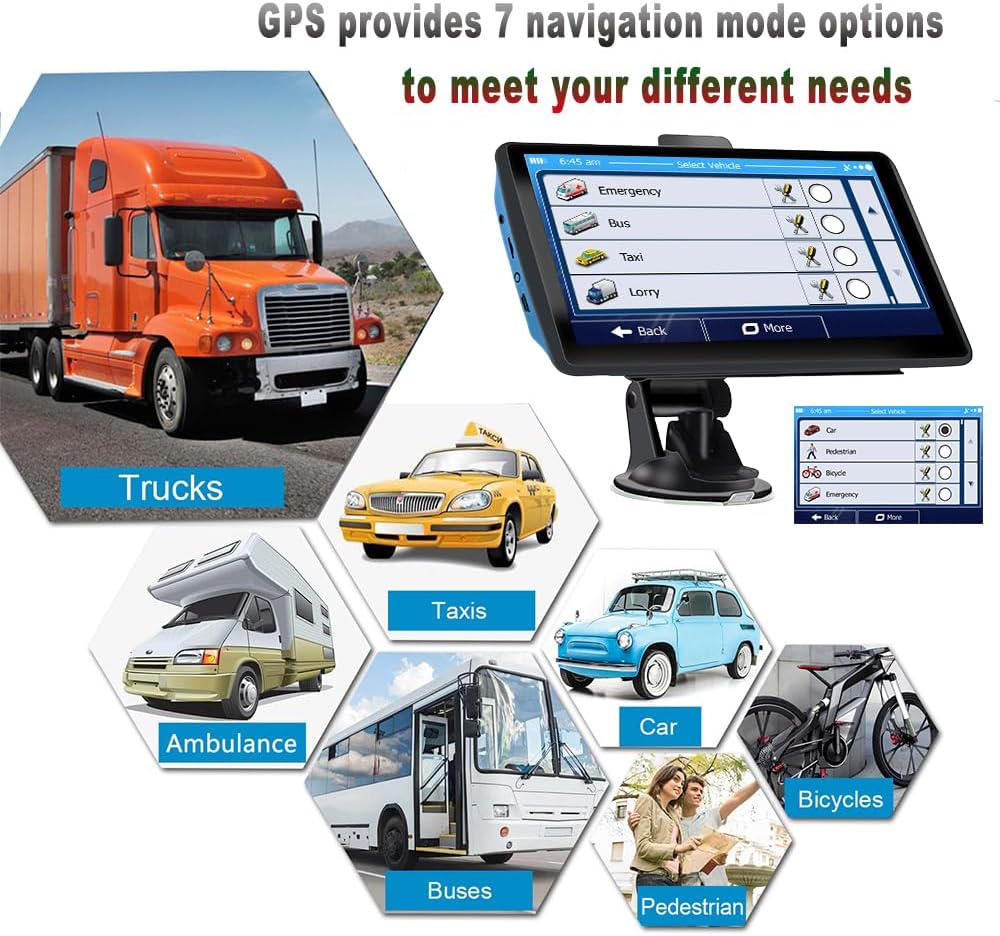
- Multiple Vehicle Modes (Car, Truck, Bicycle, Bus, Ambulance, Taxi, Walking)
- Professional Truck Mode with dimension/weight restrictions
- 2D/3D Map View
- POSTCODE/ADDRESS Search
- Built-in Hi-Fi Speaker and FM Transmitter
- Voice Reminders for Speed Limits and Turns
- Multimedia Playback (MP3, MP4, Photo Viewer, eBook Reader)
- Free Map Updates for North America (2024 maps pre-installed)
การตั้งค่า
1. การติดตั้งอุปกรณ์
The device can be mounted using either the windshield suction cup bracket or the center console bracket.
- ขายึดกระจกหน้ารถ:
- Attach the back clip to the GPS device.
- Connect the back clip assembly to the suction cup bracket.
- ทำความสะอาดบริเวณที่ต้องการบนกระจกหน้ารถของคุณ
- Press the suction cup firmly against the windshield and engage the lever to secure it.
- ปรับแต่ง viewมุมเอียงตามต้องการ
- Center Console Mount:
- Attach the back clip to the GPS device.
- Connect the back clip assembly to the center console bracket.
- Peel off the protective film from the adhesive pad on the center console bracket.
- Press the bracket firmly onto a clean, flat surface on your dashboard or center console.
- ปรับแต่ง viewมุมเอียงตามต้องการ

2. การเปิดเครื่องและการชาร์จ
Connect the device to your vehicle's 12V power outlet using the provided car charger. The device will automatically power on when connected and begin charging its internal battery. A full charge is recommended before initial use.
3. Initial Satellite Signal Acquisition
For the first use, position the device in an open area with a clear view of the sky to allow it to acquire GPS satellite signals. This process may take a few minutes. Once acquired, the device will display your current location.

คำแนะนำการใช้งาน
1. การนำทางเมนูหลัก
Upon powering on, the device will display the main menu with various icons for different functions. Tap an icon to access its corresponding feature.

2. Setting a Destination
- From the main menu, tap the "Navigation" icon.
- Select your preferred search method (e.g., "Address Search", "POSTCODE Search", "Find on Map", "Places Search").
- Enter the destination details using the on-screen keyboard.
- Confirm the destination, and the device will calculate the route.
- Follow the voice-guided instructions and on-screen map for navigation.

3. Vehicle Mode Selection
The device supports 7 vehicle modes. Selecting the correct mode ensures optimal route planning.
- From the navigation interface or settings, locate the "Select Vehicle" option.
- Choose from: Car, Truck, Bicycle, Bus, Ambulance, Taxi, or Pedestrian.
- For Truck mode, you can input specific vehicle dimensions (length, width, height) and weight to avoid restricted routes.
4. Truck Routing Features
In Professional Truck Mode, the GPS system considers vehicle-specific parameters to provide safe and efficient routes, avoiding low bridges, weight-restricted roads, and other truck-specific limitations.

5. FM Transmitter Function
The built-in FM transmitter allows you to broadcast navigation voice prompts and music through your vehicle's stereo system.
- From the main menu, tap the "FM" icon.
- Select an unused FM frequency on the device.
- ปรับคลื่นวิทยุในรถของคุณให้ตรงกับคลื่นความถี่ FM เดียวกัน
- Navigation voice and music from the GPS will now play through your car speakers.

6. การเล่นมัลติมีเดีย
The device supports playing MP3 and MP4 media files, viewing photos, and reading eBooks. Access these functions via their respective icons on the main menu.
การซ่อมบำรุง
- การทำความสะอาด: Use a soft, dry cloth to clean the screen and exterior of the device. Avoid abrasive cleaners or solvents.
- พื้นที่จัดเก็บ: เมื่อไม่ได้ใช้งานเป็นเวลานาน ควรเก็บอุปกรณ์ไว้ในที่แห้งและเย็น หลีกเลี่ยงแสงแดดโดยตรง
- การดูแลแบตเตอรี่ เพื่อยืดอายุการใช้งานแบตเตอรี่ ควรหลีกเลี่ยงการปล่อยประจุแบตเตอรี่จนหมดบ่อยๆ ควรชาร์จอุปกรณ์เป็นประจำ
- อัปเดตแผนที่: The device comes with 2024 North America maps and offers free updates. Refer to the manufacturer's website or support information for instructions on how to update maps.
การแก้ไขปัญหา
| ปัญหา | สาเหตุที่เป็นไปได้ | สารละลาย |
|---|---|---|
| อุปกรณ์ไม่เปิดเครื่อง | Low battery; faulty power connection. | Connect to car charger or USB power source. Ensure connections are secure. |
| ไม่มีสัญญาณ GPS | ถูกขัดขวาง view of sky; device indoors. | ย้ายไปยังพื้นที่เปิดโล่งที่มีอากาศบริสุทธิ์ view ของท้องฟ้า รอสักครู่เพื่อให้รับสัญญาณได้ |
| Navigation voice not heard. | Volume too low; FM transmitter not configured correctly. | Increase device volume. If using FM transmitter, ensure device and car radio are on the same frequency. |
| หน้าจอสัมผัสไม่ตอบสนอง | ซอฟต์แวร์มีปัญหาชั่วคราว | Perform a soft reset (refer to device settings or contact support if no reset button is visible). |
ข้อมูลจำเพาะ
| คุณสมบัติ | รายละเอียด |
|---|---|
| หมายเลขรุ่น | X20-1 |
| ขนาดจอแสดงผล | 7 นิ้ว |
| ขนาดสินค้า | 8.46 x 5.51 x 3.54 นิ้ว |
| น้ำหนักสินค้า | 1.17 ปอนด์ |
| แบตเตอรี่ | ต้องใช้แบตเตอรี่ 1 ก้อน (รวมอยู่ด้วย) |
| ระบบปฏิบัติการ | หน้าต่าง |
| การเชื่อมต่อ | ยูเอสบี |
| ประเภทแผนที่ | North America (2024, free updates) |
| คุณสมบัติพิเศษ | Touchscreen, Voice Command |
| โหมดเอาต์พุตเสียง | Stereo (via built-in speaker or FM transmitter) |
การรับประกันและการสนับสนุน
ข้อมูลการรับประกัน:
ผลิตภัณฑ์นี้มาพร้อมกับ รับประกัน 1 ปี from the date of purchase. The warranty covers manufacturing defects and malfunctions under normal use. It does not cover damage caused by misuse, accidents, unauthorized modifications, or natural disasters.
การสนับสนุนลูกค้า:
For technical assistance, warranty claims, or general inquiries, please refer to the contact information provided with your purchase documentation or visit the manufacturer's official website. Please have your model number (X20-1) and purchase date ready when contacting support.


