
KUIDAMOS T80
KUIDAMOS T80 Intelligent Pressure Controller User Manual
รุ่น : T80
1. บทนำ
This manual provides comprehensive instructions for the installation, operation, and maintenance of the KUIDAMOS T80 Intelligent Pressure Controller. The T80 is a 4-20mA level transmitter with a light column display, designed for accurate liquid level measurement in various applications such as urban water supply, high-rise pools, and sewage treatment facilities.
โปรดอ่านคู่มือนี้อย่างละเอียดก่อนใช้งานอุปกรณ์ เพื่อให้มั่นใจได้ว่าอุปกรณ์ทำงานได้อย่างถูกต้องและปลอดภัย
2. ข้อมูลจำเพาะ
| คุณสมบัติ | ข้อมูลจำเพาะ |
|---|---|
| แบบอย่าง | T80 |
| อินพุต Voltage | ไฟ AC220V |
| สัญญาณเอาท์พุต | 4-20มิลลิแอมป์ |
| สื่อการวัด | Liquid (water, oil, sewage) |
| ขนาดสินค้า | 6.69 x 4.72 x 3.54 นิ้ว |
| น้ำหนัก | ประมาณ 1.14 ปอนด์ (521 กรัม) |
| เทคโนโลยีเซ็นเซอร์ | Diffusion Silicon Sensor |
| การออกแบบโพรบ | Stainless steel sealing structure, silicone oil filling |
| การชดเชยอุณหภูมิ | Effective up to 200 meters depth |
| หมายเลขรุ่นสินค้า | KUIDAMOS9xgd14vr6o |
3. ส่วนประกอบของผลิตภัณฑ์และการแสดงผลview
The KUIDAMOS T80 Intelligent Pressure Controller features a clear display and intuitive controls. Familiarize yourself with the components before installation and operation.

รูปที่ 3.1: เค้าโครงแผงด้านหน้า
This image displays the front panel of the T80 controller. Key elements include the light column display indicating measurement levels, the digital PV display for precise readings, and control buttons: SET (confirm), UP (increase), DOWN (decrease), and MOBILE (shift/move).
- Measuring Light Column Display: Visual representation of the liquid level, ranging from 0 to 100.
- Measuring Display (PV): Digital readout of the current measured value.
- สัญญาณเตือน:
- AHH: Ultimate Upper Limit Alarm Switch
- อาฮ์: Upper Limit Alarm Switch
- อ.ล: Lower Limit Alarm Switch
- ทั้งหมด: Ultimate Lower Limit Alarm Switch
- ปุ่มควบคุม:
- SET: ใช้สำหรับเข้าสู่โหมดการตั้งค่าและยืนยันการเลือก
- ขึ้น (▲): เพิ่มค่าหรือเลื่อนขึ้นในเมนู
- ลง (▼): ลดค่าหรือเลื่อนลงในเมนู
- MOBILE (◄): Shifts cursor or moves between digits during setting.
4. การติดตั้งและเดินสายไฟ
Proper installation and wiring are crucial for the safe and accurate operation of the T80 controller. Ensure all power is disconnected before proceeding with any wiring.
4.1. แผนผังการเดินสายไฟทั่วไป
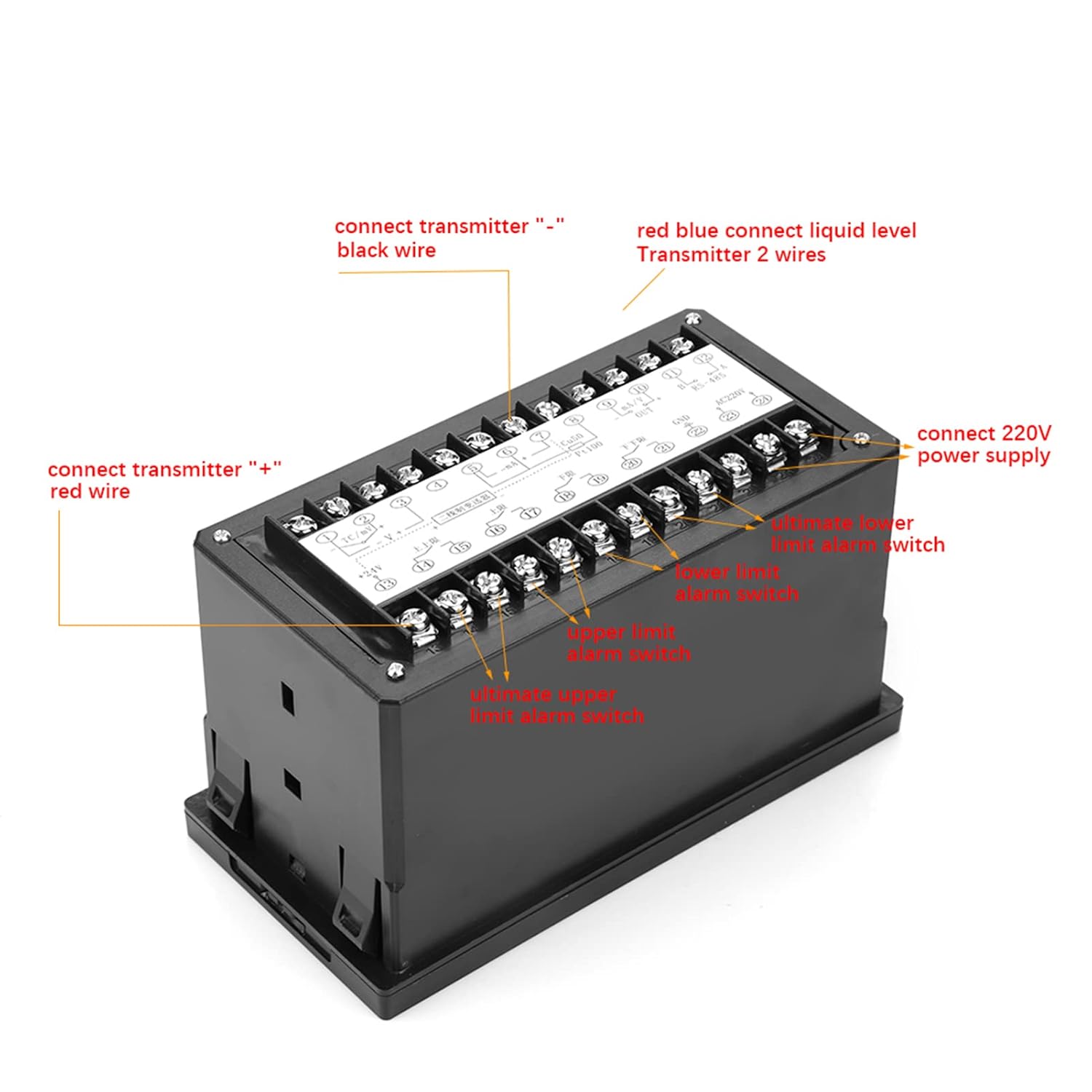
Figure 4.1: General Wiring Connections
This diagram illustrates the general wiring for the T80 controller. Connect the transmitter's black wire to the "-" terminal and the red wire to the "+" terminal. The liquid level transmitter's two wires connect to the red and blue terminals. The AC220V power supply connects to the designated terminals. Additional terminals are available for ultimate upper/lower limit alarm switches and current loop output.
- การเชื่อมต่อเครื่องส่งสัญญาณ:
- Connect the transmitter's negative (-) terminal to the black wire terminal on the controller.
- Connect the transmitter's positive (+) terminal to the red wire terminal on the controller.
- Liquid Level Transmitter: Connect the two wires from the liquid level transmitter to the red and blue terminals as indicated.
- แหล่งจ่ายไฟ: Connect the AC220V power supply to the terminals labeled for AC220V.
- Alarm Switches: Connect ultimate upper/lower limit alarm switches to their respective terminals.
- Current Loop Output: Connect current loop output to the designated terminals.
4.2. Drain Wiring Diagram

Figure 4.2: Drain Wiring Configuration
This diagram illustrates a specific wiring configuration for drain applications. Water level probe 'A' (positive) and probe 'B' (negative) are connected to their respective terminals. Terminals 'C' and 'D' are for connecting a pump and electromagnetic valve (if current exceeds 3A, use a contactor) for upper limit alarm cooperation. Terminals 'E' and 'F' are for connecting the 220V power supply.
- Water Level Probes: Connect Water Level Probe "A" (+) and Probe "B" (-) to the indicated terminals. Refer to the label for exact polarity.
- Pump and Electromagnetic Valve: Connect the pump and electromagnetic valve to terminals C and D. If the current exceeds 3A, a contactor must be used in conjunction with the upper limit alarm.
- แหล่งจ่ายไฟ: Connect the 220V power supply to terminals E and F.
สำคัญ: Always ensure correct polarity and voltage connections to prevent damage to the device and ensure safe operation.
5. การดำเนินการ
The T80 controller provides real-time liquid level measurement and control. Follow these steps for basic operation.
5.1. การเปิดเครื่องและการแสดงผลเริ่มต้น
Upon powering on the device, the light column display will illuminate, indicating the current liquid level. The PV display will show the precise numerical value.

Figure 5.1: Controller in Operation
This image shows the T80 controller's front panel during operation, with the light column indicating a level and the digital display showing a numerical value. This is the primary interface for monitoring liquid levels.
5.2. Setting Alarm Limits
The T80 allows for setting various alarm limits (AHH, AH, AL, ALL) to trigger external actions or alerts. Refer to the detailed programming guide (if available separately) for specific parameter settings. Generally, the SET button is used to enter and confirm settings, while UP/DOWN buttons adjust values, and the MOBILE button shifts the cursor.
5.3. Liquid Level Measurement Application Example

Figure 5.2: Liquid Level Measurement Setup
This diagram illustrates a typical application where the T80 controller monitors the liquid level in a tank. When the level drops, the controller activates an AC contactor, which in turn starts a pump to fill the tank, demonstrating automatic liquid level control.
In a typical liquid level control scenario, the T80 monitors the tank's liquid level. When the level falls below a preset threshold (e.g., AL or ALL), the controller can activate an external device, such as an AC contactor, to start a pump. The pump then fills the tank until the liquid reaches an upper threshold (e.g., AH or AHH), at which point the controller deactivates the pump.
6. การบำรุงรักษา
To ensure the longevity and accurate performance of your KUIDAMOS T80 Intelligent Pressure Controller, follow these maintenance guidelines:
- การทำความสะอาดปกติ: Keep the display and housing clean using a soft, dry cloth. Avoid abrasive cleaners or solvents.
- การตรวจสอบด้วยโพรบ: Periodically inspect the transmitter probe for any buildup of sediment or foreign material, especially in applications involving sewage or viscous liquids. Clean the probe gently if necessary, ensuring not to damage the sensor.
- การตรวจสอบสายไฟ: Annually, or as needed, inspect all wiring connections for tightness and signs of corrosion or damage. Loose connections can lead to intermittent operation or device failure.
- สภาพแวดล้อม : Ensure the controller is operating within its specified environmental conditions (temperature, humidity) to prevent premature wear.
- การสอบเทียบ: If you suspect inaccurate readings, consult a qualified technician for recalibration. The T80 utilizes diffusion silicon sensor technology for stable measurements, but environmental factors or prolonged use may necessitate calibration checks.
7 การแก้ไขปัญหา
This section addresses common issues you might encounter with the T80 Intelligent Pressure Controller. If the problem persists after attempting these solutions, contact customer support.
| ปัญหา | สาเหตุที่เป็นไปได้ | สารละลาย |
|---|---|---|
| ไม่มีการแสดงผล/ปิดเครื่อง | No power supply; Loose power connection; Blown fuse. | Check AC220V power supply. Ensure connections are secure. Check and replace fuse if necessary. |
| การอ่านที่ไม่ถูกต้อง | Sensor probe fouled; Incorrect calibration; Wiring issues. | Clean the sensor probe. Verify calibration settings. Check transmitter wiring for correct polarity and secure connections. |
| สัญญาณเตือนไม่ทำงาน | Alarm limits set incorrectly; External device (pump/valve) not connected or faulty; Wiring issues. | Review alarm limit settings (AHH, AH, AL, ALL). Check connections to external devices. Test external devices independently. |
| การทำงานแบบไม่สม่ำเสมอ | Loose wiring connections; Electrical interference; Faulty component. | Inspect all wiring for secure connections. Ensure proper grounding. If problem persists, contact support. |
8. การรับประกันและการสนับสนุน
For warranty information or technical support, please refer to the product packaging or contact KUIDAMOS customer service directly. Ensure you have your product model (T80) and purchase details available when contacting support.
ผู้ผลิต: KUIDAMOS
แบบอย่าง: T80
วันที่เข้าใช้งานครั้งแรก: 16 พฤษภาคม 2024
หากต้องการความช่วยเหลือเพิ่มเติม โปรดไปที่ KUIDAMOS Store on Amazon.
Ask a question about this manual
Ask about setup, troubleshooting, compatibility, parts, safety, or missing instructions. Manuals+ will review the question and use this page’s manual context to help answer it.