
1. คำแนะนำด้านความปลอดภัยที่สำคัญ
When using electrical appliances, basic safety precautions should always be followed to reduce the risk of fire, electric shock, and personal injury. Read all instructions carefully before using the Milex Digital Steam Iron.
- ต้องแน่ใจเสมอว่าปริมาตรtagตัวอักษร e บนฉลากระบุระดับแรงดันไฟฟ้าตรงกับระดับเสียงของแหล่งจ่ายไฟหลักของคุณtage.
- ห้ามจุ่มเตารีด สายไฟ หรือปลั๊กไฟลงในน้ำหรือของเหลวอื่นๆ
- ถอดปลั๊กเตารีดออกจากเต้าเสียบไฟฟ้าเมื่อเติมน้ำ เทน้ำออก หรือเมื่อไม่ได้ใช้งาน
- ห้ามใช้งานอุปกรณ์ใดๆ กับสายไฟหรือปลั๊กที่ชำรุด หรือหลังจากที่เครื่องทำงานผิดปกติ หรือตกหล่นหรือเสียหายในลักษณะใดๆ
- เก็บเตารีดและสายไฟให้พ้นมือเด็กและสัตว์เลี้ยงขณะเปิดเครื่องหรือขณะเครื่องเย็นลง
- Never leave the iron unattended while it is connected to the power supply or on an ironing board.
- ใช้เตารีดเฉพาะเมื่อใช้ในครัวเรือนเท่านั้น
- The soleplate of the iron can become extremely hot. Avoid direct contact with the hot soleplate.
- ควรวางเตารีดบนพื้นผิวที่มั่นคงและทนความร้อนเสมอเมื่อพักเตารีด
2. สินค้าหมดview
The Milex Digital Steam Iron MSI004 is designed for efficient garment care. Familiarize yourself with its components before use.
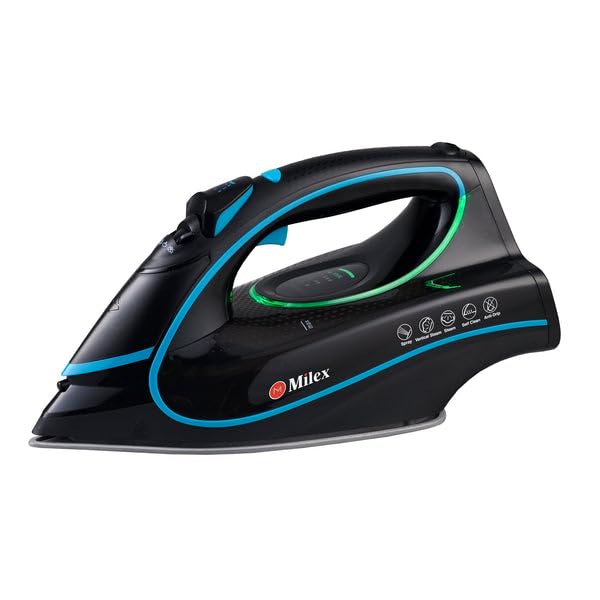
Figure 1: Milex Digital Steam Iron (3/4 view)
This image displays the Milex Digital Steam Iron from a three-quarter angle, highlighting its sleek black design with blue and green accents. Key features visible include the handle, water tank, and the general shape of the soleplate.
ส่วนประกอบ:
- หัวฉีดสเปรย์น้ำ: For moistening fabrics.
- ช่องเติมน้ำ: บริเวณที่เติมน้ำลงในถัง
- Steam Control Dial/Buttons: To adjust steam output.
- Temperature Control Dial/Buttons: To select desired heat setting.
- จอแสดงผล LED: แสดงการตั้งค่าปัจจุบัน
- รับมือ: For gripping the iron.
- ถังเก็บน้ำ: อ่างเก็บน้ำ
- แผ่นความร้อน: พื้นผิวที่ให้ความร้อนซึ่งเลื่อนไปบนเนื้อผ้า
- สายไฟ: ต่อเตารีดเข้ากับเต้ารับไฟฟ้า

Figure 2: Ceramic Soleplate
ภาพนี้แสดงให้เห็นภาพระยะใกล้ view of the ceramic soleplate, showing its textured surface and steam vents designed for even heat distribution and smooth gliding.
3. การตั้งค่าและการใช้งานครั้งแรก
3.1 การแกะกล่อง
- Remove the iron from its packaging.
- Remove any protective film or stickers from the soleplate.
- ตรวจสอบเตารีดว่ามีร่องรอยความเสียหายหรือไม่ หากพบความเสียหาย ห้ามใช้งานและติดต่อฝ่ายบริการลูกค้า
3.2 การเติมถังเก็บน้ำ
- ตรวจสอบให้แน่ใจว่าได้ถอดปลั๊กเตารีดออกจากเต้าเสียบไฟฟ้าแล้ว
- Set the steam control to the "Dry Ironing" position (if applicable).
- เปิดฝาครอบช่องเติมน้ำ
- Using a measuring cup, carefully pour clean tap water into the water tank up to the "MAX" fill line. Do not overfill.
- ปิดฝาครอบช่องเติมน้ำให้แน่น
บันทึก: For areas with hard water, it is recommended to use a mixture of 50% tap water and 50% distilled water to prevent mineral buildup. Never use perfumed water, vinegar, starch, or descaling agents in the water tank.
4. คู่มือการใช้งาน
4.1 การเตรียมตัวก่อนรีดผ้า
- Sort garments according to fabric type (e.g., linen, cotton, wool, silk, synthetics).
- ตรวจสอบป้ายดูแลเสื้อผ้าเพื่อดูอุณหภูมิการรีดที่แนะนำ
- Plug the iron into a suitable electrical outlet. The LED display will illuminate.
4.2 การตั้งอุณหภูมิและไอน้ำ
- Use the temperature control buttons to select the appropriate heat setting for your fabric. The LED display will show the selected temperature.
- Allow the iron to heat up until the indicator light (if present) or LED display confirms it has reached the desired temperature.
- For steam ironing, ensure the water tank is filled. Adjust the steam control to the desired steam level. Steam is typically available at higher temperature settings.
- For dry ironing, ensure the water tank is empty or the steam control is set to "Dry Ironing".
4.3 Using Steam Functions
- ไอน้ำต่อเนื่อง: Select a steam setting on the control. Steam will be continuously emitted from the soleplate.
- ระเบิดไอน้ำ: Press the "Burst" button for an extra shot of steam to remove stubborn wrinkles. Wait a few seconds between bursts.
- ละอองน้ำ: Press the "Spray" button to lightly moisten fabric before ironing.
4.4 คุณสมบัติปิดเครื่องอัตโนมัติ
The iron is equipped with an auto-shutoff safety feature. If left unattended horizontally for a certain period (e.g., 30 seconds) or vertically (e.g., 8 minutes), the heating element will automatically turn off. To reactivate, simply move the iron.
4.5 ระบบป้องกันการหยด
The anti-drip system prevents water from dripping from the soleplate when the iron is not hot enough to produce steam. This helps prevent water stains on delicate fabrics.
5. การบำรุงรักษาและการทำความสะอาด
Regular maintenance ensures optimal performance and extends the life of your Milex Digital Steam Iron.
5.1 หลังการใช้งานแต่ละครั้ง
- ถอดปลั๊กเตารีดและปล่อยให้เย็นลงสนิท
- เทน้ำที่เหลือจากถังเก็บน้ำ
5.2 การทำความสะอาดแผ่นความร้อน
- When the soleplate is cool, wipe it with a damp ผ้าและน้ำยาทำความสะอาดที่ไม่กัดกร่อนหากจำเป็น
- ห้ามใช้แผ่นขัดถูที่มีฤทธิ์กัดกร่อนหรือสารเคมีรุนแรง เพราะอาจทำให้สารเคลือบเซรามิกเสียหายได้
5.3 ฟังก์ชันทำความสะอาดตัวเอง
The iron features a self-cleaning function to remove mineral deposits from the steam vents.
- เติมแท้งค์น้ำถึงเส้น MAX
- เสียบปลั๊กเตารีดและตั้งอุณหภูมิสูงสุด
- เมื่อเตารีดร้อนถึงอุณหภูมิสูงสุดแล้ว ให้ถอดปลั๊กออก
- ถือเตารีดในแนวนอนเหนืออ่างล้างจาน
- Press and hold the self-clean button (refer to product diagram for location). Hot water and steam will be expelled from the soleplate, flushing out mineral deposits.
- เขย่าเตารีดเบาๆ ไปมาจนกว่าถังน้ำจะว่างเปล่า
- Plug the iron back in and allow it to heat up again to dry the soleplate.
- ถอดปลั๊กและเก็บเมื่อเย็นลงแล้ว
5.4 พื้นที่จัดเก็บ
Always store the iron upright on its heel rest, with the cord neatly wrapped, once it has completely cooled down and the water tank is empty.
6 การแก้ไขปัญหา
| ปัญหา | สาเหตุที่เป็นไปได้ | สารละลาย |
|---|---|---|
| เหล็กไม่ร้อน | ไม่ได้เสียบปลั๊ก; ไม่มีไฟtage; auto-shutoff activated; faulty outlet. | Check power connection; check circuit breaker; move iron to reactivate; try a different outlet. |
| ไม่มีไอน้ำ หรือไอน้ำไม่เพียงพอ | Water tank empty; temperature too low for steam; steam vents clogged; steam control set to "Dry". | Fill water tank; increase temperature setting; perform self-clean; adjust steam control. |
| น้ำหยดจากแผ่นรองเตารีด | Temperature too low for steam (anti-drip system working); water tank overfilled. | เพิ่มอุณหภูมิ แต่อย่าเติมน้ำในถังมากเกินไป |
| คราบหรือเศษสีขาวบนเสื้อผ้า | Mineral buildup in water tank/steam vents. | Perform self-clean function; use distilled water or a mix with tap water. |
7. ข้อมูลจำเพาะ
| หมายเลขรุ่น | เอ็มเอสไอ004 |
| ยี่ห้อ | มิเล็กซ์ |
| พลัง | 2400วัตต์ |
| เล่มที่tage | 220-240 โวลต์, 50 เฮิรตซ์ |
| ฟังก์ชั่น | Dry, Spray, Steam, Burst |
| วัสดุแผ่นรองพื้น | เซรามิค |
| ประเภทจอภาพ | นำ |
| ความจุถังน้ำ | 450มล. |
| คุณสมบัติพิเศษ | Anti-drip, Auto-shutoff, Lightweight |
| ขนาดสินค้า (ยาว x กว้าง) | 32L x 16W เซนติเมตร |
8. การรับประกันและการสนับสนุนลูกค้า
For information regarding warranty coverage, please refer to the warranty card included with your product or contact the retailer where the product was purchased.
If you experience any issues or have questions about your Milex Digital Steam Iron, please contact Milex customer support. You can find more information and contact details on the official Milex webเว็บไซต์หรือผ่านทาง Milex Store on Amazon.