
กูโจดอค AC1041
คู่มือผู้ใช้โปรเจ็กเตอร์ GOOJODOQ โปรเจ็กเตอร์ Android WiFi ระดับมืออาชีพ
แบบ: AC1041
1. บทนำ
ขอบคุณสำหรับการซื้อasing the GOOJODOQ Professional Android WiFi Projector. This manual provides essential information for setting up, operating, and maintaining your projector. Please read this manual thoroughly before using the product to ensure proper operation and to extend its lifespan. This projector is designed to deliver a high-quality visual experience with its 1080P Full HD resolution, advanced connectivity options, and user-friendly features.
2. คำแนะนำด้านความปลอดภัย
เพื่อให้มั่นใจถึงการทำงานที่ปลอดภัยและป้องกันความเสียหาย โปรดปฏิบัติตามข้อควรระวังด้านความปลอดภัยต่อไปนี้:
- อย่าปิดกั้นช่องระบายอากาศ ตรวจสอบให้แน่ใจว่ามีการระบายอากาศรอบ ๆ โปรเจ็กเตอร์อย่างเพียงพอเพื่อป้องกันความร้อนสูงเกินไป
- ใช้เฉพาะอะแดปเตอร์ไฟฟ้าที่มาพร้อมกับโปรเจ็กเตอร์เท่านั้น
- ห้ามให้โปรเจ็กเตอร์โดนฝน ความชื้น หรืออุณหภูมิที่สูงหรือต่ำเกินไป
- หลีกเลี่ยงการมองเข้าไปในเลนส์โปรเจ็กเตอร์โดยตรงเมื่อเลนส์amp เปิดอยู่เพราะอาจทำให้ดวงตาเสียหายได้
- วางโปรเจ็กเตอร์บนพื้นผิวที่มั่นคงและระดับเพื่อป้องกันไม่ให้ตก
- อย่าพยายามถอดประกอบหรือซ่อมแซมโปรเจ็กเตอร์ด้วยตนเอง โปรดติดต่อช่างผู้ชำนาญเพื่อขอรับบริการ
- เก็บโปรเจ็กเตอร์ให้ห่างจากน้ำและของเหลวอื่นๆ
3. เนื้อหาบรรจุภัณฑ์
โปรดตรวจสอบว่าสินค้าทั้งหมดมีอยู่และอยู่ในสภาพดี:
- GOOJODOQ Projector (Model: AC1041)
- รีโมทคอนโทรล
- สายไฟ
- เคเบิ้ล AV
- คู่มือการใช้งาน (เอกสารนี้)

Image: The GOOJODOQ projector shown with its remote control, illustrating the main unit and a key accessory.
4. สินค้าหมดview
4.1. ส่วนประกอบและการควบคุม
Familiarize yourself with the various parts of your projector:
- เลนส์: ฉายภาพขึ้นบนจอภาพ
- ช่องระบายอากาศ: Located on the sides and rear, crucial for heat dissipation.
- แผงควบคุม: Fabric-covered buttons on the top for basic navigation and settings (Power, OK, Navigation arrows).
- พอร์ตอินพุต:
- HDMI (x2): For connecting laptops, TV boxes, gaming consoles (PS5, Switch), etc.
- ยูเอสบี (x2): For connecting USB drives, mice, keyboards.
- เอวี: สำหรับเชื่อมต่ออุปกรณ์รุ่นเก่าโดยใช้สาย AV
- แจ็คเสียงขนาด 3.5 มม.: สำหรับเชื่อมต่อลำโพงภายนอกหรือหูฟัง
- ลำโพงในตัว: ให้เอาต์พุตเสียง

ภาพ: ระยะใกล้ view of the projector's smart design, highlighting the fabric-covered control buttons, efficient heat dissipation system, and the internal speaker component.

Image: Diagram showing the various input and output ports on the projector, including USB, HDMI, AV, and headphone jack, along with exampจำนวนอุปกรณ์ที่เข้ากันได้
5. การตั้งค่า
5.1 การวาง
Place the projector on a stable, flat surface such as a table. Ensure there is enough space around the projector for proper ventilation. The optimal projection distance will vary based on the desired screen size. This projector supports a maximum projection size of 200 inches.

Image: Visual representation of different projection sizes (35", 90", 200") from the projector, demonstrating its versatility in various room sizes.
5.2. การเชื่อมต่อไฟฟ้า
Connect the supplied power cable to the projector's power input port, then plug the other end into a power outlet.
5.3. เปิดเครื่องครั้งแรก
กดปุ่มเปิด/ปิดบนโปรเจ็กเตอร์หรือรีโมทคอนโทรลเพื่อเปิดเครื่อง ไฟแสดงสถานะจะสว่างขึ้น
5.4. การแก้ไขโฟกัสและคีย์สโตน
This projector features electronic focus and automatic keystone correction. Use the remote control to adjust the focus until the image is clear. The automatic keystone correction will adjust the image shape to be rectangular, even if the projector is not perfectly aligned with the screen.

Image: Illustration demonstrating the electronic focus and automatic keystone correction features, showing how the projector adjusts the image to maintain a perfect rectangular shape.
6. คู่มือการใช้งาน
6.1. อุปกรณ์เชื่อมต่อ
คุณสามารถเชื่อมต่ออุปกรณ์ต่างๆ เข้ากับโปรเจ็กเตอร์ของคุณได้:
- ช่องต่อ HDMI: Connect your laptop, TV stick, DVD player, computer, PS5, or Switch using an HDMI cable. Select the corresponding HDMI input source from the projector's menu.
- ยูเอสบี: Insert a USB disk to play media files directly. You can also connect a USB mouse or keyboard for easier navigation.
- เอวี: Use the provided AV cable to connect older devices like VCRs or some set-top boxes.
- Bluetooth 5.0: Pair with Bluetooth headphones, speakers, or AirPods for an immersive audio experience. Navigate to the Bluetooth settings in the projector's menu to pair devices.
- WiFi 6 (2.4G/5G): Connect to your home network for online streaming and screen mirroring. WiFi 6 technology ensures reduced latency and smooth streaming.
6.2. Screen Mirroring (Android/iOS)
The projector supports wireless screen mirroring from Android and iOS devices. Ensure your mobile device and the projector are connected to the same WiFi network. Follow the on-screen instructions on the projector to initiate screen mirroring from your smartphone or tablet.
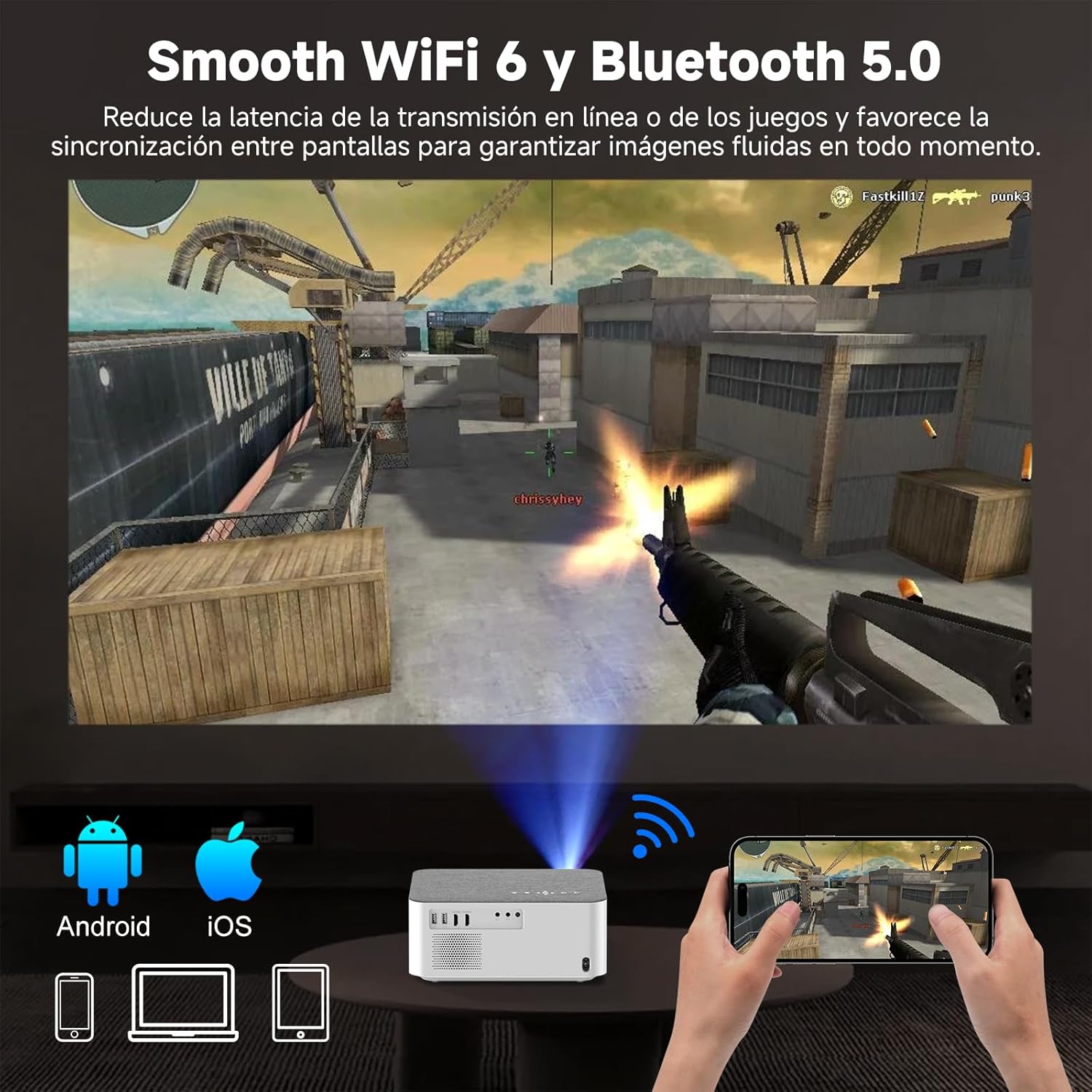
Image: Depiction of the projector's WiFi 6 and Bluetooth 5.0 capabilities, showing a smartphone wirelessly mirroring its screen to the projector, enabling seamless online streaming and gaming.
6.3. เอาต์พุตเสียง
You can use the built-in speaker for audio. For a more immersive experience, connect external speakers or headphones via the 3.5mm audio jack or Bluetooth.
7. การบำรุงรักษา
การบำรุงรักษาอย่างถูกวิธีจะช่วยให้โปรเจคเตอร์ของคุณมีอายุการใช้งานยาวนานและทำงานได้อย่างมีประสิทธิภาพสูงสุด:
- การทำความสะอาดเลนส์: ใช้ผ้าเนื้อนุ่ม ปราศจากขน ที่ออกแบบมาสำหรับเลนส์โดยเฉพาะ เช็ดเลนส์โปรเจคเตอร์เบาๆ อย่าใช้สารทำความสะอาดที่มีฤทธิ์กัดกร่อนหรือออกแรงมากเกินไป
- การทำความสะอาดช่องระบายอากาศ: Regularly check and clean the ventilation openings to prevent dust buildup, which can hinder heat dissipation and affect performance. Use a soft brush or compressed air.
- พื้นที่จัดเก็บ: เมื่อไม่ได้ใช้งานเป็นเวลานาน ควรเก็บโปรเจคเตอร์ไว้ในที่แห้งและเย็น หลีกเลี่ยงแสงแดดโดยตรงและอุณหภูมิที่สูงหรือต่ำเกินไป ควรใช้บรรจุภัณฑ์เดิมหรือกล่องป้องกันหากมี
- การทำความสะอาดทั่วไป: Wipe the exterior of the projector with a soft, dry cloth. Avoid using liquid cleaners directly on the surface.
8 การแก้ไขปัญหา
หากคุณพบปัญหาเกี่ยวกับโปรเจ็กเตอร์ของคุณ โปรดดูปัญหาทั่วไปและวิธีแก้ไขต่อไปนี้:
| ปัญหา | สาเหตุที่เป็นไปได้ | สารละลาย |
|---|---|---|
| ไม่มีภาพบนหน้าจอ | Power cable loose, incorrect input source, device not connected properly. | ตรวจสอบการเชื่อมต่อสายไฟ เลือกแหล่งสัญญาณเข้าที่ถูกต้อง (HDMI, USB, AV) ตรวจสอบให้แน่ใจว่าอุปกรณ์ต้นทางเปิดอยู่และเชื่อมต่อแน่นหนาดีแล้ว |
| ภาพเบลอ | Out of focus, projector too close/far, dirty lens. | Adjust electronic focus using the remote control. Ensure projector is within optimal projection distance. Clean the lens. |
| ไม่มีเสียง | ระดับเสียงเบาเกินไป อุปกรณ์เสียงภายนอกไม่ได้เชื่อมต่อ การตั้งค่าเอาต์พุตเสียงไม่ถูกต้อง | Increase projector volume. Check if external speakers/headphones are connected and powered on. Verify audio output settings in the projector menu. |
| ไม่สามารถเชื่อมต่อกับ WiFi/Bluetooth ได้ | Incorrect password, device out of range, interference. | Re-enter WiFi password. Ensure devices are within range. Reduce interference from other electronic devices. Restart projector and router. |
| รีโมตคอนโทรลไม่ทำงาน | Dead batteries, obstruction, remote not pointed at sensor. | เปลี่ยนแบตเตอรี่ นำสิ่งกีดขวางระหว่างรีโมทและโปรเจ็กเตอร์ออก เล็งรีโมทไปที่เซ็นเซอร์อินฟราเรดของโปรเจ็กเตอร์โดยตรง |
9. ข้อมูลจำเพาะ
| คุณสมบัติ | รายละเอียด |
|---|---|
| ยี่ห้อ | GOOJODOQ |
| แบบอย่าง | เอซี1041 |
| ความละเอียดดั้งเดิม | 1920 x 1080 พิกเซล (ฟูลเอชดี) |
| ความสว่าง | 15000 ลูเมน (600 ANSI ลูเมน) |
| อัตราส่วนคอนทราสต์ | 800:1 น. |
| อัตราส่วนภาพ | 16:9, 4:3 |
| เทคโนโลยีการแสดงผล | จอแอลซีดี |
| ระดับเสียง | 40 dB (reduced by 80% with latest temperature control technology) |
| การเชื่อมต่อ | WiFi 6 (2.4G/5G), Bluetooth 5.0 |
| อินเทอร์เฟซ | 2x HDMI, 2x USB, AV, 3.5mm Audio Jack |
| อุปกรณ์ที่รองรับ | Smartphone, Tablet, Laptop, PC, TV Box, PS5, Switch, Speakers, Headphones |
| คุณสมบัติพิเศษ | Electronic Focus, Auto Keystone Correction, Portable, Fabric-covered design |
| การใช้พลังงาน | 99 วัตต์ |
| ขนาด (แพ็คเกจ) | 33 x 24.9 x 15.6 ซม. |
| น้ำหนัก (แพ็คเกจ) | 2.58 กก. |
10. การรับประกันและการสนับสนุน
For warranty information and technical support, please refer to the warranty card included with your purchase or visit the official GOOJODOQ webไซต์ คุณยังสามารถติดต่อผู้ค้าปลีกที่คุณซื้อผลิตภัณฑ์เพื่อขอความช่วยเหลือได้
แหล่งข้อมูลออนไลน์:
- For the latest updates and FAQs, visit the GOOJODOQ official support page.
- Check the product listing on the platform where you purchased for additional support contact details.
Ask a question about this manual
Ask about setup, troubleshooting, compatibility, parts, safety, or missing instructions. Manuals+ will review the question and use this page’s manual context to help answer it.