
NXGKET 2AYV7YG-811
NXGKET FRS 2-Way Radio Walkie Talkies User Manual
Model: 2AYV7YG-811
การแนะนำ
This manual provides detailed instructions for the operation and maintenance of your NXGKET FRS 2-Way Radio Walkie Talkies. Please read this manual thoroughly before using the product to ensure proper function and safety. These walkie talkies are designed for reliable communication in various environments, featuring long-range transmission, durable batteries, and NOAA weather alerts.

คำอธิบายภาพ: This image displays the four NXGKET walkie talkie units included in the pack, showcasing their distinct color options: purple, blue, orange, and yellow.
สินค้าเกินview
เนื้อหาแพ็คเกจ
- 4 x NXGKET FRS 2-Way Radio Walkie Talkies
- 4 x หูฟัง
- 2 x 2-in-1 USB-C Charging Cables
คุณสมบัติหลัก
- Intelligent Control System: Includes auto squelch, auto memory, auto scan, auto power saving, and low battery alarm.
- iVOX Hands-Free Operation: Allows for voice-activated transmission without pressing buttons.
- การออกแบบที่ทนทาน: Drop-proof construction.
- Channels and Privacy Codes: 22 FRS channels with 122 privacy codes (2684 combinations).
- NOAA Emergency Weather Alert: Provides alerts for unpredictable weather conditions.
- แบตเตอรี่แบบชาร์จไฟได้: Built-in 1200mAh Li-ion battery with overcharge, overvoltage และการป้องกันไฟฟ้าลัดวงจร
- การชาร์จ USB-C: Convenient charging with included 2-in-1 USB-C cables.
- การส่งสัญญาณระยะไกล: Upgraded custom gain antenna and lossless transmission technology for clear communication.
การระบุส่วนประกอบ
Refer to the diagram below for identification of the walkie talkie components.

คำอธิบายภาพ: A detailed diagram of the NXGKET walkie talkie, highlighting key components such as the antenna, LCD display, PTT button, Power button, Up/Down buttons, Menu/Lock button, Speaker/Mic, Charge Jack (USB-C), and Earphone Jack.
การตั้งค่า
การชาร์จแบตเตอรี่
- Locate the USB-C charging port on the walkie talkie.
- Connect one end of the provided 2-in-1 USB-C charging cable to the walkie talkie's charging port.
- Connect the other end of the USB-C charging cable to a compatible USB power source (e.g., wall adapter, power bank, computer USB port).
- The charging indicator light on the walkie talkie will illuminate to show it is charging.
- A full charge typically provides 3-4 days of use.
- The walkie talkie automatically shuts down after 3-4 hours of non-use to conserve power. Restart it when needed.

คำอธิบายภาพ: Two NXGKET walkie talkies (orange and yellow) connected to USB-C charging cables, illustrating the convenient charging method. The image also compares the built-in 1200mAh Li-ion battery to AAA batteries, highlighting its durability.
การเปิด/ปิดเครื่อง
- หากต้องการเปิดเครื่อง ให้กดค้างไว้ ปุ่มเปิดปิด จนกว่าหน้าจอ LCD จะสว่างขึ้น
- ในการปิดเครื่องให้กดปุ่ม ปุ่มเปิดปิด จนกว่าจอ LCD จะดับลง
คำแนะนำการใช้งาน
Selecting Channels and Privacy Codes
- กดปุ่ม เมนู button once to enter channel selection mode. The channel number will flash on the LCD screen.
- ใช้ - (ขึ้น)หรือ - (Down) buttons to select your desired channel (1-22).
- กดปุ่ม เมนู button again to enter privacy code selection mode. The privacy code will flash.
- ใช้ - (ขึ้น)หรือ - (Down) buttons to select your desired privacy code (1-122).
- กดปุ่ม เมนู button a third time or wait a few seconds for the settings to be saved.
- สำคัญ: For successful communication, all walkie talkies must be set to the same channel and privacy code.
การส่งและรับ
- หากต้องการส่งสัญญาณ ให้กดปุ่มค้างไว้ ปตท. (กดเพื่อพูด) button and speak clearly into the microphone.
- ปล่อยตัว ปตท. ปุ่มสำหรับหยุดการส่งสัญญาณและรอฟังการตอบกลับ
- The walkie talkie will automatically receive transmissions when not transmitting.
iVOX (Hands-Free Operation)
- The iVOX feature allows for voice-activated transmission without needing to press the PTT button.
- To activate/deactivate iVOX, consult the full user manual for specific button sequences, as this feature often has adjustable sensitivity levels.
การแจ้งเตือนสภาพอากาศฉุกเฉินของ NOAA
- To enter the NOAA channel mode, long press the - (Up) key. The radio will automatically jump to one of the 11 NOAA channels.
- กดปุ่ม เมนู key to lock the selected NOAA channel.
- ใช้ - (ขึ้น)หรือ - (Down) keys to adjust to a different NOAA channel if desired.
- To exit the NOAA channel mode, long press the - (Up) key again.

คำอธิบายภาพ: A family hiking through a forest, each carrying an NXGKET walkie talkie. Icons at the bottom represent various weather phenomena like tornadoes, snowstorms, rainstorms, fires, tsunamis, and earthquakes, indicating the NOAA emergency weather alert capability for outdoor safety.
การซ่อมบำรุง
การดูแลแบตเตอรี่
- To maximize battery life, fully charge the walkie talkies before first use.
- ควรหลีกเลี่ยงการปล่อยให้แบตเตอรี่หมดเกลี้ยงเป็นประจำ
- Store the walkie talkies in a cool, dry place when not in use for extended periods.
- The built-in Li-ion battery includes protection against overcharge, overvoltage และไฟฟ้าลัดวงจร
การทำความสะอาด
- Wipe the exterior of the walkie talkie with a soft, damp ผ้า.
- อย่าใช้สารเคมีรุนแรงหรือน้ำยาทำความสะอาดที่มีฤทธิ์กัดกร่อน
- Ensure the charging port cover is securely closed to prevent dust and moisture ingress.
การแก้ไขปัญหา
- ไม่มีไฟฟ้า: Ensure the battery is charged. Connect the walkie talkie to the charger and verify the charging indicator.
- ไม่สามารถติดต่อสื่อสารได้: Verify that all walkie talkies are on the same channel and privacy code. Check that the PTT button is being pressed fully during transmission.
- คุณภาพเสียงไม่ดี/สัญญาณรบกวน: Move to an open area with fewer obstructions. Ensure you are within the effective communication range. Check for any interference from other electronic devices.
- ขอบเขตจำกัด: Range is affected by terrain, weather, and obstructions (buildings, dense foliage). Optimal range is achieved in open areas.
- แบตเตอรี่หมดเร็ว: Ensure the walkie talkie is fully charged. Reduce usage of power-intensive features like continuous transmission.
ข้อมูลจำเพาะ
| ยี่ห้อ | NXGKET |
| หมายเลขรุ่น | 2AYV7YG-811 |
| จำนวนช่องสัญญาณ | 22 ช่อง FRS |
| รหัสความเป็นส่วนตัว | 122 |
| ช่วงความถี่ | 462.5500-462.7250เมกะเฮิรตซ์, 467.5625-467.7125เมกะเฮิรตซ์ |
| ระยะการพูดคุย (สูงสุด) | Up to 3 miles (open areas) |
| ประเภทแบตเตอรี่ | แบตเตอรี่ลิเธียมไอออนแบบรีชาร์จขนาด 1200mAh ในตัว |
| เล่มที่tage | 3.6 โวลต์ |
| คุณสมบัติพิเศษ | Keypad Lock, Lightweight, Long Range, Rechargeable, Weather Alert (NOAA), VOX |
| ระดับความต้านทานต่อน้ำ | ไม่ทนน้ำ |
| น้ำหนักสินค้า | 1.37 ปอนด์ (สำหรับแพ็ค) |
| ขนาดแพ็คเกจ | 6.65 x 4.72 x 3.15 นิ้ว |
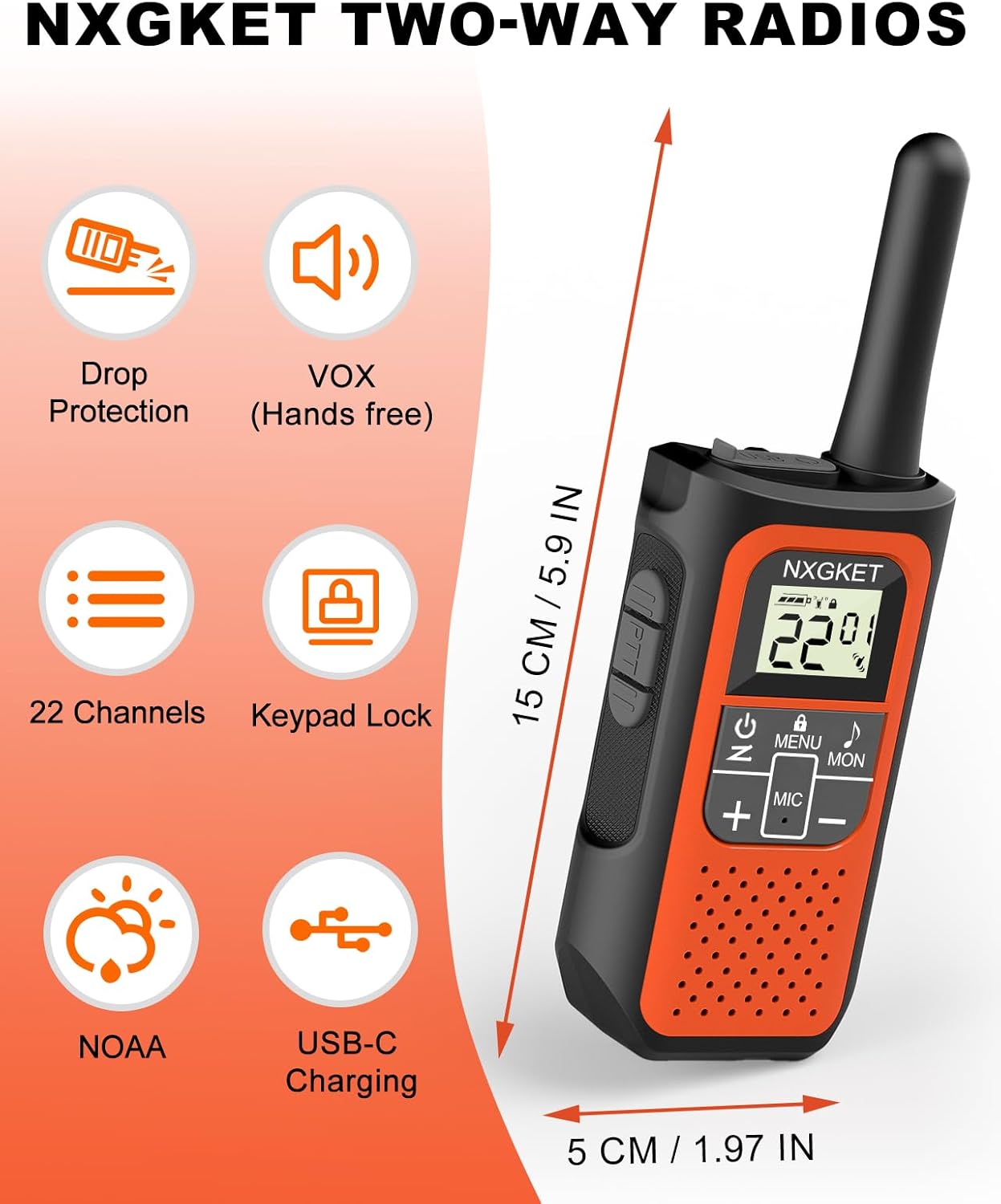
คำอธิบายภาพ: An orange NXGKET two-way radio displayed alongside icons representing its features: Drop Protection, VOX (Hands-free), 22 Channels, Keypad Lock, NOAA, and USB-C Charging. Dimensions of the radio (15 cm / 5.9 inches height, 5 cm / 1.97 inches width) are also indicated.

คำอธิบายภาพ: A graphic titled "Long Range Walkie-Talkies" showing a person on a mountain path using a walkie talkie, with signal waves extending. Text indicates communication ranges: up to 1.5 miles in city and town, up to 3 miles in open water area, and up to 5 miles in mountain or valley.
การรับประกันและการสนับสนุน
ข้อมูลการรับประกัน
ผลิตภัณฑ์นี้มีการรับประกันจากผู้ผลิต 2 ปี โปรดเก็บหลักฐานการซื้อไว้เพื่อใช้ในการเคลมประกัน
การสนับสนุนลูกค้า
For technical assistance, troubleshooting, or warranty inquiries, please contact NXGKET customer support. Refer to the product packaging or the official NXGKET webเว็บไซต์สำหรับข้อมูลการติดต่อปัจจุบัน
Ask a question about this manual
Ask about setup, troubleshooting, compatibility, parts, safety, or missing instructions. Manuals+ will review the question and use this page’s manual context to help answer it.