
1. ข้อมูลด้านความปลอดภัยที่สำคัญ
Please read all safety instructions carefully before using the VETEK NPX108 camcorder. Keep this manual for future reference.
- อย่าให้กล้องโดนน้ำหรือความชื้น
- หลีกเลี่ยงอุณหภูมิที่สูงหรือต่ำเกินไป
- อย่าพยายามถอดประกอบหรือซ่อมแซมกล้องด้วยตัวเอง
- ใช้เฉพาะอุปกรณ์เสริมและอะแดปเตอร์แปลงไฟที่ได้รับอนุญาตเท่านั้น
- เก็บให้พ้นจากมือเด็ก
2. เนื้อหาบรรจุภัณฑ์
ตรวจสอบว่ามีรายการทั้งหมดอยู่ในแพ็คเกจของคุณ:
- VETEK NPX108 4K Camcorder
- มือถือโคลง
- ฮูดเลนส์
- ไมโครโฟน
- เติมแสง
- การ์ด SD 64GB
- รีโมทคอนโทรล
- แบตเตอรี่ DV-108 (4500mAh)
- สาย USB
- เครื่องชาร์จ
- กระเป๋ากล้อง
- คู่มือการใช้งาน

Image: The VETEK NPX108 camcorder with all included accessories, such as the handheld stabilizer, microphone, fill light, SD card, battery, cables, and carrying bag.

Image: A visual representation of the camcorder and its accessories, including microphone, remote control, LED lights, lens hood, battery, bag, 64GB SD card, data line, charger, and user manual.
3. สินค้าหมดview
3.1. ส่วนประกอบและการควบคุม

Image: A multi-angle diagram of the camcorder highlighting key components such as Handle Charging Port, Battery, Video Button, Photo Button, Confirmation Button/Control Wheel, DISP Button, USB Interface/Camera Charging Port, MIC Interface, HDMI Interface, Lens, Power Button, Menu Button, Mode Button, Playback Button, SD Card Slot, Speaker, Handle Hot Shoe, Handle Video/Photo Button, Handle Digital Zoom, Camera Zoom, and Camera Hot Shoe.
The VETEK NPX108 camcorder features a 4.0-inch 270-degree rotating touchscreen for flexible viewing and control. It supports 4K Ultra HD 60FPS video resolution and 64MP image resolution, with 18X digital zoom.

Image: The VETEK NPX108 camcorder showcasing its 4K UHD capabilities, 64MP resolution, 270-degree rotating screen, and 3.0-inch HD touch screen.
4. การตั้งค่า
4.1. การติดตั้งและการชาร์จแบตเตอรี่
The camcorder uses a 4500mAh Lithium Polymer battery. Ensure the battery is fully charged before first use.
- เปิดฝาช่องใส่แบตเตอรี่
- Insert the battery according to the polarity indicators.
- ปิดฝาช่องใส่แบตเตอรี่ให้แน่น
- Connect the USB cable to the camera's charging port and the charger, then plug into a power outlet. The camera supports recording while charging.

Image: The camcorder displaying a 93% battery charge on its screen, emphasizing its 4500mAh battery for longer shooting times.
4.2. การติดตั้งการ์ด SD
The camcorder comes with a 64GB SD card. Insert it correctly to store your recordings.
- ค้นหาช่องเสียบการ์ด SD บนกล้อง
- เสียบการ์ด SD โดยให้ด้านที่เป็นโลหะหันไปในทิศทางที่ถูกต้อง จนกระทั่งได้ยินเสียงคลิกเข้าที่
- To remove, gently press the card until it ejects.
4.3. การติดตั้งอุปกรณ์เสริม
Attach the included accessories for enhanced functionality.
- อุปกรณ์กันสั่นแบบถือด้วยมือ: Attach the stabilizer to the bottom of the camera for improved stability, especially for low-angle shots. It includes zoom and shooting buttons for convenience.
- ไมโครโฟน: Connect the external microphone to the MIC interface for clearer audio recording, reducing background noise.
- เติมแสง: Mount the fill light onto the camera's hot shoe for additional illumination in low-light conditions. Adjust brightness and color temperature as needed.
- เลนส์ฮูด: Attach the lens hood to protect the lens from damage and improve image contrast by reducing glare.
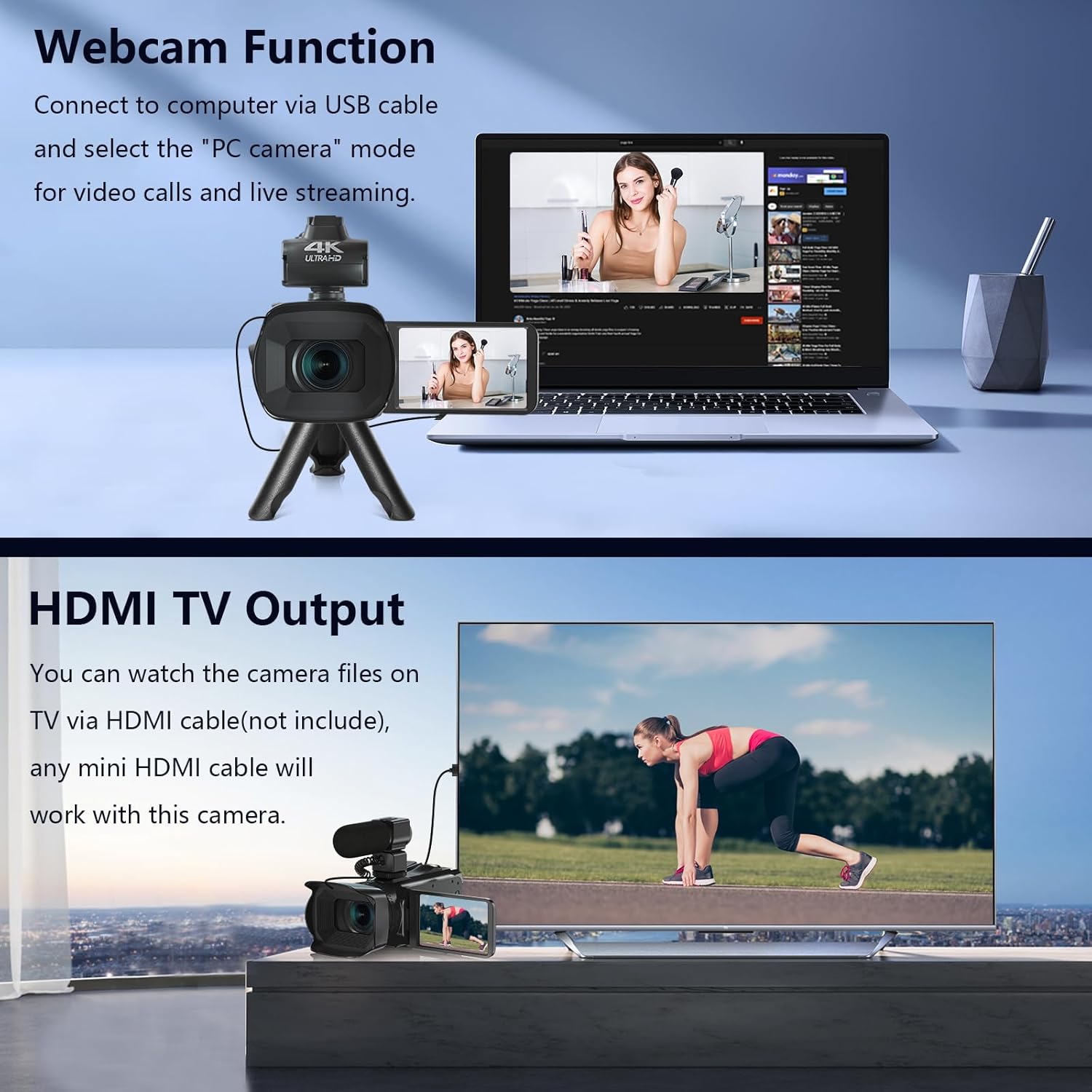
Image: The fill light accessory demonstrating its adjustable brightness (100%, 50%, 10%) and color temperature (3300K-5600K) settings, with examples of white light, white glow, and warm light.
5. การใช้งานกล้อง
5.1. เปิด/ปิดเครื่อง
Open the LCD screen to power on the camera. Close it to power off.
5.2. Basic Recording (Video/Photo)
Use the dedicated Video and Photo buttons to switch between modes and start/stop recording or capture images.
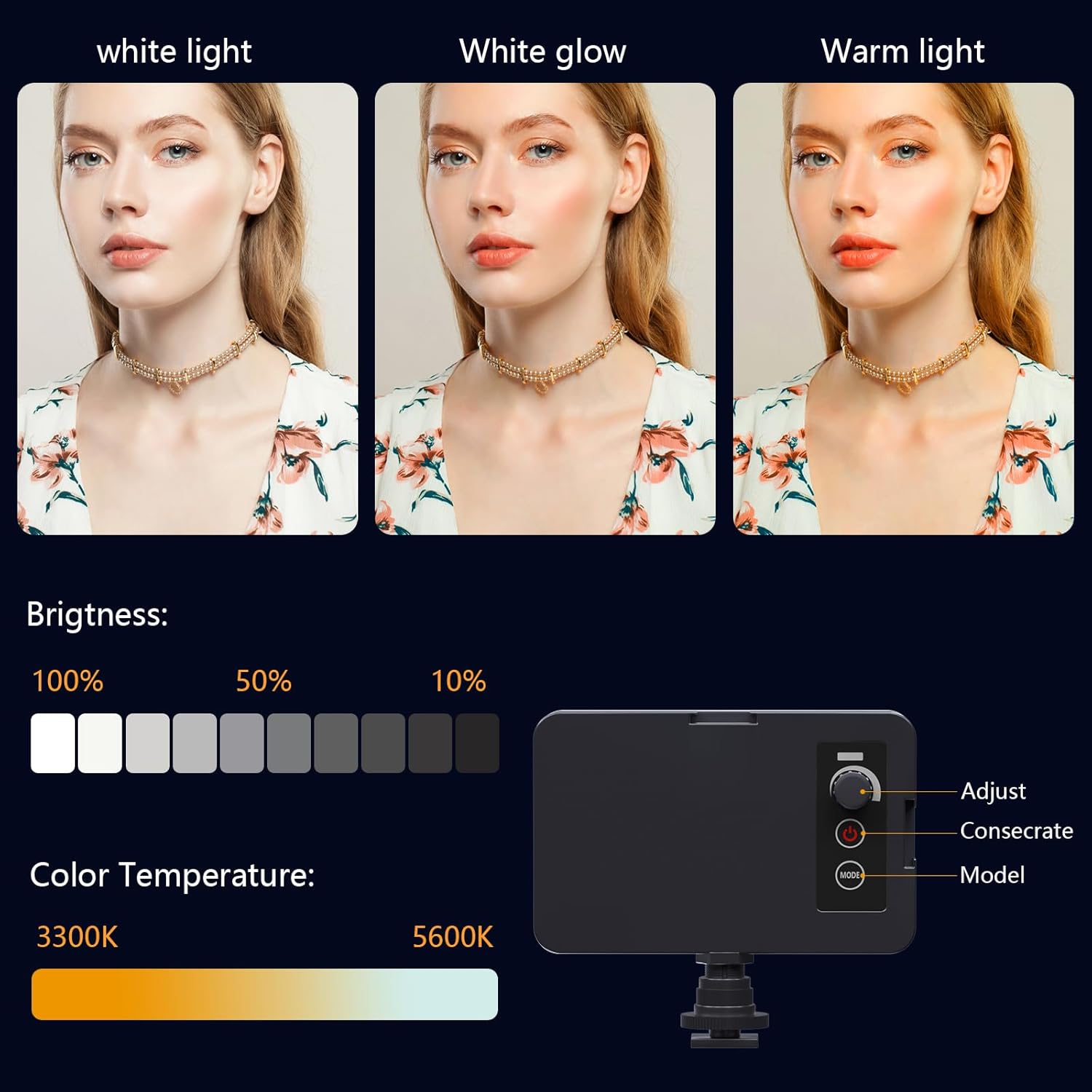
Image: The camcorder recording a 4K 60FPS video, with smaller inset images showing the effect of 18X, 16X, and 12X digital zoom on a subject.
5.3. ฟังก์ชั่นซูม
Use the zoom controls on the camera body or handheld stabilizer to adjust the 18X digital zoom.
5.4. การใช้งานหน้าจอสัมผัส
Navigate menus and settings directly on the 4.0-inch touchscreen. The screen can rotate 270 degrees for versatile shooting angles.
5.5. การตั้งค่าเมนู
Press the Menu button to access various settings such as resolution, white balance, exposure, and metering mode. Use the control wheel or touchscreen to make selections.
5.6. Wi-Fi Connection and App Usage
Connect your smartphone to the camcorder via Wi-Fi to control it remotely and transfer files.
- Turn on Wi-Fi on the camcorder via the menu. The screen will display the Wi-Fi ID (e.g., 4K_WIFI) and password (e.g., 12345678), along with a QR code.
- Download the "IDC CAM" app by scanning the QR code or searching on your app store.
- On your smartphone, go to Wi-Fi settings and connect to the camcorder's Wi-Fi network using the provided password.
- Open the "IDC CAM" app. You can now view a live feed, control recording, and capture photos remotely.

Image: The camcorder's screen showing Wi-Fi ID, password, and a QR code for downloading the companion app, with smartphones connected via Wi-Fi in the background.
For a visual guide on Wi-Fi connection and app usage, watch this video:
Video: This video demonstrates how to connect the NPX108 digital video camera to Wi-Fi and use the companion app for remote control and file การจัดการ.
5.7. Webฟังก์ชั่นลูกเบี้ยว
The camcorder can be used as a webcam for video calls and live streaming.
- เชื่อมต่อกล้องวิดีโอเข้ากับคอมพิวเตอร์โดยใช้สาย USB
- On the camera's screen, select "PC CAM" mode.
- Your computer should now recognize the camcorder as a webลูกเบี้ยว.
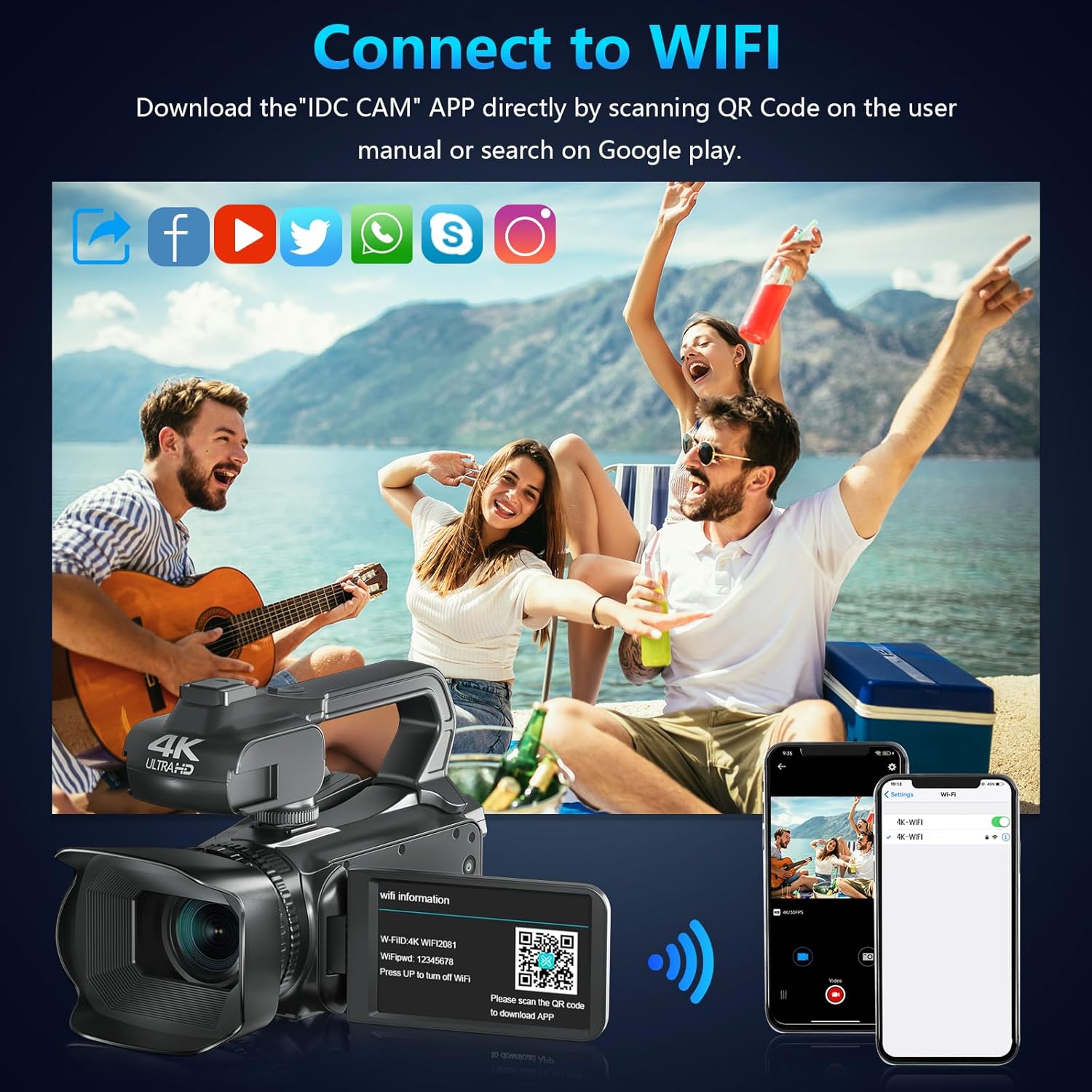
Image: The camcorder functioning as a webcam connected to a laptop, and also connected to a TV via HDMI for output.
5.8. HDMI TV Output
View your recorded videos and photos directly on a TV or monitor.
- Connect the camcorder to your TV using a mini HDMI cable (not included).
- เลือกอินพุต HDMI ที่เหมาะสมบนทีวีของคุณ
- The camera's display will now be mirrored on your TV.

Image: The camcorder connected to a laptop for live streaming (webcam mode) and to a TV via an HDMI cable for real-time viewเนื้อหา
5.9.คุณสมบัติพิเศษ
- บันทึกขณะชาร์จ: Continue recording even when the battery is low by connecting the charger.
- สโลว์โมชั่น: Capture dynamic scenes in slow motion.
- เวลาที่ล่วงเลย: Record events over an extended period and condense them into a short video.
- ตั้งเวลาถ่ายเอง: Set a delay before capturing a photo or starting a video.
- ป้องกันการสั่น: ระบบป้องกันภาพสั่นไหวแบบดิจิทัลช่วยลดความเบลอที่เกิดจากการสั่นไหวของกล้อง
- การมองเห็นตอนกลางคืน: Capture clear footage ในสภาพแสงน้อย

Image: A collage demonstrating various camcorder features: recording while charging, pause function, continuous shooting, and anti-shake stabilization.

Image: A sequence of three images illustrating the time-lapse recording feature, capturing the progression of a sunset over water.
6. การบำรุงรักษา
6.1. การทำความสะอาด
- ใช้ผ้าแห้งนุ่มๆ เช็ดทำความสะอาดตัวกล้อง
- For the lens, use a lens cleaning cloth and specialized lens cleaning solution. Avoid touching the lens directly with your fingers.
- Clean the touchscreen with a microfiber cloth.
6.2. การจัดเก็บ
- When not in use, store the camera in its protective bag in a cool, dry place.
- ถอดแบตเตอรี่ออกหากจะไม่ได้ใช้งานกล้องเป็นเวลานาน
7 การแก้ไขปัญหา
| ปัญหา | สาเหตุที่เป็นไปได้ | สารละลาย |
|---|---|---|
| กล้องไม่เปิดใช้งาน | แบตเตอรี่หมดหรือใส่ไม่ถูกต้อง | ชาร์จแบตเตอรี่หรือใส่แบตเตอรี่กลับเข้าไปให้ถูกต้อง |
| ไม่สามารถบันทึกวิดีโอ/ถ่ายภาพได้ | การ์ด SD เต็ม ไม่ได้ใส่ หรือเสียหาย | Insert a new SD card, ensure it's properly inserted, or format the card (this will erase all data). |
| Poor video/image quality | Lens is dirty, insufficient lighting, or incorrect settings. | Clean the lens, use the fill light, or adjust exposure/white balance settings. |
| ปัญหาการเชื่อมต่อ Wi-Fi | Incorrect password, app not installed, or distance too far. | Verify password, install "IDC CAM" app, ensure close proximity to camera. |
8. ข้อมูลจำเพาะ
- ยี่ห้อ: เวเทค
- หมายเลขรุ่น: เอ็นพีเอ็กซ์108
- ความละเอียดการจับภาพวิดีโอ: 4K (60เฟรมต่อวินาที)
- ความละเอียดของภาพ: 64MP
- ซูมดิจิตอล: 18X
- ขนาดหน้าจอ: 4.0 Inches (270-degree rotating touchscreen)
- การเชื่อมต่อ: ไวไฟ, USB, HDMI
- คุณสมบัติพิเศษ: Auto Focus, Recording While Charging, Slow Motion, Time-Lapse, Webcam Function, Self-Timer, HD Output, External MIC Support, Handheld Stabilizer Support, Night Vision, Anti-Shake, Face Detection
- แบตเตอรี่: ลิเธียมโพลิเมอร์ 4500mAh (รวมอยู่ด้วย)
- พื้นที่จัดเก็บ: การ์ด SD (มีให้มาด้วย 64GB)
- น้ำหนักสินค้า: 3.56 ปอนด์
- ขนาดสินค้า : 6.7 x 3.8 x 3.9 นิ้ว
9. การรับประกันและการสนับสนุน
VETEK products are designed for quality and reliability. For any issues or inquiries, please refer to the following:
- นโยบายการคืนสินค้า: สินค้าทุกชิ้นสามารถส่งคืนได้ฟรีภายใน 30 วันนับจากวันที่ซื้อ
- บริการลูกค้า: VETEK offers 24-hour customer service. Please contact us for assistance.
- แผนการคุ้มครอง: มีแผนคุ้มครองเพิ่มเติมให้เลือกซื้อ (เช่น แผนคุ้มครอง 2 ปี, แผนคุ้มครอง 3 ปี, แผนคุ้มครองครบวงจร)

Image: The VETEK brand logo, representing quality and customer commitment.