
การแนะนำ
The Sonodyne Antara is a 40W wireless portable Bluetooth speaker designed to deliver high-quality stereo sound. It features a robust design with IP65 water and dust resistance, making it suitable for various environments. This manual provides essential information for setting up, operating, maintaining, and troubleshooting your Antara speaker.
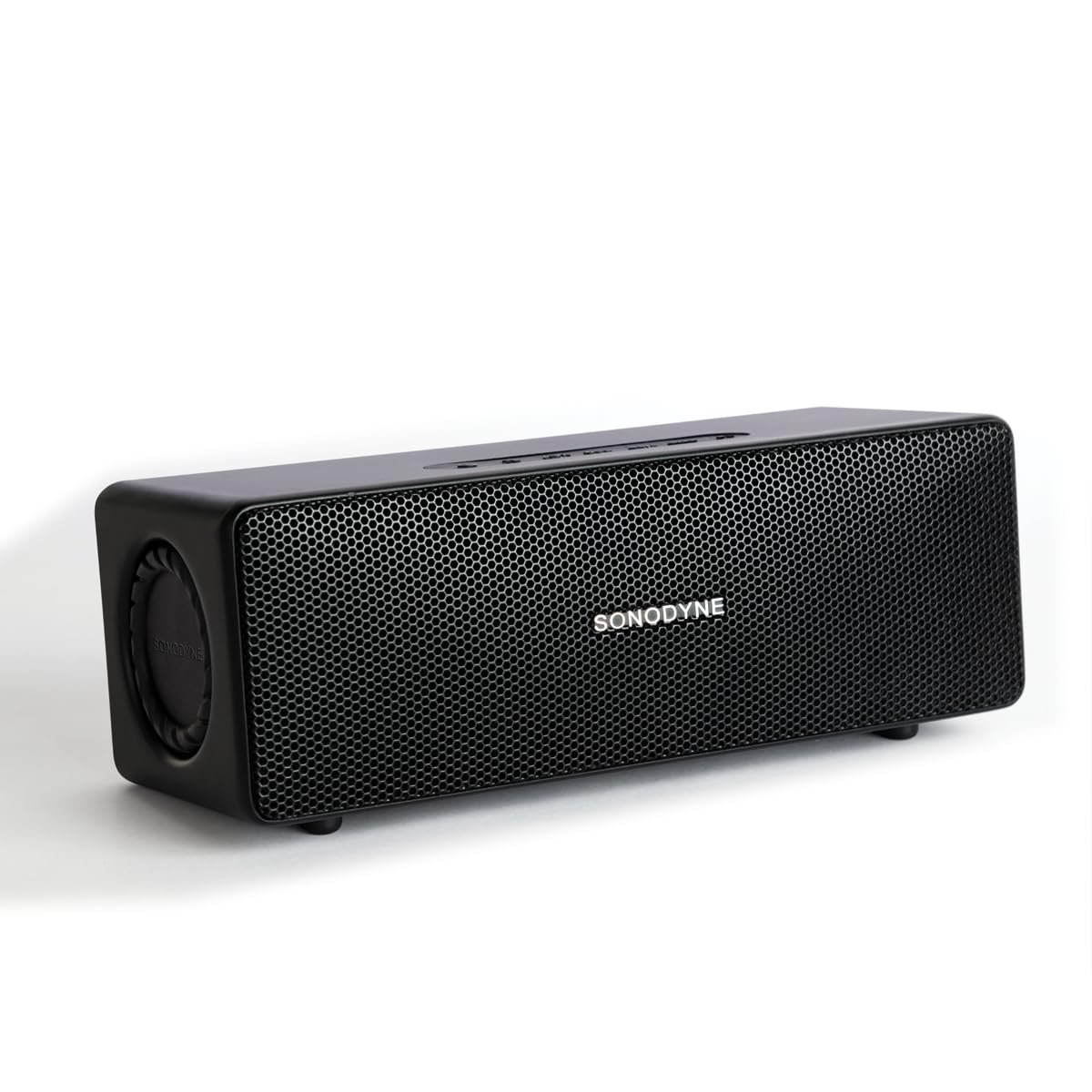
Figure 1: Sonodyne Antara Speaker - Front View
Video 1: Sonodyne Antara Bluetooth Speaker Overview. This video provides a general introduction to the speaker's features and design.
มีอะไรอยู่ในกล่อง
Carefully unpack your Sonodyne Antara speaker and ensure all items are present:
- Sonodyne Antara Speaker
- สายชาร์จ Type-C
- High Current Charger
- คู่มือการใช้งาน (เอกสารนี้)
สินค้าเกินview
การควบคุมและตัวบ่งชี้

รูปที่ 2: แผงควบคุมด้านบน
The top panel features soft-touch controls for easy operation:
- ปุ่มเปิด/ปิด: กดค้างไว้เพื่อเปิด/ปิด
- เพิ่ม/ลดระดับเสียง: ปรับระดับเสียงการเล่น
- ปุ่มเล่น/หยุดชั่วคราว: ควบคุมการเล่นสื่อ
- ปุ่มจับคู่บลูทูธ: เริ่มโหมดจับคู่บลูทูธ
- ปุ่มโหมด: Switch between input sources (Bluetooth, Aux-in, USB).
พอร์ตแผงด้านหลัง

รูปที่ 3: พอร์ตแผงด้านหลัง
แผงด้านหลังมีตัวเลือกการเชื่อมต่อหลากหลายรูปแบบ:
- พอร์ต USB: สำหรับการเล่นเสียง fileจากไดรฟ์ USB
- ก่อนออก: Audio output for connecting to a powered subwoofer.
- ช่องรับสัญญาณเสียงเข้า: 3.5mm analog line input for wired connections.
- กระแสตรงใน 5V: พอร์ตชาร์จ Type-C
การตั้งค่า
การชาร์จลำโพง
- Connect the provided Type-C charging cable to the DC IN 5V port on the speaker's rear panel.
- Connect the other end of the cable to the Sonodyne high current USB charger.
- เสียบที่ชาร์จเข้ากับเต้ารับไฟฟ้า
- The charging indicator will illuminate. The speaker is fully charged when the indicator changes color or turns off (refer to specific indicator behavior in the quick start guide). A full charge takes approximately 4.5 hours and provides up to 12 hours of playtime.
เปิด/ปิดเครื่อง
- การเปิดเครื่อง: Press and hold the Power button on the top panel until the indicator light illuminates.
- วิธีปิดเครื่อง: กดปุ่มเปิด/ปิดค้างไว้อีกครั้งจนกว่าไฟแสดงสถานะจะดับลง
จับคู่บลูทู ธ

รูปที่ 4: คุณสมบัติการเชื่อมต่อ
- ตรวจสอบให้แน่ใจว่าลำโพงเปิดอยู่
- Press the Bluetooth Pairing button on the top panel. The Bluetooth indicator will flash, indicating it's in pairing mode.
- On your smartphone or other Bluetooth-enabled device, go to the Bluetooth settings and search for available devices.
- Select "Sonodyne Antara" from the list.
- เมื่อเชื่อมต่อแล้ว ไฟแสดงสถานะบลูทูธบนลำโพงจะหยุดกะพริบและติดสว่างค้าง
การเชื่อมต่อ Aux-in
- Connect a 3.5mm audio cable (not included) from your audio source to the AUX IN port on the speaker's rear panel.
- Press the Mode button on the top panel to switch to Aux-in mode.
การเล่นผ่าน USB
- เสียบไดรฟ์ USB ที่มีไฟล์เสียง files into the USB port on the speaker's rear panel.
- Press the Mode button on the top panel to switch to USB mode. The speaker will automatically begin playing audio fileจากไดรฟ์
Duet Mode (True Stereo Pairing)

Figure 5: Duet Mode Feature
To pair two Antara speakers for a true stereo experience:
- Ensure both Antara speakers are powered on and not connected to any Bluetooth device.
- On one speaker (this will be the primary speaker), press and hold the Bluetooth Pairing button until you hear a confirmation tone.
- Repeat the same step on the second speaker (secondary speaker).
- The speakers will automatically search and connect to each other. Once connected, the primary speaker's Bluetooth indicator will flash slowly, and the secondary speaker's indicator will be solid.
- Now, connect your device to the primary speaker via Bluetooth as described in the "Bluetooth Pairing" section. Audio will play in true stereo across both speakers.
คำแนะนำการใช้งาน
การควบคุมการเล่นขั้นพื้นฐาน
- เล่น/หยุดชั่วคราว: กดปุ่มเล่น/หยุดชั่วคราวหนึ่งครั้ง
- ปรับระดับเสียงขึ้น: กดปุ่มเพิ่มระดับเสียง
- ลดเสียงลง: กดปุ่มลดระดับเสียง
- เพลงถัดไป: Press and hold the Volume Up button (or double-press, refer to quick start guide for exact behavior).
- แทร็กก่อนหน้า: Press and hold the Volume Down button (or triple-press, refer to quick start guide for exact behavior).
Call Management (when connected via Bluetooth)
- รับสาย: กดปุ่มเล่น/หยุดชั่วคราวหนึ่งครั้ง
- วางสาย: กดปุ่มเล่น/หยุดชั่วคราวหนึ่งครั้งระหว่างการโทร
- ปฏิเสธสาย: กดปุ่มเล่น/หยุดชั่วคราว
การซ่อมบำรุง
การทำความสะอาด
- เช็ดลำโพงด้วยผ้าแห้งนุ่มๆ ที่ไม่มีขน
- ห้ามใช้สารทำความสะอาดที่มีฤทธิ์กัดกร่อน แอลกอฮอล์ เบนซีน หรือตัวทำละลายเคมีอื่นๆ เนื่องจากอาจทำให้พื้นผิวเสียหายได้
พื้นที่จัดเก็บ
- เก็บลำโพงไว้ในที่แห้งและเย็น หลีกเลี่ยงแสงแดดโดยตรงและอุณหภูมิที่สูงหรือต่ำเกินไป
- If storing for an extended period, charge the battery to approximately 50% every few months to prolong battery life.
ความต้านทานน้ำและฝุ่น (IP65)
The Sonodyne Antara speaker is rated IP65, meaning it is protected against dust ingress and low-pressure water jets from any direction. This makes it suitable for outdoor use in light rain or dusty conditions.
- ห้ามจุ่มลำโพงลงในน้ำ
- Avoid exposing the speaker to powerful water jets.
- ตรวจสอบให้แน่ใจว่าฝาปิดช่องต่างๆ ปิดสนิทก่อนนำลำโพงไปสัมผัสกับน้ำหรือฝุ่น
- If the speaker gets wet, wipe it dry with a soft cloth before charging or using it again.
การแก้ไขปัญหา
| ปัญหา | สาเหตุที่เป็นไปได้ | สารละลาย |
|---|---|---|
| ลำโพงไม่เปิดเครื่อง | แบตเตอรี่อ่อน | Charge the speaker using the provided charger and Type-C cable. |
| ไม่สามารถจับคู่ผ่านบลูทูธได้ | ลำโพงไม่อยู่ในโหมดจับคู่ อุปกรณ์อยู่ไกลเกินไป มีอุปกรณ์ที่เคยจับคู่ไว้แล้วเชื่อมต่ออยู่ | Ensure speaker is in pairing mode (flashing indicator). Move device closer. Disconnect from other devices or reset speaker's Bluetooth. |
| ไม่มีเสียง. | ระดับเสียงเบาเกินไป; แหล่งสัญญาณเข้าไม่ถูกต้อง; อุปกรณ์ไม่เล่น | Increase speaker and device volume. Press Mode button to select correct input (Bluetooth, Aux, USB). Ensure audio is playing on your source device. |
| คุณภาพเสียงไม่ดี/เสียงผิดเพี้ยน | Source audio quality; speaker too far from source (Bluetooth); interference. | Try a different audio source. Move Bluetooth device closer to the speaker. Avoid obstacles between speaker and device. |
| Duet Mode not working. | Speakers not properly paired in Duet Mode. | Ensure both speakers are disconnected from other devices before initiating Duet Mode pairing. Follow Duet Mode instructions carefully. |
ข้อมูลจำเพาะ
| คุณสมบัติ | รายละเอียด |
|---|---|
| ยี่ห้อ | Sonodyne |
| ชื่อรุ่น | อันตารา |
| ประเภทลำโพง | Stereo, Portable Bluetooth Speaker |
| กำลังขับสูงสุดของลำโพง | 40 วัตต์ |
| โหมดเอาต์พุตเสียง | Stereo (2.0 Channels) |
| เทคโนโลยีการเชื่อมต่อ | Bluetooth 5.4, Aux-in (3.5mm), USB |
| ประเภทไดร์เวอร์เสียง | Dynamic Driver (4 transducers, 2 passive radiators) |
| Woofer Driver Diameter | 2.5 นิ้ว |
| Tweeter Driver Diameter | 0.5 นิ้ว |
| อัตราส่วนสัญญาณต่อเสียงรบกวน | 85 เดซิเบล |
| การตอบสนองความถี่ | Up to 20 KHz (typical range for full-range speakers) |
| แหล่งพลังงาน | ใช้พลังงานจากแบตเตอรี่ (รวมแบตเตอรี่ลิเธียมไอออน 1 ก้อน) |
| ความจุของแบตเตอรี่ | 3350 มิลลิแอมป์ |
| อายุการใช้งานแบตเตอรี่โดยเฉลี่ย | นานถึง 12 ชั่วโมง |
| เวลาในการชาร์จแบตเตอรี่ | 4.5 ชั่วโมง |
| วิธีการควบคุม | การควบคุมแบบสัมผัส |
| ระดับความต้านทานต่อน้ำ | IP65 (Water Resistant, Dustproof) |
| วัสดุของตู้หุ้ม | อะคริโลไนไตรล์ บิวทาไดอีน สไตรีน (ABS) |
| ขนาดสินค้า (ลึก x กว้าง x สูง) | 9.8D x 25W x 8.6H เซนติเมตร |
| น้ำหนักสินค้า | 1.5 กิโลกรัม |
การรับประกันและการสนับสนุน
การรับประกันของผู้ผลิต
The Sonodyne Antara speaker comes with a การรับประกันแบบจำกัดของผู้ผลิต 2 ปีการรับประกันนี้ครอบคลุมข้อบกพร่องด้านวัสดุและฝีมือการผลิตภายใต้การใช้งานปกติ โปรดเก็บหลักฐานการซื้อไว้เพื่อขอรับสิทธิ์การรับประกัน
การสนับสนุนลูกค้า
For technical assistance, warranty claims, or any other inquiries, please contact Sonodyne customer support:
- ข้อมูลติดต่อผู้ผลิต: Sonodyne Technologies Pvt. Ltd. 98 NB Block E New Alipore, Kolkata 700053
- Refer to the official Sonodyne website or your purchase documentation for the most current contact details and support options.