
1. บทนำ
This manual provides essential information for the installation, operation, and maintenance of your DATOUBOSS 10200W Hybrid Solar Inverter. Please read this manual thoroughly before installation and operation to ensure proper use and safety. Keep this manual for future reference.
2. คำแนะนำด้านความปลอดภัย
คำเตือน: การไม่ปฏิบัติตามคำแนะนำด้านความปลอดภัยเหล่านี้อาจส่งผลให้เกิดการบาดเจ็บร้ายแรงหรือความเสียหายต่ออุปกรณ์
- The starting power of an inductive load must be at least three times the rated power of the inverter. Connecting loads with too high switching power can damage the inverter.
- Ensure all circuits are connected correctly and install appropriate circuit breakers for each circuit to prevent overcurrent and short circuits.
- Follow the correct ignition order during startup: First, connect the battery, then turn on the inverter, and finally connect the PV (solar panels), mains (utility grid), and load circuit breakers.
- Follow the reverse order when shutting down the system: Disconnect load, mains, PV, then turn off the inverter, and finally disconnect the battery.
- This inverter provides multiple protection methods including short circuit protection, over-current protection, over-voltagการป้องกัน e ภายใต้ voltage protection, overload protection, backfill protection, and over-temperature protection. However, proper installation and operation are crucial for safety.
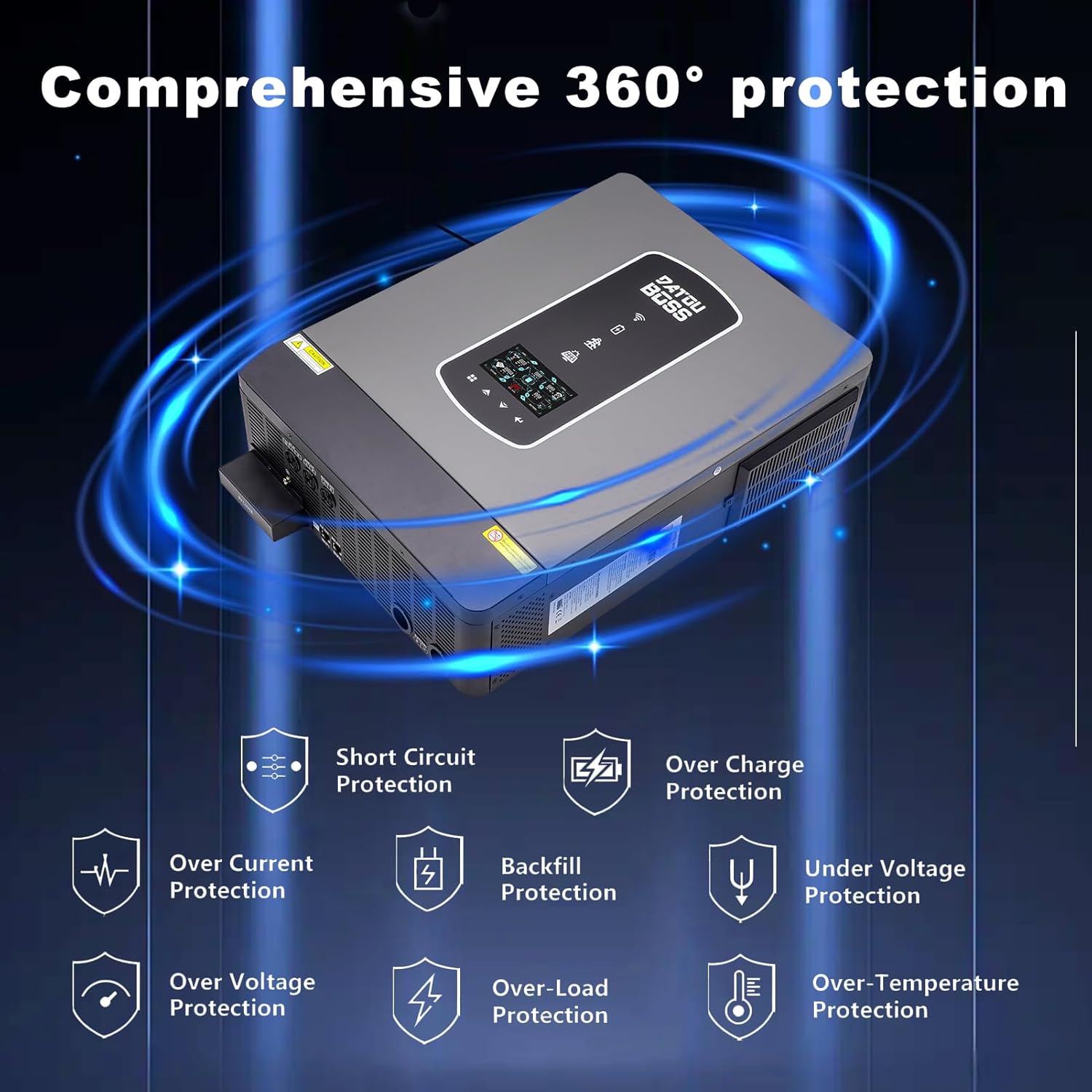
Image: Comprehensive protection features of the DATOUBOSS Hybrid Solar Inverter, including short circuit, over-current, over-charge, under-voltage, ปริมาณเกินtage, backfill, over-load, and over-temperature protection.
3. สินค้าหมดview
The DATOUBOSS 10200W Hybrid Solar Inverter is a 48V DC to 220V/230V AC pure sine wave inverter with an integrated 160A MPPT solar charge controller. It is designed to provide reliable power for various home or office appliances and supports both lead-acid and lithium batteries.
3.1 คุณสมบัติหลัก
- กำลังขับสูง: 10.2KW rated power, capable of powering various electrical appliances.
- Dual Photovoltaic Input: Features two independent MPPTs with a total of 36A, allowing connection of higher power solar panels for uninterrupted power supply.
- เอาต์พุต AC คู่: Provides a primary and secondary output. The secondary output remains active when the primary circuit turns off due to low battery voltage or lack of PV/grid power, similar to a super power-saving mode.
- โหมดการชาร์จที่หลากหลาย: Offers 4 configurable charging modes: Solar Priority, Solar Only, Utility Priority, and Solar Hybrid and Utilities.
- โหมดเอาต์พุตที่ยืดหยุ่น: Includes 3 output modes: Solar Priority (SUB), Utility Priority (USB), and SBU (Solar-Battery-Utility).
- ความเข้ากันได้กว้าง: Compatible with various battery types including FLD, GEL, SLD, AGM, and Lithium.

ภาพ: ด้านหน้า view of the DATOUBOSS 10200W Hybrid Solar Inverter, showcasinด้วยการออกแบบที่กะทัดรัดและจอแสดงผลแบบบูรณาการ

ภาพ: เหนือview of key specifications including 150V starting voltage, 10200W AC output power, 160A MPPT solar charge controller, and 500Vdc maximum PV array open circuit voltage.
3.2 คำอธิบายลักษณะที่ปรากฏ
The inverter features an LCD display for monitoring, status and fault indicators, charging indicators, and touch function buttons for configuration. The rear panel includes various connection ports.
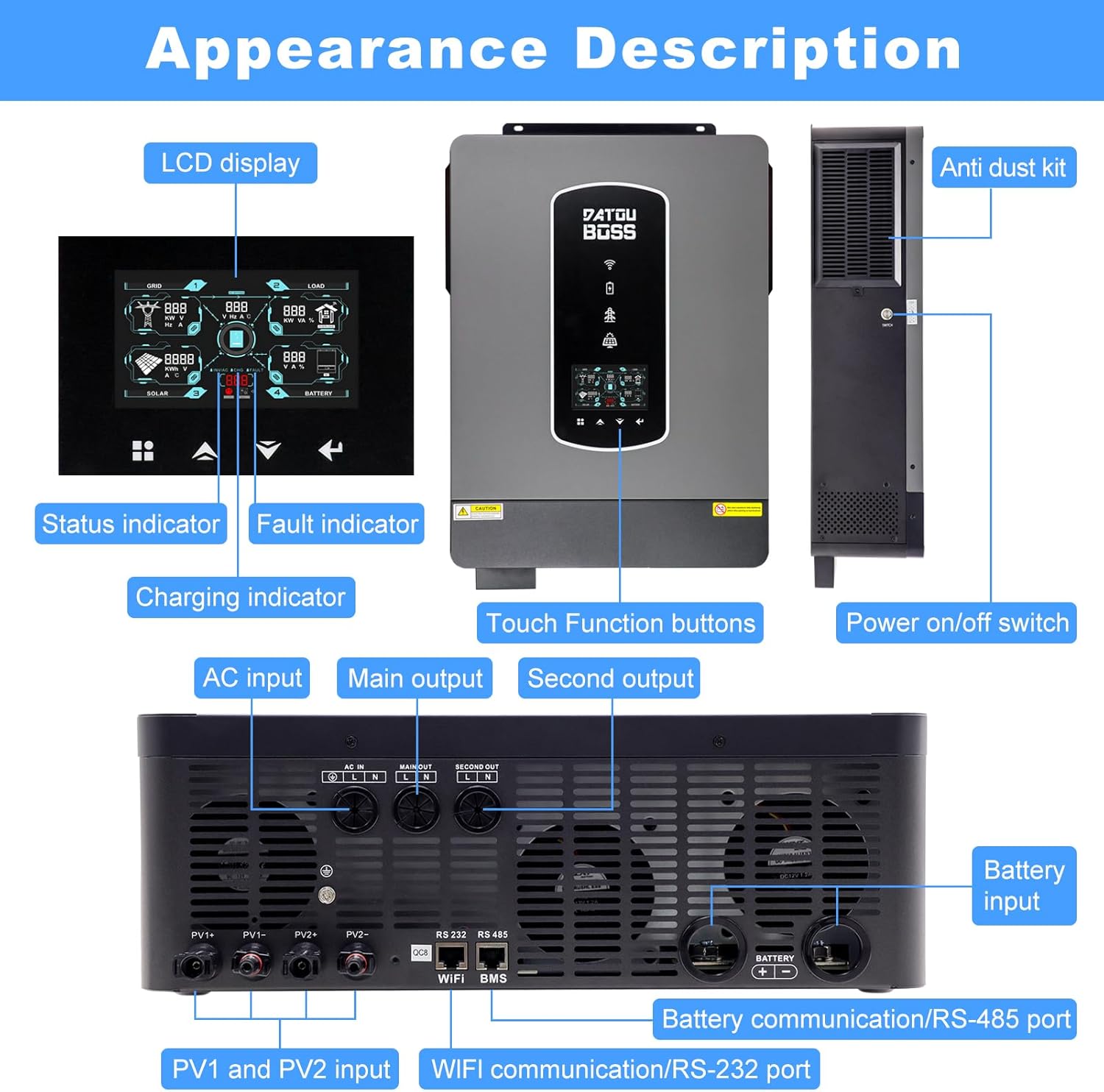
Image: Detailed appearance description showing the LCD display, indicators, touch buttons on the front, and AC input, main output, second output, PV1/PV2 inputs, battery input, and communication ports on the rear panel.
4. การตั้งค่าและการติดตั้ง
Proper installation is critical for the safe and efficient operation of your hybrid solar inverter. Ensure all connections are secure and follow local electrical codes.
4.1 การติดตั้งอินเวอร์เตอร์
Mount the inverter in a well-ventilated area, away from direct sunlight, moisture, and flammable materials. Ensure sufficient clearance around the unit for heat dissipation.
4.2 การเชื่อมต่อทางไฟฟ้า
Refer to the system connection diagram for detailed wiring instructions. All wiring should be performed by a qualified electrician.
- การเชื่อมต่อแบตเตอรี่: Connect the 48V battery bank to the designated battery input terminals. Ensure correct polarity.
- การเชื่อมต่ออินพุต PV: Connect your solar panels to the PV1 and PV2 input terminals. The inverter supports dual MPPT inputs, allowing for flexible solar array configurations. The PV operating voltage range is 90Vdc-450Vdc, with a maximum open circuit voltagกระแสตรง 500V.
- การเชื่อมต่ออินพุต AC: Connect the utility grid (mains power) to the AC input terminal.
- การเชื่อมต่อเอาต์พุต AC: Connect your household or office appliances to the main output and second output terminals.

Image: Illustration of dual MPPT inputs for solar panels and compatibility with multiple battery types including FLD, GEL, SLD, AGM, and Lithium.

Image: System connection diagram showing solar panels, generator, power grid, external battery packs, and home appliances connected to the DATOUBOSS Hybrid Solar Inverter.
5. โหมดการทำงาน
The DATOUBOSS Hybrid Solar Inverter offers flexible charging and output modes to optimize energy usage based on your preferences and available power sources.
5.1 โหมดการชาร์จ
The battery charging current can be configured via the LCD display. There are four available charging modes:
- ลำดับความสำคัญของพลังงานแสงอาทิตย์: ให้ความสำคัญกับการใช้พลังงานแสงอาทิตย์ในการชาร์จแบตเตอรี่
- พลังงานแสงอาทิตย์เท่านั้น: ชาร์จแบตเตอรี่โดยใช้พลังงานแสงอาทิตย์เพียงอย่างเดียว
- ลำดับความสำคัญของสาธารณูปโภค: Prioritizes utility grid power for charging the battery.
- Solar Hybrid and Utilities: ใช้พลังงานทั้งจากแสงอาทิตย์และไฟฟ้าจากระบบสาธารณะในการชาร์จ
5.2 โหมดเอาต์พุต
The inverter provides three output modes to manage power distribution to your loads:
- Solar Priority (SUB): Prioritizes solar power, then battery, then utility grid for powering loads.
- ลำดับความสำคัญของยูทิลิตี้ (USB): Prioritizes utility grid power, then solar, then battery for powering loads.
- ลำดับความสำคัญของ SBU (พลังงานแสงอาทิตย์-แบตเตอรี่-สาธารณูปโภค): Prioritizes solar power, then battery, then utility grid for powering loads.

Image: Diagram illustrating the four charging modes (Priority of mains power supply, Solar priority, Mixed loading, Solar only) and three discharge modes (SUB Solar First, USB Utility First, SBU Priority).
6. การบำรุงรักษา
Regular maintenance ensures the longevity and optimal performance of your DATOUBOSS Hybrid Solar Inverter.
- การทำความสะอาด: ควรทำความสะอาดภายนอกและช่องระบายอากาศของอินเวอร์เตอร์เป็นระยะ เพื่อป้องกันฝุ่นละอองสะสม ซึ่งอาจขัดขวางการระบายความร้อน ใช้ผ้าแห้งและนุ่มเช็ดทำความสะอาด
- ตรวจสอบการเชื่อมต่อ: ตรวจสอบการเชื่อมต่อทางไฟฟ้าทั้งหมด (แผงโซลาร์เซลล์ แบตเตอรี่ อินพุต/เอาต์พุต AC) เป็นประจำทุกปี เพื่อดูว่าแน่นหนาและมีร่องรอยการกัดกร่อนหรือไม่ ขันให้แน่นหากมีจุดเชื่อมต่อหลวม
- การตรวจสอบสิ่งแวดล้อม: Ensure the installation environment remains within the specified operating temperature range and free from excessive humidity or corrosive substances.
- อัพเดตเฟิร์มแวร์: ตรวจสอบของผู้ผลิต webตรวจสอบเว็บไซต์เพื่อดูการอัปเดตเฟิร์มแวร์ที่มีให้ใช้งาน เพื่อให้แน่ใจว่าอินเวอร์เตอร์ของคุณมีคุณสมบัติล่าสุดและได้รับการแก้ไขข้อบกพร่องแล้ว
7 การแก้ไขปัญหา
If you encounter issues with your inverter, refer to the following basic troubleshooting steps. For complex problems, contact customer support.
- ไม่มีพลังงาน/ปิดจอแสดงผล: ตรวจสอบการเชื่อมต่อแบตเตอรี่และระดับแบตเตอรี่tage, and AC input power. Ensure the inverter's power switch is ON.
- โอเวอร์โหลดปลุก: Reduce the connected load. Ensure the total load does not exceed the inverter's rated power. Remember inductive loads require higher starting power.
- PV Input Error: Check solar panel connections, PV array voltage, and ensure no shading is affecting the panels. Verify PV operating voltage อยู่ในช่วงที่ระบุ
- แบตเตอรี่ต่ำ Voltagอีปลุก: Check battery charge level. Ensure solar panels are generating power or the utility grid is connected for charging.
- ปลุกอุณหภูมิเกิน: Ensure the inverter is in a well-ventilated area and its cooling fins are not obstructed. Clean any dust from the vents.
8. ข้อมูลจำเพาะ
The following table details the technical specifications of the DATOUBOSS 10200W Hybrid Solar Inverter.

Image: Detailed specifications label found on the inverter, including model number, power ratings, input/output voltages, and operating conditions.
| คุณสมบัติ | ข้อมูลจำเพาะ |
|---|---|
| หมายเลขรุ่น | 48V 10200W |
| กำลังไฟที่กำหนด | 10200วัตต์ (10.2กิโลวัตต์) |
| อินพุต Voltage | กระแสตรง 48 โวลต์ |
| ปริมาณการส่งออกtage | กระแสไฟสลับ 220V/230V |
| ตัวควบคุมการชาร์จพลังงานแสงอาทิตย์แบบ MPPT | 160เอ |
| กำลังอินพุต PV สูงสุด | 10200วัตต์ |
| ปริมาณการดำเนินงาน PVtagอี เรนจ์ | 90Vdc-450Vdc |
| แม็กซ์ PV Open Circuit Voltage | กระแสตรง 500 โวลต์ |
| Max PV Load Current | 160Amp |
| กระแสไฟขาออกที่กำหนด | 44.3Amp |
| ประสิทธิภาพการแปลง | สูงสุดถึง 99% |
| ขนาดสินค้า | 24.02 x 18.5 x 8.27 นิ้ว |
| น้ำหนักสินค้า | 33 ปอนด์ |
| ช่วงอุณหภูมิในการทำงาน | -10 ถึง 50℃ |
9. การรับประกันและการสนับสนุน
DATOUBOSS products are designed for reliability and performance. For warranty information, please refer to the warranty card included with your product or visit the official DATOUBOSS website. For technical support, troubleshooting assistance, or spare parts, please contact DATOUBOSS customer service through the contact information provided on the product packaging or webเว็บไซต์.
When contacting support, please have your product model number (48V 10200W) and serial number (if applicable) ready.