
1. บทนำ
ขอบคุณสำหรับการซื้อasing the YESIDO YSW13 Mini Portable Bluetooth Speaker. This manual provides essential information for the safe and efficient use of your device. The YSW13 speaker features wireless Bluetooth connectivity, vibrant RGB lighting, and a compact design for portable audio enjoyment.

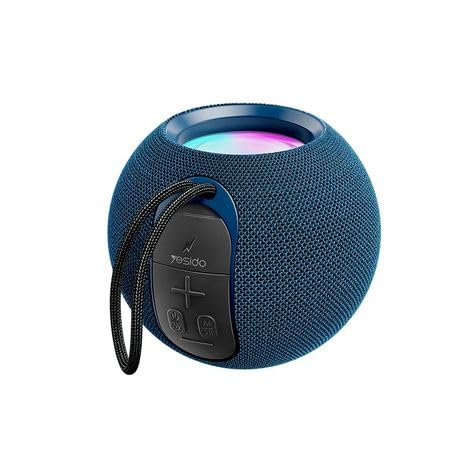
ด้านหน้า view of the YESIDO YSW13 Mini Portable Bluetooth Speaker, showcasing its compact design and fabric finish.
2. เนื้อหาบรรจุภัณฑ์
กรุณาตรวจสอบแพ็คเกจสำหรับรายการต่อไปนี้:
- YESIDO YSW13 Mini Portable Bluetooth Speaker
- สายชาร์จ USB
- คู่มือการใช้งาน
The retail packaging for the YESIDO YSW13 Mini Portable Bluetooth Speaker, showing product features and branding.
3. การตั้งค่า
3.1 การชาร์จลำโพง
Before first use, fully charge the speaker. Connect the provided USB charging cable to the speaker's charging port and the other end to a DC 5V power source (e.g., a USB wall adapter or computer USB port). The charging indicator light will illuminate during charging and turn off when fully charged. A full charge typically takes approximately 2-3 hours.
3.2 การเปิด/ปิดเครื่อง
- To power on: Press and hold the Power button for a few seconds until you hear an audible prompt and the RGB lights activate.
- To power off: Press and hold the Power button again for a few seconds until you hear an audible prompt and the lights turn off.
3.3 การจับคู่บลูทูธ
The YESIDO YSW13 uses Bluetooth version 5.1 for stable wireless connection up to 10 meters.
- ตรวจสอบให้แน่ใจว่าลำโพงเปิดอยู่และอยู่ในโหมดจับคู่บลูทูธ (โดยจะมีไฟกะพริบหรือเสียงแจ้งเตือน)
- บนอุปกรณ์มือถือของคุณ เปิดใช้งาน Bluetooth และค้นหาอุปกรณ์ที่มีอยู่
- Select "YESIDO YSW13" from the list of devices.
- เมื่อเชื่อมต่อเสร็จแล้ว คุณจะได้ยินเสียงยืนยัน และไฟแสดงสถานะของลำโพงจะติดสว่างค้าง
4. คู่มือการใช้งาน
4.1 การเล่นเพลง
- เล่น/หยุดชั่วคราว: กดปุ่มเล่น/หยุดชั่วคราวหนึ่งครั้งเพื่อเล่นหรือหยุดเพลงชั่วคราว
- การควบคุมระดับเสียง: Use the volume buttons on the speaker or your connected device to adjust the volume.
- เพลงถัดไป / ก่อนหน้า: Press and hold the volume up button for the next track, and the volume down button for the previous track.
4.2 โหมดการเชื่อมต่อ
The YSW13 speaker supports both wireless (Bluetooth) and wired connections, as well as TF card playback.
- โหมดบลูทู ธ : เชื่อมต่อแบบไร้สายตามที่อธิบายไว้ในหัวข้อ 3.3
- โหมดการ์ด TF: ใส่การ์ด TF (MicroSD) พร้อมเสียง MP3 fileเสียบการ์ด TF ลงในช่องที่กำหนด ลำโพงจะเปลี่ยนไปใช้โหมดการ์ด TF โดยอัตโนมัติและเริ่มเล่น

ภาพระยะใกล้ view of the YESIDO YSW13 speaker's side panel, illustrating the TF card slot for direct music playback without Bluetooth.
4.3 แสง RGB
The speaker features integrated RGB lights that enhance the listening experience. The lights typically cycle through various colors automatically. Refer to the speaker's specific controls for any options to change light modes or turn them off, if available.
4.4 ฟังก์ชั่น True Wireless Stereo (TWS)
For an enhanced audio experience, two YESIDO YSW13 speakers can be interconnected to create a True Wireless Stereo (TWS) system, providing 3D sound effects.
- Ensure both YSW13 speakers are powered on and not connected to any Bluetooth device.
- On one speaker (this will be the primary speaker), double-press the Power button (or a dedicated TWS button if present). The speaker will enter TWS pairing mode.
- The two speakers will automatically search for and connect to each other. A confirmation sound will indicate successful pairing.
- Once paired, connect your mobile device to the primary speaker via Bluetooth as described in Section 3.3. Audio will now play through both speakers in stereo.

Two YESIDO YSW13 speakers placed side-by-side, demonstrating the True Wireless Stereo (TWS) function for interconnected playback and enhanced 3D sound.
5. การบำรุงรักษา
- การทำความสะอาด: ใช้ผ้านุ่มและแห้งเช็ดทำความสะอาดพื้นผิวของลำโพง ห้ามใช้น้ำยาทำความสะอาดหรือตัวทำละลายที่มีฤทธิ์กัดกร่อน
- พื้นที่จัดเก็บ: เก็บลำโพงไว้ในที่แห้งและเย็น หลีกเลี่ยงแสงแดดโดยตรงและอุณหภูมิที่สูงหรือต่ำเกินไป
- การดูแลแบตเตอรี่ เพื่อยืดอายุการใช้งานแบตเตอรี่ ควรหลีกเลี่ยงการปล่อยให้แบตเตอรี่หมดจนเกลี้ยงบ่อยๆ ควรชาร์จลำโพงเป็นประจำ แม้ว่าจะไม่ได้ใช้งานเป็นเวลานานก็ตาม
- ความต้านทานน้ำ: ลำโพงนี้ไม่กันน้ำ โปรดหลีกเลี่ยงการสัมผัสน้ำหรือความชื้นมากเกินไป
6 การแก้ไขปัญหา
| ปัญหา | สาเหตุที่เป็นไปได้ | สารละลาย |
|---|---|---|
| ลำโพงไม่เปิด | แบตเตอรี่อ่อน; กดปุ่มเปิด/ปิดไม่ถูกต้อง | Charge the speaker; Press and hold the Power button until it turns on. |
| ไม่สามารถจับคู่ผ่านบลูทูธได้ | ลำโพงไม่ได้อยู่ในโหมดจับคู่; บลูทูธของอุปกรณ์ปิดอยู่; อยู่ห่างจากลำโพงมากเกินไป | Ensure speaker is in pairing mode; Enable Bluetooth on your device; Move device closer to speaker (within 10m). |
| ไม่มีเสียงในระหว่างการเล่น | Volume too low; Speaker not connected; Incorrect source selected | Increase volume on speaker and device; Re-pair Bluetooth; Ensure correct mode (Bluetooth/TF Card) is active. |
| การจับคู่ TWS ล้มเหลว | ลำโพงเชื่อมต่อกับอุปกรณ์อื่นอยู่แล้ว; อยู่ห่างกันเกินไป | Disconnect both speakers from other devices; Ensure speakers are close to each other during TWS pairing. |
7. ข้อมูลจำเพาะ

การภายใน view of the YESIDO YSW13 speaker, highlighting the full-frequency audio unit and top bass diaphragm for HIFI music timbre.
- แบบอย่าง: YSW13
- ยี่ห้อ: YESIDO
- เวอร์ชันบลูทูธ: 5.1
- ความจุแบตเตอรี่: 1200mAh
- แหล่งจ่ายไฟ: กระแสตรง 5 โวลต์
- ช่วงบลูทู ธ : > 10 เมตร
- โหมดการเชื่อมต่อ: Wired / Wireless (Bluetooth, TF Card)
- Audio Signal to Noise Ratio: 95เดซิเบล
- หน่วยลำโพง: Full frequency unit + low frequency diaphragm (52mm speaker unit)
- การตอบสนองความถี่: 85เฮิรตซ์-20กิโลเฮิรตซ์
- วัสดุ: ABS + PC + silicone
- ขนาดสินค้า : 7D x 6W x 5H เซนติเมตร
- คุณสมบัติพิเศษ: Bass Boost, RGB Lights, TWS (True Wireless Stereo) support

An exploded diagram illustrating the 360-degree sound output and the internal 52mm speaker unit of the YESIDO YSW13, designed for high bass.
8. การรับประกันและการสนับสนุน
The YESIDO YSW13 Mini Portable Bluetooth Speaker comes with a limited warranty. Please refer to the product packaging or contact your retailer for specific warranty terms and conditions. For technical support or inquiries, please contact the YESIDO customer service department or your point of purchase.
