
การแนะนำ
The JBL Soundgear Frames are innovative Bluetooth audio glasses designed to provide an immersive audio experience while allowing you to remain aware of your surroundings. Equipped with ultra-slim speakers, an integrated microphone, and touch controls, these frames offer seamless connectivity for music, calls, and video conferences. This manual provides essential information for setting up, operating, and maintaining your Soundgear Frames.
มีอะไรอยู่ในกล่อง
Carefully unpack your JBL Soundgear Frames and ensure all items are present:
- JBL Soundgear Frames (Onyx)
- สายชาร์จ
- ผ้าเช็ดทำความสะอาด
- กระเป๋าใส่อุปกรณ์
หมายเหตุ: อุปกรณ์เสริมเพิ่มเติมอาจจำหน่ายแยกต่างหาก
การตั้งค่า
1. การชาร์จอุปกรณ์
Before first use, fully charge your JBL Soundgear Frames. Connect the provided charging cable to the charging port on the frames and to a USB power source. The LED indicator will show charging status.

ภาพ: ด้านข้าง view of the JBL Soundgear Frames, highlighting the charging port and internal electronics within the temple arms.
- เวลาในการชาร์จ: ประมาณ 2 ชั่วโมงสำหรับการชาร์จเต็ม
- อายุการใช้งานแบตเตอรี่: Up to 8 hours of audio playback on a full charge.
2. การจับคู่บลูทู ธ
To connect your Soundgear Frames to a Bluetooth-enabled device:
- Ensure the Soundgear Frames are charged and powered off.
- Press and hold the power button (usually located on one of the temple arms) until the LED indicator flashes blue, indicating pairing mode.
- บนอุปกรณ์ของคุณ (สมาร์ทโฟน แท็บเล็ต คอมพิวเตอร์) ไปที่การตั้งค่าบลูทูธ แล้วเปิดใช้งานบลูทูธ
- Select "JBL Soundgear Frames" from the list of available devices.
- เมื่อเชื่อมต่อแล้ว ไฟแสดงสถานะ LED จะเปลี่ยนเป็นสีน้ำเงินค้าง
The frames support Bluetooth 5.2 for stable and efficient wireless connectivity.
คำแนะนำการใช้งาน
เปิด/ปิดเครื่อง
- เปิดเครื่อง: กดปุ่มเปิด/ปิดค้างไว้ 2 วินาที ไฟ LED จะสว่างขึ้น
- หมดแรง: กดปุ่มเปิด/ปิดค้างไว้ 3 วินาที ไฟ LED จะดับลง
การเล่นเพลง
Use the touch controls located on the temple arms to manage your audio:
- เล่น/หยุดชั่วคราว: Single tap on either temple arm.
- เพลงถัดไป: Double tap on the right temple arm.
- แทร็กก่อนหน้า: Double tap on the left temple arm.
- ปรับระดับเสียงขึ้น: Swipe forward on the right temple arm.
- ลดเสียงลง: Swipe backward on the right temple arm.
การจัดการการโทร
The integrated microphone allows for clear hands-free calls:
- รับ/วางสาย: Single tap on either temple arm.
- ปฏิเสธสาย: Press and hold either temple arm for 2 seconds.
ผู้ช่วยเสียง
Activate your device's voice assistant (e.g., Siri, Google Assistant) by triple-tapping on either temple arm.

Image: A person wearing the JBL Soundgear Frames outdoors, demonstrating their use in a real-world setting.
การซ่อมบำรุง
การทำความสะอาด
To maintain the clarity of your lenses and the integrity of the frames:
- ใช้ผ้าทำความสะอาดที่ให้มาเช็ดเลนส์และกรอบแว่นเบาๆ
- For stubborn smudges, use a lens cleaning spray specifically designed for eyewear.
- Avoid using abrasive materials or harsh chemicals, as these can damage the lenses and frame finish.
พื้นที่จัดเก็บ
When not in use, store your Soundgear Frames in the provided carrying case to protect them from scratches and impacts.
การดูแลแบตเตอรี่
To prolong battery life, avoid exposing the frames to extreme temperatures. If storing for an extended period, charge the battery to approximately 50% before storage.
การแก้ไขปัญหา
| ปัญหา | สารละลาย |
|---|---|
| Frames do not power on. | ตรวจสอบให้แน่ใจว่าแบตเตอรี่ชาร์จเต็มแล้ว เสียบปลั๊กเข้ากับแหล่งจ่ายไฟแล้วลองอีกครั้ง |
| ไม่สามารถเชื่อมต่อผ่านบลูทูธได้ | Make sure the frames are in pairing mode (flashing blue LED). Check your device's Bluetooth settings and forget previous connections if necessary. Restart both devices. |
| ไม่มีเสียงหรือเสียงเบา | Check the volume level on both the frames and your connected device. Ensure the frames are properly paired. |
| การควบคุมแบบสัมผัสไม่ตอบสนอง | Ensure the touch surface is clean and dry. Restart the frames. |
ข้อมูลจำเพาะ
| คุณสมบัติ | รายละเอียด |
|---|---|
| หมายเลขรุ่น | JBLSNDGEARFMSRONX |
| ยูพีซี | 050036399845 |
| สี | โอนิกซ์ |
| รูปร่างรายการ | กลม |
| สีเลนส์ | สีดำ |
| ประเภทเลนส์ | ไม่โพลาไรซ์ |
| วัสดุกรอบ | เทอร์โมพลาสติก |
| การครอบคลุมเฟรม | ฟูลเฟรม |
| การเชื่อมต่อ | บลูทูธ 5.2 |
| ลำโพง | Ultra-slim 25mm x 9mm |
| ไมโครโฟน | บูรณาการ |
| การควบคุม | สัมผัส |
| อายุการใช้งานแบตเตอรี่ | นานถึง 8 ชั่วโมง |
| เวลาในการชาร์จ | ประมาณ 2 ชั่วโมง |
| ความต้านทานต่อน้ำ | IP54 (Splash and dust resistant) |
| ข้อแนะนำการใช้ | การฟังเพลง |
| ช่วงอายุ | ผู้ใหญ่ |
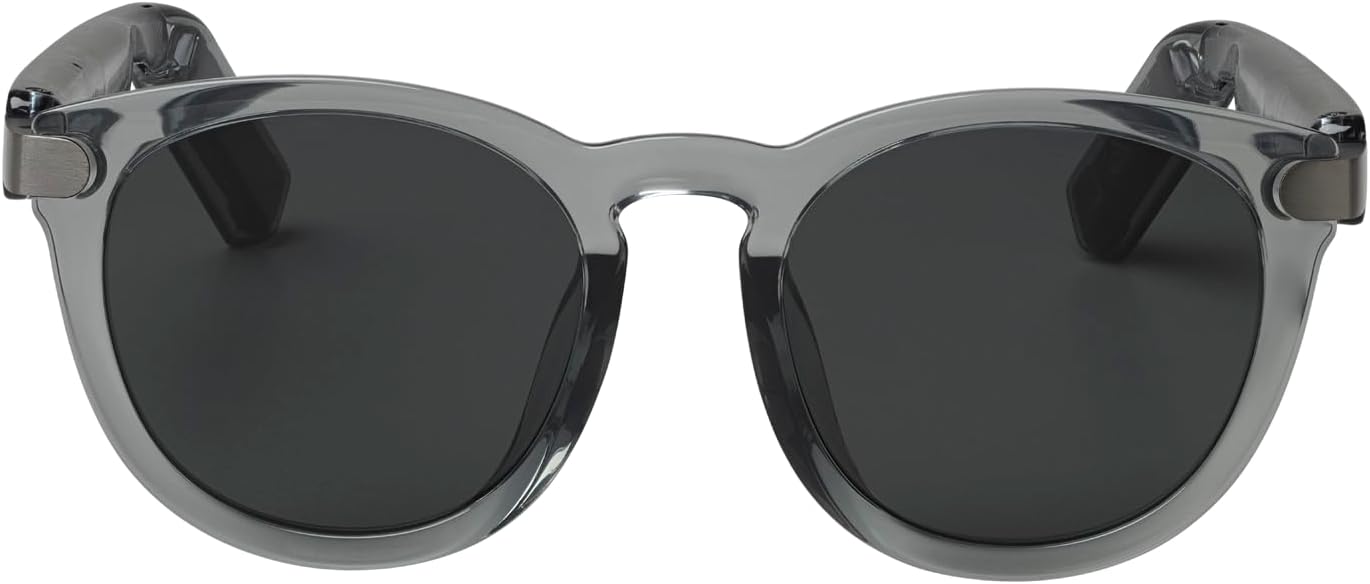
ภาพ: ด้านหน้า view of the JBL Soundgear Frames, showcasing the round, full-frame design and black non-polarized lenses.

ภาพ: ด้านหลัง view of the JBL Soundgear Frames, showing the overall structure from the rear.
การรับประกันและการสนับสนุน
JBL products are designed for reliability and performance. For warranty information and customer support, please refer to the warranty card included with your product or visit the official JBL website. You can also find FAQs and additional support resources online.
การสนับสนุนทางออนไลน์: www.jbl.com/support