
1. บทนำ
Thank you for choosing the EUKI Compressed Air Duster F31. This electric air duster is designed to provide a powerful and efficient cleaning solution for various applications, from delicate electronics to larger outdoor tasks. Its rechargeable design offers an environmentally responsible alternative to traditional canned air. Please read this manual thoroughly before use to ensure safe and optimal operation.
2. ข้อมูลด้านความปลอดภัย
- เก็บอุปกรณ์ให้ห่างจากน้ำและความชื้น
- อย่าใช้งานอุปกรณ์หากได้รับความเสียหาย
- ตรวจสอบให้แน่ใจว่าหัวฉีดได้รับการติดอย่างแน่นหนา ก่อนใช้งาน
- Avoid directing airflow directly at eyes or sensitive body parts.
- เก็บให้พ้นจากมือเด็ก
- ห้ามปิดกั้นช่องรับหรือระบายอากาศขณะใช้งาน
- The device features 150° overheat protection. If it overheats, allow it to cool down before further use.
3. เนื้อหาบรรจุภัณฑ์
ตรวจสอบว่ามีรายการทั้งหมดอยู่ในแพ็คเกจของคุณ:
- EUKI Compressed Air Duster F31 Unit
- Various Nozzles/Attachments (for different cleaning needs)
- สายชาร์จ USB-C
- Cleaning Brushes (assorted sizes and types)
- กระเป๋าเก็บของ
- คู่มือการใช้งาน
4. สินค้าหมดview และคุณสมบัติ
The EUKI Compressed Air Duster F31 is a powerful, portable, and rechargeable device designed for efficient cleaning. Key features include:
- มอเตอร์ความเร็วสูง: Capable of up to 130,000 RPM, delivering a strong airflow of 45 m/s.
- ปรับความเร็วได้ 3 ระดับ: Allows for tailored cleaning intensity for various tasks.
- แบตเตอรี่ทรงพลัง: Rechargeable via Type-C (5V 1.5A), fully charging in 3-4 hours. Provides up to 4 hours of continuous use on the 1st speed setting.
- การป้องกันอัจฉริยะ: Features a heat sink and 150° overheat protection. Automatically shuts off after 3 minutes of standby. The 3rd speed requires continuous pressing for safety.
- Environmentally Responsible: Reusable and rechargeable, eliminating the need for disposable canned air.
- พกพาสะดวกและมีน้ำหนักเบา: Weighs only 0.48 lbs, making it easy to handle and transport.

Figure 1: EUKI Compressed Air Duster F31 showcasing its 3-gear speed adjustable design for deep cleaning.

Figure 2: The electric air duster offers an eco-friendly and energy-efficient alternative to traditional compressed canned air.

Figure 3: High-efficiency motor providing powerful dust removal and stable wind speeds.
5. การตั้งค่า
5.1 การชาร์จอุปกรณ์
- เชื่อมต่อสายชาร์จ USB-C ที่ให้มากับพอร์ตชาร์จบนอุปกรณ์
- Plug the other end of the cable into a compatible 5V 1.5A USB power adapter (not included).
- The indicator lights will illuminate to show the charging status. All lights will be solid when fully charged.
- การชาร์จเต็มโดยทั่วไปจะใช้เวลา 3-4 ชั่วโมง
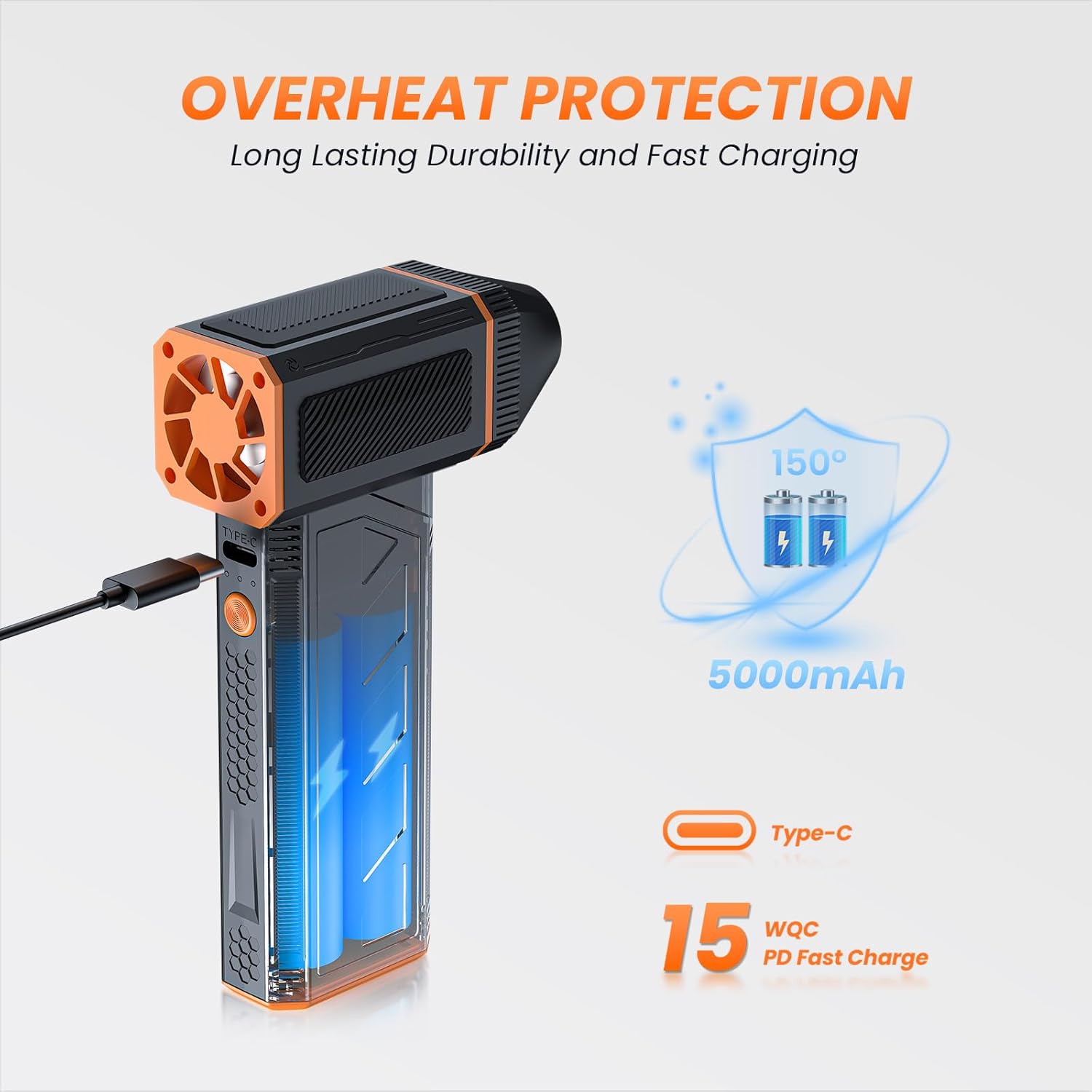
Figure 4: The device features a Type-C charging port and 150° overheat protection for safe and efficient use.
5.2 การติดตั้งหัวฉีด
The EUKI Compressed Air Duster F31 features a strong magnetic design for easy nozzle attachment and removal.
- เลือกหัวฉีดที่เหมาะสมสำหรับงานทำความสะอาดของคุณ
- Align the nozzle with the air outlet on the device.
- Gently push and twist the nozzle until it magnetically locks into place.
- To remove, twist the nozzle in the opposite direction and pull it off.

Figure 5: The strong magnetic design allows for easy disassembly and cleaning of nozzles.
6. คู่มือการใช้งาน
6.1 เปิด/ปิดเครื่อง
- To power on the device, long-press the power button located on the back of the unit for a few seconds. The indicator lights will illuminate.
- To power off, long-press the power button again.
6.2 การปรับการตั้งค่าความเร็ว
The device has 3 adjustable speed settings:
- After powering on, short-press the power button to cycle through the speeds.
- 1st Speed (Low): One indicator light illuminated. Ideal for delicate surfaces.
- 2nd Speed (Medium): Two indicator lights illuminated. Suitable for general cleaning.
- 3rd Speed (High): Three indicator lights illuminated. Provides maximum airflow for stubborn debris. This speed requires continuous pressing of the trigger button.
6.3 Activating Airflow
- Once the desired speed is selected, press the trigger button on the front of the handle to activate the airflow.
- For 1st and 2nd speeds, a single press will turn on continuous airflow. Press again to stop.
- For 3rd speed, you must continuously press and hold the trigger button for airflow. Releasing the button will stop the airflow.
6.4 การใช้งาน เช่นampเลส
The EUKI Compressed Air Duster F31 is versatile for various cleaning tasks:
- อิเล็กทรอนิกส์: Clean keyboards, PC mainframes, camera lenses, and other sensitive devices.
- ยานยนต์: Dust car interiors, air conditioning vents, and remove leaves from car windows.
- ครัวเรือน: Clear sofa crumbs, clean window tracks, and blow dust from hard-to-reach areas.
- กลางแจ้ง: Assist with barbecue fueling, inflate air mattresses or pool floaties, and clear light snow or leaves.
- การดูแลสัตว์เลี้ยง: Gently blow-dry pet hair on lower settings.

Figure 6: The air duster is suitable for a wide range of applications including cleaning keyboards, PCs, cars, and household items.
Video 1: Demonstration of the GAMRUXI Compressed Air Duster (F31 model) in action, cleaning a computer, keyboard, outdoor leaves, car, and camera. This video illustrates the product's versatility and effectiveness across different environments.
Video 2: An unboxing and usage demonstration of an Electric Air Duster (F31 model), highlighting its application for cleaning computers, keyboards, and car interiors. The video also shows the various attachments included.
วิดีโอ 3: จบview of the 300,000RPM Powerful Electric Compressed Air Duster G1, demonstrating its unboxing, various attachments, charging process, speed level adjustments, and cleaning capabilities for different tasks.
7. การบำรุงรักษา
- การทำความสะอาดหน่วย: เช็ดทำความสะอาดภายนอกของอุปกรณ์ด้วยผ้าแห้งเนื้อนุ่ม ห้ามใช้สารเคมีรุนแรงหรือวัสดุที่มีฤทธิ์กัดกร่อน
- การทำความสะอาดหัวฉีด: Detach nozzles and clean them with a soft brush or cloth. Ensure they are dry before reattaching.
- พื้นที่จัดเก็บ: Store the device and its accessories in the provided storage bag in a cool, dry place when not in use.
- การดูแลแบตเตอรี่ For optimal battery life, charge the device regularly and avoid completely draining the battery frequently.
8 การแก้ไขปัญหา
- อุปกรณ์ไม่เปิด: Ensure the device is fully charged. Long-press the power button for a few seconds to activate.
- การไหลเวียนของอากาศที่อ่อนแอ: Check battery level and recharge if necessary. Ensure the nozzle is correctly attached and not obstructed.
- อุปกรณ์หยุดโดยไม่คาดคิด: The overheat protection may have activated. Allow the device to cool down for a few minutes before resuming use. For 3rd speed, ensure the trigger button is continuously pressed.
9. ข้อมูลจำเพาะ
| คุณลักษณะ | ข้อมูลจำเพาะ |
|---|---|
| ยี่ห้อ | ยูกิ |
| หมายเลขรุ่น | เอฟ31 |
| ความเร็วของมอเตอร์ | สูงสุด 130,000 รอบต่อนาที |
| ความเร็วลม | 45 ม./วินาที |
| สปีดเกียร์ | เกียร์ปรับได้ 3 ระดับ |
| ประเภทแบตเตอรี่ | ชาร์จไฟได้ |
| พอร์ตชาร์จ | ประเภท-C (5V 1.5A) |
| เวลาในการชาร์จ | 3-4 ชั่วโมง |
| Continuous Use (1st speed) | นานถึง 4 ชั่วโมง |
| ระบบป้องกันความร้อนสูงเกินไป | 150° Automatic Shutoff |
| Standby Shutoff | 3 นาที |
| น้ำหนักสินค้า | 0.48 lbs (approx. 10 Ounces) |
10. การรับประกันและการสนับสนุน
The EUKI Compressed Air Duster F31 comes with a 30-day full refund or replacement policy, a 12-month warranty, and lifetime after-sales service support. For any inquiries or assistance, please contact EUKI customer service through your purchase platform.