
1. บทนำ
Thank you for choosing the PULWTOP 9-in-1 Powered USB C Hub. This instruction manual provides essential information for the safe and efficient use of your new device. Please read it thoroughly before operation and retain it for future reference.
This USB C Powered Hub is designed to expand the connectivity of your laptop, desktop, or gaming host by adding multiple USB-C and USB-A ports for data transfer and charging. It comes with a dedicated power adapter to ensure stable performance across all connected devices.
2. คุณสมบัติหลัก
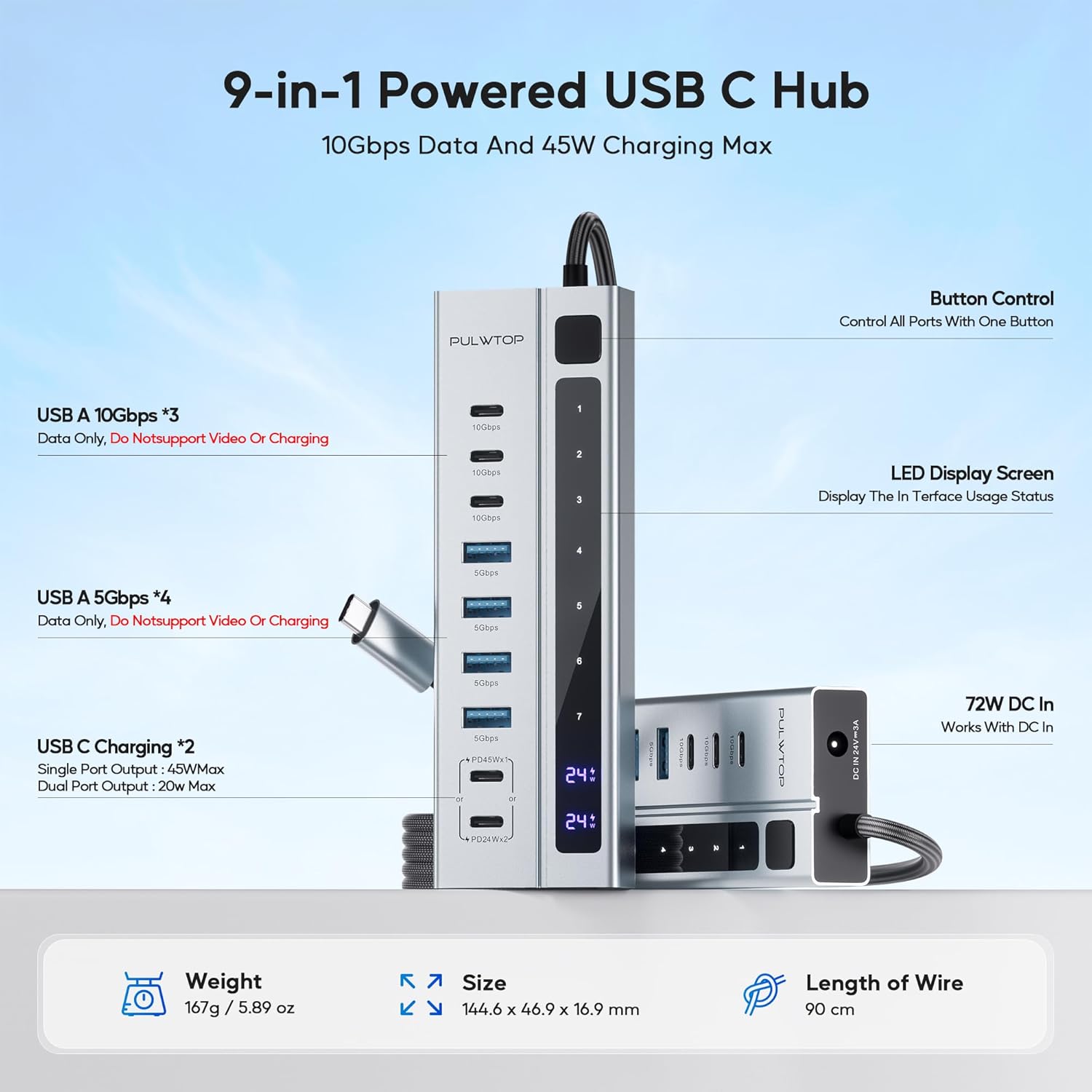
- Hybrid Powered USB C Hub: Adds 3 USB-C 3.2 10Gbps ports (Data ONLY), 4 USB-A 3.0 5Gbps ports (Data ONLY), and 2 USB-C PD Charging Ports (Charge ONLY).
- ทรงพลังและปลอดภัย: Equipped with a 72W (24V/3A) power adapter, supporting 1x45W or 2x24W charging via PD ports. Ensures secure and stable data transfer for all connected devices.
- การถ่ายโอนข้อมูลที่รวดเร็วอย่างเหลือเชื่อ: 3 USB-C ports provide up to 10Gbps and 4 USB-A 3.0 ports provide up to 5Gbps for rapid file การโอนย้าย
- Sturdy Design & Button Control: High-quality aluminum housing with a durable 90cm braided cable. Features a single power button to control all ports.
- Note on Video Output: All ports of this Powered USB C Hub do NOT support video output function.
- Note on PD Charging: USB-C PD ports only support charging, without data and video transmission. Not designed to provide power to your laptop.
- Samsung Charging Protocol: Due to Samsung's charging protocol, the hub supports a maximum of 24W charging for Samsung phones and tablets.
3. เนื้อหาบรรจุภัณฑ์
โปรดตรวจสอบให้แน่ใจว่าสินค้าทุกชิ้นครบถ้วนและอยู่ในสภาพดีก่อนแกะกล่อง:
- PULWTOP 9-in-1 Powered USB C Hub
- อะแดปเตอร์แปลงไฟ DC 72 วัตต์
- คู่มือการใช้งาน

4. คำแนะนำในการตั้งค่า
- เชื่อมต่ออะแดปเตอร์ไฟ: Plug the 72W DC Power Adapter into the DC IN 24V=3A port on the hub. Then, plug the power adapter into a wall outlet.
- เชื่อมต่อกับอุปกรณ์โฮสต์: Connect the integrated USB-C cable from the hub to a compatible USB-C port on your laptop, desktop, or gaming host.
- เปิดเครื่อง: Press the power button on the hub to activate the device. The LED display screen will show usage status.
- เชื่อมต่ออุปกรณ์ต่อพ่วง: You can now connect your USB-C and USB-A devices to the available ports on the hub.

5. คู่มือการใช้งาน
5.1 ฟังก์ชันพอร์ต
- USB-C 3.2 10Gbps Ports (x3): These ports are for data transfer ONLY. They do NOT support video output or charging.
- USB-A 3.0 5Gbps Ports (x4): These ports are for data transfer ONLY. They do NOT support video output or charging.
- USB-C PD Charging Ports (x2): These ports are for charging ONLY. They do NOT support data transfer or video output. They can deliver 45W max for a single port or 24W max per port when both are connected.
5.2 ปุ่มควบคุม
The hub features a single power button that controls all ports. Press the button to turn the hub on or off. If you reconnect or restart your laptop, please press the USB-C hub's power button to re-enable the device.


5.3 ความเข้ากันได้สากล
The PULWTOP 9-in-1 Powered USB C Hub is compatible with a wide range of operating systems and devices:
- ระบบ: MacOS, Windows, Linux, ChromeOS, Android
- อุปกรณ์โฮสต์: PC, Laptop, Phone, Tablet
- อุปกรณ์ต่อพ่วง: Keyboard, Flash Drive, USB Fan, USB Lamp, HDD/SSD, Gamepad, Camera, Printer, Card Reader

5.4 วิดีโอผลิตภัณฑ์อย่างเป็นทางการ
6. ข้อมูลจำเพาะ
| ขนาดสินค้า | 4.25 x 1.85 x 0.66 นิ้ว |
| น้ำหนักสินค้า | 1.32 ปอนด์ |
| หมายเลขรุ่นสินค้า | CW2403000C6 |
| ยี่ห้อ | พูลท็อป |
| ผู้ผลิต | พูลท็อป |
| ฮาร์ดแวร์อินเตอร์เฟซ | ยูเอสบี |
| คุณสมบัติพิเศษ | 9-Port Powered USB hub, Fast Data Transfer, Indicator Light, Multiple USB C Port Hub Powered |
| อุปกรณ์ที่รองรับ | โน๊ตบุ๊ค |
7. การบำรุงรักษา
- การทำความสะอาด: Use a soft, dry cloth to clean the hub. Avoid liquid cleaners or aerosols.
- พื้นที่จัดเก็บ: เก็บฮับไว้ในที่แห้งและเย็น หลีกเลี่ยงแสงแดดโดยตรงและอุณหภูมิที่สูงหรือต่ำเกินไป
- การจัดการ: หลีกเลี่ยงการทำอุปกรณ์หล่นหรือกระแทกอย่างรุนแรง
8 การแก้ไขปัญหา
- ไม่รู้จักอุปกรณ์:
- Ensure the hub's power adapter is securely plugged into a wall outlet and the hub.
- Verify the hub's integrated USB-C cable is firmly connected to your host device.
- Press the power button on the hub to ensure it is turned on.
- If using a Windows laptop, ensure its USB C port supports data transfer.
- การถ่ายโอนข้อมูลช้า:
- Ensure your connected devices and cables support 10Gbps or 5Gbps speeds.
- ควรหลีกเลี่ยงการเชื่อมต่ออุปกรณ์ที่ใช้แบนด์วิดท์สูงจำนวนมากพร้อมกัน
- อุปกรณ์ไม่ชาร์จ:
- Confirm you are using the dedicated USB-C PD Charging Ports for charging.
- Check if the device you are trying to charge is compatible with the hub's charging output (e.g., Samsung devices have a 24W max limit).
- Ensure the hub's power adapter is providing sufficient power.
- ไม่มีเอาต์พุตวิดีโอ:
- This hub does NOT support video output from any of its ports. It is designed for data and charging only.
9. การรับประกันและการสนับสนุน
For warranty information and technical support, please refer to the contact details provided on the product packaging or visit the official PULWTOP webไซต์ โปรดเก็บใบเสร็จรับเงินของคุณไว้เป็นหลักฐานการซื้อสำหรับการเรียกร้องการรับประกันใดๆ