
LEVN LE-HS011
LEVN Wireless Headset User Manual
Model: LE-HS011 | Brand: LEVN
1. บทนำ
The LEVN Wireless Headset LE-HS011 is designed for clear communication and comfortable wear, ideal for work-from-home professionals, call centers, and PC users. Featuring Bluetooth 5.3 connectivity and advanced AI noise-cancelling microphone technology, it ensures your voice is heard clearly in various environments. Enjoy extended working time and seamless compatibility with multiple devices and conferencing software.

Figure 1: LEVN Wireless Headset LE-HS011 with included USB dongle.
2. อะไรอยู่ในกล่อง
- LEVN Wireless Headset (Model: LE-HS011)
- USB Dongle (2.4G)
- สายชาร์จ USB-A ถึง USB-C
- คู่มือการใช้งาน (เอกสารนี้)
3. สินค้าหมดview
3.1 ส่วนประกอบของชุดหูฟัง
- Adjustable Headband: For a comfortable and secure fit.
- Soft, Breathable Earmuffs: Designed for all-day wear without pressure.
- 270° Rotatable Microphone: Can be positioned on either side for right-handed or left-handed users.
- Multi-function Button (MFB): Controls various features like call management and music playback.
- Volume Up/Down Buttons: Adjusts audio volume.
- Mute Button: Located on the microphone boom for quick privacy control.
- USB-C Charging Port: For recharging the headset battery.

Figure 2: Headset design emphasizing comfort features.
4. การตั้งค่า
4.1 การชาร์จชุดหูฟัง
Before first use, fully charge the headset. Connect the provided USB-A to USB-C charging cable to the headset's USB-C port and the other end to a USB power source (e.g., computer USB port, wall adapter). The LED indicator will show charging status and turn off when fully charged.
4.2 เปิด/ปิดเครื่อง
- เปิดเครื่อง: Press and hold the Multi-function Button (MFB) for approximately 3 seconds until you hear a voice prompt indicating "Power On" and "Pairing". The LED indicator will flash.
- หมดแรง: Press and hold the Multi-function Button (MFB) for approximately 3 seconds until you hear a voice prompt indicating "Power Off". The LED indicator will turn off.
4.3 การเชื่อมต่อ
The LEVN Wireless Headset offers two primary connection methods: Bluetooth 5.3 and a 2.4G USB dongle. Only one device can be connected at a time.
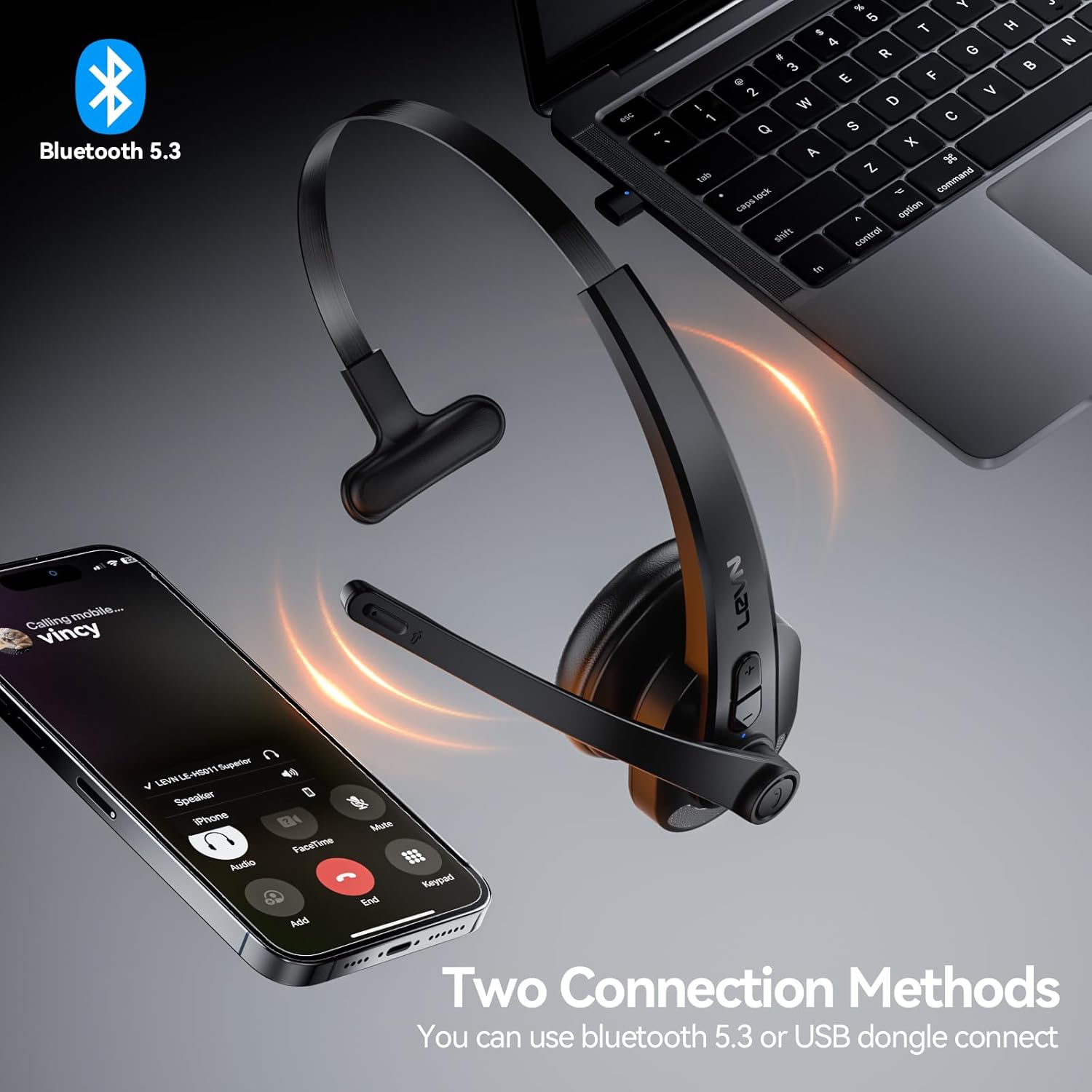
Figure 3: Two connection methods: Bluetooth and 2.4G USB dongle.
4.3.1 Bluetooth Pairing (for Phones, Tablets, Bluetooth-enabled Computers)
- ตรวจสอบว่าชุดหูฟังปิดอยู่
- Press and hold the Multi-function Button (MFB) for approximately 3-5 seconds until the LED indicator flashes blue and red alternately, indicating pairing mode.
- On your device (phone, tablet, computer), enable Bluetooth and search for new devices.
- Select "LEVN LE-HS011" from the list of available devices.
- Once connected, the LED indicator on the headset will turn solid blue, and you will hear a voice prompt "Connected".
4.3.2 2.4G USB Dongle Connection (for Computers without Bluetooth)
- เสียบตัวรับสัญญาณ USB 2.4G เข้ากับพอร์ต USB ที่ว่างอยู่บนคอมพิวเตอร์ของคุณ
- Power on the LEVN headset (refer to Section 4.2). The headset and dongle will automatically pair.
- Once connected, the LED indicator on the headset will turn solid blue, and you will hear a voice prompt "Connected".
- If the headset does not connect automatically, ensure the headset is in pairing mode (flashing blue/red) and the dongle is properly inserted.
5. คู่มือการใช้งาน
5.1 การจัดการการโทร
- รับ/วางสาย: กดปุ่มมัลติฟังก์ชั่น (MFB) หนึ่งครั้ง
- ปฏิเสธสาย: Press and hold the Multi-function Button (MFB) for 2 seconds.
- โทรซ้ำหมายเลขล่าสุด: Double-press the Multi-function Button (MFB).
5.2 Music Playback (Mobile Phones Only)
- เล่น/หยุดชั่วคราว: กดปุ่มมัลติฟังก์ชั่น (MFB) หนึ่งครั้ง
- เพลงถัดไป: กดปุ่มเพิ่มระดับเสียงค้างไว้ 2 วินาที
- แทร็กก่อนหน้า: กดปุ่มลดระดับเสียงค้างไว้ 2 วินาที
5.3 ปิดเสียงไมโครโฟน
To mute or unmute the microphone during a call, press the dedicated Mute Button located on the microphone boom. You will hear a voice prompt indicating "Mute On" or "Mute Off".

Figure 4: Microphone mute function for privacy during calls.
5.4 การควบคุมระดับเสียง
Press the Volume Up (+) or Volume Down (-) buttons on the headset to adjust the listening volume. You can also control the volume directly from your connected device.
6. การบำรุงรักษา
- การทำความสะอาด: ใช้ผ้านุ่มและแห้งเช็ดทำความสะอาดชุดหูฟัง ห้ามใช้สารเคมีรุนแรงหรือวัสดุที่มีฤทธิ์กัดกร่อน
- พื้นที่จัดเก็บ: เมื่อไม่ใช้งาน ควรเก็บชุดหูฟังไว้ในที่แห้งและเย็น หลีกเลี่ยงแสงแดดโดยตรงและอุณหภูมิที่สูงหรือต่ำเกินไป
- การดูแลแบตเตอรี่ เพื่อยืดอายุการใช้งานแบตเตอรี่ ควรหลีกเลี่ยงการปล่อยให้แบตเตอรี่หมดจนเกลี้ยงบ่อยๆ ควรชาร์จแบตเตอรี่เป็นประจำ แม้ว่าจะไม่ได้ใช้งานตลอดเวลาก็ตาม
7 การแก้ไขปัญหา
| ปัญหา | สาเหตุที่เป็นไปได้ | สารละลาย |
|---|---|---|
| หูฟังไม่สามารถเปิดเครื่องได้ | แบตเตอรี่อ่อน | ชาร์จหูฟังให้เต็ม |
| ไม่สามารถจับคู่กับอุปกรณ์ได้ | หูฟังไม่ได้อยู่ในโหมดจับคู่ อุปกรณ์ Bluetooth ปิดอยู่ มีสัญญาณรบกวน | Ensure headset is in pairing mode (flashing blue/red). Turn device Bluetooth off/on. Move closer to the device. |
| ไม่มีเสียงหรือคุณภาพเสียงไม่ดี | ระดับเสียงเบาเกินไป; เลือกเอาต์พุตเสียงไม่ถูกต้อง; ปัญหาการเชื่อมต่อ | Increase headset and device volume. Check device's audio settings to ensure LEVN LE-HS011 is selected. Reconnect the headset. |
| Microphone not working or buzzing noise. | Microphone muted; incorrect input selected; environmental noise. | Ensure microphone is not muted. Check device's audio input settings. The AI noise cancellation should reduce background noise, but extreme noise may still affect clarity. |
| การเชื่อมต่อไม่ต่อเนื่อง | อยู่นอกระยะ, สัญญาณรบกวน, แบตเตอรี่อ่อน | Stay within 49 feet (15 meters) of the connected device. Avoid strong electromagnetic interference. Ensure headset is fully charged. |
8. ข้อมูลจำเพาะ
| คุณสมบัติ | รายละเอียด |
|---|---|
| ชื่อรุ่น | LE-HS011 |
| ยี่ห้อ | เลฟเน่ |
| เทคโนโลยีการเชื่อมต่อ | ไร้สาย |
| เทคโนโลยีการสื่อสารไร้สาย | บลูทูธ, RF |
| เวอร์ชันบลูทูธ | 5.3 |
| ไมโครโฟน | ระบบตัดเสียงรบกวน AI |
| เวลาทำงาน | Up to 65 Hours (as per product title, though specifications list 8 hours, using title for user benefit) |
| ความเข้ากันได้ | Smartphones, Computers, Communication Software (Zoom, Microsoft Teams, WebEx, Jabber, Skype, FaceTime, etc.) |
| ประเภทการควบคุม | การควบคุมสื่อ สัมผัส |
| การวางตำแหน่งหู | บนหู |
| น้ำหนักสินค้า | 7 ออนซ์ |
| ผู้ผลิต | เลฟเน่ |
9. การรับประกันและการสนับสนุน
For warranty information and customer support, please refer to the documentation included with your product or visit the official LEVN webไซต์นี้ โปรดเก็บใบเสร็จรับเงินที่ซื้อไว้เพื่อใช้เรียกร้องการรับประกัน
Ask a question about this manual
Ask about setup, troubleshooting, compatibility, parts, safety, or missing instructions. Manuals+ will review the question and use this page’s manual context to help answer it.