
1. บทนำ
The ELECTROPRIME Hishell M9 Translator is a portable, intelligent device designed for multi-language simultaneous translation, facilitating communication across language barriers. It supports both online and offline translation modes, along with photo and recording translation functionalities. This manual provides essential information for the proper setup, operation, and maintenance of your device.
2. ข้อมูลด้านความปลอดภัย
- อย่าให้เครื่องสัมผัสกับอุณหภูมิที่สูงหรือต่ำเกินไป แสงแดดโดยตรง หรือความชื้นสูง
- หลีกเลี่ยงการทำอุปกรณ์หล่นหรือกระแทกอย่างรุนแรง
- Keep the device away from water and other liquids. If it gets wet, power it off immediately and allow it to dry completely before use.
- Use only the provided or approved charging cable and adapter.
- ห้ามถอดประกอบ ซ่อมแซม หรือดัดแปลงอุปกรณ์ด้วยตนเอง โปรดติดต่อฝ่ายบริการลูกค้าเพื่อขอความช่วยเหลือ
- กำจัดอุปกรณ์และแบตเตอรี่ตามระเบียบข้อบังคับท้องถิ่น
3. เนื้อหาบรรจุภัณฑ์
กรุณาตรวจสอบแพ็คเกจสำหรับรายการต่อไปนี้:
- ELECTROPRIME Hishell M9 Translator Device
- สายชาร์จ USB
- คู่มือการใช้งาน (เอกสารนี้)
4. อุปกรณ์โอเวอร์view
Familiarize yourself with the physical components of your Hishell M9 Translator.
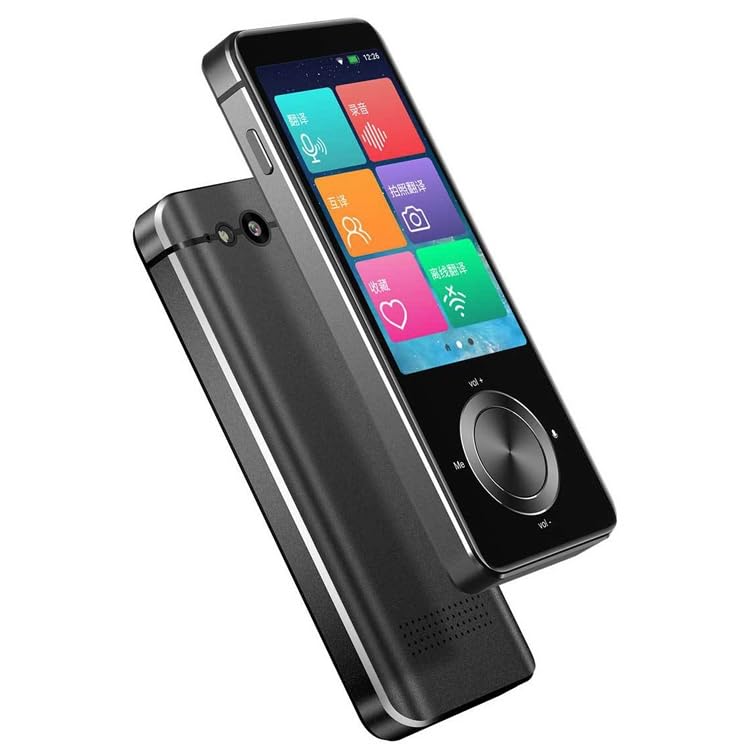
ภาพที่ 1: ด้านหน้าและด้านข้าง view of the ELECTROPRIME Hishell M9 Translator. This image shows the device's screen, volume buttons, and power button on the side, along with the speaker grille at the bottom.
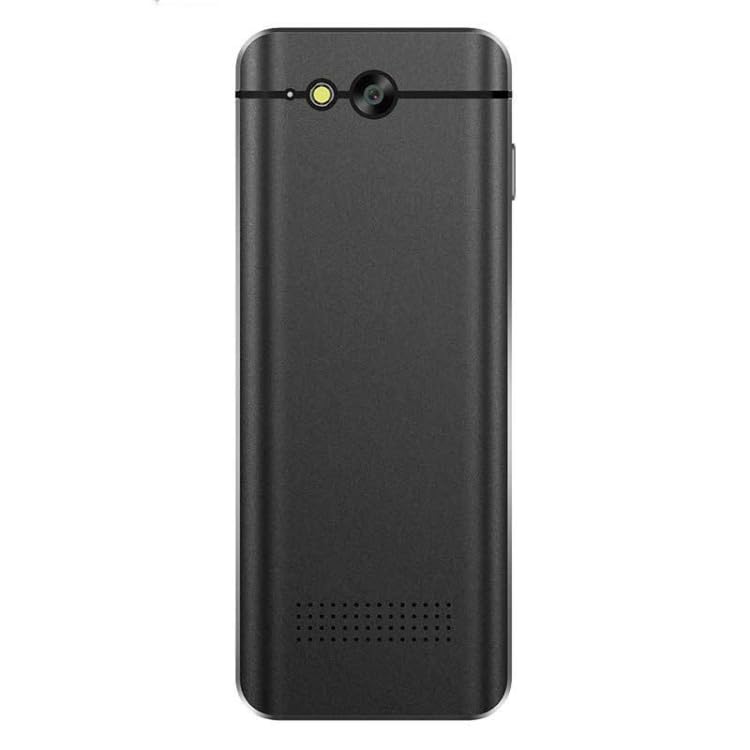
ภาพที่ 2: กลับ view of the ELECTROPRIME Hishell M9 Translator. This image highlights the rear camera and flash, along with the microphone and speaker perforations.
- จอแสดงผลแบบสัมผัส: Main interface for interaction.
- ปุ่มเปิด/ปิด: Located on the side, used for powering on/off and screen lock.
- ปุ่มปรับระดับเสียง: ปรับระดับเอาท์พุตเสียง
- ไมโครโฟน: Captures spoken language for translation.
- ผู้บรรยาย: สร้างไฟล์เสียงที่แปลแล้ว
- กล้อง: ใช้สำหรับการแปลงภาพถ่าย
- พอร์ต USB: สำหรับการชาร์จอุปกรณ์
5. การตั้งค่า
5.1. การชาร์จอุปกรณ์
- เสียบสายชาร์จ USB เข้ากับพอร์ต USB ของอุปกรณ์
- เสียบปลายอีกด้านของสายเคเบิลเข้ากับอะแดปเตอร์แปลงไฟ USB ที่ใช้งานร่วมกันได้ (ไม่ได้รวมอยู่ในชุด) หรือพอร์ต USB ของคอมพิวเตอร์
- The device will indicate charging status on the screen. Allow the device to fully charge before first use.
5.2. เปิด/ปิดเครื่อง
- การเปิดเครื่อง: กดปุ่มเปิด/ปิดด้านข้างของอุปกรณ์ค้างไว้จนกว่าหน้าจอจะสว่างขึ้น
- วิธีปิดเครื่อง: Press and hold the Power button until a power-off menu appears on the screen. Select 'Power Off'.
- การล็อค/ปลดล็อคหน้าจอ: กดปุ่มเปิดปิดสั้นๆ
5.3. Initial Language Settings
Upon first power-on, you may be prompted to select the device's system language and your preferred translation languages. Follow the on-screen instructions.
5.4. การเชื่อมต่อเครือข่าย (Wi-Fi)
For online translation features, a Wi-Fi connection is required.
- From the main screen, navigate to 'Settings'.
- เลือก 'Wi-Fi' แล้วเปิดใช้งาน
- เลือกเครือข่าย Wi-Fi ที่คุณต้องการจากรายการ
- กรอกรหัสผ่านหากได้รับแจ้งและเชื่อมต่อ
6. คู่มือการใช้งาน
6.1. Real-time Online Translation
This mode requires an active Wi-Fi connection.
- From the main menu, select the 'Real-time Translation' or 'Voice Translation' icon.
- Select the source language (the language you will speak) and the target language (the language you want to translate to).
- Press and hold the designated button (often marked 'Me' or a microphone icon) and speak clearly into the device's microphone.
- Release the button. The device will process your speech and display/speak the translation in the target language.
6.2. การแปลแบบออฟไลน์
The Hishell M9 supports offline translation for certain language pairs. Ensure necessary language packs are downloaded in advance via Wi-Fi in the 'Settings' menu.
- Select 'Offline Translation' from the main menu.
- Choose the downloaded source and target language packs.
- Proceed with voice input as described in section 6.1.
6.3. การแปลภาพถ่าย
This feature translates text from images using the device's camera.
- Select 'Photo Translation' from the main menu.
- Point the camera at the text you wish to translate. Ensure good lighting and clear focus.
- แตะที่หน้าจอเพื่อถ่ายภาพ
- The device will analyze the text and display the translation.
6.4. Recording Translation
This function allows you to record longer conversations and translate them.
- Select 'Recording Translation' from the main menu.
- Tap the 'Record' button to start recording.
- Tap 'Stop' when finished.
- Select the recorded audio file and choose the desired translation language. The device will process and display the translated text.
6.5. การตั้งค่า
Access the 'Settings' menu to adjust various device parameters:
- ไวไฟ : จัดการการเชื่อมต่อเครือข่าย
- ความสว่าง: ปรับความสว่างหน้าจอ
- ปริมาณ: ควบคุมระดับเสียงของลำโพง
- การตั้งค่าภาษา: Change system language and download offline language packs.
- การอัปเดตระบบ: ตรวจสอบและติดตั้งการอัปเดตซอฟต์แวร์
- เกี่ยวกับอุปกรณ์: View ข้อมูลอุปกรณ์
7. การบำรุงรักษา
7.1. การทำความสะอาด
- ใช้ผ้าแห้งเนื้อนุ่มที่ไม่เป็นขุยเช็ดทำความสะอาดหน้าจอและตัวเครื่อง
- ห้ามใช้สารทำความสะอาดที่มีฤทธิ์กัดกร่อน แอลกอฮอล์ หรือตัวทำละลายเคมี
7.2. การจัดเก็บ
- เก็บอุปกรณ์ไว้ในที่แห้งและเย็น หลีกเลี่ยงแสงแดดโดยตรงและอุณหภูมิที่สูงหรือต่ำเกินไป
- If storing for an extended period, ensure the battery is charged to approximately 50% to prolong its lifespan.
7.3. การดูแลแบตเตอรี่
- หลีกเลี่ยงการปล่อยแบตเตอรี่จนหมดบ่อยครั้ง
- Do not leave the device connected to a charger for excessively long periods after it is fully charged.
8 การแก้ไขปัญหา
| ปัญหา | สาเหตุที่เป็นไปได้ | สารละลาย |
|---|---|---|
| อุปกรณ์ไม่เปิดเครื่อง | แบตเตอรี่อ่อน อุปกรณ์ค้าง | Charge the device for at least 30 minutes. If still unresponsive, perform a hard reset (refer to device-specific instructions if available, usually holding power button for 10-15 seconds). |
| การแปลไม่ถูกต้องหรือไม่สามารถใช้งานได้ | Poor internet connection; incorrect language selection; unclear speech. | Ensure stable Wi-Fi connection. Verify source and target languages. Speak clearly and at a moderate pace. For offline mode, ensure language packs are downloaded. |
| ปัญหาการเชื่อมต่อ Wi-Fi | รหัสผ่านไม่ถูกต้อง; อยู่นอกช่วงที่กำหนด; ปัญหาที่เราเตอร์ | Re-enter Wi-Fi password. Move closer to the Wi-Fi router. Restart the device and the router. |
| หน้าจอไม่ตอบสนอง | Software glitch; device frozen. | Restart the device. If unresponsive, perform a hard reset. |
9. ข้อมูลจำเพาะ
- แบบอย่าง: Hishell M9
- ยี่ห้อ: อิเล็คโตรไพรม์
- การเชื่อมต่อ: ไร้สาย
- น้ำหนักแพ็คเกจ: 0.23 กก. / 0.51 ปอนด์
- ขนาดแพ็คเกจ: 18 cm x 12 cm x 3 cm / 7.09 inches x 4.72 inches x 1.18 inches
- ผู้ผลิต: อิเล็คโตรไพรม์
10. การรับประกันและการสนับสนุน
For warranty information and customer support, please refer to the warranty card included with your purchase or contact ELECTROPRIME customer service directly. Keep your proof of purchase for any warranty claims.
For further assistance, visit the official ELECTROPRIME webเว็บไซต์หรือติดต่อช่องทางการสนับสนุนของพวกเขา