
1. บทนำ
ขอบคุณสำหรับการซื้อasing the ELECTROPRIME K22T Multifunctional Rotatable Clock Night Light Wireless Fast Charger. This device combines a digital clock, an adjustable night light, and a 15W wireless fast charger into one compact unit. This manual provides essential information for safe operation, setup, and maintenance of your new device. Please read it thoroughly before use and retain it for future reference.
2. ข้อมูลด้านความปลอดภัย
- อย่าให้เครื่องสัมผัสกับน้ำ ความชื้น หรืออุณหภูมิที่สูงหรือต่ำเกินไป
- หลีกเลี่ยงการทำอุปกรณ์หล่นหรือกระแทกอย่างรุนแรง
- Use only the provided or a certified power adapter (9V/2A recommended) to prevent damage.
- ห้ามถอดประกอบ ซ่อมแซม หรือดัดแปลงอุปกรณ์ด้วยตนเอง โปรดติดต่อเจ้าหน้าที่บริการที่มีคุณสมบัติเหมาะสมเพื่อขอความช่วยเหลือ
- เก็บอุปกรณ์ให้ห่างจากเด็กและสัตว์เลี้ยง
- ควรจัดให้มีการระบายอากาศที่เหมาะสมขณะชาร์จเพื่อป้องกันความร้อนสูงเกินไป
- Remove any metal objects or magnetic cards from the charging area before placing a device for wireless charging.
3. สินค้าหมดview
3.1 ส่วนประกอบ
The ELECTROPRIME K22T features a sleek design integrating multiple functions:
- การแสดงนาฬิกาดิจิตอล: LED display for time.
- แผ่นชาร์จไร้สาย: Top surface for wireless charging compatible devices.
- Rotatable Night Light: Adjustable light source for ambient illumination.
- ปุ่มควบคุม: Touch-sensitive buttons for operating the clock and light functions.
- USB-C/Type-C Input Port: สำหรับการเชื่อมต่อไฟฟ้า
- Silicone Base: ช่วยให้ทรงตัวได้ดีและป้องกันการลื่นไถล
3.2 คุณสมบัติหลัก
- 15W Wireless Fast Charging: Supports 5W, 7.5W, 10W, and 15W output.
- การออกแบบมัลติฟังก์ชั่น: Combines alarm clock, night light, and wireless charger.
- Rotatable Night Light: Adjustable angle for optimal lighting.
- จอแสดงผล LED: Clear time display with three levels of brightness adjustment.
- การควบคุมแบบสัมผัส: Intuitive operation for various functions.
- ฟังก์ชั่นการป้องกันหลากหลาย: Built-in overcurrent, overtemperature, and short circuit protection for safe charging.
- แสงสีขาวอุ่น: 3500K color temperature for comfortable illumination.
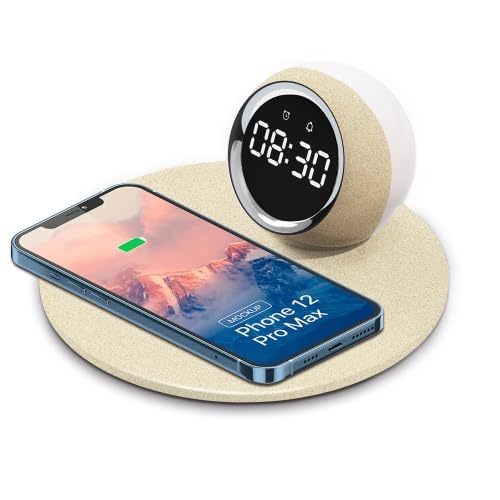
Image 1: The ELECTROPRIME K22T device, showcasing its digital clock, wireless charging pad, and night light.
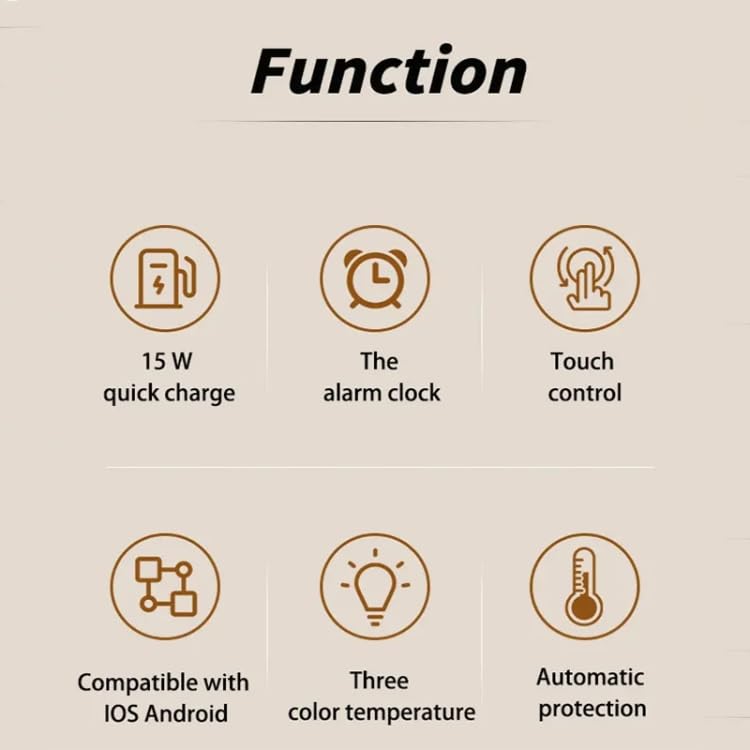
Image 2: Visual representation of the key functions including 15W quick charge, alarm clock, touch control, compatibility, adjustable color temperature, and automatic protection.
4. การตั้งค่า
- แกะอุปกรณ์ออกจากกล่อง: Carefully remove the ELECTROPRIME K22T from its packaging.
- เชื่อมต่อพลังงาน: Insert the USB-C connector of the power cable into the input port on the back of the device. Connect the other end of the cable to a compatible power adapter (9V/2A recommended) and plug it into a wall outlet.
- เปิดเครื่องครั้งแรก: The digital clock display will illuminate, indicating the device is powered on and ready for use.
5. คู่มือการใช้งาน
5.1 การตั้งนาฬิกา
The device typically features touch-sensitive buttons for time adjustment. Refer to the icons near the display for specific functions (e.g., 'M' for Mode, '+' for Increase, '-' for Decrease).
- เข้าสู่โหมดการตั้งค่าเวลา: Press and hold the 'Mode' button (or similar icon) for a few seconds until the hour digits start blinking.
- ปรับชั่วโมง: Use the '+' and '-' buttons to set the correct hour.
- ปรับนาที: Press the 'Mode' button again to switch to minute adjustment. Use the '+' and '-' buttons to set the correct minutes.
- ออกจากโหมดการตั้งค่า: Press the 'Mode' button once more, or wait a few seconds for the display to stop blinking, to save the time.
5.2 การใช้งานไฟกลางคืน
The night light offers adjustable brightness and a rotatable design.
- เปิด/ปิด: Tap the light icon button (or similar) to turn the night light on or off.
- ปรับความสว่าง: With the light on, tap the light icon button repeatedly to cycle through brightness levels: 100% > 50% > 10% > Off.
- ปรับมุม: Gently rotate the night light component to direct the illumination as desired.
5.3 การชาร์จแบบไร้สาย
The device supports 15W wireless fast charging for compatible smartphones and other devices.
- การจัดวาง: Place your wireless charging compatible device (e.g., smartphone) centrally on the charging pad.
- ไฟแสดงสถานะการชาร์จ: The device's display or a dedicated LED indicator (if present) may show a charging status. Your phone will also indicate that it is charging.
- การชาร์จที่เหมาะสมที่สุด: Ensure your device is properly aligned on the charging pad for efficient charging. Remove phone cases thicker than 3mm or those containing metal.
6. การบำรุงรักษา
- การทำความสะอาด: Disconnect the power before cleaning. Use a soft, dry cloth to wipe the surface of the device. Do not use abrasive cleaners, solvents, or harsh chemicals.
- พื้นที่จัดเก็บ: เมื่อไม่ได้ใช้งานเป็นเวลานาน ควรเก็บอุปกรณ์ไว้ในที่แห้งและเย็น หลีกเลี่ยงแสงแดดโดยตรง
- หลีกเลี่ยงสิ่งกีดขวาง: Keep the charging pad clear of dust and debris to ensure optimal performance.
7 การแก้ไขปัญหา
| ปัญหา | สาเหตุที่เป็นไปได้ | สารละลาย |
|---|---|---|
| อุปกรณ์ไม่เปิดเครื่อง | ไม่มีการเชื่อมต่อไฟหรืออะแดปเตอร์ชำรุด | Ensure the power cable is securely connected and the adapter is working. Try a different power outlet. |
| การชาร์จไร้สายช้าหรือไม่ทำงานเลย | Misalignment, phone case, or incompatible device. | Reposition the device on the charging pad. Remove thick or metallic phone cases. Ensure your device supports wireless charging. Use a 9V/2A power adapter. |
| ไฟกลางคืนไม่ทำงาน | Light is off or device is not powered. | Tap the light button to turn it on. Check if the device is powered on. |
| หน้าจอแสดงผลนาฬิกามืดหรือดับ | Brightness setting or power issue. | Adjust the display brightness using the control buttons. Ensure the device is powered on. |
8. ข้อมูลจำเพาะ
| พารามิเตอร์ | ค่า |
|---|---|
| ชื่อรุ่น | K22T |
| หมายเลขรุ่น | TBD0604275402 |
| ป้อนข้อมูล | 9V/2A |
| เอาท์พุต | 9V/1.67A |
| พลังการชาร์จแบบไร้สาย | 5วัตต์ / 7.5วัตต์ / 10วัตต์ / 15วัตต์ |
| พลังแสง | 0.5วัตต์ |
| อุณหภูมิสี | 3500K (ขาวอมเหลือง) |
| โหมดแสงสว่าง | 100% - 50% - 10% Brightness |
| อินเตอร์เฟซการชาร์จ | USB-C / Type-C |
| ระยะการชาร์จ | 3-8มม. |
| Charge Conversion Rate | 75% |
| วัสดุ | ABS + PP (Acrylonitrile Butadiene Styrene, Polypropylene, Silicone) |
| ขนาดสินค้า | 180 x 180 x 84มม. |
| น้ำหนักสุทธิ | 270กรัม |
9. การรับประกันและการสนับสนุน
For warranty information or technical support, please refer to the documentation provided with your purchase or contact your retailer. Keep your proof of purchase for any warranty claims.
Manufacturer Contact Information: ELECTROGADGETSSTORE