
สินค้าเกินview
The ELECTROPRIME HOPESTAR A6 Max is a robust and portable Bluetooth speaker designed for outdoor use, featuring IPX6 water resistance. It delivers powerful audio with high-fidelity speakers and supports various playback modes including Bluetooth, AUX, USB disk, and TF card. Its durable design and integrated lanyard make it an ideal companion for travel and outdoor activities.
คุณสมบัติหลัก
- การเชื่อมต่อบลูทูธ V5.1: Ensures stable and efficient wireless audio streaming.
- การออกแบบกันน้ำ IPX6: Provides protection against strong jets of water, suitable for outdoor parties and rainy conditions.
- High-Fidelity Speakers: Delivers natural and delicate sound reproduction.
- โหมดการเล่นหลายโหมด: Supports Bluetooth, standard 3.5mm AUX input, USB disk, and TF card playback.
- การสนับสนุนรูปแบบเสียง: Decodes MP3, WAV, WMA, FLAC, and APE music formats.
- ฟังก์ชั่นหน่วยความจำ: Resumes transmission from breakpoints for seamless playback.
- การควบคุมเสียงที่ปรับได้: Allows adjustment of microphone volume, microphone reverberation, and master volume.
- การออกแบบพกพา: Features a convenient lanyard for easy carrying.
- อายุการใช้งานแบตเตอรี่ยาวนาน: Equipped with a 12000mAh lithium-ion battery for extended playing time.
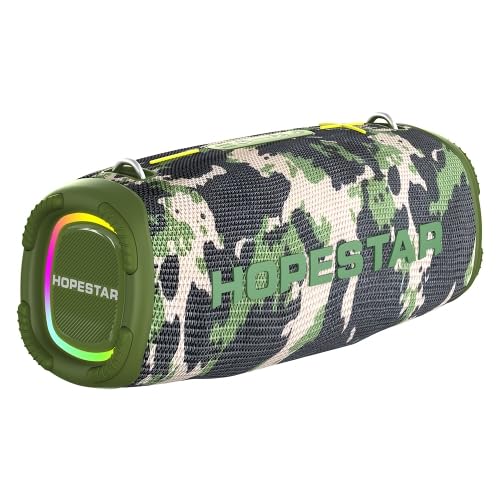
Figure 1: The ELECTROPRIME HOPESTAR A6 Max Portable Bluetooth Speaker, showcasing its camouflage design and integrated RGB lighting.
เนื้อหาแพ็คเกจ
โปรดตรวจสอบสิ่งของภายในบรรจุภัณฑ์เมื่อแกะกล่องเพื่อให้แน่ใจว่าสินค้าทั้งหมดอยู่ในกล่องและอยู่ในสภาพดี
- ELECTROPRIME HOPESTAR A6 Max Bluetooth Speaker
- สายชาร์จ USB
- สายสัญญาณเสียง AUX 3.5 มม.
- คู่มือการใช้งาน
การตั้งค่า
1. ชาร์จลำโพง
- เชื่อมต่อสายชาร์จ USB ที่ให้มาเข้ากับพอร์ตชาร์จของลำโพง
- Connect the other end of the USB cable to a 5V 2A USB power adapter (not included) or a computer's USB port.
- ไฟแสดงสถานะการชาร์จจะสว่างขึ้นขณะชาร์จและจะดับลงเมื่อชาร์จเต็มแล้ว
- โดยทั่วไปการชาร์จเต็มจะใช้เวลาประมาณ 6-7 ชั่วโมง
2. การเปิด/ปิดเครื่อง
- การเปิดเครื่อง: Press and hold the Power button for a few seconds until you hear an audible prompt and the indicator lights illuminate.
- วิธีปิดเครื่อง: Press and hold the Power button again for a few seconds until you hear an audible prompt and the indicator lights turn off.
3. การจับคู่บลูทู ธ
- Ensure the speaker is powered on and in Bluetooth pairing mode (indicated by a flashing blue light). If not, briefly press the Mode button to switch to Bluetooth mode.
- บนอุปกรณ์เคลื่อนที่ของคุณ (สมาร์ทโฟน แท็บเล็ต ฯลฯ) เปิดใช้งานบลูทูธและค้นหาอุปกรณ์ที่มีอยู่
- Select "HOPESTAR A6 Max" from the list of found devices.
- Once successfully paired, you will hear a confirmation sound, and the Bluetooth indicator light will remain solid blue.
- ลำโพงจะเชื่อมต่อกับอุปกรณ์ที่จับคู่ไว้ล่าสุดโดยอัตโนมัติเมื่อเปิดเครื่อง หากอุปกรณ์อยู่ในระยะและเปิดใช้งาน Bluetooth ไว้
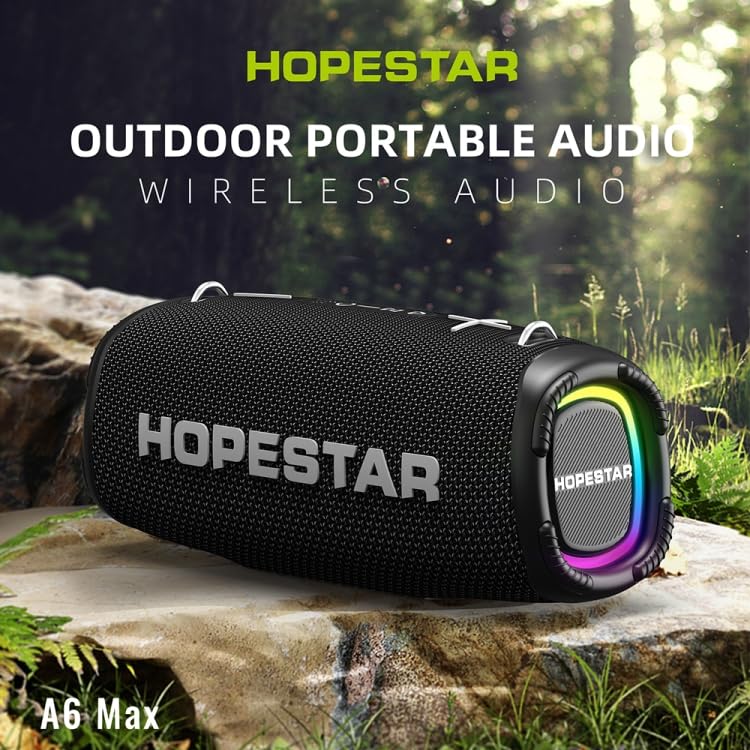
Figure 2: The HOPESTAR A6 Max speaker positioned outdoors, highlighting its portability and suitability for various environments.
คำแนะนำการใช้งาน
1. การเล่นบลูทูธ
After successful Bluetooth pairing, you can play audio from your connected device. Use your device's controls or the speaker's buttons for playback control.
2. อินพุต AUX
- ต่อปลายด้านหนึ่งของสายสัญญาณเสียง AUX ขนาด 3.5 มม. เข้ากับพอร์ตอินพุต AUX ของลำโพง
- Connect the other end to the audio output jack of your external audio device (e.g., MP3 player, computer).
- ลำโพงจะเปลี่ยนไปใช้โหมด AUX โดยอัตโนมัติ หรือคุณอาจต้องกดปุ่ม Mode เพื่อเลือก AUX
3. การเล่นข้อมูลจาก USB Disk / TF Card
- Insert a USB flash drive or a TF (microSD) card containing MP3, WAV, WMA, FLAC, or APE audio fileเสียบสายเข้ากับพอร์ตที่เกี่ยวข้องบนลำโพง
- The speaker will automatically detect the storage device and begin playing music. If not, press the Mode button to switch to USB/TF card mode.
4. การจับคู่ True Wireless Stereo (TWS)
To achieve a stereo sound experience, you can pair two HOPESTAR A6 Max speakers together.
- ตรวจสอบให้แน่ใจว่าลำโพงทั้งสองเปิดอยู่และไม่ได้เชื่อมต่อกับอุปกรณ์ Bluetooth ใดๆ
- On one speaker (this will be the primary speaker), press and hold the TWS button (often indicated by two interlocking circles or a similar icon) until you hear a prompt.
- ลำโพงหลักจะค้นหาลำโพงรอง เมื่อเชื่อมต่อแล้ว คุณจะได้ยินเสียงยืนยัน
- จากนั้นเชื่อมต่ออุปกรณ์มือถือของคุณกับลำโพงหลักผ่านบลูทูธตามที่อธิบายไว้ในส่วน "การจับคู่บลูทูธ" เสียงจะเล่นผ่านลำโพงทั้งสองตัวในระบบสเตอริโอ
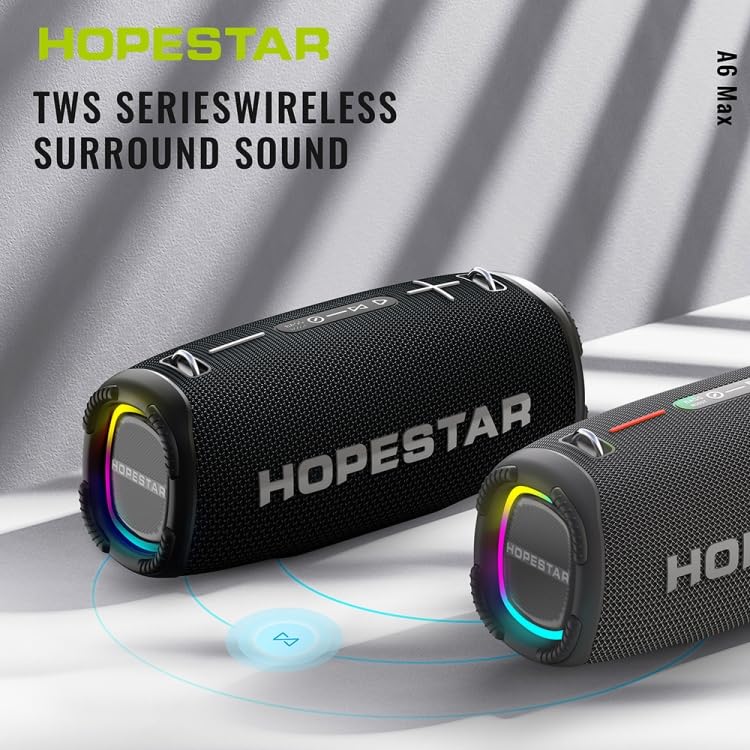
Figure 3: Two HOPESTAR A6 Max speakers wirelessly connected, illustrating the True Wireless Stereo (TWS) function for enhanced audio.
5. การจัดการการโทร
- รับสาย: Briefly press the Play/Pause button when an incoming call rings.
- วางสาย: Briefly press the Play/Pause button during a call.
- ปฏิเสธสาย: Press and hold the Play/Pause button for 2 seconds during an incoming call.
6. การควบคุมระดับเสียงและแทร็ก
- ปรับระดับเสียงขึ้น: Briefly press the "+" button.
- ลดเสียงลง: Briefly press the "-" button.
- เพลงถัดไป: กดปุ่ม "+" ค้างไว้
- แทร็กก่อนหน้า: กดปุ่ม "-" ค้างไว้
การซ่อมบำรุง
การบำรุงรักษาอย่างถูกวิธีจะช่วยให้ลำโพงของคุณมีอายุการใช้งานยาวนานและทำงานได้อย่างมีประสิทธิภาพสูงสุด
1. การทำความสะอาด
- Wipe the speaker's surface with a soft, damp ผ้า.
- Do not use abrasive cleaners, alcohol, benzene, or other chemical solvents, as these may damage the surface or internal components.
- Ensure all ports are dry before charging or connecting cables after exposure to water.
2. การจัดเก็บ
- เก็บลำโพงไว้ในที่แห้งและเย็น หลีกเลี่ยงแสงแดดโดยตรงและอุณหภูมิที่สูงหรือต่ำเกินไป
- If storing for an extended period, charge the battery to approximately 50% every few months to preserve battery health.
3. ความทนทานต่อน้ำ (IPX6)
- The speaker is rated IPX6, meaning it is protected against powerful water jets. It is suitable for use in rainy conditions or near splashes.
- อย่าทำ immerse the speaker in water.
- Ensure the charging port and other covers are securely closed before exposing the speaker to water.
การแก้ไขปัญหา
หากคุณพบปัญหาเกี่ยวกับลำโพง โปรดดูปัญหาและวิธีแก้ไขที่พบบ่อยต่อไปนี้:
| ปัญหา | สาเหตุที่เป็นไปได้ | สารละลาย |
|---|---|---|
| ลำโพงไม่เปิดเครื่อง | แบตเตอรี่อ่อน; กดปุ่มเปิด/ปิดไม่ถูกต้อง | Charge the speaker fully. Press and hold the Power button firmly for a few seconds. |
| ไม่สามารถจับคู่ผ่านบลูทูธได้ | ลำโพงไม่ได้อยู่ในโหมดจับคู่ อุปกรณ์ Bluetooth ปิดอยู่ อยู่ไกลจากลำโพงเกินไป มีสัญญาณรบกวน | Ensure speaker is in Bluetooth pairing mode (flashing blue light). Enable Bluetooth on your device. Move device closer to speaker. Avoid strong electromagnetic interference. |
| ไม่มีเสียงจากลำโพง | ระดับเสียงต่ำเกินไป โหมดอินพุตไม่ถูกต้อง อุปกรณ์ไม่เล่นเสียง | Increase speaker and device volume. Press Mode button to select correct input (Bluetooth, AUX, USB/TF). Ensure audio is playing on your connected device. |
| ความผิดเพี้ยนของเสียง | Volume too high; Low battery; Poor audio source. | Reduce volume on both speaker and device. Charge the speaker. Try a different audio source or file. |
| การจับคู่ TWS ล้มเหลว | Speakers already paired to a device; Too far apart. | Ensure both speakers are disconnected from any Bluetooth devices. Place speakers close to each other during TWS pairing. |
ข้อมูลจำเพาะ
Detailed technical specifications for the ELECTROPRIME HOPESTAR A6 Max Bluetooth Speaker:
| เวอร์ชันบลูทูธ | วี5.1 |
| ระยะการส่งข้อมูล | สูงถึง 10 เมตร (33 ฟุต) |
| กำลังขับ | 50W x 1 (main speaker), 15W x 2 (side speakers) |
| เวลาเล่น | 6-7 ชั่วโมง (ที่ระดับเสียงปานกลาง) |
| ช่วงความถี่ | 80Hz - 15KHz |
| การกำหนดค่าลำโพง | 1 x 119mm (4 ohm 50W), 2 x 78mm (4 ohm 15W) |
| กำลังไฟเข้า | กระแสตรง 5V 2A |
| ประเภทแบตเตอรี่ | แบตเตอรี่ลิเธียมไอออน 18650 |
| ความจุของแบตเตอรี่ | 12000mAh |
| อินเทอร์เฟซอินพุตเสียง | ช่องเสียบหูฟังมาตรฐาน 3.5 มม. (สเตอริโอ) |
| โหมดการเล่นที่รองรับ | U disk, TF card, AUX, Bluetooth |
| ฟอร์แมตเพลงที่รองรับ | MP3,WAV,WMA,FLAC,APE |
| ขนาด (กว้าง x ยาว x สูง) | 162 มม. x 380 มม. x 146 มม. (6.38 นิ้ว x 14.96 นิ้ว x 5.75 นิ้ว) |
| น้ำหนัก | ประมาณ 4.50 กก. (9.93 ปอนด์) |
| ระดับการกันน้ำ | IPX6 |
การรับประกันและการสนับสนุน
ELECTROPRIME products are manufactured with high-quality standards. This product comes with a standard manufacturer's warranty against defects in materials and workmanship from the date of purchase.
For warranty claims, technical support, or any inquiries, please contact your retailer or the ELECTROPRIME customer service team. Please retain your proof of purchase for warranty validation.
Note: Warranty terms and conditions may vary based on region and retailer. Please refer to the specific warranty information provided at the time of purchase.
ข้อมูลติดต่อ:
- ผู้ผลิต: ELECTROGADGETSSTORE
- อีเมล: support@electroprime.com (Example email, please refer to actual product documentation for official contact.)
- Webเว็บไซต์: www.electroprime.com (Example website, please refer to actual product documentation for official contact.)