
1. บทนำ
ขอบคุณสำหรับการซื้อasing the ELECTROPRIME HOCO BS59 Pearlescent Wireless Karaoke Bluetooth Speaker. This manual provides essential information for setting up, operating, and maintaining your device. Please read it carefully before use and retain it for future reference.
2. ข้อมูลด้านความปลอดภัย
- อย่าเปิดเผย the device to extreme temperatures, humidity, or direct sunlight.
- หลีกเลี่ยงการทำหล่น or subjecting the device to strong impacts.
- ห้ามถอดประกอบ or attempt to repair the device yourself. Contact qualified service personnel.
- เก็บให้พ้นมือ ของเด็กๆ
- ใช้เฉพาะ the provided or recommended charging cables and adapters.
- ตรวจสอบการระบายอากาศให้เหมาะสม when operating the speaker.
3. เนื้อหาบรรจุภัณฑ์
กรุณาตรวจสอบว่ามีรายการทั้งหมดอยู่ในแพ็คเกจของคุณ:
- 1 x HOCO BS59 Karaoke Bluetooth Speaker
- 2 x ไมโครโฟนไร้สาย
- 1 x สายชาร์จ (USB-C)
- 1 x คู่มือผู้ใช้
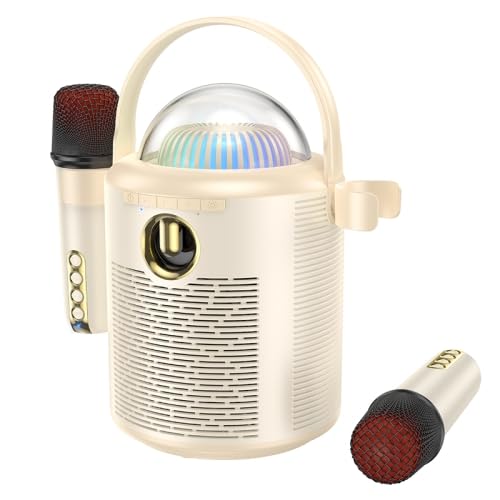
Image: The main unit of the HOCO BS59 speaker in beige, featuring a transparent dome with colorful lights, a handle, and two wireless microphones attached to its sides. Another microphone is shown separately at the bottom right.
4. สินค้าหมดview
Familiarize yourself with the main components of your karaoke speaker system.
- หน่วยลำโพงหลัก: Houses the 8W full-range speaker and 2W tweeter, control buttons, and light dome.
- Wireless Microphones (x2): For vocal input during karaoke.
- แผงควบคุม: Buttons for power, mode, volume, and light effects.
- โดมแสง: Provides colorful light effects.
- พอร์ตชาร์จ: For speaker and microphones.
- อินพุต AUX: สำหรับการเชื่อมต่อเสียงแบบมีสาย
- ช่องเสียบการ์ด TF: สำหรับเล่นเพลงโดยตรงจากเมมโมรี่การ์ด
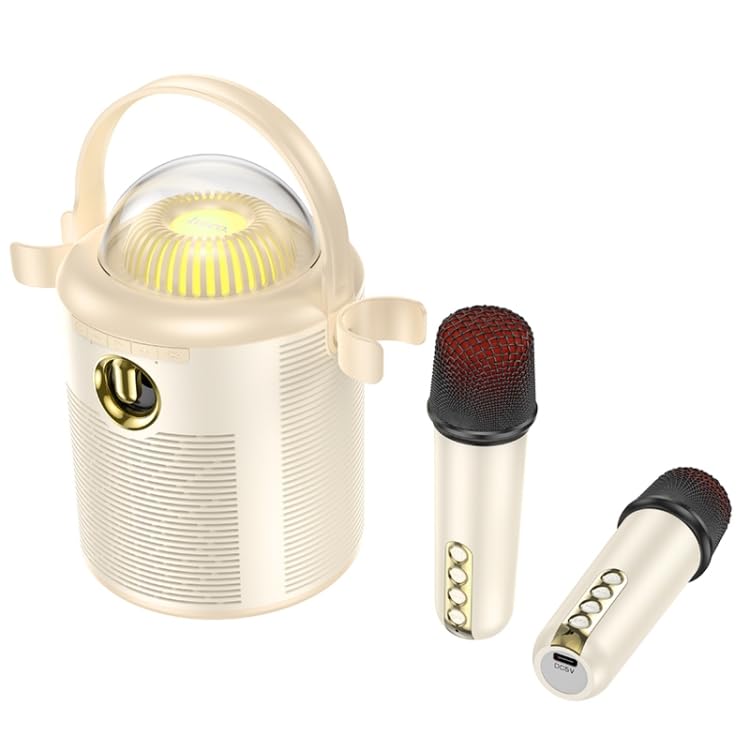
ภาพ: รายละเอียด view of the HOCO BS59 speaker and its two wireless microphones. The speaker's front panel with controls and the transparent light dome are clearly visible. One microphone is shown attached to the speaker, and the other is lying separately, showcasing its buttons and charging port.
5. การตั้งค่า
5.1. การชาร์จอุปกรณ์
ก่อนใช้งานครั้งแรก โปรดชาร์จลำโพงและไมโครโฟนทั้งสองตัวให้เต็ม
- ผู้บรรยาย: Connect the charging cable to the speaker's charging port and a suitable USB power adapter (not included). The charging indicator will show charging status. Full charge takes approximately 3 hours.
- ไมโครโฟน: Connect the charging cable to each microphone's charging port. Full charge takes approximately 2 hours per microphone.
5.2. การเปิด/ปิดเครื่อง
- ผู้บรรยาย: Press and hold the Power button on the speaker for a few seconds to turn it on or off.
- ไมโครโฟน: Press and hold the Power button on each microphone to turn it on or off.
5.3. การจับคู่บลูทู ธ
- ตรวจสอบให้แน่ใจว่าลำโพงเปิดอยู่และอยู่ในโหมดบลูทูธ (โดยจะมีเสียงแจ้งเตือนหรือไฟ LED แสดงสถานะ)
- เปิดใช้งานบลูทูธบนสมาร์ทโฟน แท็บเล็ต หรืออุปกรณ์เสียงอื่นๆ ของคุณ
- ค้นหา "HOCO BS59" or similar in your device's Bluetooth list.
- Select "HOCO BS59" to pair. A confirmation sound will indicate successful pairing.
- The microphones will automatically connect to the speaker when both are powered on.
5.4 การเชื่อมต่อผ่านช่องต่อ AUX
Use a 3.5mm audio cable (not included) to connect an external audio source to the speaker's AUX port. The speaker will automatically switch to AUX mode or you may need to press the Mode button.
5.5. Playing from TF Card
ใส่การ์ด TF (microSD) พร้อมเสียง MP3 fileเสียบการ์ด TF ลงในช่องที่กำหนด ลำโพงจะเปลี่ยนไปใช้โหมดการ์ด TF โดยอัตโนมัติและเริ่มเล่น
6. คู่มือการใช้งาน
6.1. การเล่นเพลง
- เล่น/หยุดชั่วคราว: กดปุ่มเล่น/หยุดชั่วคราวบนลำโพง
- การควบคุมระดับเสียง: ใช้ปุ่มปรับระดับเสียงบนลำโพงหรืออุปกรณ์ที่เชื่อมต่ออยู่
- เพลงถัดไป / ก่อนหน้า: Use the track skip buttons on the speaker.
6.2. ฟังก์ชั่นคาราโอเกะ
Once your music source is playing and microphones are connected:
- ปริมาณไมโครโฟน: Adjust the volume on the microphones directly.
- One-Click Original Sound Cancellation: Press the dedicated button on the speaker or microphone (refer to device markings) to remove vocals from a song, allowing you to sing along. Press again to restore original vocals.
- เสียงสะท้อน/รีเวิร์บ: Some microphones may have controls for echo effects.
6.3. Colorful Lights
The speaker features colorful lights. Press the Light button on the speaker to cycle through different light modes or turn them off.
7. การบำรุงรักษา
- การทำความสะอาด: Wipe the speaker and microphones with a soft, dry cloth. Do not use abrasive cleaners or solvents.
- พื้นที่จัดเก็บ: Store the device in a cool, dry place away from direct sunlight when not in use for extended periods.
- การดูแลแบตเตอรี่ To prolong battery life, avoid fully discharging the device frequently. Charge regularly, even if not in use.
8 การแก้ไขปัญหา
| ปัญหา | สาเหตุที่เป็นไปได้ | สารละลาย |
|---|---|---|
| ไม่มีไฟฟ้า | แบตเตอรี่หมด | Charge the speaker/microphones fully. |
| ไม่มีเสียง | Volume too low; Not paired; Incorrect mode | Increase volume; Ensure successful Bluetooth pairing; Switch to correct input mode (Bluetooth, AUX, TF). |
| ไมโครโฟนไม่ทำงาน | Microphone off; Battery low; Not paired with speaker | Turn on microphone; Charge microphone; Ensure speaker and microphone are both on and within range. |
| การเชื่อมต่อบลูทูธไม่เสถียร | Too far from device; Interference | Move speaker closer to the paired device; Avoid obstacles and other wireless devices. |
9. ข้อมูลจำเพาะ
| คุณสมบัติ | รายละเอียด |
|---|---|
| แบบอย่าง | อีดีเอ006048701เอ |
| เวอร์ชันบลูทูธ | 5.1 (Chip: JL AC6965E4) |
| ความจุแบตเตอรี่ของลำโพง | 1800mAh |
| ความจุแบตเตอรี่ไมโครโฟน | 500mAh |
| เวลาในการชาร์จลำโพง | ประมาณ 3 ชั่วโมง |
| เวลาในการชาร์จไมโครโฟน | ประมาณ 2 ชั่วโมง |
| Speaker Usage Time | ประมาณ 5 ชั่วโมง |
| Microphone Usage Time | ประมาณ 16 ชั่วโมง |
| หน่วยลำโพง | 8W full-range speaker + 2W tweeter |
| กำลังขับทั้งหมด | 10วัตต์ |
| ขนาด (ลำโพง) | 190 x 120 x 215มม. |
| Weight (Speaker) | 774กรัม |
| โหมดที่รองรับ | บลูทูธ, การ์ด TF, ช่องต่อ AUX |
| คุณสมบัติพิเศษ | Dual wireless microphones, One-click original sound cancellation, Colorful lights |
10. การรับประกันและการสนับสนุน
This product comes with a standard manufacturer's warranty. Please refer to the warranty card included in your package for specific terms and conditions. For technical support, troubleshooting assistance, or warranty claims, please contact ELECTROPRIME customer service through your retailer or the official brand webเว็บไซต์.
หากต้องการข้อมูลเพิ่มเติมสามารถเยี่ยมชมได้ที่ ELECTROPRIME brand store.