
การแนะนำ
The Yesido YAU41 is a versatile 2-in-1 Bluetooth 5.0 audio adapter designed to function as both a transmitter (TX) and a receiver (RX). It enables wireless audio streaming for a wide range of devices, converting traditional audio systems into Bluetooth-enabled ones. Additionally, it features a built-in TF card reader for direct music playback. This manual provides essential information for proper setup, operation, and maintenance of your YAU41 device.
สินค้าเกินview
คุณสมบัติหลัก:
- Bluetooth 5.0 เพื่อการเชื่อมต่อไร้สายที่เสถียรและมีประสิทธิภาพ
- 2-in-1 functionality: Transmitter (TX) and Receiver (RX) modes.
- Integrated TF card reader for direct audio playback.
- 3.5mm AUX audio input/output.
- Rechargeable battery with approximately 10 hours of music playback.
- การออกแบบที่กะทัดรัดและพกพาสะดวก
- Intuitive TX/RX mode switch button.
ส่วนประกอบอุปกรณ์:
Familiarize yourself with the various parts of your YAU41 audio adapter:
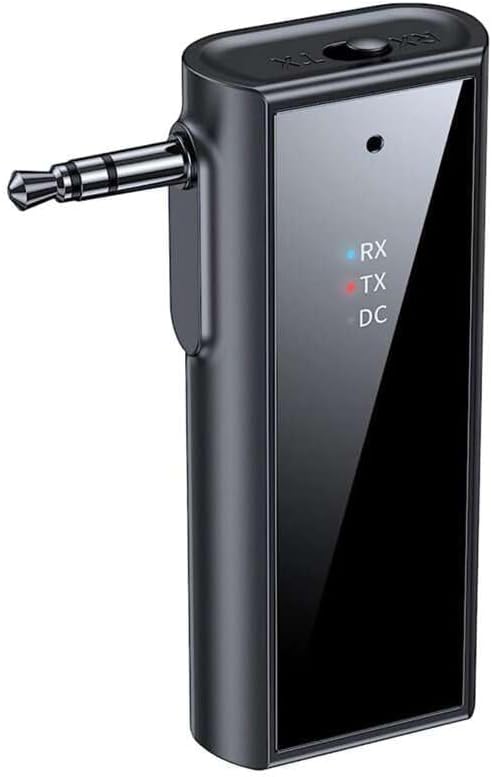
ภาพ: ด้านหน้า view of the Yesido YAU41 Audio Adapter, highlighting the 3.5mm audio jack, mode indicator lights (RX, TX, DC), and the Yesido logo.
- แจ็คเสียงขนาด 3.5 มม.: For connecting to audio sources (TX mode) or speakers (RX mode).
- TX/RX Switch Button: สลับระหว่างโหมดเครื่องส่งและเครื่องรับ
- ปุ่มเปิด/ปิด/ปุ่มมัลติฟังก์ชั่น: Powers the device on/off, plays/pauses music, answers/ends calls.
- ปุ่มเพิ่มเสียง/ปุ่มเปลี่ยนเพลงถัดไป: เพิ่มระดับเสียงหรือข้ามไปยังแทร็กถัดไป
- ปุ่มลดเสียง/ปุ่มเล่นเพลงก่อนหน้า: ลดระดับเสียงหรือย้อนกลับไปเล่นแทร็กก่อนหน้า
- ช่องเสียบการ์ด TF: For inserting a TF (MicroSD) card for direct music playback.
- พอร์ตชาร์จ USB-C: สำหรับการชาร์จอุปกรณ์
- Indicator Lights (RX, TX, DC):
- RX (Blue): Indicates Receiver mode is active.
- TX (Red): Indicates Transmitter mode is active.
- DC (Green): บ่งชี้สถานะการชาร์จ
การตั้งค่า
1. การชาร์จครั้งแรก:
Before first use, fully charge the YAU41 adapter. Connect the provided USB-C charging cable to the device's USB-C port and the other end to a standard USB power adapter (not included) or a computer USB port. The DC indicator light will illuminate during charging and turn off when fully charged.
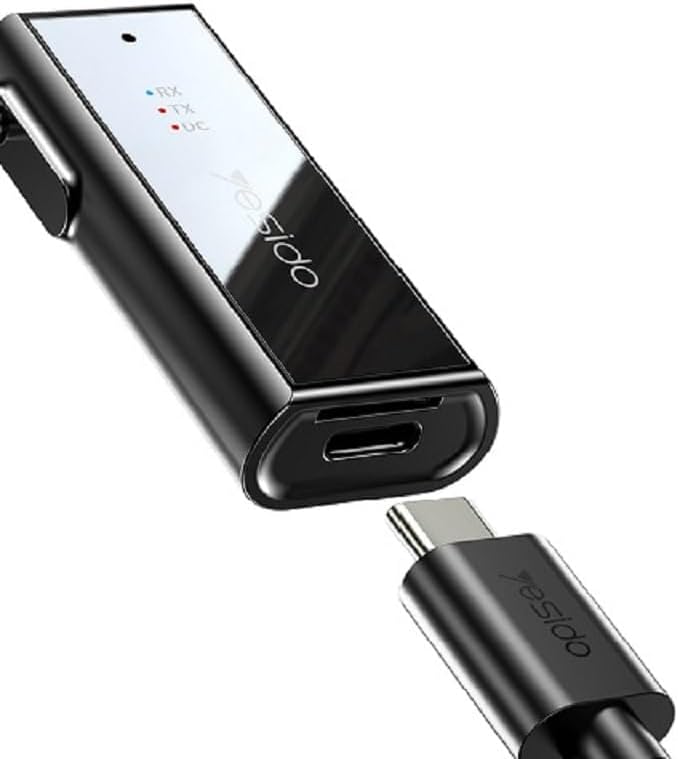
Image: The Yesido YAU41 Audio Adapter being charged via its USB-C port.
2. การเปิด/ปิดเครื่อง:
- การเปิดเครื่อง: Press and hold the Power button for approximately 3 seconds until the indicator lights flash.
- วิธีปิดเครื่อง: กดปุ่มเปิด/ปิดค้างไว้ประมาณ 3 วินาที จนกระทั่งไฟแสดงสถานะดับ
โหมดการทำงาน
โหมดเครื่องส่งสัญญาณ (TX):
In TX mode, the YAU41 transmits audio from a non-Bluetooth device (e.g., TV, computer, MP3 player) to a Bluetooth-enabled receiving device (e.g., Bluetooth headphones, Bluetooth speaker).
- Ensure the YAU41 is powered on.
- เลื่อนสวิตช์ TX/RX ไปที่ตำแหน่ง TX position. The red TX indicator light will illuminate.
- Connect the YAU41's 3.5mm audio jack to the audio output port of your non-Bluetooth device using the provided 3.5mm audio cable.
- Place your Bluetooth receiving device (headphones/speaker) into pairing mode.
- The YAU41 will automatically search for and connect to nearby Bluetooth receiving devices. Once connected, the TX indicator light may change its blinking pattern or remain solid.
- Play audio on your non-Bluetooth device. The sound should now be transmitted to your Bluetooth headphones/speaker.
โหมดตัวรับ (RX):
In RX mode, the YAU41 receives audio from a Bluetooth-enabled device (e.g., smartphone, tablet) and outputs it to a non-Bluetooth audio system (e.g., car stereo, home stereo, wired headphones).
- Ensure the YAU41 is powered on.
- เลื่อนสวิตช์ TX/RX ไปที่ตำแหน่ง RX position. The blue RX indicator light will illuminate and flash, indicating it's in pairing mode.
- Connect the YAU41's 3.5mm audio jack to the audio input port (e.g., AUX-in) of your non-Bluetooth audio system using the provided 3.5mm audio cable.
- On your Bluetooth-enabled device (e.g., smartphone), enable Bluetooth and search for available devices. Select "YAU41" from the list to pair.
- Once successfully paired, the blue RX indicator light will remain solid.
- Play audio on your Bluetooth-enabled device. The sound will now be output through your connected audio system.

Image: The Yesido YAU41 Audio Adapter in a car, demonstrating its use with a TF card for direct music playback.
การเล่นการ์ด TF:
The YAU41 supports direct audio playback from a TF (MicroSD) card.
- ใส่การ์ด TF ที่มีไฟล์เสียง files (e.g., MP3) into the TF card slot on the YAU41.
- The device will automatically switch to TF card playback mode.
- Use the Volume Up/Next Track and Volume Down/Previous Track buttons to control playback.
- The Power/Multi-function button can be used to play/pause.
- Ensure the YAU41 is connected to an audio output device (e.g., speaker in RX mode) to hear the audio.
การชาร์จไฟ
When the battery is low, the indicator light may flash or a voice prompt may be heard. To charge the device:
- Connect the YAU41 to a USB power source using the provided USB-C cable.
- The DC indicator light will turn on during charging.
- Once fully charged, the DC indicator light will turn off.
- A full charge typically takes approximately 1-2 hours and provides up to 10 hours of music playback.
การซ่อมบำรุง
- ควรเก็บอุปกรณ์ให้แห้ง อย่าให้โดนความชื้นหรือของเหลว
- ทำความสะอาดอุปกรณ์ด้วยผ้านุ่มและแห้ง หลีกเลี่ยงการใช้สารเคมีรุนแรงหรือน้ำยาทำความสะอาดที่มีฤทธิ์กัดกร่อน
- เก็บอุปกรณ์ไว้ในที่แห้งและเย็น หลีกเลี่ยงแสงแดดโดยตรงและอุณหภูมิที่สูงหรือต่ำเกินไป
- หลีกเลี่ยงการทำอุปกรณ์หล่นหรือกระแทกอย่างรุนแรง
- ห้ามถอดประกอบหรือดัดแปลงอุปกรณ์ เนื่องจากจะทำให้การรับประกันเป็นโมฆะและอาจทำให้เกิดความเสียหายได้
การแก้ไขปัญหา
| ปัญหา | วิธีแก้ปัญหาที่เป็นไปได้ |
|---|---|
| อุปกรณ์ไม่เปิดเครื่อง | Ensure the device is fully charged. Press and hold the Power button for 3-5 seconds. |
| Cannot pair in TX/RX mode. |
|
| ไม่มีช่องต่อสัญญาณเสียงเข้า/ออก |
|
| เสียงดีเลย์/หน่วง | Bluetooth audio transmission can sometimes introduce minor latency. This device uses Bluetooth 5.0, which minimizes this, but some applications (e.g., live music performance) may still experience noticeable delay. Ensure no obstacles are between devices. |
ข้อมูลจำเพาะ
| คุณสมบัติ | รายละเอียด |
|---|---|
| แบบอย่าง | YAU41 |
| เวอร์ชันบลูทูธ | 5.0 |
| โหมดการทำงาน | เครื่องส่ง (TX), เครื่องรับ (RX) |
| การเชื่อมต่อ | บลูทูธ, 3.5 มม. AUX |
| รองรับการ์ด TF | Yes (MicroSD) |
| ระยะการส่งข้อมูล | สูงถึง 10 เมตร (33 ฟุต) |
| ประเภทแบตเตอรี่ | Rechargeable Lithium Ion/Polymer |
| เวลาเล่นเพลง | ประมาณ 10 ชั่วโมง |
| พอร์ตชาร์จ | ยูเอสบี-ซี |
| วิธีการควบคุม | ปุ่ม |
| วัสดุ | พีซี (โพลีคาร์บอเนต) |
| น้ำหนัก | 300 กรัม |
| สี | สีดำ |
| อุปกรณ์ที่รองรับ | TV, Radio, Speaker, Smartphone, Car Audio Systems |
ข้อมูลด้านความปลอดภัย
- Do not expose the device to extreme temperatures, direct sunlight, or open flames.
- Avoid using the device in dusty or dirty environments.
- เก็บอุปกรณ์ให้ห่างจากสนามแม่เหล็กแรงสูง
- Do not use unauthorized chargers or cables, as this may damage the device or pose a safety risk.
- กำจัดอุปกรณ์และแบตเตอรี่อย่างมีความรับผิดชอบตามกฎระเบียบท้องถิ่น
การรับประกันและการสนับสนุน
สำหรับข้อมูลการรับประกันและการสนับสนุนทางเทคนิค โปรดดูเอกสารที่แนบมาพร้อมกับสินค้าที่ซื้อ หรือติดต่อผู้ผลิตโดยตรง โปรดเก็บหลักฐานการซื้อไว้เพื่อใช้ในการเคลมประกัน