
VENZ R7246
VENZ Smart Air Conditioner Controller (Model R7246)
คู่มือการใช้งาน
1. สินค้าหมดview
The VENZ Smart Air Conditioner Controller (Model R7246) transforms traditional air conditioners and heat pumps into smart, energy-efficient devices. It features a built-in thermohygrometer sensor for real-time temperature and humidity monitoring, enabling intelligent climate control. This controller supports remote operation via a mobile application and voice commands through Amazon Alexa and Google Home. Advanced features include 7-day programming, geo-fencing, and an IR learning function to manage a wide range of infrared-controlled appliances.
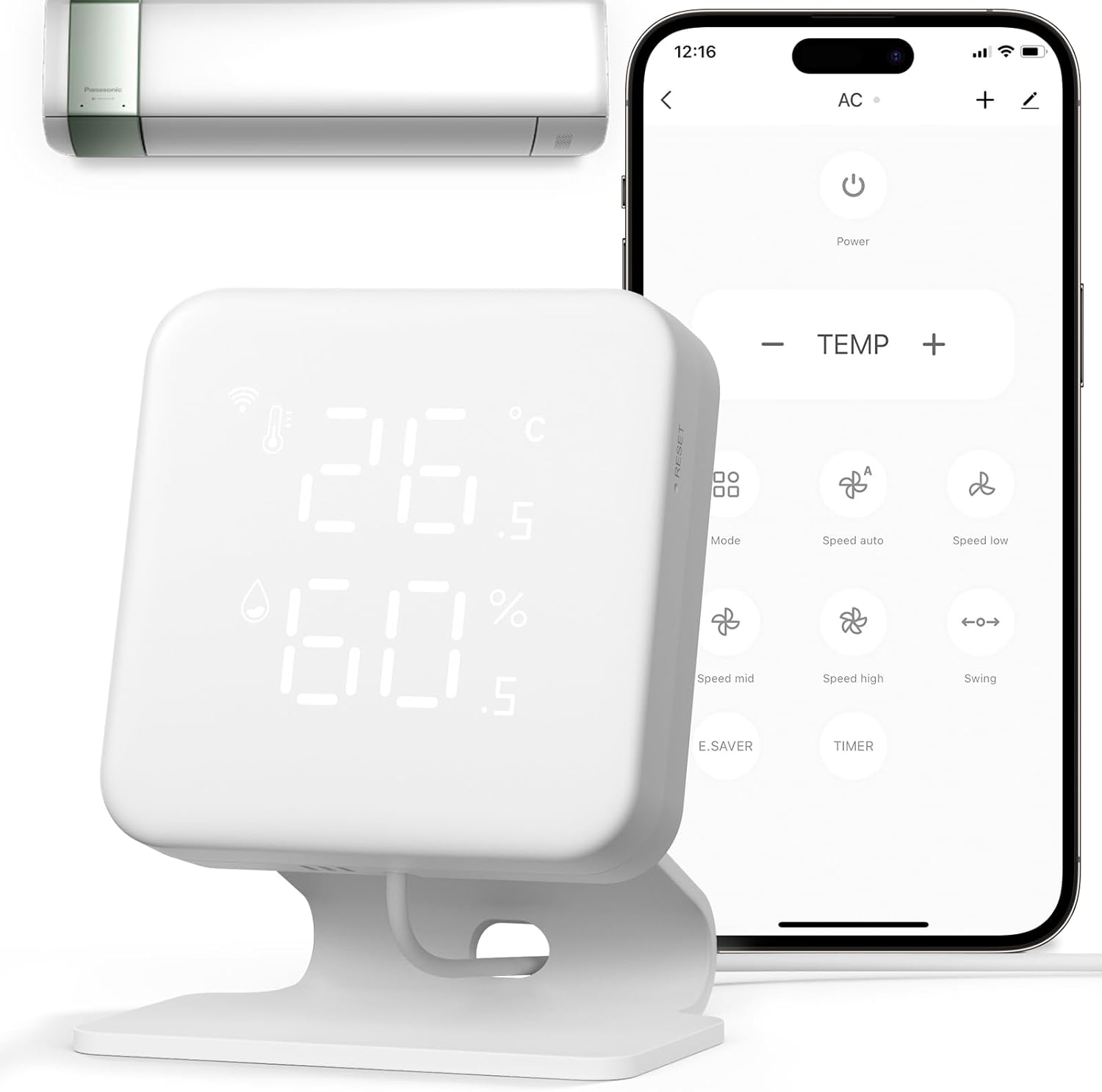
Image: The VENZ Smart Air Conditioner Controller, a white square device displaying temperature and humidity, shown alongside a smartphone displaying its control app and a mini-split air conditioner unit.
2. เนื้อหาบรรจุภัณฑ์
ตรวจสอบให้แน่ใจว่ามีสินค้าทั้งหมดอยู่ในแพ็คเกจของคุณ:
- Smart Controller (Model R7246) x 1
- วงเล็บ x 1
- สายเคเบิลข้อมูล USB Type-C จำนวน 1 เส้น
- อะแดปเตอร์ x 1
- Metal Panel x 1
- พินรีเซ็ต x 1

Image: All components included in the VENZ Smart Air Conditioner Controller package, including the controller, bracket, cables, adapter, and manual.
3. คู่มือการติดตั้ง
3.1 การเปิดเครื่องและการจับคู่ครั้งแรก
- เปิดเครื่อง: Connect the provided USB Type-C cable to the controller and an adapter, then plug it into a power source. The device display will light up.
- Observe Wi-Fi Signal: After powering on, the Wi-Fi signal icon in the upper left corner of the controller's display should turn white and start flashing. This indicates the device is in pairing mode. If it does not flash, proceed to Section 3.2 for reset instructions.
- เปิดใช้งานแอปพลิเคชัน: Open the "WOOX Home" application on your smartphone.
- เพิ่มอุปกรณ์: The app should automatically detect the smart remote and a quick pairing pop-up window will appear. Tap "Add" to proceed.
- Confirm Wi-Fi Network: ป้อนชื่อเครือข่าย Wi-Fi 2.4GHz และรหัสผ่านของคุณ Note: Only 2.4GHz Wi-Fi is supported.
- การลงทะเบียนอุปกรณ์: แอพจะค้นหาอุปกรณ์และลงทะเบียนเข้ากับบัญชีของคุณ
- ชื่ออุปกรณ์: Once successfully added, you can enter a custom name for your device. This name will also be used for voice control with Amazon Alexa and Google Home.
Video: This video demonstrates the initial setup process for the VENZ Smart Air Conditioner Controller, including powering on, observing the Wi-Fi signal, launching the app, adding the device, confirming Wi-Fi details, and naming the device. It also covers the reset procedure.
3.2 การรีเซ็ตอุปกรณ์
If the Wi-Fi signal does not flash or you need to re-pair the device, follow these steps to reset:
- รับประกันการจ่ายไฟ: ตรวจสอบให้แน่ใจว่าอุปกรณ์เปิดอยู่
- ตรวจสอบสัญญาณ Wi-Fi: Confirm that the device's Wi-Fi signal is flashing white.
- ทำการรีเซ็ต: If the Wi-Fi signal is not flashing, use the provided reset pin (or a similar thin object) to press and hold the reset button on the side of the device for more than 5 seconds. The Wi-Fi signal should then start flashing, indicating it's ready for pairing again.
4. คู่มือการใช้งาน
4.1 การควบคุมระยะไกลผ่านแอปพลิเคชัน
Once paired, use the "WOOX Home" app to control your air conditioner or heat pump remotely. You can adjust modes, air speed, and temperature settings from anywhere.

Image: A visual representation of the smartphone app sending a Wi-Fi signal to the VENZ controller, which then transmits an infrared (IR) signal to control an air conditioner.
4.2 การบูรณาการการควบคุมด้วยเสียง
The controller is compatible with Amazon Alexa and Google Home. After linking your WOOX Home account to your voice assistant, you can use voice commands to control your connected appliances. For example, "Alexa, set the heat pump to seventy-two degrees."

Image: A woman in bed interacting with an Amazon Echo device, demonstrating voice control functionality for the smart AC controller. The controller is visible on a bedside table.
4.3 การตรวจสอบอุณหภูมิและความชื้น
The built-in Swiss-made chip thermohygrometer sensor provides real-time temperature and humidity readings directly on the device's LED display and within the app. This allows for precise environmental monitoring and intelligent control based on these values.

ภาพ: ภาพระยะใกล้ view of the VENZ Smart Air Conditioner Controller, highlighting its LED display showing current temperature (26.5°C) and humidity (64.5%).
4.4 Smart Programming and Geo-fencing
Utilize the 7-day programming feature to set automated schedules for your AC or heat pump based on your daily habits. Geo-fencing allows the controller to automatically adjust your climate control settings when you enter or leave a predefined area, enhancing comfort and energy efficiency.

Image: A man relaxing on a couch, with the VENZ controller mounted on the wall in the background. A smartphone in the foreground displays the app's weekly scheduling interface, showing options for intelligent climate control.
4.5 ฟังก์ชันการเรียนรู้ IR
The smart IR learning function allows the controller to copy commands from 99% of traditional infrared remotes. This enables you to consolidate control of various IR-controlled devices, such as TVs, projectors, sound systems, lights, and motorized curtains, all within the WOOX Home app.

Image: The VENZ Smart Air Conditioner Controller prominently displayed, surrounded by a variety of traditional infrared remote controls and other IR-controlled appliances like TVs, fans, and air purifiers, illustrating its universal control capability.
5. การบำรุงรักษา
To ensure optimal performance and longevity of your VENZ Smart Air Conditioner Controller, follow these maintenance guidelines:
- การทำความสะอาด: Gently wipe the device with a soft, dry cloth. Avoid using abrasive cleaners, solvents, or strong chemicals, as these can damage the surface and internal components.
- การจัดวาง: Place the controller in a location free from direct sunlight, excessive heat, moisture, or extreme cold. Ensure it has a clear line of sight to the appliances it controls for effective IR transmission.
- แหล่งจ่ายไฟ: Use only the provided power adapter and cable. Ensure the power source is stable and meets the device's voltagข้อกำหนด e (5 โวลต์)
- อัพเดตเฟิร์มแวร์: Periodically check the WOOX Home app for available firmware updates. Keeping the device's firmware up-to-date ensures access to the latest features and performance improvements.
6 การแก้ไขปัญหา
If you encounter issues with your VENZ Smart Air Conditioner Controller, refer to the following common troubleshooting steps:
- อุปกรณ์ไม่ได้เชื่อมต่อกับ Wi-Fi:
- ตรวจสอบให้แน่ใจว่าเครือข่าย Wi-Fi ของคุณเป็น 2.4GHz อุปกรณ์นี้ไม่รองรับเครือข่าย 5GHz
- ตรวจสอบว่ารหัสผ่าน Wi-Fi ของคุณถูกป้อนในแอปอย่างถูกต้อง
- เลื่อนตัวควบคุมให้ใกล้กับเราเตอร์ Wi-Fi มากขึ้นเพื่อเพิ่มความแรงของสัญญาณ
- ทำการรีเซ็ตอุปกรณ์ตามที่อธิบายไว้ในหัวข้อ 3.2
- App Not Finding Device During Pairing:
- Check your smartphone's system settings to ensure Bluetooth and location permissions are enabled for the WOOX Home app.
- Ensure the device's Wi-Fi signal is flashing white, indicating it's in pairing mode. If not, reset the device.
- ระบบควบคุมอินฟราเรดใช้งานไม่ได้:
- Ensure there is a clear line of sight between the controller and the appliance you are trying to control. Obstructions can block the IR signal.
- Verify that the correct appliance model has been selected or that the IR learning process was successful for custom remotes.
- Check if the controller is powered on and connected to Wi-Fi.
- การวัดอุณหภูมิ/ความชื้นที่ไม่ถูกต้อง:
- Ensure the device is not placed near heat sources (e.g., direct sunlight, vents, electronics) or sources of moisture that could affect readings.
- Allow some time for the sensor to stabilize after initial setup or relocation.
For further assistance, please refer to the manufacturer's support channels.
7. ข้อมูลจำเพาะ
| คุณสมบัติ | รายละเอียด |
|---|---|
| ยี่ห้อ | เวนซ์ |
| ชื่อรุ่น | ตัวควบคุมเครื่องปรับอากาศอัจฉริยะ |
| หมายเลขรุ่น | R7246 |
| ประเภทตัวควบคุม | Amazon Alexa, Android, Google Assistant, iOS |
| คุณสมบัติพิเศษ | Air Conditioner And Fan Smart Control, Date Display, Geofence Technology, Temperature And Humidity Monitor, Weekly Auto-Scheduling |
| สี | สีขาว |
| การใช้งานเฉพาะของผลิตภัณฑ์ | Air Conditioner Controller, Humidifier Monitor, Temperature Monitor |
| ประเภทการควบคุมอุณหภูมิ | การทำให้เย็น |
| เทคโนโลยีการเชื่อมต่อ | Bluetooth, IR, Wi-Fi |
| เล่มที่tage | 5 โวลต์ |
| วัสดุ | อะคริโลไนไตรล์ บิวทาไดอีน สไตรีน (ABS), โพลีคาร์บอเนต (PC) |
| ประเภทจอภาพ | นำ |
| ประเภทการควบคุม | การควบคุมแอพ |
| วิธีการควบคุม | แอพ, เสียง |
| โปรโตคอลการเชื่อมต่อ | บลูทู ธ Wi-Fi |
| สไตล์ | ทันสมัย |
| แสงไฟแบ็คไลท์ | ใช่ |
| ขนาดสินค้า | 2.76 x 0.73 x 2.76 นิ้ว |
| น้ำหนักสินค้า | 7.8 ออนซ์ |
8. การรับประกันและการสนับสนุน
For warranty information, technical support, or further inquiries, please contact VENZ customer service through their official webตรวจสอบเว็บไซต์หรือรายละเอียดการติดต่อที่ระบุไว้ในบรรจุภัณฑ์ของผลิตภัณฑ์ เก็บใบเสร็จรับเงินไว้เพื่อใช้ในการเคลมประกัน
Ask a question about this manual
Ask about setup, troubleshooting, compatibility, parts, safety, or missing instructions. Manuals+ will review the question and use this page’s manual context to help answer it.