
1. บทนำ
The Brilagi VELVET SMART LED Ceiling Light is a high-efficiency, dimmable LED lighting solution designed for indoor use. With 24 watts of power and 230 volts, it offers significant energy savings. Its modern black and gold design complements various interior styles. Featuring Wi-Fi Tuya technology, this ceiling light allows remote control of brightness and color temperature (2700-6500K) via an application, and also includes a remote control for convenience. The light has a 45 cm diameter and comes with mounting hardware.
2. คำแนะนำด้านความปลอดภัยที่สำคัญ
- อ่านคำแนะนำทั้งหมดอย่างละเอียดก่อนการติดตั้งและใช้งาน
- Ensure the power supply is disconnected at the main circuit breaker before installation or maintenance.
- การติดตั้งควรดำเนินการโดยช่างไฟฟ้าที่มีคุณสมบัติหากคุณไม่แน่ใจ
- ห้ามดัดแปลงผลิตภัณฑ์ไม่ว่ากรณีใดๆ
- ผลิตภัณฑ์นี้ออกแบบมาสำหรับใช้ภายในอาคารเท่านั้น ห้ามวางในที่ที่มีความชื้นหรืออุณหภูมิสูงเกินไป
- เก็บวัสดุบรรจุภัณฑ์ให้พ้นมือเด็ก
3. เนื้อหาบรรจุภัณฑ์
ตรวจสอบว่าส่วนประกอบทั้งหมดมีอยู่ก่อนเริ่มการติดตั้ง
- Brilagi VELVET SMART LED Ceiling Light (1 unit)
- รีโมทคอนโทรล (1 ยูนิต)
- ฮาร์ดแวร์สำหรับติดตั้ง (สกรู, พุก)
- คู่มือการใช้งาน (เอกสารนี้)
4. การตั้งค่าและการติดตั้ง
The Brilagi VELVET SMART LED Ceiling Light is designed for flush ceiling mounting and does not require assembly.
4.1. Mounting the Ceiling Light
- ปิดไฟ: Before starting, ensure the power supply to the installation area is completely off at the main circuit breaker.
- เตรียมพื้นผิวในการติดตั้ง: Mark the drilling points on the ceiling using the light fixture's mounting bracket as a template.
- เจาะรู: เจาะรูตามจุดที่ทำเครื่องหมายไว้ และติดตั้งพุกยึดผนังที่เหมาะสมหากจำเป็น
- เชื่อมต่อสายไฟ: Connect the household electrical wires to the light fixture's wires according to local electrical codes (Live to Live, Neutral to Neutral, Ground to Ground). Ensure connections are secure.
- ติดตั้งอย่างแน่นหนา: Attach the light fixture to the ceiling using the provided mounting hardware. Ensure it is securely fastened.
- คืนพลังงาน: เมื่อการติดตั้งเสร็จสมบูรณ์แล้ว ให้เสียบปลั๊กไฟที่เบรกเกอร์หลักอีกครั้ง

Image: The Brilagi VELVET SMART LED Ceiling Light seamlessly integrated into a modern living room setting, showcasing its aesthetic appeal when installed.
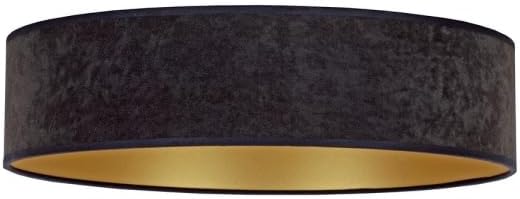
ภาพ: รายละเอียด view of the Brilagi VELVET SMART LED Ceiling Light, highlighting its black exterior finish and the contrasting gold interior, which enhances light reflection.
4.2. การจับคู่รีโมทคอนโทรล
The remote control is typically pre-paired. If not, or if you need to re-pair:
- ตรวจสอบให้แน่ใจว่าไฟเปิดอยู่
- Within 5 seconds of turning on the light, press and hold the "ON/OFF" button on the remote control until the light flashes, indicating successful pairing.

Image: The included white remote control, featuring buttons for power, brightness adjustment, color temperature control, and preset scene selections for convenient operation.
4.3. Wi-Fi (Tuya App) Setup
- ดาวน์โหลดแอป Tuya Smart: Download and install the "Tuya Smart" app from your smartphone's app store (iOS or Android).
- ลงทะเบียน/เข้าสู่ระบบ: เปิดแอปและลงทะเบียนบัญชีใหม่หรือเข้าสู่ระบบหากคุณมีบัญชีอยู่แล้ว
- เพิ่มอุปกรณ์: แตะไอคอน "+" ที่มุมขวาบนของแอปเพื่อเพิ่มอุปกรณ์ใหม่
- เลือกแสงสว่าง: Choose "Lighting" or "Light Source (Wi-Fi)" from the device categories.
- Enter Wi-Fi details: ตรวจสอบให้แน่ใจว่าโทรศัพท์ของคุณเชื่อมต่อกับเครือข่าย Wi-Fi 2.4GHz แล้ว ป้อนรหัสผ่าน Wi-Fi ของคุณในแอป
- Reset Light for Pairing Mode: Turn the light ON-OFF-ON-OFF-ON (with 2-second intervals) until the light starts blinking rapidly. This indicates it's in pairing mode.
- ยืนยันการกะพริบ: ในแอป ตรวจสอบว่าไฟแสดงสถานะกำลังกะพริบเร็ว ๆ
- เชื่อมต่อ: The app will search for and connect to the light. Once connected, you can rename the device.
5. คู่มือการใช้งาน
5.1. การใช้รีโมทคอนโทรล
The remote control provides convenient access to the light's primary functions:
- เปิด/ปิด: Press the central button to turn the light on or off.
- การปรับความสว่าง: Use the "+" and "-" buttons to increase or decrease the light intensity.
- อุณหภูมิสี: Adjust the color temperature from warm white (2700K) to cool white (6500K) using the dedicated buttons.
- ฉากที่ตั้งไว้ล่วงหน้า: Select from various pre-programmed lighting scenes (e.g., night mode, reading mode) using the scene buttons.
Image: The remote control layout, illustrating the functions of each button for controlling the ceiling light's features.
5.2. การใช้แอป Tuya Smart
The Tuya Smart app offers advanced control and customization options:
- เปิด/ปิดระยะไกล: Control the light from anywhere with an internet connection.
- การหรี่แสงแบบไม่ต่อเนื่อง: Precisely adjust brightness levels.
- การควบคุมอุณหภูมิสี: Fine-tune the color temperature across the 2700K-6500K range.
- การปรับแต่งฉาก: Create and save your own custom lighting scenes.
- การกำหนดตารางเวลา: ตั้งเวลาและกำหนดตารางเวลาเพื่อให้ไฟเปิด/ปิดหรือเปลี่ยนการตั้งค่าโดยอัตโนมัติ
- การควบคุมด้วยเสียง: Integrate with voice assistants like Amazon Alexa or Google Assistant (requires compatible device and setup within the Tuya app).
6. การบำรุงรักษา
- การทำความสะอาด: ตรวจสอบให้แน่ใจว่าได้ปิดไฟแล้วก่อนทำความสะอาด เช็ดโคมไฟด้วยผ้าแห้งนุ่มๆ ห้ามใช้สารทำความสะอาดที่มีฤทธิ์กัดกร่อนหรือตัวทำละลาย
- ไฟ LED: แหล่งกำเนิดแสง LED ในตัวได้รับการออกแบบมาสำหรับการใช้งานระยะยาวและไม่สามารถเปลี่ยนได้ด้วยตนเอง
- รีโมทคอนโทรล: Replace batteries (type not specified, assume standard AAA or button cell) when the remote's range decreases or it stops responding.
7 การแก้ไขปัญหา
| ปัญหา | สาเหตุที่เป็นไปได้ | สารละลาย |
|---|---|---|
| ไฟไม่เปิด | ไม่มีแหล่งจ่ายไฟ สายไฟหลวม สวิตช์ชำรุด | Check circuit breaker. Verify wiring connections. Test with another switch if possible. |
| รีโมทคอนโทรลไม่ทำงาน | แบตเตอรี่หมด รีโมตไม่จับคู่ | Replace remote control batteries. Re-pair the remote control (see Section 4.2). |
| Cannot connect to Wi-Fi (Tuya app). | Incorrect Wi-Fi password; 5GHz Wi-Fi network; light not in pairing mode; network interference. | Ensure correct 2.4GHz Wi-Fi network and password. Reset light to pairing mode (Section 4.3). Move closer to router. |
| ไฟกระพริบหรือหรี่ลงโดยไม่คาดคิด | Unstable power supply; loose connection; incompatible dimmer (if external). | Check power supply stability. Verify wiring. This light is internally dimmable; do not use with external dimmers. |
8. ข้อมูลจำเพาะผลิตภัณฑ์
| คุณสมบัติ | รายละเอียด |
|---|---|
| ยี่ห้อ | บริลากิ |
| ชื่อรุ่น | กำมะหยี่ |
| หมายเลขรุ่น | บีจี0436 |
| ขนาด | 45L x 45W x 10H ซม |
| สี | สีดำ,สีทอง |
| วัสดุ | Glass (Shade) |
| ประเภทแหล่งกำเนิดแสง | นำ |
| วัดtage | 24 วัตต์ |
| เล่มที่tage | 230 โวลต์ |
| อุณหภูมิสี | 2700K - 6500K (ปรับได้) |
| การเชื่อมต่อ | Wi-Fi (Tuya Smart App), Remote Control |
| ประเภทการติดตั้ง | Flush Mount, Ceiling Mount |
| ฉลากประสิทธิภาพพลังงาน | High / Excellent (EU Label) |
| จำเป็นต้องประกอบ | เลขที่ |
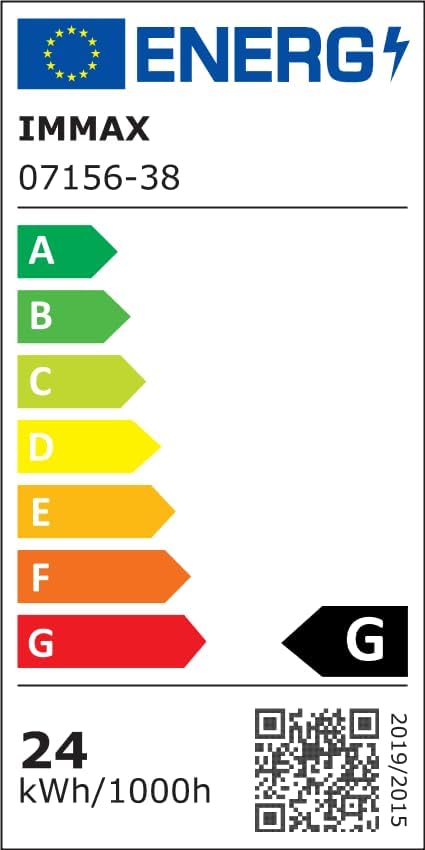
Image: The EU Energy Efficiency Label, indicating the product's energy consumption and efficiency class. For more details, refer to the official EPREL database via the QR code or link.
Official EPREL Database Link: https://eprel.ec.europa.eu/qr/1294167
9. การรับประกันและการสนับสนุน
For warranty information and customer support, please refer to the documentation provided with your purchase or contact Brilagi customer service. Keep your proof of purchase for warranty claims.