1. บทนำ
Thank you for choosing the ISWARD G30 Robotic Lawn Mower. This manual provides essential information for the safe and efficient operation, maintenance, and troubleshooting of your new robotic lawn mower. The ISWARD G30 is designed to provide effortless lawn care for areas up to 3000 m², utilizing advanced RTK + Vision integration for precise positioning without the need for boundary wires. Its intelligent features include multi-zone management, app control, and a low-noise operation, ensuring a pristine lawn with minimal effort.

Figure 1.1: The ISWARD G30 Robotic Lawn Mower, a compact and efficient device for automated lawn care.
2. ข้อมูลด้านความปลอดภัย
Always read and understand all safety warnings and instructions before operating the robotic lawn mower. Failure to follow the warnings and instructions may result in electric shock, fire, and/or serious injury.
- ความปลอดภัยทั่วไป: Keep children and pets away from the working area when the mower is operating. Never allow children to play with the appliance.
- ก่อนการดำเนินการ: Inspect the lawn for objects such as stones, toys, or wires that could be thrown by the blades. Remove any such objects.
- ระหว่างดำเนินการ: Do not lift the mower while it is running. Always turn off the mower and disconnect the power before performing any maintenance or cleaning.
- ความปลอดภัยของใบมีด: The blades are sharp. Exercise caution when handling the blades. Always wear protective gloves when replacing blades.
- การชาร์จ: Use only the charger supplied by the manufacturer. Ensure the charging station is placed on a level surface and protected from extreme weather conditions.
3. เนื้อหาบรรจุภัณฑ์
ตรวจสอบว่าสินค้าทั้งหมดที่ระบุไว้ด้านล่างนี้รวมอยู่ในแพ็คเกจของคุณแล้ว หากมีสินค้าใดสูญหายหรือเสียหาย โปรดติดต่อฝ่ายสนับสนุนลูกค้า

รูปที่ 3.1: เกินview of the items included in the ISWARD G30 Robotic Lawn Mower package.
- ISWARD Mower
- สถานีชาร์จ
- แปรงทำความสะอาด
- แบตเตอรี่ (ลิเธียม-ไอออน)
- Nails (for securing charging station)
- สถานีฐาน RTK
- แหล่งจ่ายไฟ
- สายต่อขยาย
- Cutting Disc with Blades
- คู่มือการใช้งาน
4. การตั้งค่า
4.1. การจัดวางตำแหน่งสถานีชาร์จ
Select a suitable location for the charging station. It should be on a flat, level surface with access to a power outlet, and ideally in a shaded area to protect it from direct sunlight and heavy rain. Secure the charging station to the ground using the provided nails.
4.2. RTK Base Station Setup
The RTK base station is crucial for precise positioning. Place it in an open area with a clear view of the sky, free from obstructions like tall buildings or dense trees, to ensure optimal satellite signal reception. Connect it to the power supply as instructed.

Figure 4.1: The RTK base station and robotic mower receiving positioning signals from satellites for accurate navigation.
4.3. การชาร์จครั้งแรก
Before first use, ensure the robotic mower is fully charged. Place the mower onto the charging station. The indicator lights on the mower will show the charging status. A full charge typically takes several hours.
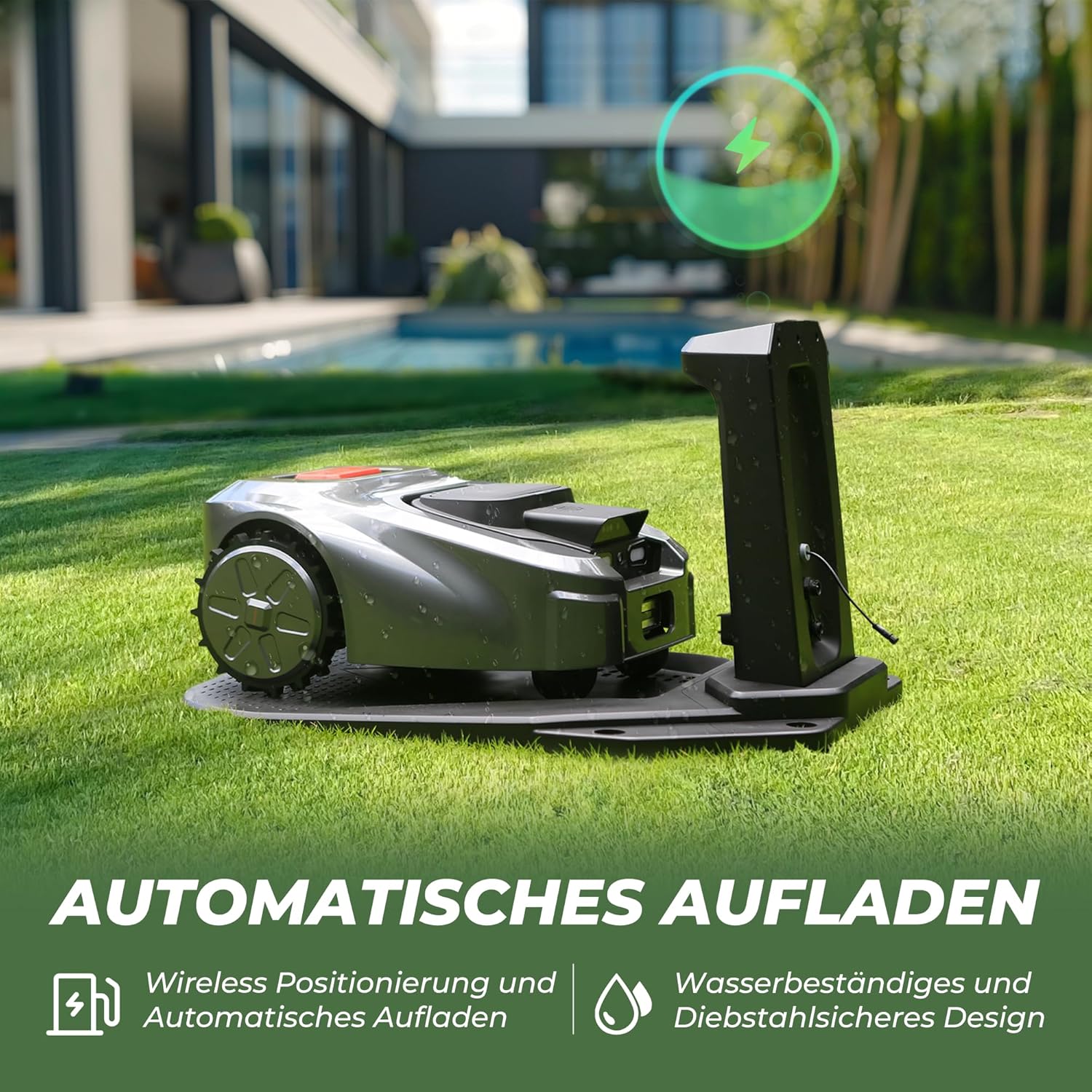
Figure 4.2: The robotic mower automatically returning to its charging station for recharging.
4.4. App Installation and Virtual Boundary Setup
Download the iSward app from your device's app store. Follow the in-app instructions to connect your mower. The app allows you to create virtual boundaries for your mowing area, eliminating the need for physical boundary wires. You can also define multiple mowing zones and set obstacle avoidance areas.

Figure 4.3: The iSward app interface showing map management and control options for the robotic mower.

Figure 4.4: Illustration of multi-zone mapping capability, allowing efficient management of different lawn areas.
5. การใช้งานเครื่องตัดหญ้า
5.1. การเริ่มต้นและการหยุด
To start mowing, use the iSward app or the control panel on the mower. Press the 'MOW' button to begin operation. To stop the mower at any time, press the large red 'STOP' button located on top of the unit. This will immediately halt all operations.

Figure 5.1: Close-up of the prominent red STOP button on the mower for immediate cessation of operation.

Figure 5.2: The mower's display screen and control buttons for direct operation and settings adjustment.
5.2. Mowing Schedule and Height Adjustment
Use the iSward app to set a mowing schedule that suits your needs. You can define specific times and days for the mower to operate. The app also allows you to adjust the cutting height to achieve your desired lawn length.
5.3. Anti-Theft Function
The ISWARD G30 is equipped with an anti-theft system. If the mower is moved outside its designated area or tampered with, you will receive an alert via the iSward app. The app also allows you to track the mower's location.
5.4. การทำงานที่เงียบ
The ISWARD G30 operates at a low noise level, typically below 65 dB, allowing for quiet lawn maintenance without disturbing your peace or your neighbors.

Figure 5.3: The ISWARD G30 operating quietly in a garden setting, demonstrating its low noise level.
6. การบำรุงรักษา
Regular maintenance ensures the longevity and optimal performance of your robotic lawn mower. Always turn off the mower and disconnect it from the charging station before performing any maintenance.
6.1. การทำความสะอาด
Regularly clean the mower's chassis, wheels, and cutting deck to remove grass clippings, dirt, and debris. Use the provided cleaning brush or a soft cloth. Avoid using high-pressure water jets directly on the mower.
6.2. การเปลี่ยนใบมีด
The blades should be inspected regularly for wear and damage. Replace dull or damaged blades to ensure a clean cut and prevent strain on the motor. Always use original ISWARD replacement blades and wear protective gloves during replacement.

รูปที่ 6.1: ระยะใกล้ view of the cutting disc with its blades, which require periodic inspection and replacement.
6.3. การดูแลแบตเตอรี่
The mower is powered by a Lithium-Ion battery. For optimal battery life, avoid fully discharging the battery frequently. Store the mower in a dry, temperate environment during off-season periods, ensuring the battery is partially charged (around 50%) before storage.
7 การแก้ไขปัญหา
This section addresses common issues you might encounter with your ISWARD G30 Robotic Lawn Mower. For more complex problems, please refer to the full user manual or contact customer support.
| ปัญหา | สาเหตุที่เป็นไปได้ | สารละลาย |
|---|---|---|
| เครื่องตัดหญ้าสตาร์ทไม่ติด | Low battery; STOP button pressed; Mower not in designated area. | Charge the mower; Release the STOP button; Place mower within virtual boundary. |
| ประสิทธิภาพการตัดต่ำ | Dull or damaged blades; Grass too high; Debris on cutting deck. | Replace blades; Mow more frequently or adjust cutting height; Clean cutting deck. |
| Mower gets stuck frequently | Obstacles in mowing area; Uneven terrain; Virtual boundary issues. | Remove obstacles; Adjust virtual boundary to exclude problematic areas; Ensure terrain is suitable. |
| ปัญหาการเชื่อมต่อแอพ | Bluetooth/Wi-Fi off; Mower out of range; App needs update. | Ensure Bluetooth/Wi-Fi is on; Move closer to mower; Update the iSward app. |
8. ข้อมูลจำเพาะ
Technical specifications for the ISWARD G30 Robotic Lawn Mower.

Figure 8.1: Dimensions and net weight of the ISWARD G30 Robotic Lawn Mower.
| คุณสมบัติ | ข้อมูลจำเพาะ |
|---|---|
| ขนาดสินค้า | 55.88 x 44.96 x 24.89 ซม. |
| หมายเลขชิ้นส่วน | G30-GREY |
| ประเภทวัสดุ | พลาสติก |
| ประเภทไดรฟ์ | ใช้พลังงานจากแบตเตอรี่ |
| ผู้ผลิต | อิศวรด |
| หมายเลขรุ่น | G30-GREY |
| ASIN | B0D12DLD85 |
| แบตเตอรี่ | ต้องใช้แบตเตอรี่ลิเธียมไอออน 1 ก้อน (มีให้มาด้วย) |
| ยี่ห้อ | อิศวรด |
| แหล่งพลังงาน | ใช้พลังงานจากแบตเตอรี่ |
| วัสดุ | พลาสติก |
| สี | สีเทา |
| สไตล์ | โรตารี่ |
| น้ำหนักสินค้า | 21.01 กิโลกรัม (46.31 ปอนด์) |
| ความกว้างในการตัด | 19.6 ซม. (7.7 นิ้ว) |
| โหมดการทำงาน | อัตโนมัติ |
| ความสูงในการตัดที่ปรับได้สูงสุด | 6 เซนติเมตร |
| ความสามารถในการรับแรงลาดชันสูงสุด | 57% (30 Degrees) |
| ระดับเสียง | น้อยกว่า 65 เดซิเบล |
| พื้นที่ตัดหญ้าสูงสุด | 3,000 ตรม. |
9. การรับประกันและการสนับสนุน
ISWARD Technology is dedicated to developing outdoor service robots and garden care solutions. Our goal is to bring innovative and personalized outdoor service robots to every home and public green space.
9.1. ข้อมูลการรับประกัน
The ISWARD G30 Robotic Lawn Mower comes with a limited warranty:
- ISWARD Mower: 2 ปี
- แบตเตอรี่: 1 ปี
Please note that the warranty does not cover wear parts such as cutting heads, tires, or decorative elements.

Figure 9.1: Visual representation of the warranty periods for the mower and its battery.
9.2. การสนับสนุนลูกค้า
For technical assistance, warranty claims, or general inquiries, please visit the official ISWARD website or contact the seller through your purchase platform. Ensure you have your model number (G30-GREY) and purchase details ready when contacting support.
คุณสามารถค้นหาข้อมูลเพิ่มเติมและทรัพยากรสนับสนุนได้โดยไปที่ ISWARD Store on Amazon.