
EASYmaxx 12040
EASYmaxx Insect Protect Telescopic Window Screen User Manual
ยี่ห้อ: EASYmaxx | แบบอย่าง: 12040
1. บทนำ
This manual provides instructions for the installation, operation, and maintenance of your EASYmaxx Insect Protect Telescopic Window Screen. Please read these instructions carefully before use and retain them for future reference.
The EASYmaxx Insect Protect is designed to provide effective protection against insects such as mosquitoes, wasps, flies, and spiders, allowing for ventilation without unwanted pests. Its telescopic design and pre-assembled net ensure quick and easy installation without the need for tools, drilling, or screws.

Image: EASYmaxx Insect Protect Telescopic Window Screen, anthracite color.

Image: Visual representation of reliable insect protection against various pests.
2. ข้อมูลด้านความปลอดภัย
To ensure safe and proper use of your window screen, please observe the following safety guidelines:
- Ensure the window screen is securely installed to prevent accidental dislodgement.
- Do not lean on the screen or use it as a support. It is designed for insect protection, not as a safety barrier.
- Keep out of reach of small children to prevent tampความเสียหายหรือความเสียหายจากอุบัติเหตุ
- Regularly inspect the screen for any damage or wear that might compromise its effectiveness.
- Do not attempt to modify the product. Use only as intended.
3. เนื้อหาบรรจุภัณฑ์
แพ็คเกจนี้ประกอบด้วยส่วนประกอบต่อไปนี้:
- 1 x Pre-assembled aluminum frame with integrated insect net.

Image: Diagram showing the pre-assembled frame with integrated net, highlighting no cutting or waste.
4. คำแนะนำในการติดตั้ง
The EASYmaxx Insect Protect window screen is designed for quick and easy installation, typically within 3 minutes, without the need for drilling or screws.
4.1. Window Compatibility Check
Before installation, ensure your window meets the following requirements:
- ขนาดภายใน: The screen is adjustable for interior window dimensions between 70 cm and 115 cm in width, and 80 cm and 135 cm in height.
- Exterior Support Surface: A minimum support surface of 25 mm is required on the exterior of the window frame.
- Roller Shutter Clearance: A minimum space of 30 mm is necessary between the window frame and any roller shutter.
- Interior Clip Space: A minimum space of 16 mm is required for the spring clips on the interior frame.

Image: Diagram illustrating window compatibility requirements, including minimum dimensions for exterior support, roller shutter clearance, and interior clip space.
The screen is compatible with plastic (PVC), aluminum, and wooden window frames.

Image: Visual representation of compatibility with plastic, aluminum, and wooden window frames.
4.2. การติดตั้งแบบทีละขั้นตอน
- ประกอบเฟรม: The frame comes pre-assembled. If corners are folded for packaging, simply connect them.
- Position in Window Frame: Place the telescopic screen into the open window frame.
- Engage Spring Clips: Secure the screen by engaging the lower spring clips into the corners of the window frame.
- ปรับขนาด: Slide the telescopic frame to adjust it to the desired size until it fits snugly and securely within the window opening. The integrated net will adapt to the frame's expansion.

Image: Four-panel illustration showing the installation steps: assembling corners, positioning in window, engaging clips, and sliding to adjust size.

Image: Diagram illustrating the telescopic frame and how the net adapts during adjustment, emphasizing no drilling, cutting, or gluing.
5. การดำเนินการ
Once installed, the EASYmaxx Insect Protect window screen provides a reliable barrier against insects while allowing fresh air to circulate. The special black fabric offers optimal visibility and does not significantly darken rooms.
- The screen allows you to keep your windows open for ventilation without worrying about insects entering your home.
- Its breathable design ensures good airflow, making it ideal for sleeping with open windows.
- Enjoy undisturbed meals and cooking with open windows.

Image: Comparison showing reliable airflow through the EASYmaxx screen versus reduced airflow with standard fabric.
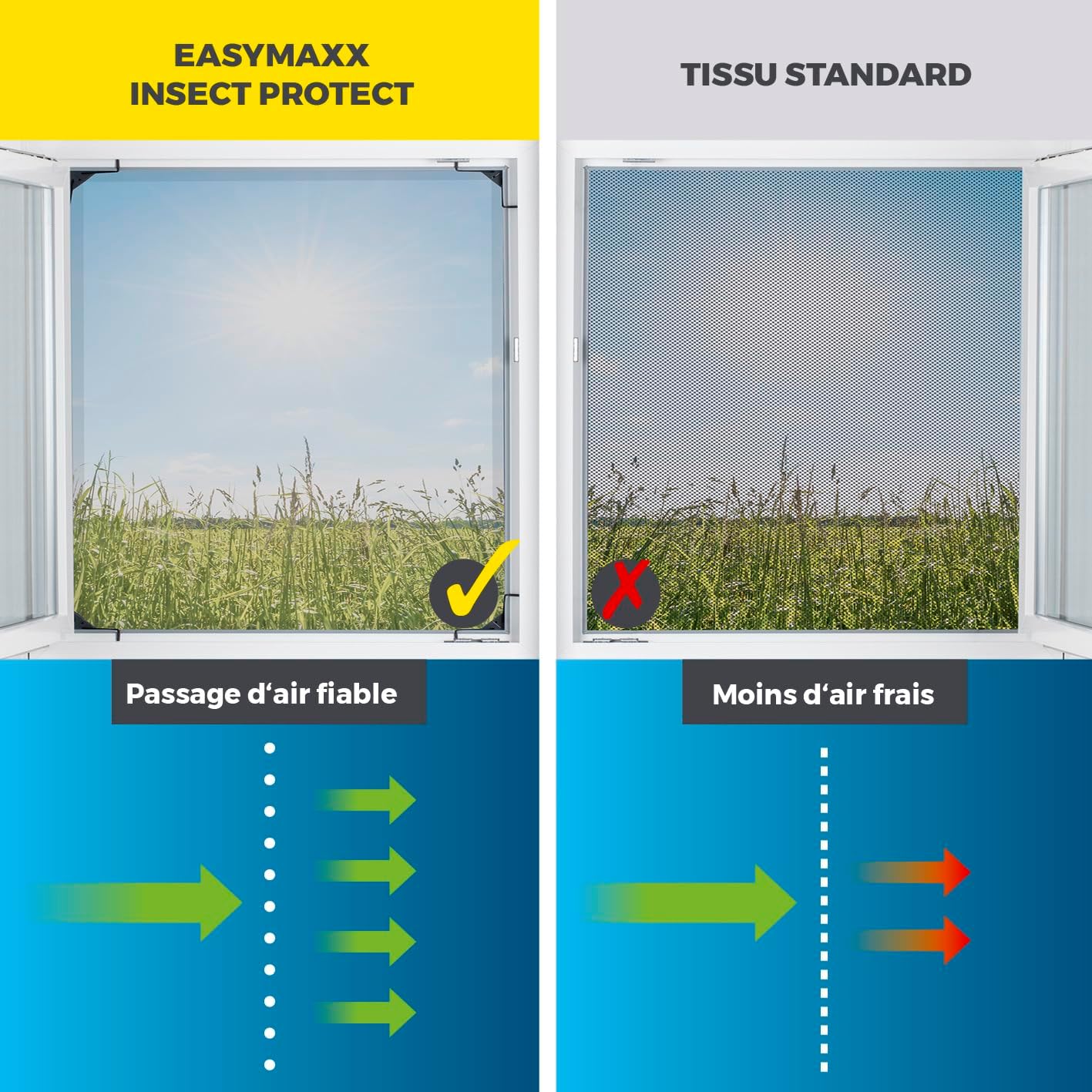
Image: Depiction of a family enjoying their home, protected from insects, with benefits like preventing insect bites, undisturbed meals, and sleeping with open windows.
6. การบำรุงรักษาและการดูแล
To ensure the longevity and effectiveness of your window screen, follow these maintenance guidelines:
- การทำความสะอาด: The insect net can be gently cleaned with a damp เช็ดด้วยผ้าและสบู่เหลวอ่อนๆ หลีกเลี่ยงสารเคมีรุนแรงหรือน้ำยาทำความสะอาดที่มีฤทธิ์กัดกร่อน
- การตรวจสอบ: Periodically check the net and frame for any tears, holes, or damage. The weather-resistant fabric is designed to be durable, but regular inspection helps maintain its integrity.
- พื้นที่จัดเก็บ: For seasonal use, the screen can be easily removed, collapsed, and stored in a dry place during colder months.
7 การแก้ไขปัญหา
If you encounter issues with your EASYmaxx Insect Protect window screen, refer to the following common problems and solutions:
| ปัญหา | สาเหตุที่เป็นไปได้ | สารละลาย |
|---|---|---|
| Screen does not fit the window opening. | Incorrect adjustment or window dimensions outside specified range. | Ensure window dimensions are within 70-115 cm width and 80-135 cm height. Re-adjust the telescopic frame to fit snugly. |
| Screen is loose or falls out. | Improper installation of spring clips or insufficient tension. | Verify that the spring clips are correctly engaged in the window frame corners. Ensure the frame is fully extended to create sufficient tension. |
| แมลงยังคงเข้ามาอยู่ | Gaps around the screen or damage to the net. | Check for any gaps between the screen frame and the window frame. Ensure the net is free from tears or holes. |
8. ข้อมูลจำเพาะ
| ยี่ห้อ | อีซี่แม็กซ์ |
| หมายเลขรุ่น | 12040 |
| ขนาดสินค้า (กว้าง x ยาว x สูง) | 120 x 140 x 3 cm (for 1 piece) |
| น้ำหนัก | 1.6 กิโลกรัม |
| สี | แอนทราไซต์ |
| วัสดุ | ABS, Aluminum, Nylon, Elastane, Steel |
| วิธีการติดตั้ง | Clamps |
| รูปร่าง | สี่เหลี่ยมผืนผ้า |
| คุณสมบัติพิเศษ | Telescopic Mosquito Net, Pre-assembled, No Cutting Required |
| ปรับความกว้างได้ | 70 ซม. - 115 ซม. |
| ปรับความสูงได้ | 80 ซม. - 135 ซม. |
9. การรับประกันและการสนับสนุน
For warranty information or technical support, please refer to the retailer where you purchased the EASYmaxx Insect Protect Telescopic Window Screen or visit the official EASYmaxx website. Please have your model number (12040) and purchase details available when contacting support.
Ask a question about this manual
Ask about setup, troubleshooting, compatibility, parts, safety, or missing instructions. Manuals+ will review the question and use this page’s manual context to help answer it.