
1. ข้อมูลด้านความปลอดภัยที่สำคัญ
โปรดอ่านคำแนะนำทั้งหมดอย่างละเอียดก่อนใช้งานเครื่องใช้ไฟฟ้านี้ และเก็บคำแนะนำไว้เพื่อใช้อ้างอิงในอนาคต การไม่ปฏิบัติตามคำแนะนำเหล่านี้อาจส่งผลให้เกิดไฟฟ้าช็อต ไฟไหม้ หรือบาดเจ็บสาหัสได้
- การสัมผัสน้ำ: Keep the trimmer away from water sources. Do not use it in or near bathtubs, showers, basins, or other vessels containing water. If the appliance falls into water, do not reach for it. Unplug immediately.
- หมดแรง: Always ensure the trimmer is turned off and unplugged when not in use, before cleaning, or when changing attachments.
- Children and Sensitive Areas: Do not use this appliance on infants or individuals with sensitive skin without proper caution. Avoid direct contact with eyes and ears.
- สิ่งที่แนบมา: Use only the attachments provided or recommended by the manufacturer for specific grooming needs.
- การระคายเคืองผิวหนัง: Discontinue use if skin irritation, redness, or discomfort occurs. Consult a medical professional if symptoms persist.
- ความปลอดภัยของแบตเตอรี่: This device is battery-powered. Use only the specified charging method. Do not attempt to open, modify, or replace the internal battery.
- ความเสียหาย: ห้ามใช้งานเครื่องใช้ไฟฟ้าหากสายไฟหรือปลั๊กชำรุด หากเครื่องทำงานผิดปกติ หรือหากเครื่องตกหล่นหรือได้รับความเสียหาย
- พื้นที่จัดเก็บ: เก็บเครื่องใช้ไว้ในสถานที่แห้ง ห่างจากมือเด็ก
2. สินค้าหมดview
The VGR V-366 is a versatile 3-in-1 grooming tool designed for men, offering precision trimming for hair, beard, and nose. It features a rechargeable lithium battery and an LED display for power indication.
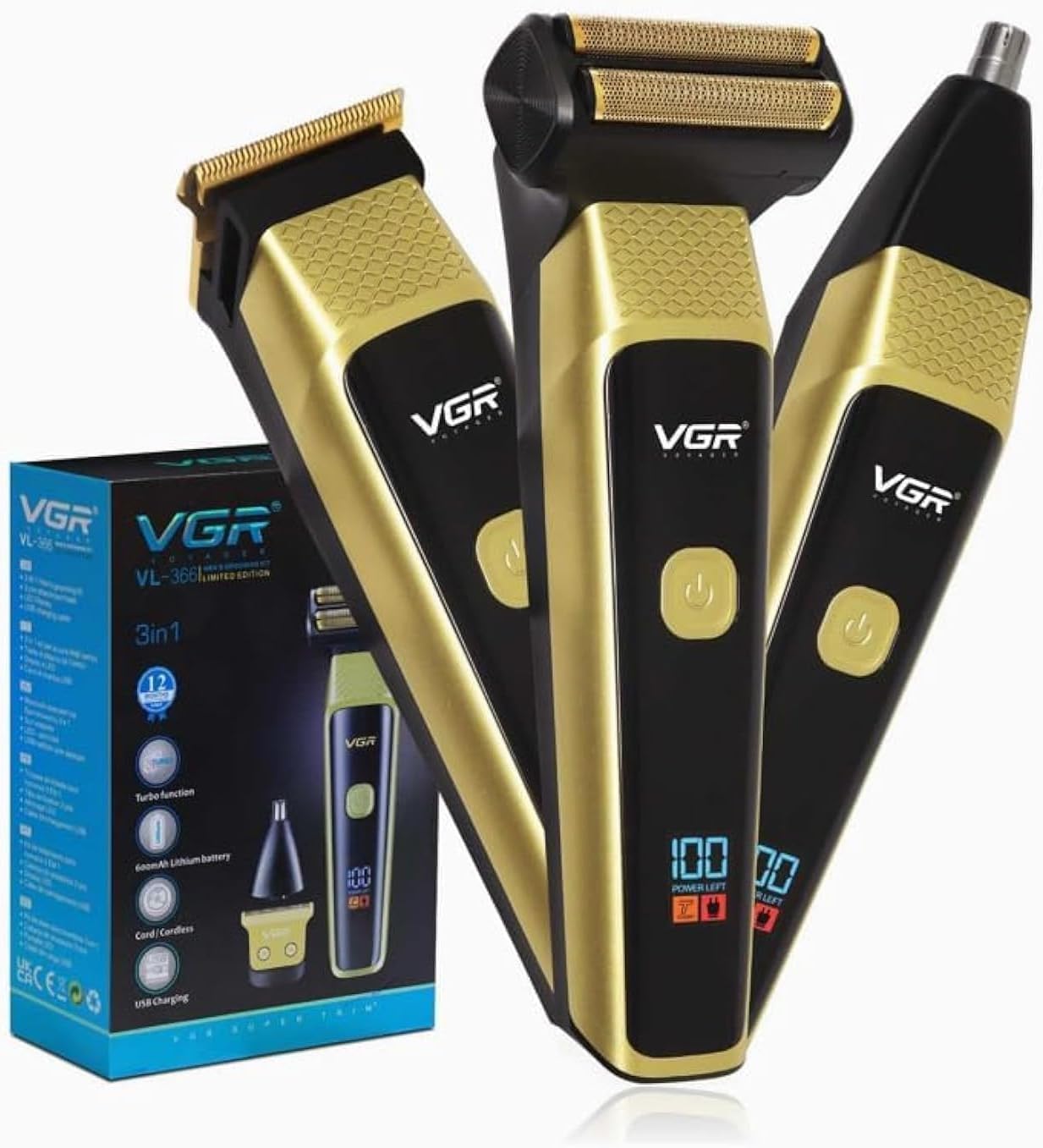
รูปที่ 1: VGR V-366 3-in-1 Electric Trimmer with its various attachments and packaging. The image displays the main trimmer body with a hair clipper head, a foil shaver head, and a nose trimmer head. The packaging highlights key features such as "3in1", "Turbo function", "600mAh Lithium battery", "Cord/Cordless", and "USB Charging". The LED display on the trimmer shows "100 POWER LEFT".
2.1 ส่วนประกอบ
- Main Trimmer Body with LED Display
- หัวตัดตัดผม
- หัวโกนแบบฟอยล์
- หัวตัดขนจมูก/หู
- Adjustable Guide Combs (various sizes)
- สายชาร์จ USB
- แปรงทำความสะอาด
- น้ำมันหล่อลื่น
2.2 คุณสมบัติหลัก
- ฟังก์ชั่น 3-in-1: Designed for hair, beard, and nose trimming.
- แบตเตอรี่แบบชาร์จไฟได้: Equipped with a 600mAh Lithium battery for cordless operation.
- จอแสดงผล LED: Shows remaining power level for convenience.
- ใช้งานแบบมีสาย/ไร้สาย: Can be used while charging or cordlessly.
- การชาร์จ USB: Easy and flexible charging via USB.
- ฟังก์ชั่นเทอร์โบ: Provides increased power for thicker hair.
- ใบมีดสแตนเลส: ใบมีดทนทานและคมกริบ เหมาะสำหรับการตัดแต่งอย่างแม่นยำ
- การตั้งค่าความเร็ว 2 ระดับ: Allows for customized trimming experience.
3. คำแนะนำในการชาร์จ
Before first use, fully charge the trimmer for approximately 1.5 hours. A full charge provides approximately 1.5 hours of cordless operation.
- ตรวจสอบให้แน่ใจว่าได้ปิดทริมเมอร์แล้ว
- Connect the USB charging cable to the charging port on the bottom of the trimmer.
- เสียบปลายอีกด้านหนึ่งของสาย USB เข้ากับอะแดปเตอร์ไฟ USB ที่ใช้งานร่วมกันได้ (ไม่รวมอยู่ด้วย) หรือพอร์ต USB ของคอมพิวเตอร์
- The LED display will indicate the charging status. It will typically show increasinแบตเตอรี่ g เปอร์เซ็นต์tage or a charging icon.
- Once fully charged, the LED display will show "100" or a full battery icon. Disconnect the charging cable.
- To preserve battery life, avoid overcharging and allow the battery to fully discharge occasionally before recharging.
4. Assembly and Attachment Installation
The VGR V-366 comes with interchangeable heads for different grooming needs.
4.1 Changing Trimmer Heads
- ตรวจสอบให้แน่ใจว่าได้ปิดทริมเมอร์แล้ว
- To remove an existing head, gently push it upwards from the front of the trimmer body until it detaches.
- To attach a new head (e.g., Hair Clipper, Foil Shaver, Nose Trimmer), align the head with the slot on the trimmer body and press down firmly until it clicks into place.
- Verify that the head is securely attached before use.
4.2 Attaching Guide Combs (for Hair Clipper Head)
- Ensure the hair clipper head is attached to the trimmer body.
- เลือกความยาวของหวีรองหวีที่ต้องการ
- Align the guide comb with the teeth of the clipper blade and slide it on until it locks securely.
- To remove, gently lift the comb from the back and slide it off.
5. คู่มือการใช้งาน
Always ensure your skin and hair are clean and dry before trimming. For best results, trim against the direction of hair growth.
5.1. การดำเนินการทั่วไป
- Press the power button once to turn on the trimmer. The LED display will show the current power level.
- Press the power button again to cycle through speed settings.
- Press and hold the power button to activate the Turbo function.
- Press the power button once more to turn off the trimmer.
5.2 การใช้งานหัวปัตตาเลี่ยนตัดผม
- Attach the hair clipper head and the desired guide comb.
- เปิดทริมเมอร์
- Start trimming from the nape of the neck, moving upwards against the direction of hair growth.
- Use smooth, even strokes. For a clean line, remove the guide comb and carefully trim edges.
5.3 Using the Foil Shaver Head
- ติดตั้งหัวโกนแบบฟอยล์
- เปิดทริมเมอร์
- Hold the shaver flat against your skin and move it in short, circular motions or straight lines against the direction of hair growth.
- Stretch the skin with your free hand for a closer shave.
5.4 การใช้หัวตัดแต่งขนจมูก/หู
- ติดหัวตัดจมูก/หู
- เปิดทริมเมอร์
- ค่อยๆ สอดปลายเครื่องตัดหญ้าเข้าไปในรูจมูกหรือช่องหู อย่าสอดเข้าไปลึกเกินไป
- ขยับเครื่องตัดแต่งขนเป็นวงกลมเพื่อกำจัดขนที่ไม่ต้องการ
- Clean the head after each use.
6. การบำรุงรักษาและการทำความสะอาด
การทำความสะอาดอย่างสม่ำเสมอจะช่วยให้เครื่องตัดแต่งทรงผมทำงานได้อย่างมีประสิทธิภาพสูงสุดและยืดอายุการใช้งาน
- ปิดและถอดปลั๊ก: ควรตรวจสอบให้แน่ใจว่าได้ปิดเครื่องตัดแต่งขนและถอดปลั๊กออกจากแหล่งจ่ายไฟแล้วก่อนทำความสะอาดทุกครั้ง
- ถอดหัว: Detach the trimmer head from the main body.
- การทำความสะอาดแปรง: ใช้แปรงทำความสะอาดที่ให้มาเพื่อกำจัดเส้นผมที่หลุดร่วงออกจากใบมีดและภายในหัวเครื่องตัดแต่งทรงผม
- การล้าง (ถ้ามี): Some heads may be rinseable under running water. Refer to the product packaging or specific instructions for your model. Ensure the main body is never submerged in water.
- การอบแห้ง: ปล่อยให้ชิ้นส่วนทั้งหมดแห้งสนิทก่อนจะใส่กลับเข้าไปหรือจัดเก็บ
- การหล่อลื่น: Apply a small drop of lubricating oil (provided) to the blades of the hair clipper head after every few uses to maintain smooth operation. Turn on the trimmer for a few seconds to distribute the oil.
- พื้นที่จัดเก็บ: Store the trimmer and its attachments in a dry, cool place, away from direct sunlight and moisture.
7 การแก้ไขปัญหา
If you encounter issues with your VGR V-366 trimmer, refer to the table below for common problems and solutions.
| ปัญหา | สาเหตุที่เป็นไปได้ | สารละลาย |
|---|---|---|
| ทริมเมอร์ไม่เปิด | แบตเตอรี่หมด | ชาร์จเครื่องตัดหญ้าให้เต็ม |
| เครื่องตัดผมทำงานช้าหรือดึงผม | ใบมีดสกปรกหรือไม่ได้รับการหล่อลื่น | Clean the blades and apply lubricating oil. |
| หัวตัดหญ้าหลวม | หัวไม่ยึดติดอย่างถูกต้อง | Ensure the head is securely clicked into place. |
| ไฟแสดงสถานะการชาร์จไม่ทำงาน | สายไฟหรือแหล่งจ่ายไฟชำรุด | ลองใช้สาย USB หรืออะแดปเตอร์จ่ายไฟอื่น |
8. ข้อมูลจำเพาะ
| แบบอย่าง: | วี-366 |
| ยี่ห้อ: | VGR |
| ประเภทแบตเตอรี่: | แบตเตอรี่ลิเธียม 600mAh |
| วิธีการชาร์จ: | การชาร์จ USB |
| เวลาในการชาร์จ: | ประมาณ 1.5 ชั่วโมง |
| เวลาทำการ : | Approx. 1.5 hours (cordless) |
| วัสดุใบมีด: | สแตนเลส |
| แหล่งพลังงาน: | ใช้พลังงานจากแบตเตอรี่ |
| น้ำหนักสินค้า: | 1 กิโลกรัม |
| ขนาดสินค้า : | 20 x 20 x 20 ซม. |
9. การรับประกันและการสนับสนุน
For warranty information or technical support, please refer to the warranty card included with your product or contact VGR customer service through their official webเว็บไซต์หรือร้านค้าที่คุณซื้อสินค้า โปรดเก็บหลักฐานการซื้อไว้เพื่อใช้ในการเรียกร้องการรับประกัน