
การแนะนำ
คู่มือการใช้งานนี้ให้คำแนะนำอย่างละเอียดเกี่ยวกับการติดตั้งและการใช้งานชุดสายไฟ Idatalink Maestro HRN-SR-VW1 T-Harness ผลิตภัณฑ์นี้ได้รับการออกแบบมาเพื่ออำนวยความสะดวกในการเปลี่ยนวิทยุเดิมจากโรงงานในรถยนต์ Volkswagen บางรุ่นที่ผลิตระหว่างปี 2002 ถึง 2016 โดยยังคงรักษาคุณสมบัติที่สำคัญของโรงงานไว้ เช่น ปุ่มควบคุมบนพวงมาลัยและการใช้งานระบบเดิมจากโรงงาน ampเครื่องขยายเสียง เพื่อประสิทธิภาพและความปลอดภัยสูงสุด โปรดอ่านคู่มือนี้อย่างละเอียดก่อนดำเนินการติดตั้ง
มีอะไรอยู่ในกล่อง
- ชุดสายไฟรูปตัว T สำหรับ Idatalink Maestro HRN-SR-VW1
ความเข้ากันได้
สายต่อพ่วงรูปตัว T รุ่น HRN-SR-VW1 ออกแบบมาโดยเฉพาะสำหรับใช้กับโมดูล iDatalink Maestro ADS-MSR (จำหน่ายแยกต่างหาก) และเข้ากันได้กับรถยนต์ Volkswagen และ Audi บางรุ่น สิ่งสำคัญคือต้องตรวจสอบยี่ห้อ รุ่น และปีของรถยนต์ของคุณกับตารางความเข้ากันได้ที่ให้มา เพื่อให้มั่นใจได้ว่าอุปกรณ์จะทำงานได้อย่างถูกต้อง
ความเข้ากันได้กับ Volkswagen
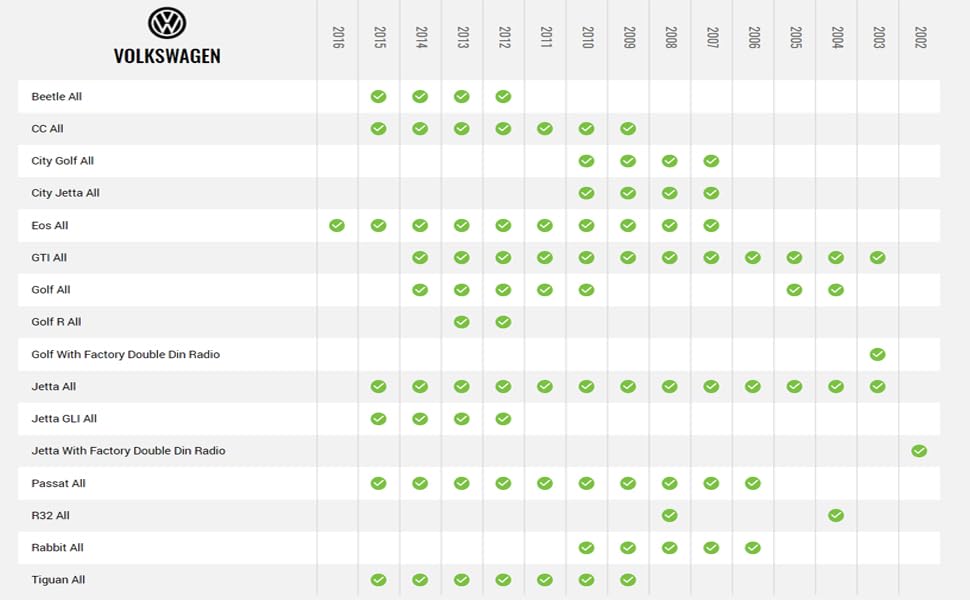
ภาพ: ตารางแสดงความเข้ากันได้ของสายไฟ T-Harness รุ่น HRN-SR-VW1 กับรถยนต์ Volkswagen โดยแสดงรุ่นรถและปีที่ใช้งานร่วมกันได้ตั้งแต่ปี 2002 ถึง 2016
ความเข้ากันได้กับ Audi
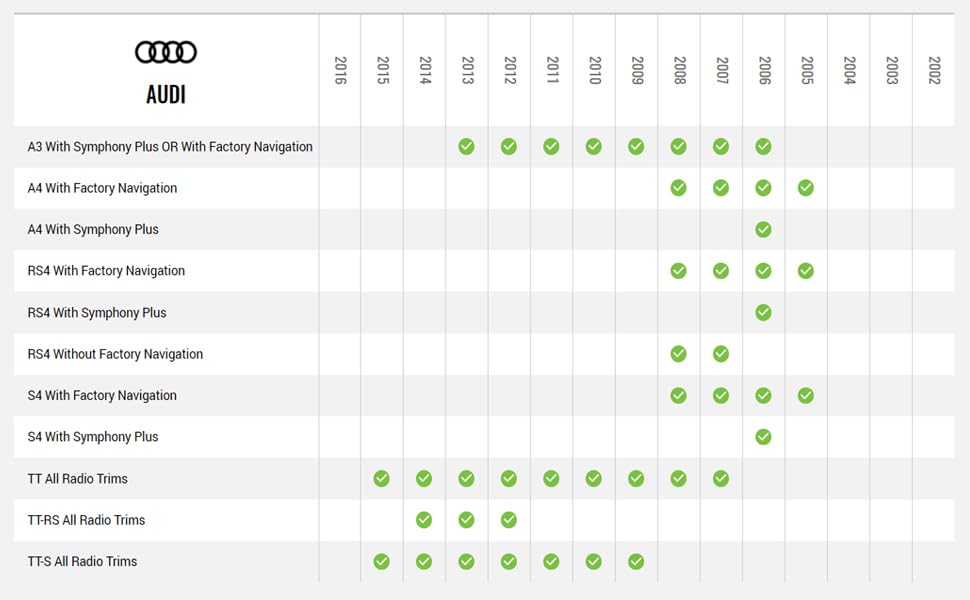
ภาพ: ตารางความเข้ากันได้ของสายไฟ T-Harness รุ่น HRN-SR-VW1 กับรถยนต์ Audi โดยแสดงรุ่นรถและปีที่ใช้งานร่วมกันได้ตั้งแต่ปี 2002 ถึง 2016
การติดตั้งและการตั้งค่า
ขั้นตอนการติดตั้งเกี่ยวข้องกับการเชื่อมต่อสายไฟ T-Harness รุ่น HRN-SR-VW1 เข้ากับโมดูล iDatalink Maestro ADS-MSR และสายไฟ T-Harness เฉพาะรุ่นสำหรับชุดควบคุมหลัก (เช่น ACC-HU-ALP1, ACC-HU-PIO1, ACC-HU-SON1, ACC-HU-KEN1/2/3, ACC-HU-BOS1) ซึ่งจำหน่ายแยกต่างหาก ระบบนี้ช่วยให้การเปลี่ยนวิทยุทำได้ง่ายขึ้น ในขณะที่ยังคงรักษาคุณสมบัติหลักจากโรงงานไว้
ส่วนประกอบที่จำเป็น
- โมดูล iDatalink Maestro ADS-MSR
- สายต่อพ่วงรูปตัว T ที่ตรงกับชุดเครื่องเสียงแต่ละรุ่น (เช่น ACC-HU-ALP1 สำหรับ Alpine, ACC-HU-PIO1 สำหรับ Pioneer เป็นต้น)

ภาพ: ชุดสายไฟรูปตัว T รุ่น Idatalink Maestro HRN-SR-VW1 พร้อมบรรจุภัณฑ์ เตรียมพร้อมสำหรับการติดตั้ง

ภาพ: ภาพระยะใกล้ view ภาพแสดงการเชื่อมต่อสายไฟรูปตัว T รุ่น HRN-SR-VW1 เข้ากับโมดูล ADS-MSR ขนาดกะทัดรัด ซึ่งแสดงให้เห็นถึงการออกแบบแบบเสียบแล้วใช้งานได้ทันที
Webลิงก์ไปยังบทช่วยสอนการเขียนโปรแกรมเดสก์ท็อป
วิดีโอ: คู่มือนี้จะแนะนำผู้ใช้เกี่ยวกับการดาวน์โหลดและการติดตั้ง WebLink Desktop บนพีซี Windows เพื่อสร้าง Webเชื่อมโยงบัญชี และทำการแฟลชโมดูล Maestro ด้วยเฟิร์มแวร์ที่ถูกต้องสำหรับรถยนต์และวิทยุหลังการขายของพวกเขา
คุณสมบัติการติดตั้งที่สำคัญ
- การติดตั้งแบบง่าย: ใช้งานได้เฉพาะกับโมดูล iDatalink Maestro ADS-MSR เพื่อการเปลี่ยนวิทยุที่ราบรื่น
- ระบบรักษาการควบคุมพวงมาลัย: ยังคงรักษาปุ่มควบคุมบนพวงมาลัยเดิมไว้สำหรับฟังก์ชั่นต่างๆ เช่น การปรับระดับเสียงและการค้นหาเพลง
- โรงงาน Ampการคงอยู่ของตัวขยายสัญญาณ: รักษาฟังก์ชันการทำงานของอุปกรณ์ที่ติดตั้งมาจากโรงงาน ampชีวิต.
- ดีไซน์แบบเสียบปลั๊กและใช้งานได้ทันที: มาพร้อมปลั๊กเฉพาะสำหรับการเชื่อมต่อที่รวดเร็วและแม่นยำ ช่วยให้การใช้งานราบรื่น
การใช้งานระบบ Maestro SR
เมื่อติดตั้งและตั้งโปรแกรมระบบ Maestro SR เสร็จแล้ว ระบบจะช่วยเพิ่มประสบการณ์การขับขี่ของคุณโดยการผสานรวมคุณสมบัติของวิทยุเสริมเข้ากับฟังก์ชันการทำงานที่มีอยู่เดิมของรถยนต์ของคุณ
iDatalink Maestro SR Overview
วิดีโอ: วิดีโอนี้ให้ข้อมูลโดยรวมview โดยเน้นคุณสมบัติของโมดูล iDatalink Maestro SR สำหรับการใช้งานแทนวิทยุ การรักษาการควบคุมจากพวงมาลัย และการบูรณาการการตั้งค่ารถยนต์
ระบบควบคุมพวงมาลัย
ระบบ Maestro SR ช่วยให้คุณสามารถคงไว้และปรับแต่งปุ่มควบคุมบนพวงมาลัยเดิมของรถยนต์ได้ ผ่านทาง... Webแอปพลิเคชัน Link Desktop ช่วยให้คุณสามารถกำหนดค่าปุ่มแต่ละปุ่มให้ทำงานตามคำสั่งเฉพาะบนวิทยุติดรถยนต์ใหม่ของคุณได้ รวมถึงฟังก์ชันการกดครั้งเดียวและการกดค้างไว้
การเก็บรักษาการตั้งค่ารถยนต์
รถยนต์รุ่นใหม่หลายรุ่นอนุญาตให้ควบคุมการตั้งค่าต่างๆ (เช่น ไฟส่องสว่าง ล็อกประตู ระบบความปลอดภัย) ผ่านวิทยุติดรถยนต์จากโรงงาน Maestro SR ช่วยให้ยังคงสามารถเข้าถึงการตั้งค่าเหล่านี้ได้ หากใช้วิทยุหลังการขายที่รองรับ Maestro คุณสามารถควบคุมการตั้งค่าเหล่านี้ได้โดยตรงจากหน้าจอสัมผัสของวิทยุ สำหรับวิทยุที่ไม่รองรับ Maestro คุณสามารถใช้แอปพลิเคชันมือถือ Maestro Central (มีให้ดาวน์โหลดใน App Store และ Google Play) ผ่าน Bluetooth เพื่อเข้าถึงและปรับการตั้งค่ารถยนต์ได้
การบูรณาการกล้อง
Maestro SR รองรับการใช้งานร่วมกับกล้องถอยหลัง กล้อง 360 องศา และกล้องเก็บสัมภาระจากโรงงาน นอกจากนี้ยังสามารถติดตั้งกล้องหน้าหรือกล้องข้างเพิ่มเติมจากภายนอกได้อีกด้วยview กล้องถ่ายรูป Viewสามารถควบคุมได้ผ่านปุ่มบนพวงมาลัย และการตั้งค่ากล้องขั้นสูงช่วยให้สามารถเรียกใช้งานกล้องด้านข้างได้view กล้องพร้อมสัญญาณไฟเลี้ยวและกล้องหน้าตามตำแหน่งการส่งกำลัง
เอาต์พุตที่ตั้งโปรแกรมได้
โมดูล Maestro SR มีเอาต์พุตที่ตั้งโปรแกรมได้สองช่อง เอาต์พุตเหล่านี้สามารถกำหนดค่าเพื่อสั่งงานอุปกรณ์เสริมต่างๆ เช่น ไฟส่องสว่างเพิ่มเติมหรือกล้อง หรือเพื่อแปลงข้อความข้อมูลดิจิทัลจากรถยนต์เป็นเอาต์พุตอะนาล็อกสำหรับฟังก์ชันเฉพาะ ตัวอย่างเช่นampตัวอย่างเช่น สามารถตั้งโปรแกรมให้สัญญาณเอาต์พุตทำงานเมื่อเหยียบเบรก เปิดไฟหน้า หรือเมื่อรถเปลี่ยนเกียร์เป็นเกียร์เดินหน้าได้
ข้อมูลจำเพาะ
- หมายเลขรุ่นสินค้า: HRN-SR-VW1
- วัสดุ: อะคริโลไนไตรล์บิวทาไดอีนสไตรีน
- น้ำหนักสินค้า: 0.13 กิโลกรัม (ประมาณ 4.41 ออนซ์)
- ขนาดแพ็คเกจ: 7.72 x 4.8 x 1.85 นิ้ว
- ยูพีซี: 627780004822
- ผู้ผลิต: ไอดาตาลิงก์
การแก้ไขปัญหา
หากพบปัญหาใดๆ ระหว่างการติดตั้งหรือการใช้งาน โปรดดูคู่มือการติดตั้งฉบับละเอียดที่ดาวน์โหลดได้จากเว็บไซต์ Webใช้แอปพลิเคชัน Link Desktop ตรวจสอบให้แน่ใจว่าการเชื่อมต่อทั้งหมดแน่นหนา และโมดูลได้รับการตั้งโปรแกรมด้วยเฟิร์มแวร์ที่ถูกต้องสำหรับรถยนต์และวิทยุหลังการขายของคุณ หากต้องการความช่วยเหลือเพิ่มเติม โปรดดูแหล่งข้อมูลสนับสนุนอย่างเป็นทางการของ Idatalink
การรับประกันและการสนับสนุน
ผลิตภัณฑ์นี้อยู่ภายใต้การรับประกันของผู้ผลิต โปรดเก็บหลักฐานการซื้อไว้เพื่อใช้ในการเรียกร้องการรับประกัน สำหรับการสนับสนุนทางเทคนิค คู่มือเพิ่มเติม หรือเพื่อติดต่อฝ่ายบริการลูกค้า โปรดเยี่ยมชมเว็บไซต์อย่างเป็นทางการของ Idatalink webเว็บไซต์: www.idatalink.com.
สำหรับการตรวจสอบความเข้ากันได้ของยานพาหนะ คุณสามารถใช้รหัส QR ที่อยู่บนบรรจุภัณฑ์ของผลิตภัณฑ์ หรือเยี่ยมชมเว็บไซต์ได้เช่นกัน https://l.ead.me/bbSyLG.