
การแนะนำ
This manual provides essential information for the safe and efficient operation of your DATOUBOSS 2000W 24V Pure Sine Wave Power Inverter. Please read these instructions carefully before installation and use. Keep this manual for future reference.
ข้อควรระวังเพื่อความปลอดภัย
- ตรวจสอบให้แน่ใจว่ามีการระบายอากาศที่เหมาะสมรอบๆ อินเวอร์เตอร์เพื่อป้องกันความร้อนสูงเกินไป
- อย่าให้อินเวอร์เตอร์โดนน้ำ ฝน หรือความชื้นมากเกินไป
- Avoid operating the inverter near flammable materials or gases.
- เชื่อมต่ออินเวอร์เตอร์เข้ากับแหล่งจ่ายไฟ DC 24V เท่านั้น
- Always disconnect the power source before performing any maintenance or cleaning.
- ห้ามเปิดอินเวอร์เตอร์ casing; ไม่มีชิ้นส่วนใดที่ผู้ใช้สามารถซ่อมบำรุงเองได้ภายใน
- เก็บให้พ้นจากมือเด็ก
สินค้าเกินview
The DATOUBOSS 2000W 24V Pure Sine Wave Power Inverter converts 24V DC battery power to 230V AC household power, suitable for sensitive electronics. It features a continuous output of 2000W and a peak power of 4000W.
คุณสมบัติหลัก
- เอาท์พุตคลื่นไซน์บริสุทธิ์: Provides clean, stable power suitable for sensitive electronics, reducing noise and energy consumption.
- การป้องกันที่ครอบคลุม: Includes protection against reverse connection, short circuit, undervoltage, ล้นเกินtage, overheating, overload, and overcurrent.
- พัดลมระบายความร้อนอัจฉริยะ: Activates automatically when the load exceeds 40% or internal temperature reaches 45°C, ensuring efficient heat dissipation and quiet operation.
- โครงสร้างทนทาน: อะลูมิเนียม casing for enhanced heat dissipation.
- ความสามารถในการควบคุมระยะไกล: ช่วยให้จัดการพลังงานได้สะดวกจากระยะไกล
การระบุส่วนประกอบ

รูปที่ 1: แผนผังแผงด้านหน้าและด้านหลังของอินเวอร์เตอร์
This image illustrates the various ports and controls on the inverter. The front panel includes AC output sockets, USB and Type-C ports, an ON/OFF switch, and an LCD display. The rear panel shows the DC input terminals (positive and negative) and cooling fans.
- ช่องจ่ายไฟ AC: Two EU standard AC 230V outlets for connecting appliances.
- อินเทอร์เฟซ USB: สำหรับชาร์จอุปกรณ์ที่ใช้พลังงานจาก USB
- อินเทอร์เฟซ Type-C: For charging Type-C powered devices.
- สวิตช์เปิด/ปิด: สวิตซ์ไฟหลักสำหรับอินเวอร์เตอร์
- Remote Switch Connection: Port for connecting the wired remote control.
- จอแสดงผล LCD: แสดงระดับเสียงเอาต์พุตtage, power, and error codes.
- ขั้วต่ออินพุต DC: Red for positive (+), Black for negative (-) connection to the 24V battery.
- พัดลมระบายความร้อน: Two high-speed fans for thermal management.
- ขั้วกราวด์: เพื่อความปลอดภัยในการต่อสายดิน

Figure 2: Inverter Dimensions and Output Waveform
This image displays the physical dimensions of the inverter (approximately 32.6cm length, 20cm width, 7.9cm height) and a graphical representation of its pure sine wave output, indicating stable and efficient power delivery.

รูปที่ 3: ระบบระบายความร้อนอัจฉริยะ
This image highlights the inverter's dual high-speed cooling fans and intelligent chip control, which activate based on load and temperature to maintain optimal operating conditions and ensure quiet performance.
คำแนะนำการตั้งค่า
Follow these steps to properly set up your DATOUBOSS power inverter.
1. การเลือกสถานที่
- Place the inverter in a dry, well-ventilated area, away from direct sunlight, heat sources, and moisture.
- Ensure there is sufficient space around the inverter for proper airflow, especially around the cooling fans.
- Mount the inverter securely on a stable surface using the integrated mounting brackets.
2. Connecting to a 24V DC Power Source
- ตรวจสอบให้แน่ใจว่าสวิตช์เปิด/ปิดของอินเวอร์เตอร์อยู่ในตำแหน่ง "ปิด"
- Connect the red battery cable to the positive (+) terminal of your 24V battery bank.
- Connect the other end of the red cable to the positive (+) DC input terminal on the inverter.
- Connect the black battery cable to the negative (-) terminal of your 24V battery bank.
- Connect the other end of the black cable to the negative (-) DC input terminal on the inverter.
- ตรวจสอบให้แน่ใจว่าการเชื่อมต่อทั้งหมดแน่นหนาและปลอดภัย เพื่อป้องกันการหลวมและการเกิดประกายไฟ
- Connect the ground terminal of the inverter to a proper earth ground.
สำคัญ: Always connect the positive (+) terminals first, then the negative (-) terminals. When disconnecting, disconnect the negative (-) terminals first.
3. Connecting the Remote Control (Optional)
- If using the remote control, plug its cable into the "Remote Switch Connection" port on the inverter.
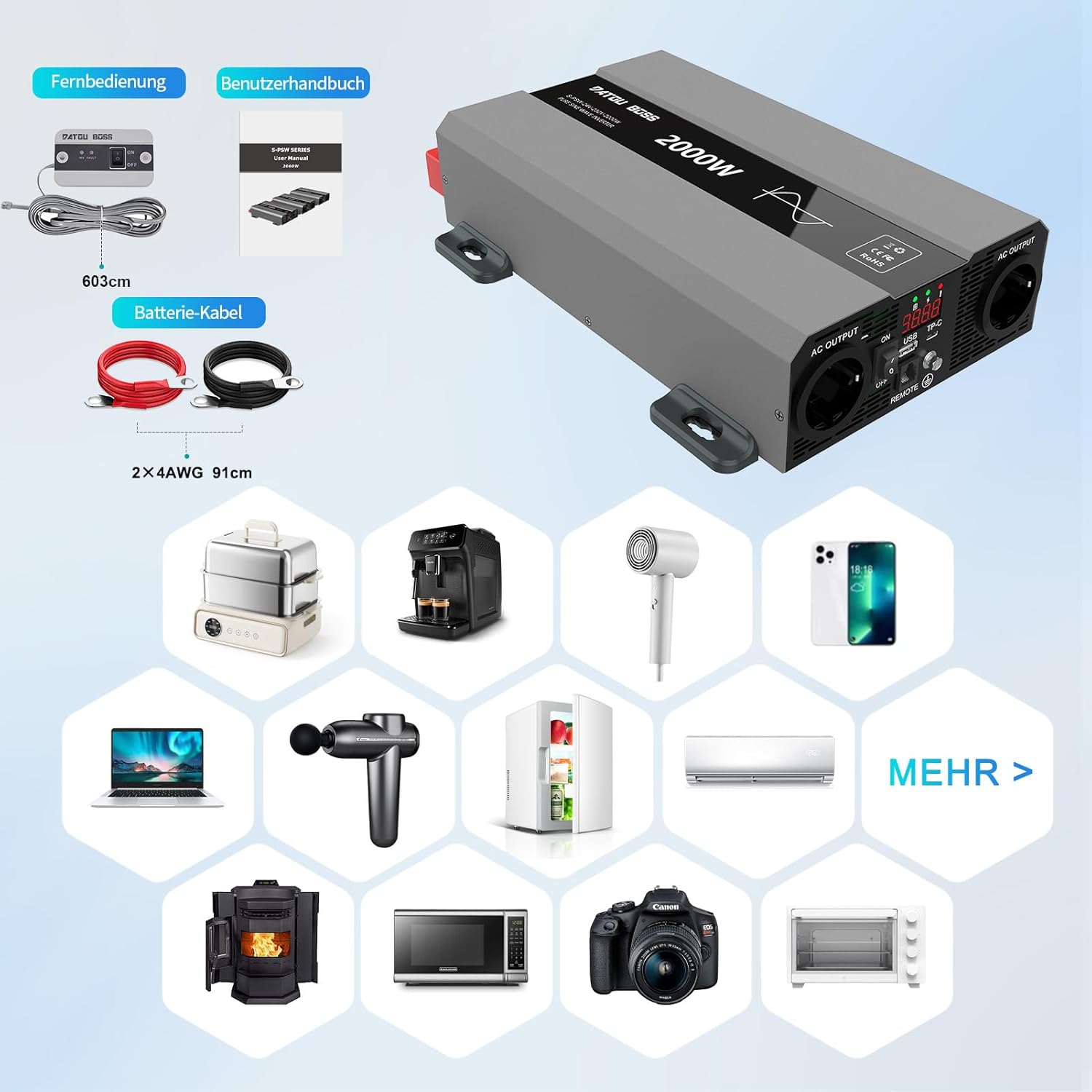
รูปที่ 4: ส่วนประกอบที่รวมอยู่
This image shows the items typically included with the inverter: the inverter unit, battery connection cables (red and black), and a remote control unit with its cable. A user manual is also included.
คำแนะนำการใช้งาน
1. การเปิดใช้งานอินเวอร์เตอร์
- After ensuring all DC connections are secure, switch the inverter's ON/OFF switch to the "ON" position.
- The LCD display will illuminate, showing the output voltage และอำนาจ
- The cooling fans may briefly spin up during startup.
2. การเชื่อมต่อเครื่องใช้ไฟฟ้าปรับอากาศ
- Plug your 230V AC appliances into the AC output sockets on the inverter.
- ตรวจสอบให้แน่ใจว่าวัตต์รวมtagกำลังไฟรวมของเครื่องใช้ไฟฟ้าที่เชื่อมต่อทั้งหมดต้องไม่เกินกำลังไฟต่อเนื่องสูงสุดของอินเวอร์เตอร์ (2000 วัตต์)
- For inductive loads (e.g., motors, refrigerators), consider their startup surge power, which can be several times their running wattage.
3. Using USB and Type-C Ports
- Connect your USB or Type-C compatible devices to the respective ports for charging.
4. การปิดเครื่องอินเวอร์เตอร์
- Disconnect all AC appliances from the inverter.
- Switch the inverter's ON/OFF switch to the "OFF" position.

Figure 5: Inverter in an Outdoor Application
This image demonstrates the inverter being used outdoors to power a laptop, highlighting its portability and utility for various scenarios like camping or remote work.
การซ่อมบำรุง
การบำรุงรักษาอย่างสม่ำเสมอจะช่วยให้เครื่องแปลงกระแสไฟฟ้าของคุณมีอายุการใช้งานยาวนานและทำงานได้อย่างมีประสิทธิภาพสูงสุด
การทำความสะอาด
- Periodically clean the exterior of the inverter with a soft, dry cloth.
- Ensure the cooling vents and fans are free from dust and debris. Use compressed air if necessary to clear blockages.
- ห้ามใช้น้ำยาทำความสะอาดหรือตัวทำละลายชนิดเหลว
การตรวจสอบการเชื่อมต่อ
- Regularly check all DC and AC connections for tightness and signs of corrosion.
- Loose connections can cause overheating and damage to the inverter or battery.
พื้นที่จัดเก็บ
- When not in use for extended periods, store the inverter in a cool, dry place.
- Ensure the battery connected to the inverter is properly maintained and charged according to its manufacturer's instructions.
การแก้ไขปัญหา
This section addresses common issues you might encounter with your inverter. The inverter is equipped with multiple protection functions, and an alarm will sound with an LED flashing to indicate a protection state.

รูปที่ 6: คุณสมบัติการป้องกันอินเวอร์เตอร์
This diagram illustrates the internal components and various protection mechanisms of the inverter, including reverse polarity, over-temperature, overload, over-voltage, ต่ำกว่า voltage และการป้องกันการลัดวงจร
| ปัญหา | สาเหตุที่เป็นไปได้ | สารละลาย |
|---|---|---|
| ไม่มีเอาต์พุต voltage / อินเวอร์เตอร์ไม่ทำงาน |
|
|
| Inverter shuts down with alarm / LED flashing |
|
|
| กำลังไฟขาออกต่ำ / เครื่องใช้ไฟฟ้าทำงานผิดปกติ |
|
|
ข้อมูลจำเพาะ
| คุณสมบัติ | รายละเอียด |
|---|---|
| ยี่ห้อ | ดาทูบอส |
| หมายเลขรุ่น | SAK-2000W24V |
| พลังงานต่อเนื่อง | 2000 วัตต์ |
| พลังสูงสุด | 4000 วัตต์ |
| อินพุต Voltage | กระแสตรง 24 โวลต์ |
| ปริมาณการส่งออกtage | AC 230 โวลต์ |
| รูปคลื่นเอาท์พุต | เพียวไซน์เวฟ |
| ประสิทธิภาพ | > 95% |
| ขนาดสินค้า | กว้าง 32.6 ยาว 20 สูง 7.9 เซนติเมตร |
| สี | สีเทา |
| การใช้ที่แนะนำ | Office, Home, Vehicle (RV, Campไอเอ็นจี) |
| ส่วนประกอบที่รวมอยู่ | 1 Pure Sine Wave Inverter, 2 Connection Cables, 1 Remote Control, 1 User Manual |
ข้อมูลการรับประกัน
This product is typically covered by a return policy that allows for refund or replacement within 30 days of purchase, as per standard retail terms. For specific warranty details, including duration and coverage, please refer to the documentation provided with your purchase or contact the seller directly.
เก็บหลักฐานการซื้อของคุณไว้เพื่อใช้ในกรณีการเรียกร้องการรับประกัน
การสนับสนุนลูกค้า
If you encounter any issues or have questions regarding the DATOUBOSS 2000W 24V Pure Sine Wave Power Inverter that are not covered in this manual, please contact the seller or manufacturer for assistance.