
การแนะนำ
This manual provides detailed instructions for the installation, operation, and maintenance of your DELLA 6000 BTU Window Air Conditioner. Please read this manual thoroughly before using the appliance and retain it for future reference.
ข้อมูลด้านความปลอดภัย
ปฏิบัติตามข้อควรระวังด้านความปลอดภัยขั้นพื้นฐานเสมอเมื่อใช้เครื่องใช้ไฟฟ้า เพื่อลดความเสี่ยงต่อการเกิดไฟไหม้ ไฟฟ้าช็อต และการบาดเจ็บต่อบุคคล
- ตรวจสอบให้แน่ใจว่าเครื่องต่อสายดินอย่างถูกต้อง
- อย่าใช้งานเครื่องด้วยสายไฟหรือปลั๊กที่ชำรุด
- ห้ามสอดนิ้วหรือวัตถุแปลกปลอมเข้าไปในช่องอากาศเข้า/ออก
- ถอดปลั๊กเครื่องก่อนทำความสะอาดหรือดำเนินการบำรุงรักษาใดๆ
- เก็บวัสดุไวไฟให้ห่างจากตัวเครื่อง
สินค้าเกินview
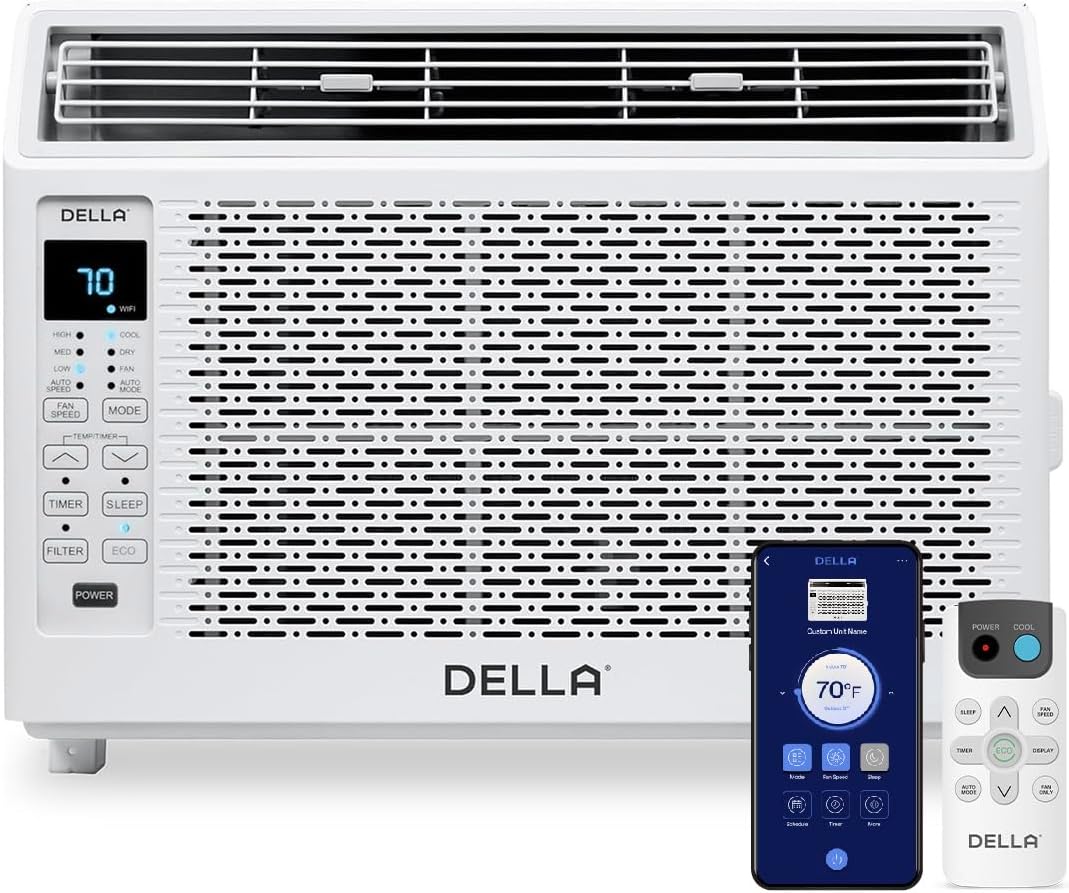
Figure 1: DELLA 6000 BTU Window Air Conditioner Unit, Remote Control, and Smartphone App Interface.
แผงควบคุม
The unit features an intuitive control panel with various buttons and indicator lights for easy operation.
- ปุ่มเปิด/ปิด: เปิดหรือปิดเครื่อง
- ปุ่มโหมด: Cycles through Cool, Dry (Dehumidifier), Fan, Auto Mode, and ECO Mode.
- ปุ่มปรับความเร็วพัดลม: Adjusts fan speed (High, Med, Low, Auto Speed).
- Temp/Timer Buttons: Adjusts temperature settings or sets timer.
- ปุ่มนอน: เปิดใช้งานโหมดประหยัดพลังงานเพื่อการทำงานที่เงียบและประหยัดพลังงานตลอดคืน
- ปุ่มตัวกรอง: แสดงให้เห็นว่าถึงเวลาต้องทำความสะอาดตัวกรองแล้ว
- ตัวบ่งชี้ WiFi: แสดงสถานะการเชื่อมต่อ Wi-Fi
รีโมทคอนโทรล

Figure 2: Remote Control for the DELLA Air Conditioner.
The remote control allows for convenient operation of all unit functions from a distance. Ensure batteries are correctly installed.
การติดตั้ง
The DELLA 6000 BTU Window Air Conditioner features a T-design for simplified installation.
ขั้นตอนการติดตั้ง

Figure 3: T-design installation allows for flexible window opening.

Figure 4: Simplified 3-step installation process.
- Step 1: Secure into window frame. Place the unit into the window opening, ensuring it is securely seated.
- Step 2: Mount with four screws. Fasten the unit to the window frame using the provided screws for stability.
- Step 3: Extend side panels into wall. Extend the accordion side panels to fill the gap between the unit and the window frame, providing insulation and reducing air leaks.
ส่วนประกอบชุดติดตั้ง

รูปที่ 5: ส่วนประกอบของชุดติดตั้งที่รวมอยู่ในชุด
The installation kit includes filler panels, insulation strips, lock frame & sash lock, screws, window sash seal, and a top mounting rail to ensure a secure and efficient installation.
ขนาดสินค้า

Figure 6: Unit dimensions and recommended window opening.
The unit dimensions are approximately 15.94"D x 16.02"W x 12.05"H. It is designed for window widths between 23"-34" and requires at least 14.5" vertical clearance.
คำแนะนำการใช้งาน
Modes and Fan Speeds

Figure 7: Available operating modes and fan speeds.
The unit offers 5 operating modes (Cool, Auto, Dehumidify, Fan Only, ECO Mode) and 4 fan speeds (Auto, Low, Mid, High) to suit various comfort needs. Use the 'Mode' and 'Fan Speed' buttons on the control panel or remote to select your desired settings.
การควบคุมอุณหภูมิ
Use the up and down arrow buttons on the control panel or remote to set your desired temperature. The digital display will show the current setting.
Smart Features (Wi-Fi Control)

Figure 8: Control your unit wirelessly with the Della+ APP.

Figure 9: Della+ app supports Google Assistant and Alexa for voice control.
Download the free Della+ app to control your unit from anywhere. The app allows for remote control, scheduling, and integration with smart home systems like Google Assistant and Alexa.
Geo Location Function

Figure 10: Smart Geo Location feature for automatic operation.
The Geo Location feature allows the unit to automatically turn on or off based on your proximity to your home. This feature can be configured via the Della+ app.
Video 1: Demonstration of the Geo Location Function setup and customization within the Della+ app.
โหมดสลีป

Figure 11: Intelligent sleep mode adjusts temperature for optimal comfort.
Intelligent sleep mode automatically adjusts the temperature overnight to maintain comfort and save energy. Activate it using the 'Sleep' button.
ฟังก์ชั่นจับเวลา
The 24-hour auto on/off timer allows you to program the unit to turn on or off at specific times, enhancing convenience and energy efficiency.
การซ่อมบำรุง
การทำความสะอาดตัวกรองแบบใช้ซ้ำได้

Figure 12: The unit features a washable and reusable filter.
The unit is equipped with a washable and reusable filter. A clean filter helps maintain optimal cooling performance and air quality. When the 'Filter' indicator light illuminates, it's time to clean the filter.
- ปิดและถอดปลั๊กเครื่องปรับอากาศ
- Remove the front panel and slide out the air filter.
- ล้างตัวกรองด้วยน้ำสบู่อุ่นๆ ล้างออกให้สะอาด
- ปล่อยให้ตัวกรองแห้งสนิทก่อนใส่กลับเข้าไปใหม่
- เปลี่ยนแผงด้านหน้า
การดูแลทั่วไป
- ทำความสะอาดด้านนอกของตัวเครื่องด้วยน้ำยานุ่มdamp ผ้า.
- อย่าใช้สารเคมีรุนแรงหรือน้ำยาทำความสะอาดที่มีฤทธิ์กัดกร่อน
- ตรวจสอบให้แน่ใจว่าบริเวณระบายน้ำไม่มีสิ่งกีดขวาง
การแก้ไขปัญหา
หากคุณพบปัญหาเกี่ยวกับเครื่องปรับอากาศ โปรดดูปัญหาและวิธีแก้ไขทั่วไปต่อไปนี้:
| ปัญหา | สาเหตุที่เป็นไปได้ | สารละลาย |
|---|---|---|
| เครื่องไม่เปิด | ไม่มีไฟ; เบรกเกอร์ตัดวงจร; เครื่องถูกถอดปลั๊ก | Check power supply; reset circuit breaker; ensure plug is fully inserted. |
| หน่วยไม่ระบายความร้อนอย่างมีประสิทธิภาพ | แผ่นกรองอากาศสกปรก; ช่องรับ/ระบายอากาศอุดตัน; ห้องใหญ่เกินไป; หน้าต่าง/ประตูเปิดอยู่ | Clean air filter; clear obstructions; ensure unit is sized correctly for room; close windows/doors. |
| การทำงานมีเสียงดัง | Loose parts; unit not level; fan obstruction. | Check for loose components; ensure unit is level; remove any fan obstructions. |
| น้ำหยดข้างนอก | การทำงานปกติ (การควบแน่น) | This is normal during cooling. Ensure proper drainage. |
ข้อมูลจำเพาะ
| คุณสมบัติ | รายละเอียด |
|---|---|
| ชื่อยี่ห้อ | เดลล่า |
| ข้อมูลรุ่น | 048-TL-W6KWD |
| ขนาดสินค้า | 15.94 x 16.02 x 12.05 นิ้ว |
| หมายเลขรุ่นสินค้า | 048-TL-W6KWD |
| ประสิทธิภาพ | ประหยัดพลังงาน |
| ความจุ | 0.5 ตัน |
| เสียงรบกวน | 51 เดซิเบล |
| ประเภทการติดตั้ง | หน้าต่าง |
| หมายเลขชิ้นส่วน | 048-TL-W6KW_2 |
| ฟอร์มแฟกเตอร์ | เครื่องปรับอากาศแบบติดหน้าต่าง |
| คุณสมบัติพิเศษ | รีโมทคอนโทรล |
| เล่มที่tage | 115 โวลต์ (AC) |
| วัดtage | 517.5 วัตต์ |
| รวมแบตเตอรี่ด้วยมั้ย? | เลขที่ |
| พื้นที่ | 250 ตารางฟุต |
| พลังทำความเย็น | 6000 หน่วยความร้อนอังกฤษ |
| การจัดอันดับดาวของ BEE | ใช่ |
| อัตราส่วนประสิทธิภาพพลังงานตามฤดูกาล (SEER) | 11 |
| แหล่งพลังงาน | สายไฟ |
การรับประกันและการสนับสนุน
Your DELLA 6000 BTU Window Air Conditioner comes with a รับประกัน 1 ปี. For any inquiries or technical assistance, Della provides ฝ่ายสนับสนุนลูกค้าตลอด 24 ชม..
กรุณาเข้าเยี่ยมชม Della Store on Amazon สำหรับข้อมูลเพิ่มเติมหรือติดต่อฝ่ายสนับสนุน