
1. บทนำ
Thank you for choosing the MAIRDI M890DCBTENC Bluetooth Headset. This manual provides essential information for setting up, operating, and maintaining your headset to ensure optimal performance and longevity. Please read this manual carefully before using the product.

Image 1: MAIRDI M890DCBTENC Bluetooth Headset.
คุณสมบัติหลัก:
- การเชื่อมต่อแบบไร้รอยต่อ: Bluetooth V5.2 for stable and fast wireless connections.
- เสียง HD: APTX and low latency technology for high-fidelity sound.
- ไมโครโฟนตัดเสียงรบกวนด้วยระบบ AI: Dual-mic technology filters out 98% of background noise for crystal-clear calls.
- อายุการใช้งานแบตเตอรี่ที่ยาวนานขึ้น: Up to 40 hours of talk and music time on a single charge.
- การจับคู่หลายจุด: Connects to two devices simultaneously (e.g., PC/laptop and mobile phone).
- ความสะดวกสบายและการปรับแต่ง: 330-degree rotatable microphone boom, adjustable headband, and super soft leather ear cushions.
- การชาร์จอเนกประสงค์: Includes a charging stand with an in-built Bluetooth receiver for plug-and-play PC connectivity, or charge via USB cable.
2. อะไรอยู่ในกล่อง
Upon opening your MAIRDI M890DCBTENC Bluetooth Headset package, you should find the following items:
- MAIRDI M890DCBTENC Bluetooth Headset
- Charging Base (with integrated Bluetooth receiver)
- สายชาร์จ USB
- คู่มือการใช้งาน
- กระเป๋าใส่ของ
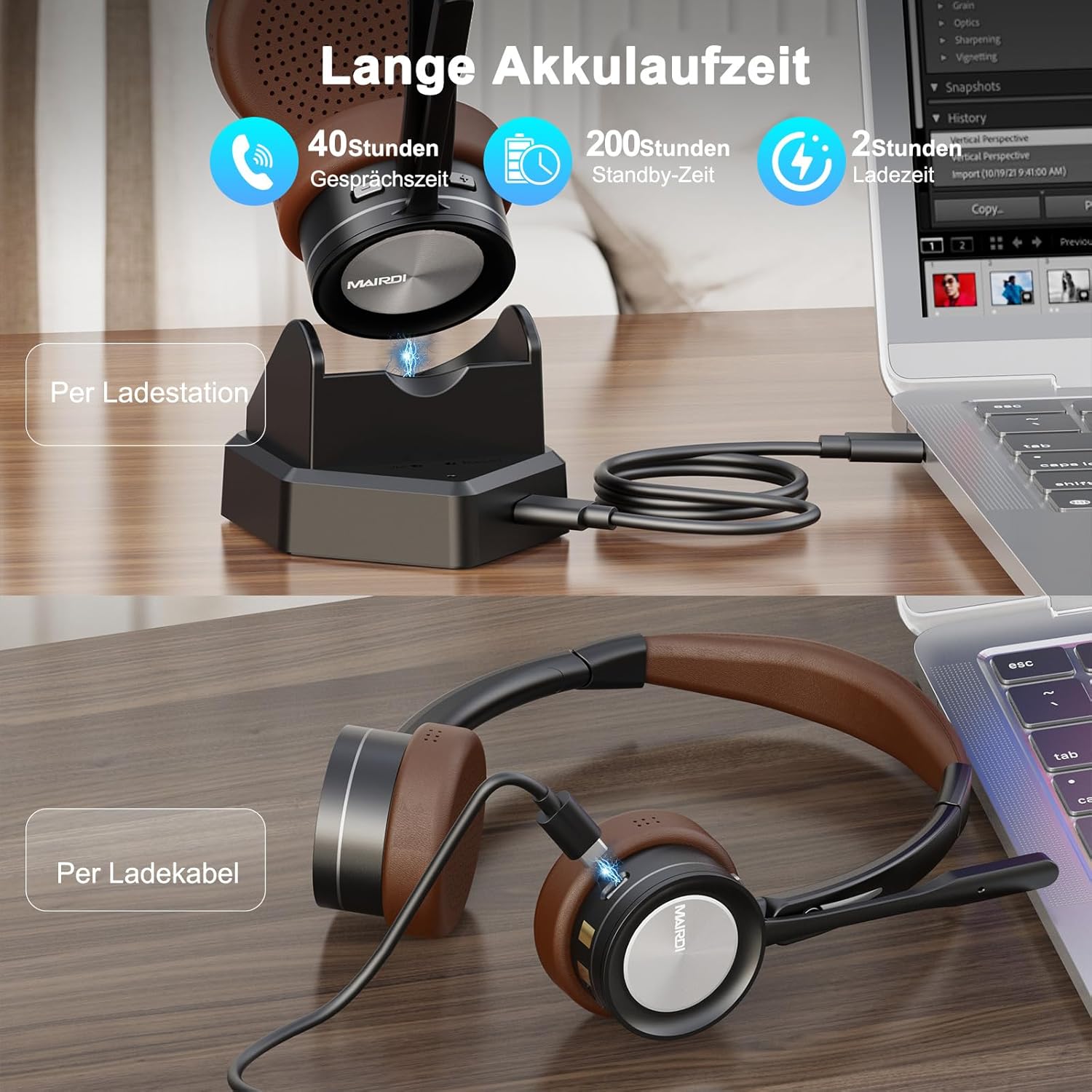
Image 2: The MAIRDI M890DCBTENC Headset with its charging base and USB cable.
3. การตั้งค่า
3.1 การชาร์จเริ่มต้น
Before first use, fully charge your headset. Connect the USB charging cable to the charging base and a power source (e.g., computer USB port or wall adapter). Place the headset on the charging base. The indicator light will show charging status.

Image 3: The headset can be charged via the charging station or directly with the USB cable.
3.2 การเชื่อมต่อกับอุปกรณ์
Your headset offers two primary connection methods: via the charging base (with integrated Bluetooth receiver) for PCs without Bluetooth, or directly via Bluetooth to any compatible device.
3.2.1 Connecting via Charging Base (for PC)
- Connect the charging base to your PC's USB port using the provided USB cable. The base acts as a plug-and-play Bluetooth receiver.
- Turn on the headset. It will automatically attempt to pair with the connected charging base.
- Once connected, your PC should recognize the headset as an audio device. Select it as your input/output device in your system's sound settings.
3.2.2 Connecting via Bluetooth (Direct)
- Ensure the headset is powered on and in pairing mode (usually indicated by a flashing LED).
- On your device (PC, laptop, Mac, smartphone), go to Bluetooth settings.
- ค้นหา available devices and select "MAIRDI M890DCBTENC" from the list.
- Once paired, the headset's LED indicator will show a steady light.

Image 4: The headset supports multipoint pairing, allowing simultaneous connection to a laptop and a smartphone.
3.3 การจับคู่แบบหลายจุด
The headset supports connecting to two Bluetooth devices simultaneously. After pairing with the first device, put the headset back into pairing mode and connect to the second device. The headset will manage audio switching between the two connected devices.
4. คู่มือการใช้งาน
4.1 เปิด/ปิดเครื่อง
- ในการเปิดเครื่อง ให้เลื่อนสวิตช์เปิด/ปิดไปที่ตำแหน่ง 'เปิด'
- หากต้องการปิดเครื่อง ให้เลื่อนสวิตช์เปิด/ปิดไปที่ตำแหน่ง 'ปิด'
4.2 การจัดการการโทร
- รับ/วางสาย: กดปุ่มอเนกประสงค์หนึ่งครั้ง
- ปฏิเสธสาย: Press and hold the multi-functional button for 2 seconds.
- ปิดเสียงไมโครโฟน: Press the mute button on the microphone boom. An audible prompt will indicate 'Mute On' or 'Mute Off'.

Image 5: The headset features a microphone with noise cancellation and a dedicated mute button.
4.3 Volume Control & Music Playback
- เพิ่ม/ลดระดับเสียง: ใช้ปุ่มปรับระดับเสียงเฉพาะที่อยู่บนตัวหูฟัง
- เล่น/หยุดชั่วคราว: กดปุ่มอเนกประสงค์หนึ่งครั้ง
- เพลงถัดไป: กดปุ่ม 'เพิ่มเสียง' ค้างไว้
- แทร็กก่อนหน้า: กดปุ่มลดเสียงค้างไว้
4.4 การปรับแต่งไมโครโฟน
The microphone boom can be rotated 330 degrees to position it optimally for your voice or to move it out of the way when not in use. Ensure the microphone is positioned close to your mouth for best voice pickup and noise cancellation.

Image 6: The headset features a soft earpad, 330° rotatable microphone arm, and an adjustable headband for comfort.
4.5 Busy Light Indicator
The headset features a busy light indicator to signal to others when you are on a call or in a meeting, helping to minimize interruptions.
5. การบำรุงรักษา
To ensure the longevity and optimal performance of your MAIRDI M890DCBTENC headset, follow these maintenance guidelines:
- การทำความสะอาด: ใช้ผ้าแห้งนุ่มเช็ดทำความสะอาดหูฟังและแท่นชาร์จ หลีกเลี่ยงการใช้สารเคมีรุนแรงหรือวัสดุที่มีฤทธิ์กัดกร่อน
- พื้นที่จัดเก็บ: When not in use, store the headset in the provided carry pouch or on the charging base to protect it from dust and damage.
- การดูแลแบตเตอรี่ Avoid fully discharging the battery frequently. Charge the headset regularly, even if not in daily use, to maintain battery health.
- สภาพแวดล้อม : Do not expose the headset to extreme temperatures, humidity, or direct sunlight. Keep it away from water and other liquids.
6 การแก้ไขปัญหา
หากคุณพบปัญหาเกี่ยวกับชุดหูฟัง โปรดดูปัญหาทั่วไปและวิธีแก้ไขต่อไปนี้:
| ปัญหา | วิธีแก้ปัญหาที่เป็นไปได้ |
|---|---|
| หูฟังไม่สามารถเปิดเครื่องได้ | Ensure the headset is fully charged. Connect it to the charging base or directly via USB cable. |
| ไม่สามารถจับคู่กับอุปกรณ์ได้ | Ensure the headset is in pairing mode (flashing LED). Turn off and on Bluetooth on your device. Move the headset closer to the device. Clear previous Bluetooth connections on your device. |
| ไม่มีเสียงหรือคุณภาพเสียงไม่ดี | Check volume levels on both the headset and your connected device. Ensure the headset is selected as the default audio input/output device. Re-pair the headset. |
| ไมโครโฟนไม่ทำงาน | Ensure the microphone is not muted. Check that the headset is selected as the default microphone in your device's sound settings. Position the microphone boom correctly. |
| แบตเตอรี่มีอายุสั้น | โปรดตรวจสอบให้แน่ใจว่าหูฟังชาร์จเต็มแล้วก่อนใช้งาน อายุการใช้งานแบตเตอรี่อาจแตกต่างกันไปขึ้นอยู่กับรูปแบบการใช้งานและระดับเสียง |
7. ข้อมูลจำเพาะ
| คุณสมบัติ | รายละเอียด |
|---|---|
| ยี่ห้อ | ไมร์ดิ |
| หมายเลขรุ่น | M890DCBTENC |
| สี | สีน้ำตาล |
| เทคโนโลยีการเชื่อมต่อ | ไร้สาย (Bluetooth) |
| เวอร์ชันบลูทูธ | 5.2 |
| การวางตำแหน่งหู | บนหู |
| การควบคุมเสียงรบกวน | การแยกเสียง |
| ไมโครโฟน | AI Noise-Canceling, 330° Rotatable |
| อายุการใช้งานแบตเตอรี่ (เฉลี่ย) | 40 ชั่วโมง |
| ช่วงความถี่ | 20 เฮิรตซ์ - 20,000 เฮิรตซ์ |
| ประเภทไดร์เวอร์เสียง | ไดร์เวอร์แบบไดนามิก |
| ประเภทการควบคุม | การควบคุมระดับเสียง, รีโมท |
| อุปกรณ์ที่รองรับ | PC, Laptop, Desktop, Mac, Smartphone, Cell Phone |
| น้ำหนักสินค้า | 0.53 กิโลกรัม |
| วัสดุ | หนัง (แผ่นรองหูฟัง) |
8. การรับประกันและการสนับสนุน
For warranty information and customer support, please refer to the official MAIRDI webหรือติดต่อผู้ค้าปลีกของคุณ เก็บใบเสร็จรับเงินไว้เป็นหลักฐานการซื้อสำหรับการเรียกร้องการรับประกัน
9. วิดีโอผลิตภัณฑ์
Bluetooth Headset with Microphone for PC
วิดีโอ 1: จบแล้วview of the MAIRDI Bluetooth Headset with Microphone for PC, highlighting its features and design.