
การแนะนำ
ขอบคุณสำหรับการซื้อasing the WIITHINK WCD-9949 Portable CD Player Boombox. This device offers versatile audio playback options including CD, FM radio, Bluetooth, USB, and AUX input. Designed for ease of use and portability, it provides a rich audio experience for various settings. Please read this manual carefully to ensure proper operation and maintenance of your new boombox.
ข้อมูลด้านความปลอดภัย
- อย่าให้เครื่องโดนฝนหรือความชื้นเพื่อป้องกันอันตรายจากไฟไหม้หรือไฟฟ้าช็อต
- อย่าปิดกั้นช่องระบายอากาศ ควรมีพื้นที่รอบเครื่องเพียงพอเพื่อให้อากาศถ่ายเทได้สะดวก
- ใช้เฉพาะอุปกรณ์เสริม/สิ่งที่แนบที่ผู้ผลิตกำหนดเท่านั้น
- ถอดปลั๊กเครื่องในระหว่างที่เกิดพายุฝนฟ้าคะนองหรือเมื่อไม่ได้ใช้งานเป็นเวลานาน
- อย่าเปิดเครื่อง casinก. ส่งต่อการบริการทั้งหมดไปยังเจ้าหน้าที่บริการที่มีคุณสมบัติเหมาะสม
- ทิ้งแบตเตอรี่อย่างถูกวิธี อย่าให้แบตเตอรี่โดนความร้อนสูงเกินไป
เนื้อหาแพ็คเกจ
ตรวจสอบว่ามีรายการทั้งหมดอยู่ในแพ็คเกจ:
- 1 x WIITHINK WTB791 Portable CD Radio Boombox (Batteries Not Included)
- 1 x Remote Control (Batteries Not Included)
- สายไฟ 1 เส้น
- สาย AUX 1 เส้น
- 1 x คู่มือผู้ใช้
- 1 x กล่องบรรจุภัณฑ์
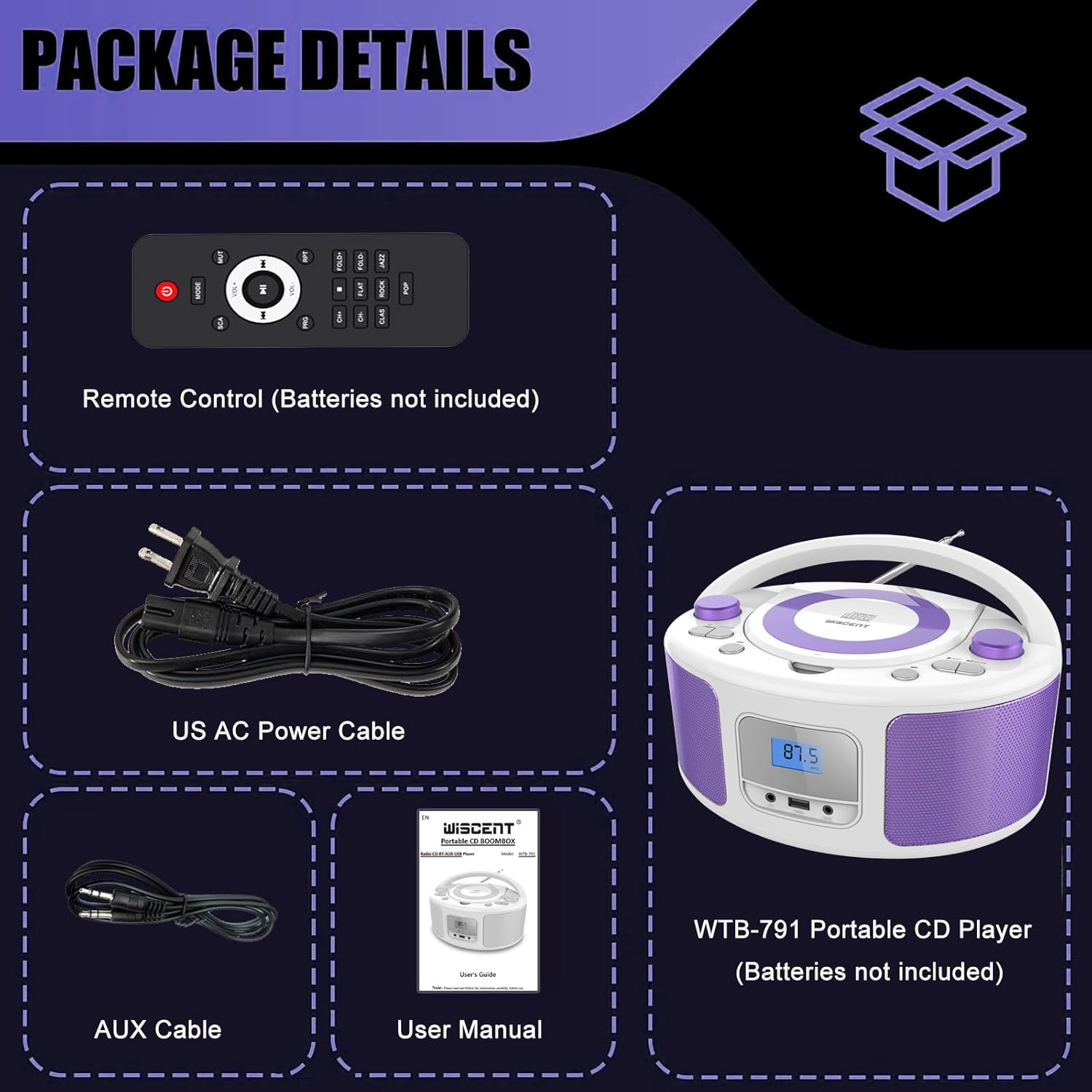
Image: Contents of the WIITHINK WCD-9949 Boombox package, showing the boombox, remote control, power cable, AUX cable, and user manual.
สินค้าเกินview
Familiarize yourself with the main components of your boombox.

ภาพ: ด้านหน้า view of the WIITHINK WCD-9949 Boombox, highlighting key features such as CD player, Bluetooth, USB port, AUX input, headphone jack, LCD display, FM radio, and power options.
- เครื่องเล่นซีดีแบบใส่แผ่นจากด้านบน: For playing CDs, CD-R/RW, MP3 CDs, and audiobook CDs.
- เครื่องรับวิทยุ FM: สำหรับการฟังสถานีวิทยุ FM
- บลูทูธ: สำหรับการสตรีมเสียงแบบไร้สายจากอุปกรณ์ที่รองรับ
- ช่องต่อ USB: For playing MP3/WMA music files from USB flash drives (FAT32 format, up to 128GB).
- ช่องต่อ AUX (3.5 มม.): สำหรับเชื่อมต่ออุปกรณ์เสียงภายนอก
- แจ็คหูฟัง (3.5 มม.): สำหรับการฟังส่วนตัว
- จอแสดงผล LCD: แสดงโหมดปัจจุบัน หมายเลขแทร็ก และความถี่วิทยุ
- ปุ่มควบคุม: Power, Mode, Play/Pause, Skip/Search, Repeat, Scan, EQ/Function.
- ปุ่มปรับระดับเสียง: ปรับระดับเอาท์พุตเสียง
- ปุ่มปรับ: ปรับความถี่วิทยุ FM
- เสาอากาศยืดไสลด์: เพื่อการรับสัญญาณวิทยุ FM ที่ดีขึ้น
- ที่จับ: เพื่อการพกพาที่สะดวก
การตั้งค่า
การจ่ายไฟให้กับบูมบ็อกซ์
เครื่องเล่นเพลงพกพาของคุณสามารถใช้พลังงานจากไฟบ้านหรือแบตเตอรี่ได้
AC Power (Wall Outlet)
- โปรดตรวจสอบให้แน่ใจว่าได้ปิดเครื่องเล่นเพลงแล้ว
- Insert one end of the provided AC power cable into the AC IN jack on the back of the boombox.
- เสียบปลายอีกด้านของสายไฟ AC เข้ากับเต้ารับติดผนังมาตรฐาน

ภาพ: ด้านหลัง view of the boombox, indicating the AC IN jack for power connection and the battery compartment.
Battery Power (Portable Use)
- โปรดตรวจสอบให้แน่ใจว่าได้ปิดเครื่องเล่นเพลงและถอดปลั๊กออกจากแหล่งจ่ายไฟแล้ว
- หาช่องใส่แบตเตอรี่ที่อยู่ด้านล่างของตัวเครื่อง
- เปิดฝาช่องใส่แบตเตอรี่
- Insert 4 x UM2-C 1.5V batteries (not included), ensuring correct polarity (+/-).
- ปิดฝาช่องใส่แบตเตอรี่ให้แน่น
บันทึก: ถอดแบตเตอรี่ออกหากจะไม่ได้ใช้งานเครื่องเป็นเวลานาน เพื่อป้องกันการรั่วไหลและความเสียหาย
คำแนะนำการใช้งาน
การดำเนินงานทั่วไป
- เปิด/ปิดเครื่อง: กดปุ่ม พลัง ปุ่มเพื่อเปิดหรือปิดเครื่อง
- เลือกโหมด: กดปุ่ม โหมด button repeatedly to cycle through available modes: CD, FM, Bluetooth (BT), USB, AUX. The selected mode will be displayed on the LCD screen.
- ปรับระดับเสียง: หมุน ปริมาณ หมุนปุ่มตามเข็มนาฬิกาเพื่อเพิ่มระดับเสียง และหมุนทวนเข็มนาฬิกาเพื่อลดระดับเสียง
- โหมด EQ: กดปุ่ม อีคิว/ความสนุก button to select different equalizer presets: ROCK / POP / FLAT / CLASS / JAZZ.

ภาพ: เหนือview of the boombox's multiple playback modes and features.
การเล่นซีดี
- กดปุ่ม โหมด button to select CD mode. "CD" will appear on the display.
- เปิดฝาช่องใส่ซีดีโดยยกขึ้นเบาๆ
- Place a CD (CD, CD-R/RW, MP3 CD, audiobook CD) onto the spindle with the label side facing up.
- ปิดฝาช่องใส่ซีดี ซีดีจะเริ่มเล่นโดยอัตโนมัติ
- เล่น/หยุดชั่วคราว: กดปุ่ม เล่น/หยุดชั่วคราว ปุ่มเพื่อหยุดชั่วคราวหรือเล่นต่อ
- ข้ามแทร็ก: กดปุ่ม ข้ามไปข้างหน้า or ข้ามย้อนกลับ ปุ่มเพื่อข้ามไปยังแทร็กถัดไปหรือก่อนหน้า
- ทำซ้ำ: กดปุ่ม รปท. button to repeat the current track (Repeat 1) or all tracks (Repeat All).
- โปรแกรมการเล่น: Refer to the detailed user manual for programming specific track orders.

Image: Close-up of the top-loading CD player with a disc inside, ready for playback.
การทำงานของวิทยุ FM
- กดปุ่ม โหมด button to select FM radio mode. The FM frequency will appear on the display.
- ยืดเสาอากาศแบบยืดหดได้ออกเพื่อให้รับสัญญาณได้ดีที่สุด
- สแกนอัตโนมัติ: กดปุ่มค้างไว้ สแกน button to automatically scan and save available FM stations (up to 30 presets).
- การปรับด้วยตนเอง: หมุน การปรับแต่ง ปุ่มหมุนสำหรับปรับความถี่ด้วยตนเอง
- เลือก Preset: ใช้ ค่าที่ตั้งไว้ล่วงหน้า +/- buttons on the remote control to navigate through saved stations.

Image: Visual representation of the FM radio feature, showing the frequency range and preset capabilities.
จับคู่บลูทู ธ
- กดปุ่ม โหมด button to select Bluetooth mode. "BT" will flash on the display, indicating it's ready for pairing.
- บนอุปกรณ์ที่รองรับ Bluetooth ของคุณ (สมาร์ทโฟน แท็บเล็ต ฯลฯ) ให้เปิดใช้งาน Bluetooth และค้นหาอุปกรณ์ที่มีอยู่
- Select "WTB-791" from the list of devices.
- Once paired, "BT" will stop flashing and remain solid. You can now stream audio wirelessly.
- Control playback (Play/Pause, Skip) using the boombox buttons or your connected device.

Image: The boombox displaying "BT" for Bluetooth mode, connected to a smartphone for wireless music streaming.
การเล่นผ่าน USB
- Insert a USB flash drive (FAT32 format, up to 128GB) containing MP3/WMA audio fileเสียบสายเข้ากับพอร์ต USB ที่ด้านหน้าของลำโพงพกพา
- กดปุ่ม โหมด button to select USB mode. "USB" will appear on the display.
- Playback will start automatically. Use the Play/Pause and Skip buttons to control playback.
อินพุต AUX
- Connect an external audio device (e.g., MP3 player, laptop) to the AUX IN jack on the front of the boombox using the provided 3.5mm AUX cable.
- กดปุ่ม โหมด button to select AUX mode. "AUX" will appear on the display.
- Control playback from your external device. Adjust volume using the boombox's volume knob.

Image: The boombox connected to multiple external devices via AUX input, demonstrating its versatility.
การใช้หูฟัง
For private listening, plug 3.5mm headphones (not included) into the HEADPHONE jack on the front of the boombox. The speakers will automatically mute.
รีโมทคอนโทรล
The included remote control allows you to operate the boombox from a distance. Ensure batteries are inserted correctly (2 x AAA, not included). Functions include Power, Mode selection, Volume, Mute, Play/Pause, Skip/Search, Repeat, Scan, and EQ modes.

Image: The boombox and its remote control, highlighting the convenience of remote operation.
การซ่อมบำรุง
- ทำความสะอาดตัวเครื่องด้วยผ้าแห้งเนื้อนุ่ม ห้ามใช้สารทำความสะอาดที่มีฤทธิ์กัดกร่อนหรือตัวทำละลาย
- Keep the CD compartment clean and free of dust. Use a CD lens cleaner if necessary.
- เก็บอุปกรณ์ไว้ในที่แห้งและเย็น หลีกเลี่ยงแสงแดดโดยตรงและอุณหภูมิที่สูงหรือต่ำเกินไป
การแก้ไขปัญหา
| ปัญหา | สารละลาย |
|---|---|
| ไม่มีไฟฟ้า | Check if the AC power cable is securely connected. If using batteries, ensure they are inserted correctly and not depleted. |
| ซีดีไม่เล่น | Ensure the CD is clean and free of scratches. Verify the CD is inserted correctly with the label side up. Close the CD compartment completely. Ensure CD mode is selected. |
| การรับสัญญาณวิทยุ FM ไม่ดี | Extend and adjust the telescopic antenna. Try repositioning the unit. |
| บลูทูธไม่จับคู่ | Ensure the boombox is in Bluetooth mode and "BT" is flashing. Make sure your device's Bluetooth is enabled and within range. Forget previous pairings on your device and try again. |
| ปัญหาการเล่นไฟล์ผ่าน USB | Ensure the USB drive is formatted to FAT32 and contains compatible MP3/WMA files. The maximum capacity supported is 128GB. |
ข้อมูลจำเพาะ
| คุณสมบัติ | รายละเอียด |
|---|---|
| หมายเลขรุ่น | WCD-9949 |
| ขนาดสินค้า (กว้าง x ยาว x สูง) | 7 x 10 x 5 นิ้ว |
| น้ำหนักสินค้า | 3.91 ปอนด์ |
| เทคโนโลยีการเชื่อมต่อ | อุปกรณ์เสริม, บลูทูธ, USB |
| ประเภทลำโพง | บิวท์อิน |
| กำลังขับ | กำลังไฟ 2x2W RMS |
| ความถี่วิทยุ FM | 87.5-108เมกะเฮิรตซ์ |
| แหล่งพลังงาน | AC 100-240V~ / 4 x C batteries (not included) |
| ความจุ USB | ความจุสูงสุด 128GB (เฉพาะรูปแบบ FAT32) |
การรับประกันและการสนับสนุน
WIITHINK is committed to customer satisfaction. Your product comes with:
- เปลี่ยนสินค้าภายใน 18 เดือน: For missing parts or defective products.
- การสนับสนุนทางเทคนิคตลอดอายุการใช้งาน: Assistance with any product inquiries.
- Amazon Buyer-Seller Messaging: Available 7/24 for support.
For any inquiries, please go to Your Orders, find your order in the list, and click on "WIITHINK" to contact us.

Image: Details on WIITHINK's customer support, including replacement policy and technical assistance.
วิดีโอผลิตภัณฑ์อย่างเป็นทางการ
WIITHINK Direct - CD Radio Portable CD Player Boombox with Bluetooth
Video: An official product video from WIITHINK Direct showcasing the features and functionality of the CD Radio Portable CD Player Boombox with Bluetooth.