
qirita PA02
คู่มือผู้ใช้ขาตั้งกล้องติดตามใบหน้าแบบแม่เหล็ก qirita
Model: PA02 | Brand: qirita
การแนะนำ
This manual provides detailed instructions for the setup, operation, and maintenance of your qirita Magnetic Car Face Tracking Tripod (Model PA02). This smart phone holder is designed to automatically detect and track faces or bodies, offering 360° continuous rotation for hands-free video recording, vlogging, and live streaming. It features both magnetic and clip phone holding options, gesture control, and a detachable remote control for enhanced convenience.
สิ่งที่รวมอยู่
- Automatic Face Tracking Tripod
- แหวนแม่เหล็ก
- รีโมทคอนโทรล
- สายชาร์จ Type-C
- คู่มือการใช้งาน (เอกสารนี้)

Image showing the qirita Automatic Face Tracking Tripod along with its accessories: the remote control, magnetic ring, and charging cable.
คู่มือการติดตั้ง
1. การชาร์จอุปกรณ์
Before first use, fully charge the tripod using the provided Type-C charging cable. Connect the cable to the charging port on the device and a suitable USB power source. The charging indicator light will show the charging status.
2. การเชื่อมต่อสมาร์ทโฟนของคุณ
The qirita tripod offers two methods for attaching your smartphone:
- การเชื่อมต่อแม่เหล็ก: For phones with built-in magnetic capabilities (e.g., iPhone 12 series and newer) or those using a magnetic phone case, simply align the phone with the magnetic ring on the tripod head until it securely attaches.
- Phone Clip Connection: For other smartphones (2.5-3.7 inches wide), use the adjustable phone clip. Gently pull open the clip and insert your phone, ensuring it is held firmly.

Illustration of the two phone attachment options: magnetic connection for compatible phones and the adjustable phone clip for wider compatibility.
3. การจับคู่รีโมทคอนโทรล
The included remote control connects to your phone via Bluetooth.
- Ensure the remote control is charged and powered on.
- เปิดใช้งานบลูทูธบนสมาร์ทโฟนของคุณ
- ค้นหา "QIRITA" in your phone's Bluetooth settings and pair with the device.
- Once paired, the remote can be used to start or stop recording on your phone.
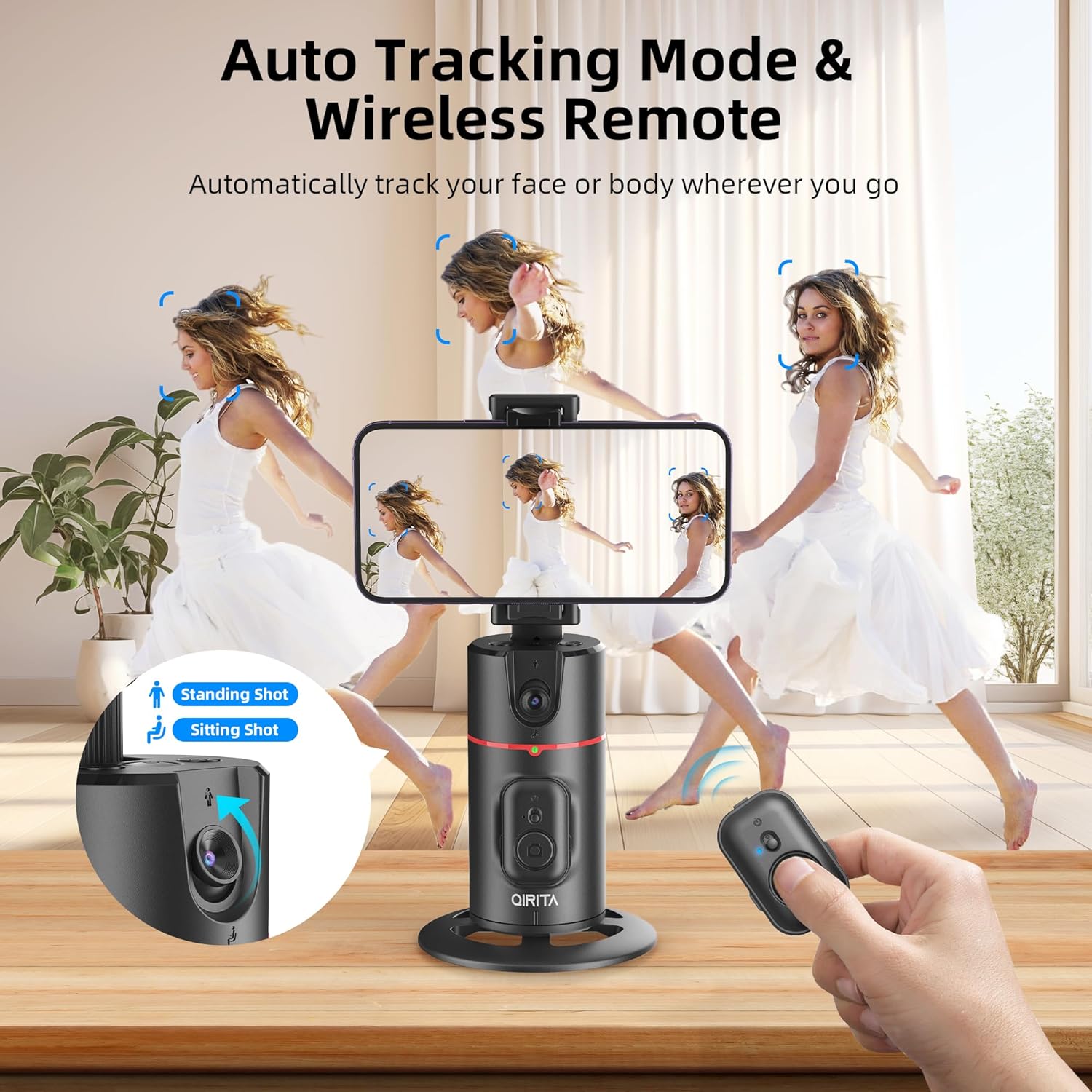
The qirita tripod in action, demonstrating its auto-tracking mode and the use of the wireless remote control.
4. Adjusting the Expandable Pole
The tripod features a hidden expandable pole. Gently pull upwards on the phone holder assembly to extend the pole, providing additional height for various shooting angles. Push down to retract.

Visual guide on extending the hidden pole of the qirita tripod for increased height and shooting flexibility.
5. ขาตั้งกล้อง (ไม่จำเป็น)
The base of the qirita tripod features a standard 1/4-inch screw interface, allowing it to be mounted on other compatible tripods for increased stability or height.

The base of the qirita tripod, highlighting its 1/4-inch thread for compatibility with external tripods (tripod not included).
คำแนะนำการใช้งาน
1. การเปิด/ปิดเครื่อง
Press and hold the power button on the main unit to turn the device on or off. An indicator light will confirm the power status.
2. Smart Face/Body Tracking
The tripod uses an AI computing system to automatically detect and track your face or body. It rotates 360° continuously to keep you in frame.
- Horizontal Tracking: Ideal for movements across the frame.
- Vertical Tracking: Suitable for movements up and down.
The device will automatically adjust its rotation to follow your movement, ensuring you remain centered in the video.
3. การควบคุมด้วยท่าทาง
Control tracking with simple hand gestures:
- "OK" Gesture (👌): Make an "OK" sign with your hand to initiate face/body tracking.
- Open Palm Gesture (✋): Show an open palm to pause the tracking function.

Visual representation of the gesture controls: the "OK" gesture to begin tracking and the open palm gesture to pause tracking.
4. Manual and Automatic 360° Rotation
In addition to automatic tracking, the device offers rotation control:
- การปรับด้วยตนเอง: The phone clip and neck design allow for 360° rotation and 180° tilt, enabling horizontal or vertical camera modes and various angles.
- Automatic Cycle Rotation: Press the designated cycle button on the device to trigger a continuous 360° rotation, useful for panoramic shots or hands-free recording without tracking a specific subject.

Demonstration of the tripod's multi-angle rotation, allowing for 360-degree horizontal rotation and 180-degree vertical adjustment of the phone holder.
5. No App Required
The qirita tripod operates independently without the need for any dedicated application. This ensures broad compatibility with various smartphones and platforms, including Instagram, YouTube, Facebook, and TikTok.

The qirita tripod's key feature: no app required for operation, making it universally compatible with popular streaming and social media platforms.
การซ่อมบำรุง
- รักษาความสะอาดของอุปกรณ์ด้วยการเช็ดด้วยผ้าแห้งเนื้อนุ่ม
- หลีกเลี่ยงการให้เครื่องสัมผัสกับอุณหภูมิที่สูง ความชื้น หรือแสงแดดโดยตรง
- ห้ามถอดชิ้นส่วนอุปกรณ์ เนื่องจากจะทำให้การรับประกันเป็นโมฆะและอาจทำให้เกิดความเสียหายได้
- เก็บไว้ในที่แห้งและเย็นเมื่อไม่ได้ใช้งาน
การแก้ไขปัญหา
| ปัญหา | สาเหตุที่เป็นไปได้ | สารละลาย |
|---|---|---|
| อุปกรณ์ไม่เปิดเครื่อง | แบตเตอรี่อ่อน | ชาร์จอุปกรณ์โดยใช้สาย Type-C ที่ให้มา |
| Tracking is not working. | Incorrect gesture or subject out of range/view. | Ensure proper lighting and that the subject is within the optimal tracking distance (best within 3 meters). Use the correct "OK" gesture to initiate tracking. |
| Remote control not connecting. | Remote not paired or low battery. | Ensure remote is powered on and charged. Re-pair the remote via your phone's Bluetooth settings. |
| โทรศัพท์ไม่ได้ยึดแน่นดี | Incorrect attachment method or phone size. | Ensure magnetic connection is strong or phone clip is fully extended and gripping the phone (2.5-3.7 inches width). |
ข้อมูลจำเพาะ
| คุณสมบัติ | รายละเอียด |
|---|---|
| หมายเลขรุ่น | PA02 |
| ขนาดสินค้า | 5.8 x 5.4 x 9.5 ซม. |
| น้ำหนักสินค้า | 300 กรัม |
| คำแนะนำน้ำหนักสูงสุด | 370 กรัม |
| แบตเตอรี่ | 1 Lithium Metal battery required (built-in) |
| คุณสมบัติพิเศษ | Rotatable, Face/Body Tracking, Gesture Control, Remote Control, No App Required |
| ความกว้างของที่วางโทรศัพท์ | 6-9 ซม. (2.5-3.7 นิ้ว) |
| ความเข้ากันได้ | iPhone 15/14/13/12/11 series, Samsung Galaxy, Google Pixel, Huawei, Xiaomi, etc. |
| ยูพีซี | 658360830456 |
การรับประกันและการสนับสนุน
For warranty information and technical support, please refer to the contact details provided with your product packaging or visit the official qirita webไซต์นี้ โปรดเก็บใบเสร็จรับเงินที่ซื้อไว้เพื่อใช้เรียกร้องการรับประกัน
Ask a question about this manual
Ask about setup, troubleshooting, compatibility, parts, safety, or missing instructions. Manuals+ will review the question and use this page’s manual context to help answer it.