การแนะนำ
Welcome to the user manual for your KORONA Wearbuds W26 Smart Watch with Wireless Earbuds. This innovative device combines the functionality of a smartwatch, high-quality wireless earbuds, and an advanced health and fitness tracker into a single, convenient timepiece. This manual provides essential information on setting up, operating, maintaining, and troubleshooting your device to ensure optimal performance and a seamless user experience.

Image: The KORONA Wearbuds W26 Smart Watch with its integrated wireless earbuds, showcasing its compact and innovative design.
คู่มือการติดตั้ง
1. การแกะกล่องและการตรวจสอบเบื้องต้น
Upon opening the package, ensure all components are present. The box should contain the KORONA Wearbuds W26 Smart Watch with integrated earbuds and a charging cable. Inspect the device for any visible damage before proceeding.
- KORONA Wearbuds W26 Smart Watch
- Wireless Earbuds (integrated)
- สายชาร์จ
2. การชาร์จครั้งแรก
Before first use, fully charge your smartwatch and earbuds. The Wearbuds Watch features a built-in magnetic charging station for the earbuds and a magnetic charging port for the watch itself.
- Connect the provided charging cable to the magnetic charging port on the back of the smartwatch.
- เสียบปลายอีกด้านของสายเคเบิลเข้ากับอะแดปเตอร์แปลงไฟ USB มาตรฐาน (ไม่ได้รวมอยู่ในชุด) หรือพอร์ต USB ของคอมพิวเตอร์
- Slide the earbuds into their designated slots within the smartwatch to begin charging them.
- The watch can be fully charged in approximately one hour. Ensure both the watch and earbuds are fully charged for optimal battery life.
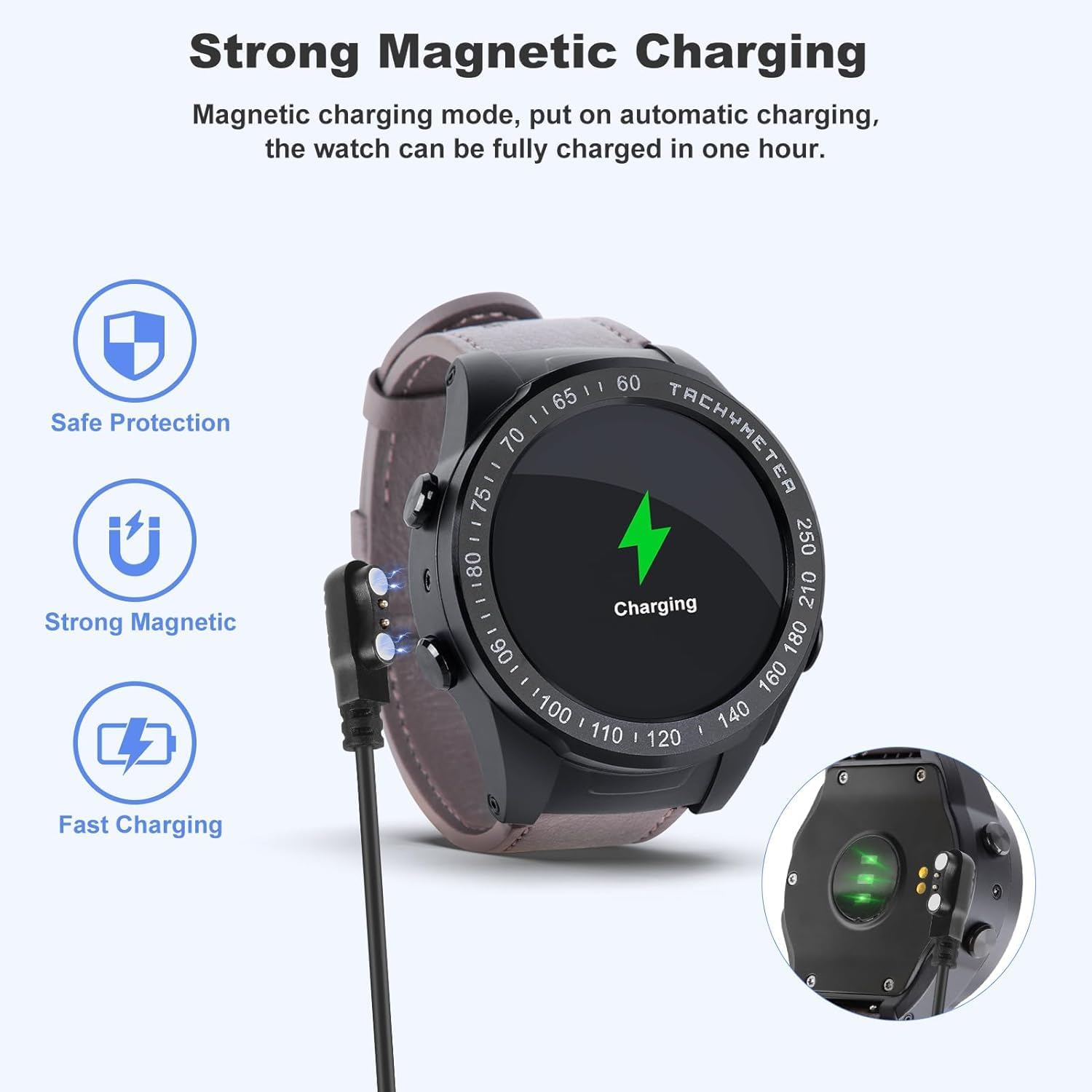
Image: The smartwatch connected to its magnetic charging cable, illustrating the strong magnetic charging feature. The earbuds also charge when placed in the watch.

Image: Illustration showing the earbuds being charged directly within the smartwatch, highlighting the convenience of on-wrist charging.
3. การจับคู่กับสมาร์ทโฟนของคุณ
To unlock the full potential of your KORONA Wearbuds W26, you need to pair it with your smartphone via Bluetooth.
- Download the companion application for the KORONA Wearbuds W26 from your smartphone's app store (e.g., Google Play Store or Apple App Store). Refer to the packaging or quick start guide for the specific app name.
- ตรวจสอบให้แน่ใจว่าได้เปิดใช้งาน Bluetooth บนสมาร์ทโฟนของคุณแล้ว
- Open the companion app and follow the on-screen instructions to search for and connect to your smartwatch. The device uses Bluetooth 5.0 for a stable connection.
- Once connected, the app will guide you through setting up your profile, preferences, and syncing data.
คำแนะนำการใช้งาน
1. ฟังก์ชั่นสมาร์ทวอทช์
The KORONA Wearbuds W26 features a large, high-brightness display for enhanced readability and easy navigation.
- On-Wrist Notifications: Receive calls, messages, and other app notifications directly on your wrist.
- การโทร: Make and receive calls directly from the watch when connected to your phone.
- การควบคุมเพลง: ควบคุมการเล่นเพลงบนสมาร์ทโฟนของคุณ
- รีโมทกล้อง: ใช้สมาร์ทวอทช์เป็นรีโมทชัตเตอร์สำหรับกล้องโทรศัพท์ของคุณ
- Countdown & Stopwatch: มีฟังก์ชันจับเวลาในตัวสำหรับกิจกรรมต่างๆ
- สภาพอากาศ: รับข้อมูลอัปเดตสภาพอากาศแบบเรียลไทม์
- ค้นหาหมายเลขโทรศัพท์: ค้นหาสมาร์ทโฟนที่หายไปของคุณ
- Time & Brightness: Adjust time settings and screen brightness.
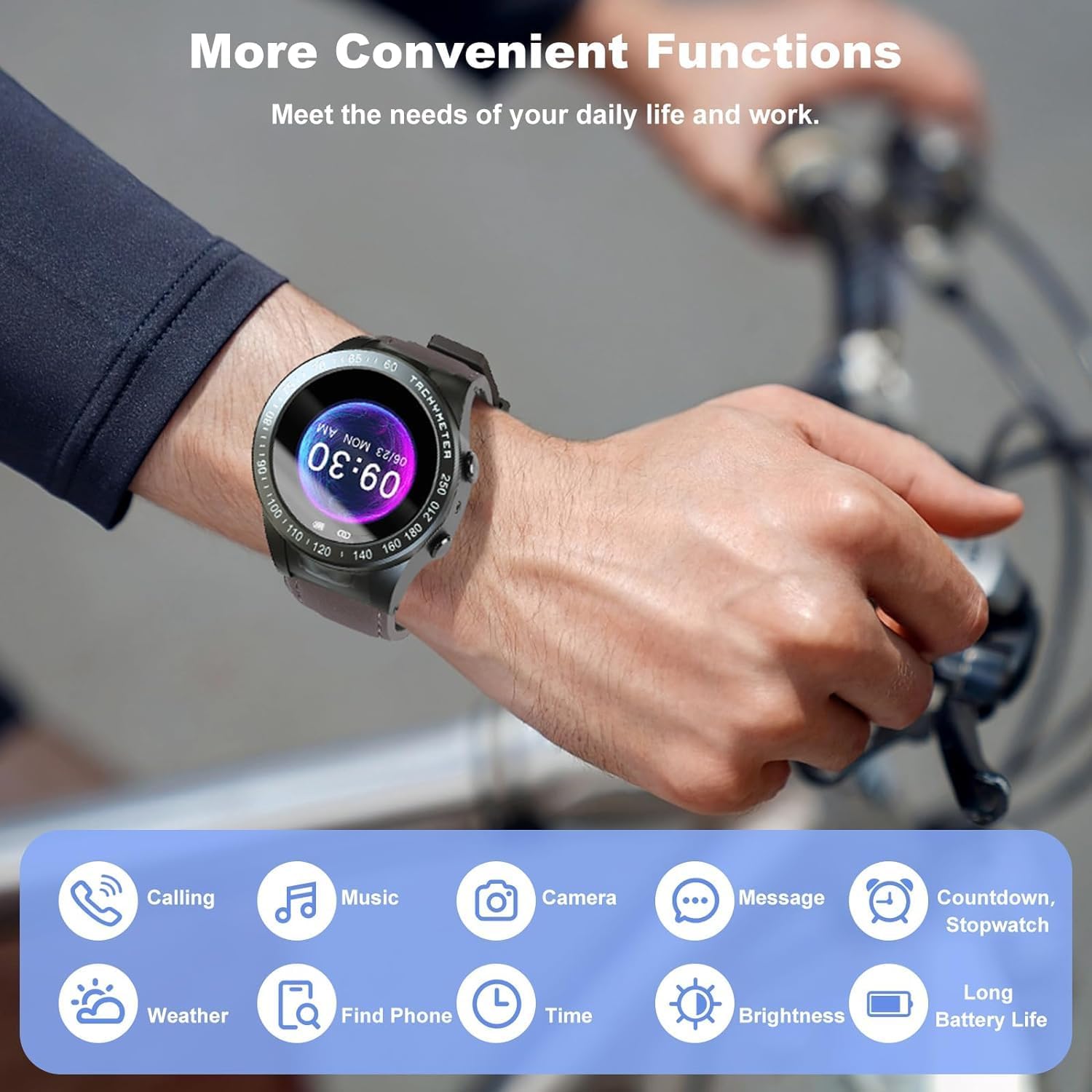
Image: Visual representation of the various convenient functions available on the smartwatch, including calling, music, camera, messages, and more.
2. Earbuds Operation
The integrated earbuds offer high-quality audio and seamless control.
- ระบบควบคุมแบบสัมผัสในตัว: Simply tap the earbuds to control music playback (play/pause) and manage calls (answer/reject).
- อายุการใช้งานแบตเตอรี่: The earbuds provide up to 12 hours of playback with recharges from the smartwatch.
- การเชื่อมต่อ: Bluetooth 5.0 ensures a stable and powerful listening experience.

Image: Two individuals demonstrating the use of the smartwatch and earbuds for communication and fitness tracking.
3. การติดตามสุขภาพและการออกกำลังกาย
The Wearbuds Watch is equipped with advanced sensors to monitor your health and fitness data.
- เครื่องวัดอัตราการเต้นของหัวใจ: ติดตามอัตราการเต้นของหัวใจของคุณตลอดทั้งวัน
- การติดตามการนอนหลับ: Analyze your sleep patterns for better rest.
- การติดตามฟิตเนส: Monitor various fitness metrics including steps, calories burned, and distance.
- เครื่องนับก้าว: Keep track of your daily steps.
- มาตรวัดความเร็ว: Measure your speed during activities.
- Blood-Oxygen (SpO2) Monitor: ตรวจสอบระดับออกซิเจนในเลือดของคุณ
- การแจ้งเตือนเกี่ยวกับพฤติกรรมนั่งอยู่กับที่นานเกินไป: รับการแจ้งเตือนให้ขยับร่างกายหลังจากไม่ได้เคลื่อนไหวเป็นเวลานาน

Image: A visual guide to the health tracking features, including heart rate, SpO2, and activity metrics displayed on the watch face.
4. Multiple Exercise Modes
The smartwatch supports various exercise modes to accurately record your workout data.
- Covers common indoor and outdoor sports.
- Records specific data for each exercise mode to help you track progress.

Image: A person hiking with the smartwatch, illustrating the availability of multiple exercise modes for tracking various physical activities.
การซ่อมบำรุง
1. การทำความสะอาดอุปกรณ์ของคุณ
To maintain the appearance and functionality of your smartwatch and earbuds, clean them regularly.
- เช็ดหน้าจอและตัวเรือนนาฬิกาด้วยผ้าที่ไม่เป็นขุยและนุ่ม
- For the earbuds, gently clean the ear tips and body with a dry cotton swab.
- หลีกเลี่ยงการใช้สารเคมีรุนแรงหรือวัสดุที่มีฤทธิ์กัดกร่อน
2. ความทนทานต่อน้ำ (IPX7)
The KORONA Wearbuds W26 and its earbuds are IPX7 waterproof, providing protection against rain, water splashes, and sweat.
- IPX7 rating means the device can be submerged in up to 1 meter of water for 30 minutes.
- เหมาะสำหรับใช้ในชีวิตประจำวัน รวมถึงการล้างมือและฝนตกปรอยๆ
- บันทึก: Not suitable for swimming, diving, or prolonged submersion in water. Avoid hot water, steam, or strong water jets.

Image: The earbuds submerged in water, visually demonstrating their IPX7 waterproof capability, protecting against rain, water, and sweat.
3. การดูแลแบตเตอรี่
To prolong battery life, avoid extreme temperatures and fully discharging the device frequently. Charge the device using the provided cable.
การแก้ไขปัญหา
ปัญหาทั่วไปและแนวทางแก้ไข
| ปัญหา | สาเหตุที่เป็นไปได้ / วิธีแก้ไข |
|---|---|
| Earbuds require manual Bluetooth connection every time. | This can sometimes occur due to specific phone settings or a temporary software glitch.
|
| สมาร์ทวอทช์ไม่เปิด |
|
| ไม่สามารถจับคู่กับสมาร์ทโฟนได้ |
|
| ข้อมูลสุขภาพที่ไม่ถูกต้อง |
|
ข้อมูลจำเพาะ
| คุณสมบัติ | รายละเอียด |
|---|---|
| ชื่อรุ่น | W26 |
| ยี่ห้อ | Generic (Manufactured by KORONA) |
| เทคโนโลยีการเชื่อมต่อ | ไร้สาย (บลูทูธ 5.0) |
| ขนาดหน้าจอ | 48 มิลลิเมตร |
| คุณสมบัติพิเศษ | Heart Rate Monitor, Sleep Monitor, Fitness Tracker, Sedentary Alerts, On-Wrist Notifications, Integrated Earbuds |
| ความต้านทานต่อน้ำ | IPX7 |
| น้ำหนักสินค้า | 8.4 ออนซ์ |
| ส่วนประกอบของเซลล์แบตเตอรี่ | ลิเธียมไอออน |
| ขนาดแพ็คเกจ | 4.72 x 4.61 x 2.83 นิ้ว |
| ประเทศต้นกำเนิด | จีน |
การรับประกันและการสนับสนุน
For warranty information and technical support, please refer to the documentation included with your purchase or contact the manufacturer, KORONA, directly through their official webเว็บไซต์หรือช่องทางการบริการลูกค้า
เก็บใบเสร็จรับเงินของคุณไว้เป็นหลักฐานการซื้อสำหรับการเรียกร้องการรับประกันใดๆ


