
การแนะนำ
Thank you for choosing the deli 4V Cordless Electric Screwdriver. This powerful and versatile tool is designed for various tasks, including light fixtures, home furnishings, electronics, and general repairs. Featuring a 3.6V rechargeable battery with a 1500mAh capacity, USB-C charging, and a high 5 N.m torque, this screwdriver offers efficiency and convenience for everyday use. This manual provides essential information for safe operation, setup, maintenance, and troubleshooting. Please read it thoroughly before using the product.
คำแนะนำเพื่อความปลอดภัย
ปฏิบัติตามข้อควรระวังด้านความปลอดภัยพื้นฐานเสมอเมื่อใช้เครื่องมือไฟฟ้า เพื่อลดความเสี่ยงต่อการเกิดไฟไหม้ ไฟฟ้าช็อต และการบาดเจ็บส่วนบุคคล
- รักษาพื้นที่ทำงานให้สะอาด: พื้นที่รกทำให้มีผู้ได้รับบาดเจ็บ
- หลีกเลี่ยงสภาพแวดล้อมที่เป็นอันตราย: ห้ามใช้เครื่องมือไฟฟ้าในดamp หรือบริเวณที่เปียกชื้น หรือตากฝน จัดพื้นที่ทำงานให้มีแสงสว่างเพียงพอ
- เก็บให้ห่างไกลเด็ก ๆ : ผู้เยี่ยมชมทุกคนควรอยู่ห่างจากพื้นที่ทำงานอย่างปลอดภัย
- การแต่งกายให้เหมาะสม: Do not wear loose clothing or jewelry. They can be caught in moving parts. Wear non-slip footwear. Wear hair covering to contain long hair.
- สวมอุปกรณ์ป้องกันดวงตา: สวมแว่นตานิรภัยทุกครั้ง
- งานที่ปลอดภัย: ใช้ clamps or a vise to hold work when practical. It's safer than using your hand and frees both hands to operate the tool.
- ไม่เกิน: รักษาการวางเท้าและการทรงตัวให้เหมาะสมตลอดเวลา
- ดูแลรักษาเครื่องมือด้วยความระมัดระวัง: รักษาเครื่องมือให้คมและสะอาดเพื่อประสิทธิภาพที่ดีขึ้นและปลอดภัยยิ่งขึ้น ปฏิบัติตามคำแนะนำในการหล่อลื่นและเปลี่ยนอุปกรณ์เสริม
- ตัดการเชื่อมต่อเครื่องมือ: Disconnect the tool from the power source before servicing, when changing accessories, or when not in use.
- หลีกเลี่ยงการสตาร์ทโดยไม่ได้ตั้งใจ: Ensure the switch is in the off position before plugging in.
- ตรวจสอบชิ้นส่วนที่เสียหาย: ก่อนใช้เครื่องมือต่อไป ควรตรวจสอบการ์ดป้องกันหรือส่วนอื่นๆ ที่เสียหายอย่างรอบคอบเพื่อพิจารณาว่าเครื่องมือจะทำงานอย่างถูกต้องและทำงานได้ตามที่ตั้งใจไว้
- ใช้อุปกรณ์เสริมที่ถูกต้อง: Do not use accessories not specifically designed for this tool.
- Never Force the Tool: มันจะทำงานได้ดีขึ้นและปลอดภัยขึ้นในอัตราที่ออกแบบไว้
เนื้อหาแพ็คเกจ
ตรวจสอบว่าสินค้าทั้งหมดที่ระบุไว้ด้านล่างนี้รวมอยู่ในแพ็คเกจของคุณแล้ว หากมีสินค้าใดสูญหายหรือเสียหาย โปรดติดต่อฝ่ายสนับสนุนลูกค้า
- deli 5 N.m Power Screwdriver (Model EDL-DP04-E3B1)
- 10x S2 Alloy Steel Bits
- 1x 60mm Magnetic Extension Rod
- 1x สายชาร์จ USB-A เป็น USB-C
- 1x คู่มือผู้ใช้
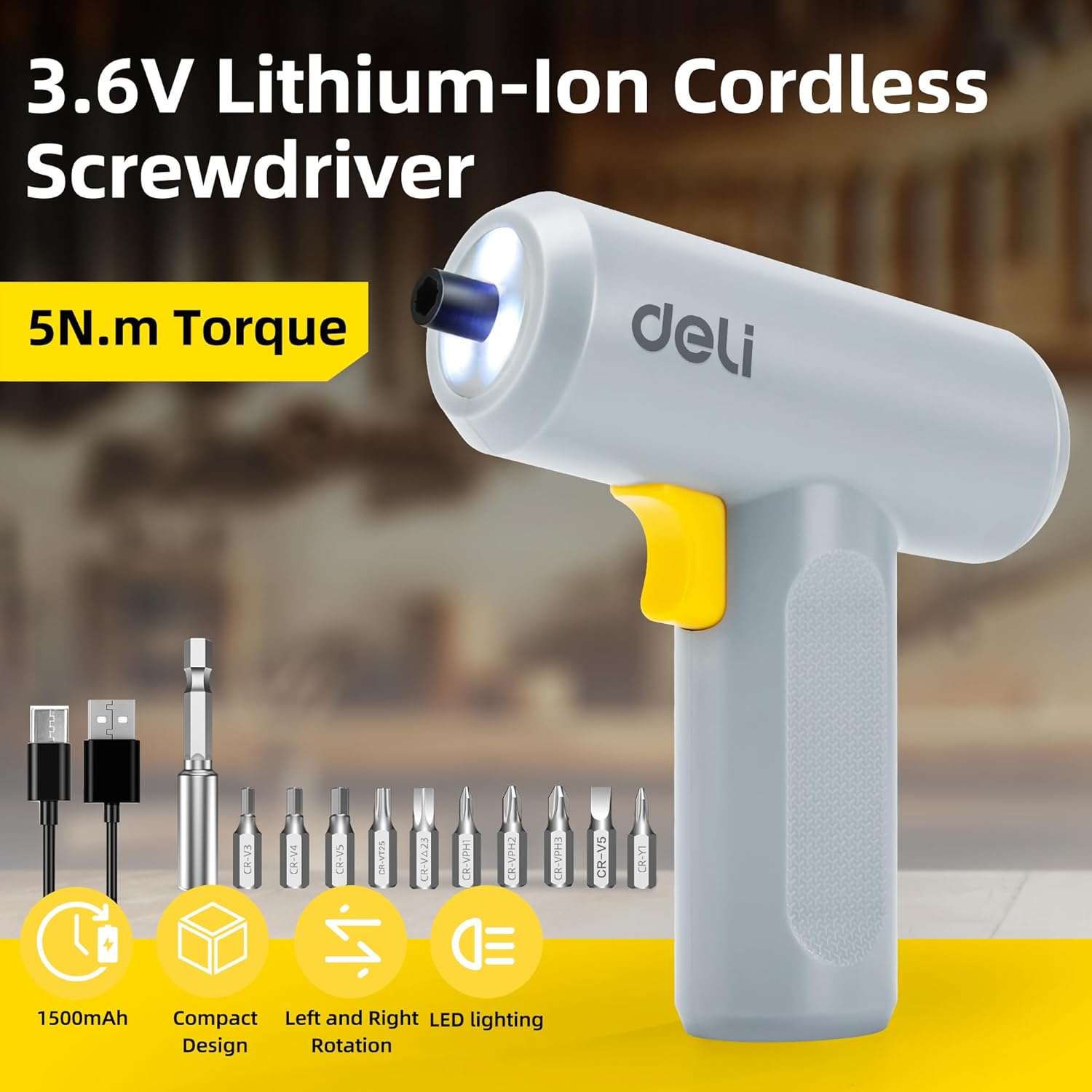
Image: The deli electric screwdriver shown with its complete set of accessories, including the 10 S2 steel bits, magnetic extension rod, and USB-C charging cable.
สินค้าเกินview
Familiarize yourself with the components and features of your deli electric screwdriver.

Image: A detailed diagram highlighting the key components of the deli electric screwdriver, including the magnetic chuck, circular LED light, two-way start button, 1500mAh battery, USB-C fast charging port, and its ergonomic design.
- หัวจับแม่เหล็ก: Securely holds screwdriver bits.
- ไฟ LED ทรงกลม: Illuminates the work area, especially useful in narrow or dimly lit spaces.
- Two-Way Start Button: Allows for easy forward and reverse rotation with a single control.
- แบตเตอรี่ 1500mAh: High-capacity lithium-ion battery for extended use.
- USB-C Fast Charging Port: อินเทอร์เฟซการชาร์จที่สะดวกและทันสมัย
- Ergonomic and Minimalist Design: Provides a comfortable and secure grip for safe operation.
การตั้งค่า
1. การชาร์จไขควง
Before first use, fully charge the screwdriver's internal battery.
- Locate the USB-C charging port on the bottom of the screwdriver handle.
- Connect the provided USB-A to USB-C charging cable to the screwdriver.
- เสียบปลายสาย USB-A เข้ากับอะแดปเตอร์แปลงไฟ USB ที่ใช้งานร่วมกันได้ (ไม่ได้รวมอยู่ในชุด) พอร์ต USB ของคอมพิวเตอร์ หรือพาวเวอร์แบงค์
- The charging indicator light (if present, typically near the charging port) will illuminate to show charging status. Refer to the indicator behavior for full charge status.
- A full charge can power the screwdriver to drive approximately 300 screws.
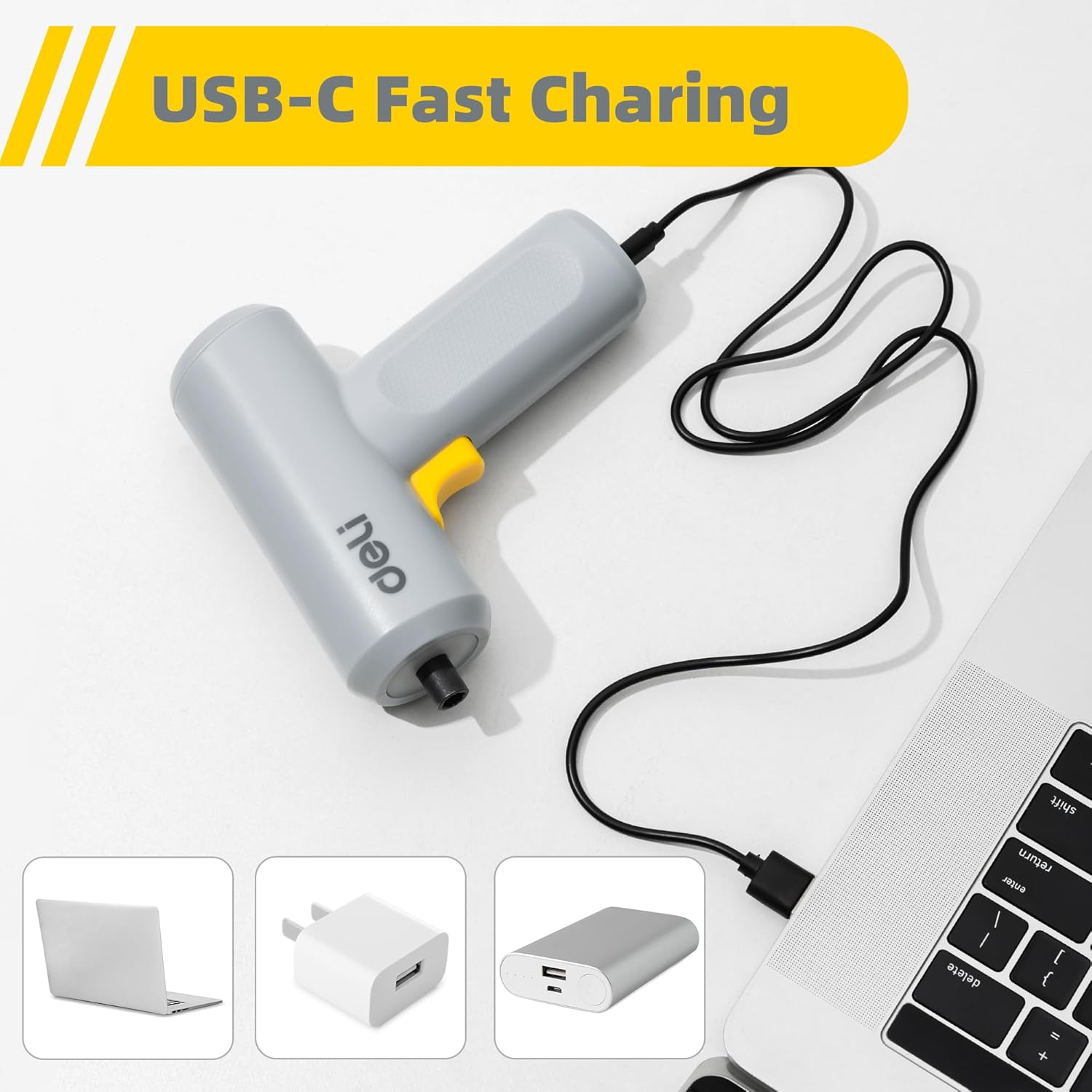
Image: The deli electric screwdriver being charged via its USB-C port, demonstrating its compatibility with various USB power sources such as laptops, wall adapters, and power banks.

ภาพ: ภาพประกอบ view of the screwdriver's internal battery, highlighting its 1500mAh capacity and the capability to drive up to 300 screws per charge.
2. การติดตั้งหัวไขควง
The screwdriver uses a magnetic chuck for quick and secure bit changes.
- Select the appropriate S2 alloy steel bit for your task from the included set.
- Insert the hex end of the bit directly into the magnetic chuck at the front of the screwdriver. The magnetic chuck will hold the bit firmly in place.
- For hard-to-reach areas, first insert the selected bit into the 60mm magnetic extension rod, then insert the extension rod into the screwdriver's magnetic chuck.
- หากต้องการถอดบิตออก เพียงดึงออกจากหัวจับโดยตรง

Image: The deli electric screwdriver positioned next to its assortment of S2 steel bits and the extension rod, illustrating the circular LED light at the front.
คำแนะนำการใช้งาน
1. Powering On and Direction Control
The screwdriver features an innovative two-way start button for intuitive operation.
- To drive screws (forward rotation), press the "R" (Right/Forward) side of the two-way button.
- To remove screws (reverse rotation), press the "L" (Left/Reverse) side of the two-way button.
- ปล่อยปุ่มเพื่อหยุดไขควง

ภาพ: ภาพระยะใกล้ view of the screwdriver's yellow two-way start button, clearly marked with 'L' for reverse and 'R' for forward rotation.
2. การใช้ไฟ LED
The screwdriver is equipped with a circular LED light that automatically illuminates when the screwdriver is in operation.
- The three LEDs form a ring light strip around the chuck, providing clear visibility of your work area.
- This feature is particularly useful when working in dimly lit conditions or in confined spaces.
Image: The deli electric screwdriver with its circular LED light activated, illustrating how it illuminates the work area, especially in tight or dark spots.
การซ่อมบำรุง
- การทำความสะอาด: Regularly wipe the screwdriver body with a soft, dry cloth. Do not use harsh chemicals or abrasive cleaners. Ensure no liquids enter the tool.
- การดูแลบิต: Keep the S2 steel bits clean and free from debris. Store them in a dry place to prevent rust. Replace worn or damaged bits to ensure optimal performance and prevent damage to screw heads.
- การจัดเก็บแบตเตอรี่: If storing the screwdriver for an extended period, ensure the battery is partially charged (around 50%) and store it in a cool, dry place. Avoid storing it in extreme temperatures. Recharge periodically to maintain battery health.
- การตรวจสอบทั่วไป: Periodically check the screwdriver for any signs of damage, loose parts, or wear. Do not operate a damaged tool.
การแก้ไขปัญหา
| ปัญหา | สาเหตุที่เป็นไปได้ | สารละลาย |
|---|---|---|
| ไขควงไม่หมุน | แบตเตอรี่หมด | Charge the screwdriver using the provided USB-C cable. |
| ไขควงไม่มีกำลังหรือหยุดขณะใช้งาน | ชาร์จแบตเตอรี่ต่ำ | ชาร์จแบตเตอรี่ให้เต็ม |
| Bit slips in the chuck. | Bit not fully inserted or chuck is dirty. | Ensure the bit is fully inserted. Clean the magnetic chuck if necessary. |
| Screws are stripped or damaged. | Incorrect bit size or excessive force. | Use the correct bit size for the screw head. Apply appropriate pressure and avoid over-tightening. |
| ไฟ LED ไม่ติด | Screwdriver not operating or malfunction. | Ensure the screwdriver is powered on. If the issue persists, contact customer support. |
ข้อมูลจำเพาะ
| คุณสมบัติ | ข้อมูลจำเพาะ |
|---|---|
| ยี่ห้อ | เดลี่ |
| หมายเลขรุ่น | EDL-DP04-E3B1 |
| เล่มที่tage | 4 โวลต์ (กระแสตรง) |
| ประเภทแบตเตอรี่ | ลิเธียมไอออน |
| ความจุของแบตเตอรี่ | 1500 มิลลิแอมป์ |
| แรงบิดสูงสุด | 5 Newton Meters (N.m) |
| ความเร็วขณะเดินเครื่องเปล่า | 250 รอบต่อนาที |
| ขนาดเชย | 0.25 Inches (Hex) |
| พอร์ตชาร์จ | ยูเอสบี-ซี |
| วัสดุ | อะคริโลไนไตรล์ บิวทาไดอีน สไตรีน (ABS), เหล็กอัลลอย |
| ส่วนประกอบที่รวมอยู่ | 10 S2 Steel Bits, Magnetic Extension Rod, USB-A to USB-C Charging Cable |
การรับประกันและการสนับสนุน
สำหรับข้อมูลการรับประกันหรือการสนับสนุนทางเทคนิค โปรดดูบัตรรับประกันที่แนบมากับผลิตภัณฑ์ของคุณ หรือติดต่อผู้ผลิตโดยตรง โปรดเก็บใบเสร็จรับเงินไว้เป็นหลักฐานการซื้อ
Manufacturer: deli
For further assistance, you may visit the official deli store online: deli Official Store