
1. บทนำ
This manual provides detailed instructions for the safe and efficient operation of your DATOUBOSS 12V 1500W Pure Sine Wave Inverter. This device converts 12V DC battery power to 220V/230V AC household power, suitable for various applications including camping, RVs, trucks, and emergency power backup. It features a pure sine wave output, ensuring compatibility with sensitive electronics, and includes multiple protection functions for reliable performance.
2. ข้อมูลด้านความปลอดภัย
Please read and understand all safety warnings and instructions before using the inverter. Failure to do so may result in electric shock, fire, or serious injury.
- ตรวจสอบให้แน่ใจว่ามีการระบายอากาศที่เหมาะสมรอบๆ อินเวอร์เตอร์เพื่อป้องกันความร้อนสูงเกินไป
- อย่าให้อินเวอร์เตอร์โดนน้ำ ฝน หรือความชื้นมากเกินไป
- ควรหลีกเลี่ยงการใช้งานอินเวอร์เตอร์ในที่ที่มีแสงแดดส่องโดยตรงหรือใกล้แหล่งความร้อน
- เชื่อมต่ออินเวอร์เตอร์เข้ากับแหล่งจ่ายไฟ DC 12V เท่านั้น
- Always connect the ground terminal to a proper earth ground.
- ห้ามเปิดอินเวอร์เตอร์ casing; ไม่มีชิ้นส่วนใดที่ผู้ใช้สามารถซ่อมบำรุงเองได้ภายใน
- Keep children away from the inverter during operation.
- ถอดอินเวอร์เตอร์ออกจากแบตเตอรี่ก่อนดำเนินการบำรุงรักษาหรือทำความสะอาดใดๆ
คุณสมบัติการป้องกัน:
- การป้องกันอุณหภูมิสูง: The inverter will shut down if internal temperature exceeds safe limits.
- เล่มสูงtagการป้องกันอี: ป้องกันปริมาณอินพุตที่มากเกินไปtage.
- ปริมาณต่ำtagการป้องกันอี: Prevents battery over-discharge with an alarm and shutdown.
- ระบบป้องกันการโอเวอร์โหลด: Shuts down if connected devices draw too much power.
- การป้องกันการลัดวงจร: มีระบบป้องกันการลัดวงจรที่เอาต์พุต
- การแยกไฟฟ้า: Provides electrical separation between input and output for enhanced safety.
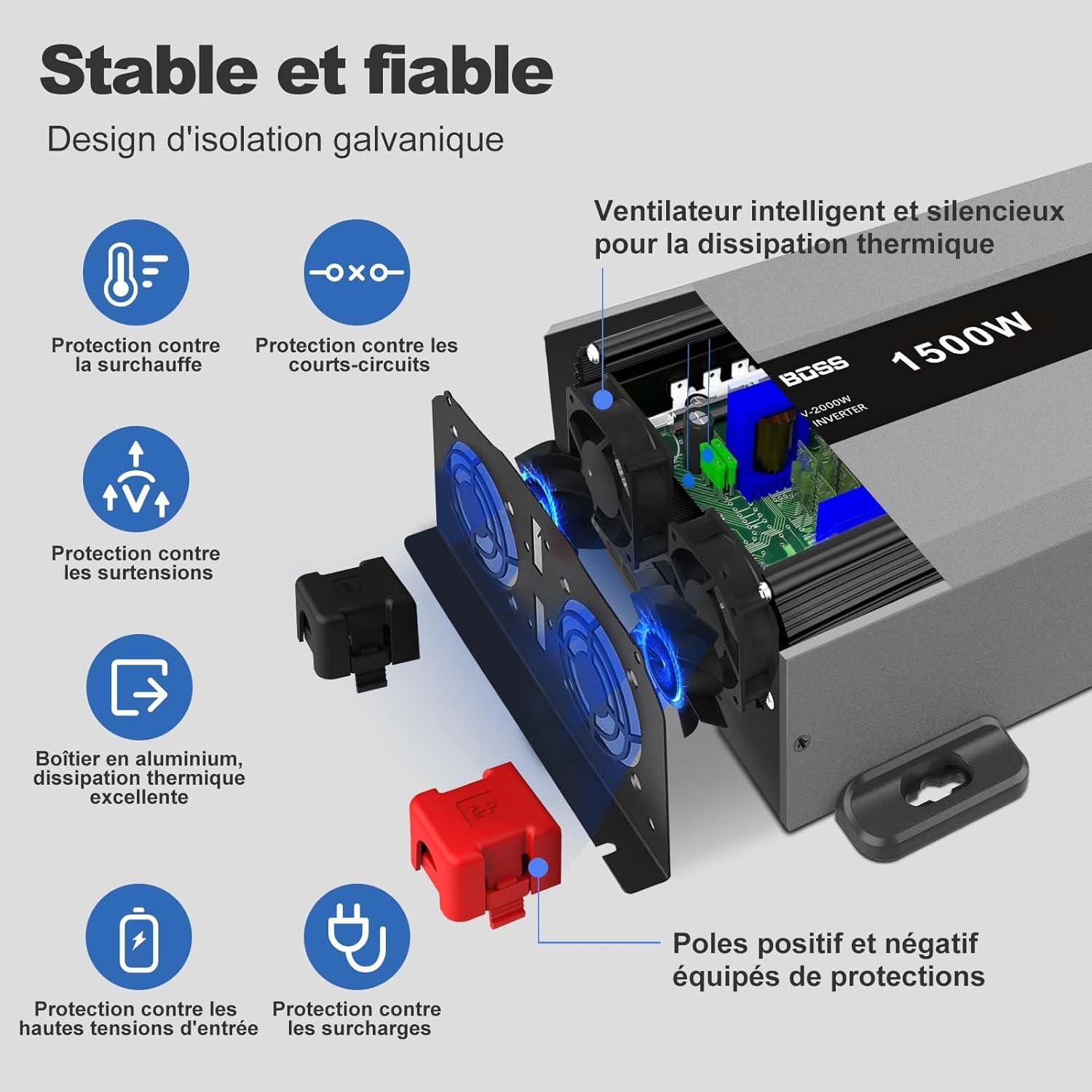
Image: Diagram illustrating the various safety protection features of the DATOUBOSS Pure Sine Wave Inverter, including overheat, short-circuit, overvoltage, overload, and high input voltagการป้องกันอี
3. คุณสมบัติของผลิตภัณฑ์
- เอาท์พุตคลื่นไซน์บริสุทธิ์: Provides clean and stable power, ideal for sensitive electronics, reducing interference.
- ประสิทธิภาพสูง: Over 90% conversion efficiency from DC to AC, minimizing energy loss.
- พอร์ตเอาต์พุตหลายพอร์ต: Equipped with 2 EU AC outlets, 1 USB port, and 1 USB-C port for versatile charging.
- จอแสดงผล LCD: การตรวจสอบปริมาณอินพุตแบบเรียลไทม์tage, ปริมาณการส่งออกtage, and power status.
- รีโมทคอนโทรล: Includes a wired remote switch for convenient power control from a distance.
- พัดลมระบายความร้อนอัจฉริยะ: Automatically activates when the internal temperature exceeds 45°C, ensuring optimal performance and longevity.
- การออกแบบที่แข็งแกร่ง: โลหะทนทาน casing ช่วยป้องกันแรงกระแทกและแรงปะทะ
- ความเข้ากันได้กว้าง: Supports various battery types including GEL, SLA, LI, FLD, AGM, CLA, and LiFePO4.
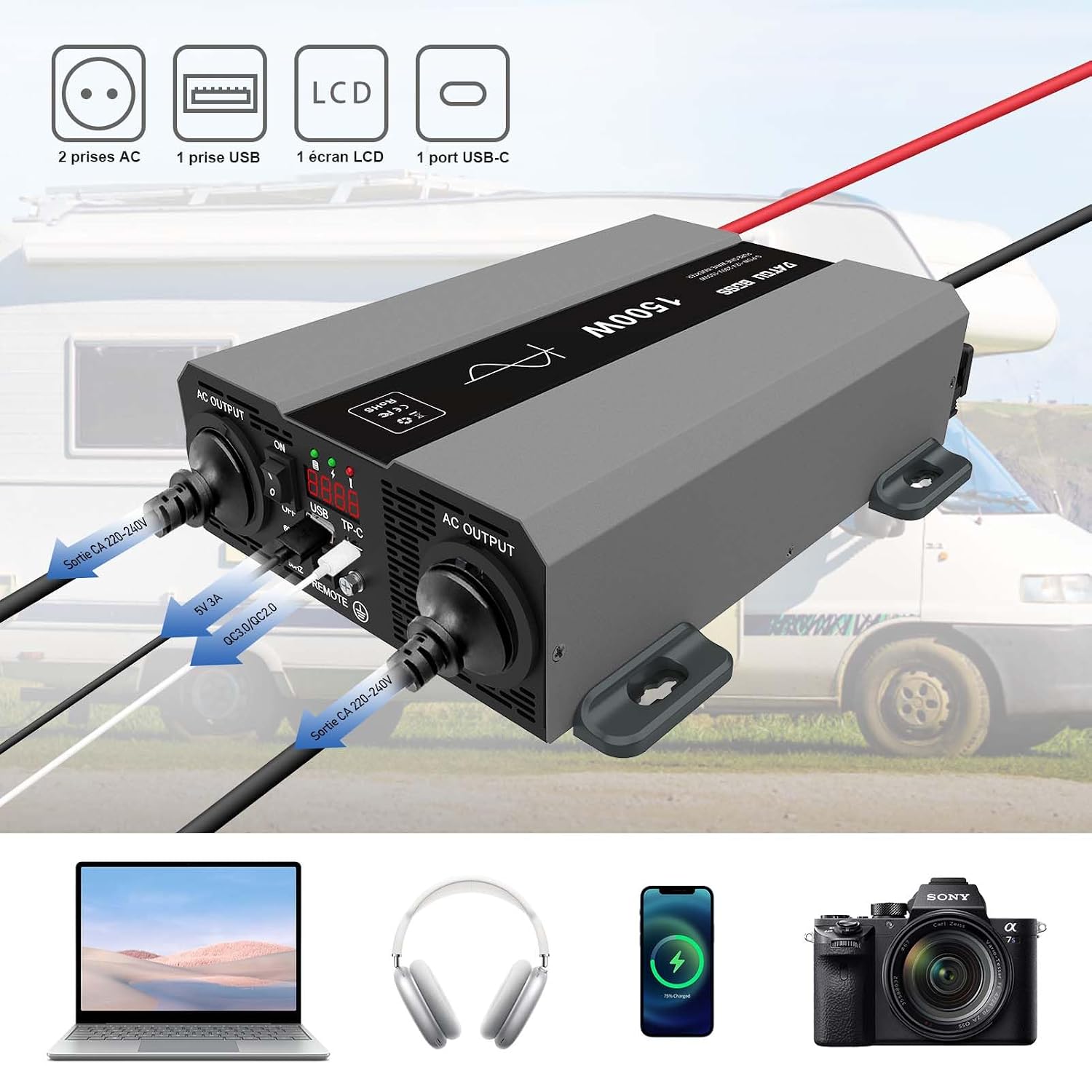
Image: The DATOUBOSS 12V 1500W Pure Sine Wave Inverter showing its two AC output sockets, USB port, USB-C port, and LCD screen. Below it, a laptop, headphones, smartphone, and camera are depicted, representing compatible devices.

Image: A close-up of the DATOUBOSS 12V 1500W Pure Sine Wave Inverter's front panel, highlighting the ON/OFF switch, USB and USB-C ports, remote control connection, and LCD display. A separate wired remote control unit is also shown.
4. เนื้อหาบรรจุภัณฑ์
เมื่อเปิดบรรจุภัณฑ์ โปรดตรวจสอบว่ามีสิ่งของครบถ้วนตามรายการด้านล่างและอยู่ในสภาพดี:
- DATOUBOSS 12V 1500W Pure Sine Wave Inverter
- Battery Connection Cables (Red for Positive, Black for Negative)
- Wired Remote Control Unit
- วงเล็บยึดและสกรู
- คู่มือการใช้งาน

Image: The DATOUBOSS 12V 1500W Pure Sine Wave Inverter displayed with its included accessories: a wired remote control, battery cables (red and black), mounting screws, and the user manual. Product dimensions are also indicated.
Video: An unboxing video demonstrating the contents of the DATOUBOSS Pure Sine Wave Inverter package, including the inverter unit, battery cables, remote control, and mounting hardware.
5. การตั้งค่าและการติดตั้ง
โปรดทำตามขั้นตอนเหล่านี้เพื่อติดตั้งอินเวอร์เตอร์อย่างถูกต้อง:
- เลือกตำแหน่ง: Select a dry, well-ventilated area away from direct sunlight, heat sources, and flammable materials. Ensure sufficient space around the inverter for airflow.
- ติดตั้งอินเวอร์เตอร์: Use the provided mounting brackets and screws to securely attach the inverter to a stable surface.
- เชื่อมต่อสายแบตเตอรี่:
- ตรวจสอบให้แน่ใจว่าสวิตช์เปิดปิดของอินเวอร์เตอร์อยู่ในตำแหน่ง "ปิด"
- Connect the red (positive) battery cable to the positive (+) terminal of the inverter and then to the positive (+) terminal of your 12V battery.
- Connect the black (negative) battery cable to the negative (-) terminal of the inverter and then to the negative (-) terminal of your 12V battery.
- ขันข้อต่อทั้งหมดให้แน่นเพื่อป้องกันการหลวมของหน้าสัมผัสและการเกิดประกายไฟ
- ต่อสายดิน: Connect a ground wire (not included) from the inverter's ground terminal to a proper earth ground.
- เชื่อมต่อรีโมทคอนโทรล (ไม่จำเป็น): If using the remote control, plug its cable into the "REMOTE" port on the inverter.
Video: This video demonstrates the physical installation of the DATOUBOSS Pure Sine Wave Inverter, including mounting it to a surface and connecting the battery cables. It also shows the connection of the remote control.
6. การดำเนินการ
- เปิดเครื่อง: Flip the ON/OFF switch on the inverter to the "ON" position. The LCD display will illuminate, showing the input voltage และเอาท์พุท voltage. The green LED indicator will light up. If using the remote control, ensure the inverter's main switch is ON, then use the remote switch to power the unit ON/OFF.
- เชื่อมต่ออุปกรณ์: Plug your AC-powered devices into the AC output sockets. For USB-powered devices, use the USB or USB-C ports.
- ประสิทธิภาพการทำงานของจอภาพ: Observe the LCD display for real-time voltage and power information. The LED indicators will show the operational status (green for normal, red for fault).
- หมดแรง: Before disconnecting any devices, switch the inverter to the "OFF" position.
Video: This video demonstrates the operation of the DATOUBOSS Pure Sine Wave Inverter, showing how to power it on, connect various appliances like a heater and an induction cooker, and monitor the output. It also shows the use of the remote control.
Video: This video illustrates the inverter's performance with different loads, including a hair dryer and a microwave, demonstrating the stable pure sine wave output and current draw.
7. การบำรุงรักษา
การบำรุงรักษาอย่างสม่ำเสมอจะช่วยให้เครื่องแปลงกระแสไฟฟ้าของคุณมีอายุการใช้งานยาวนานและทำงานได้อย่างมีประสิทธิภาพสูงสุด:
- การทำความสะอาด: ควรทำความสะอาดภายนอกของอินเวอร์เตอร์เป็นระยะด้วยผ้าแห้งเนื้อนุ่ม ตรวจสอบให้แน่ใจว่าช่องระบายอากาศปราศจากฝุ่นและสิ่งสกปรก
- ตรวจสอบการเชื่อมต่อ: Regularly inspect all electrical connections (battery cables, ground wire) to ensure they are tight and free from corrosion.
- พื้นที่จัดเก็บ: หากต้องเก็บรักษาอินเวอร์เตอร์เป็นเวลานาน ควรตัดการเชื่อมต่อจากแบตเตอรี่และเก็บไว้ในที่แห้งและเย็น
8 การแก้ไขปัญหา
หากคุณพบปัญหาเกี่ยวกับอินเวอร์เตอร์ โปรดดูขั้นตอนการแก้ไขปัญหาทั่วไปต่อไปนี้:
| ปัญหา | สาเหตุที่เป็นไปได้ | สารละลาย |
|---|---|---|
| ไม่มีไฟออก / อินเวอร์เตอร์ไม่ทำงาน |
|
|
| Red LED indicator on / Alarm sounding |
|
|
| ปริมาณการส่งออกtagไม่เสถียร |
|
|
หากปัญหายังคงอยู่หลังจากทำตามขั้นตอนเหล่านี้แล้ว โปรดติดต่อฝ่ายบริการลูกค้า
9. ข้อมูลจำเพาะ
| คุณสมบัติ | ข้อมูลจำเพาะ |
|---|---|
| ยี่ห้อ | ดาทูบอส |
| ชื่อรุ่น | 12V1500W |
| ขนาดสินค้า (กว้าง x ยาว x สูง) | 31 x 23.5 x 8 ซม. |
| น้ำหนัก | 3.5 กิโลกรัม |
| กำลังขับ | 1500 Watts (Rated) / 3000 Watts (Peak) |
| อินพุต Voltage | กระแสตรง 12 โวลต์ |
| ปริมาณการส่งออกtage | กระแสไฟสลับ 220V/230V |
| รูปคลื่นเอาท์พุต | เพียวไซน์เวฟ |
| ประสิทธิภาพ | มากกว่า 90% |
| ประเภทจอภาพ | จอแอลซีดี |
| ปลั๊กไฟทั้งหมด | 4 (2 EU AC, 1 USB, 1 USB-C) |
| ความจุแบตเตอรี่ที่แนะนำ | 100 Ampere-hours (minimum for sustained use) |
| การทำให้เย็น | Intelligent Fan (activates >45°C) |
| การรับรอง | CE, FCC, RoHS |
10. การรับประกันและการสนับสนุน
DATOUBOSS offers a 12-month warranty for this product. For any issues or inquiries during use, please contact our customer service team. We are committed to providing friendly and perfect service.
- ระยะเวลารับประกัน: 12 เดือน
- การสนับสนุนลูกค้า: Available for assistance with product operation, troubleshooting, and warranty claims.